Chase Mortgage Balance Not Updated In Quicken Classic Premier Windows

I have our Chase mortgage in Quicken Classic Premier for Windows with online services enabled. The top of the account page says Express Web Connect+ and shows the correct date and time of the last download. If I open the Account Overview dialog, it lists the Last Statement Download and Last Online Balance correctly. However, the Quicken account doesn't show any transactions since 8/22/2022 and thus the headline Loan Balance is the balance from three years ago.
I've tried disconnecting and reconnecting the online services and all the usual troubleshooting recommendations, but nothing seems to fix it.
Answers
-
Hello @Tim Onders,
Thanks for reaching out — before we go deeper, I have a few questions to help figure out what’s actually being pulled in vs. what’s just displaying:
- When you open the Loan Details window (not just the register), does the “Loan Terms” section still match your original setup? Or does anything look off there?
- Are you using automatic loan payments in Quicken, or were you manually entering or downloading payment transactions before it stopped in 2022?
- If you check the Account Overview > Online Services tab, does it still show that Chase is connected as a loan account, or is it trying to treat it like a standard banking account?
- Have you ever been able to download individual loan payment transactions from Chase into this account? Or has it always just pulled the balance?
- When you reconnected the account, did it give you the option to link to existing, or did it try to set up a new loan from scratch?
This one sounds like it could be part of how EWC+ is handling Chase mortgage data — but let’s confirm a few of those details first.
-Quicken Jasmine
Make sure to sign up for the email digest to see a round-up of your top posts.
0 -
Loan Details: Yes, all the details match my original setup. That said, do you mean the Load Details pop-up window (reached through the "Edit Terms…" button on the main loan window), or the Loan Details tab (reached from selecting Loan Details on the "Loan Details/Payment Details/Equity/What If Tool" selector)? The loan doesn't seem to have a register as long as the online service is connected.
I think I've always been using a Scheduled Bill Reminder for loan payments. If I recall correctly, 2022 was when there were a bunch of changes in the Quicken online services. I don't think Chase always connected loan accounts.
The only Online Services tab I see is in the Account Details pop-up (reached either from the Settings gear→Edit Account Details or from the Account Overview pop-up and selecting Edit Account Details). The Online Services tab shows Chase connected using "Connection Method: Express Web Connect+". It doesn't seem to provide any indication as to the type of account it thinks is connected. That said, the lightning bolt icon on the main loan page links to Chase's credit card page (https://www.chase.com/personal/credit-cards/login-account-access).
I can't recall the original experience with this account, although I seem to remember individual transaction data (and Quicken showing a register for the loan).
If I deactivate the account (through the Online Serivces tab), it deactivates, but the Online Services tab goes away. To re-connect, I need to use the "Add Account…" option in the Tools menu and act as if I am adding a new Chase account. However, the UI on the Chase side shows the Mortgage account is already connected. The Quicken UI shows the other connected Chase accounts and the Mortgage account. The Mortgage account defaults to Link To Existing (I have not tried re-adding it as a new account). After finishing out of that workflow, it ends up back in the same state - "Last download August 12, 2025 - 8:33 am" but the Loan Balance is "as of 8/22/2022".
When the account is deactivated, Quicken shows a register under Payment Details, and provides things like Update Balance (under the top right gear pull-down) and such. All of that goes away when the account is linked.
0 -
Hello @Tim Onders,
Based on what you’ve shared, it looks like the issue is that Express Web Connect+ is authenticating successfully with Chase but is only returning a snapshot balance, not the ongoing loan transactions. This explains why the register disappears when the account is connected and why the balance hasn’t updated since 2022.
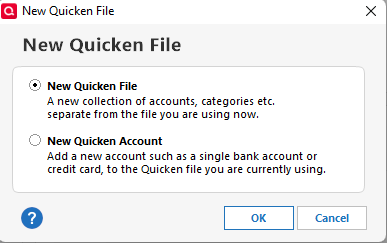
However, I would like to confirm this by having you create a test file and adding the Chase Mortgage account to see if the same issue presents itself. You can create a test file by navigating to File > New > Start from Scratch. It is always recommended to save a backup (just in case).
Let me know how it goes!
-Quicken Jasmine
Make sure to sign up for the email digest to see a round-up of your top posts.
0 -
When I create the test file and connect Chase accounts, the Mortgage Loan only seems to have a balance - no details or transactions or anything else.
0 -
Online - connected loan accounts do NOT have a transaction register. All data shown in the account come from whatever information the bank downloads to you ... if this process works at all.
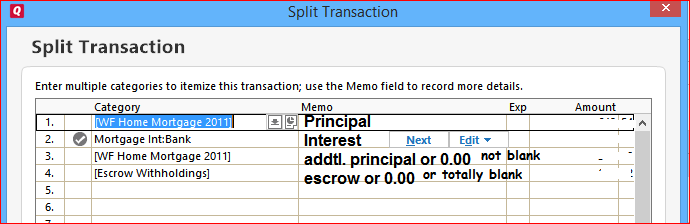
As a result of being connected, the scheduled payment transaction reminder cannot transfer the amount of principal paid into the (non-existent) account register and must use a category, usually something like Mortgage:Principal, instead. The category name seems to vary with the Loan Type you selected when creating the loan account in Quicken.If you want a loan account in Quicken to show the actual loan balance, you need to maintain the account as offline account. In that case, the Scheduled Reminder used for the monthly payment must have the correct transfer of principal and optional additional principal amounts as shown in the image below
 5
5 -
That may be the answer, but it seems utterly pointless. Quicken is downloading the current loan balance (it shows up in the Account Overview dialog), which could at least be used to reconcile the manual transactions.
What's the point of linking the account online if the downloaded data isn't used for anything, and the ability to manually update or reconcile the account (so that it actually provides some useful information) becomes disabled when the account is linked? If that is the expected behavior, the feature is either badly broken, or completely useless.
0 -
Thank you for your feedback,
The information @UKR provided is correct.
While there is no transaction register in a connected (online) loan account, there are ways you can update your information. Please read this help article for more information:
If you would like to see changes to how online loan accounts work in Quicken, I recommend creating an Idea post to request those changes. Ideas that get enough votes may be implemented in the future! For information on creating an Idea post, please review this post:
I hope this helps!
Quicken Kristina
Make sure to sign up for the email digest to see a round up of your top posts.
0 -
Thank you for all the info.
I don't think it qualifies as an Idea to have the current loan balance actually update with the data downloaded from the institution. As it says in the Work With A Loan page:

If Quicken has downloaded a current loan balance (as evidenced by the information in the Account Overview dialog), it would seem that would be more "current" than a balance it got from somewhere in 2022. Otherwise, what's the actual point of connecting the loan to online services?
0 -
@Tim Onders I would like to add that an offline loan is not really "manual". If you have a payment reminder set up for the loan payment, the P & I split is calculated automatically as long as you have the loan provisions set up correctly. Each month all you need to do is post the loan payment reminder.
The other thing is with a offline loan, you can also set up an escrow account and keep track of escrow deposits and payments. In @UKR's example of a loan payment split, the entry in line #4 is a transfer to an escrow account (Escrow Withholdings).
I have an offline mortgage loan and it works perfectly. The P & I splits are accurate to the penny. I reconcile monthly, and have never been off. With the account register, I can see past and pending payments at a glance. I also have a payment schedule or amortization schedule I can refer to at any time.
Lastly, I asked Copilot about offline mortgage loans, and this is what it came up with -
*********************************************************************************************************************
🛠️ Why Offline Mortgage Loans Offer More Control
- Customizable Payment Splits
You can manually define how each payment is split between principal, interest, escrow, and fees — perfect for tracking nuanced flows like you’ve done with home sales and Sankey diagrams. - No Sync Surprises
Online loans rely on financial institution data, which can be incomplete or miscategorized. Offline loans let you avoid sync errors, unexpected balance changes, or missing transactions. - Historical Accuracy
You can backfill past payments with precise splits and categories, ensuring your records match your actual mortgage statements — something online loans rarely support well. - Linked Transactions
You can link payments directly to your checking account and ensure they reflect properly in both registers, with full control over how principal and interest are allocated. - Freedom from Connectivity Issues
No need to worry about broken connections, login errors, or institution changes that disrupt your data flow.
⚠️ When Online Might Be Useful
If your lender provides detailed transaction-level data and you prefer automation over manual entry, online loans can save time.
**********************************************************************************************************************
0 - Customizable Payment Splits


