edward jones connection error 15500

now getting the above connection error to edward jones. i know the password i am entering is correct and i have logged in to edward jones. are others seeing this error from edward jones?
Best Answer
-
Hello again,
This issue has been escalated, and there is now an active Alert for it. At this time, we do not have an ETA for a resolution. While the investigation remains ongoing, please refer to this Community Alert for any and all available updates and information.
We apologize for any inconvenience in the meantime! Thank you.
-Quicken Anja
Make sure to sign up for the email digest to see a round up of your top posts.2

Comments
-
I'm using Quicken for Mac and I don't see a connection error number, but I get: "Did you mistype your sign-in info? Please re-enter your credentials for Edward Jones." even though the password and everything is correct. I've made the password fewer than 20 digits and have removed special characters, but still no luck.
2 -
@DominickF i get same error when i try to fix the 15500 connection error.
1 -
Hello @Brad L Vandermoon & @DominickF,
Since you’re receiving Error 15500, we recommend reviewing this support article.
This is the exact error you’re encountering, and the article provides additional context about what it means (essentially that the financial institution is rejecting the credentials) along with the recommended troubleshooting steps for Quicken for Mac.
Also, there is currently an open alert for Edward Jones blocking Quicken traffic, which is still ongoing and may also be contributing to the issue. We do not have an ETA at this time. Please refer to this Community Alert for any available updates.
Additionally, we will be forwarding this issue to the proper channels to have this further investigated. However, we request that you please navigate to Help > Report a problem within your Quicken program and submit a problem report with log files and screenshots attached in order to contribute to the investigation.
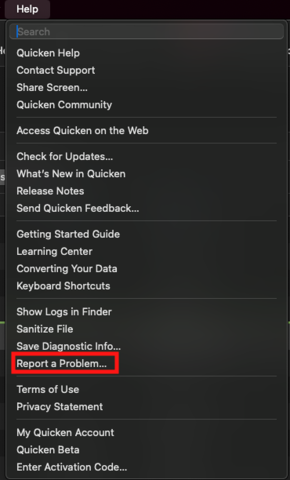
It would also aid the investigation to include a sanitized file when submitting the problem report. A sanitized file is a data file that removes personally identifiable information so you can comfortably share this file with the Quicken team.
While you will not receive a response through this submission, these reports will help our teams in further investigating the issue.
We apologize for any inconvenience in the meantime! Thank you.
(CBT-769)-Quicken Anja
Make sure to sign up for the email digest to see a round up of your top posts.0 -
I also have this same issue. My Edward Jones accounts have not updated for a month. I do not understand how this issue is still not resolved. Please give this issue your highest priority!
Sincerely,
A very frustrated paying customer!
2 -
Each time I try to download transactions, it asks me to add my password to the keychain, and then it tells me it's the wrong password again. What the heck.
3 -
Thank you both for sharing your experience. I understand how frustrating this issue can be. Please refer back to my previous response for guidance on the current status and steps being taken.
If you’d like to contribute to the investigation, please submit a problem report from within Quicken (Help > Report a Problem) with your log files and screenshots attached. Once submitted, we can add your information to the ongoing ticket.
Thank you!
-Quicken Anja
Make sure to sign up for the email digest to see a round up of your top posts.0 -
Hello again,
This issue has been escalated, and there is now an active Alert for it. At this time, we do not have an ETA for a resolution. While the investigation remains ongoing, please refer to this Community Alert for any and all available updates and information.
We apologize for any inconvenience in the meantime! Thank you.
-Quicken Anja
Make sure to sign up for the email digest to see a round up of your top posts.2 -
Quicken Classic Deluxe for Mac v 8.2.1 under OSX 15.6 on a MacBook Air 15" M2 2023: Same problem appeared about 3 days ago. The connection dialog gives this diagnostic: "Did you mistype your sign-in info? Please re-enter your credentials for Edward Jones." even though the password and everything is correct. The existing login and password work correctly with Edward Jones account access, but not through Quicken. Access was previously fine for at least 5 years.
1 -
Hello @K.Silverstein,
Thank you for sharing your experience. I understand how frustrating this must be, especially after years of successful access. As noted in my previous response, this issue has been escalated, and there is an active Community Alert for Edward Jones blocking Quicken traffic. Please refer to that alert for the latest updates and information.
We appreciate your patience while the investigation is ongoing.
-Quicken Anja
Make sure to sign up for the email digest to see a round up of your top posts.0 -
[Removed - Off Topic/Rant]
0 -
I've had this issue since Friday and just submitted a report through Quicken.
0 -
This is becoming more and more frequent it seems.. Are programming changes being made and installed without through testing..
0 -
Hello All,
Thank you for continuing to join this thread and keep us updated.
Please bookmark the alert that was previously posted in this thread by @Quicken Anja for all further updates.
We appreciate your continued patience and support!
-Quicken Jasmine
Make sure to sign up for the email digest to see a round-up of your top posts.
0 -
This download issue with Edward Jones transactions has been going on for 3 days. What needs to be done to get this the proper attention to address a resolution for this problem?
Thanks.
1 -
Hello @Woelfman,
Thank you for checking in!
As mentioned earlier in this thread, there is already an active Community Alert regarding the Edward Jones download issue. The problem has been escalated and our teams are working with the financial institution to resolve it, though unfortunately we do not yet have an ETA for a fix.
In the meantime, the best way to contribute to the investigation is to go to Help > Report a problem within Quicken and submit your logs/screenshots.
Please also bookmark the Alert linked earlier in this discussion, as that will be updated with the latest information as soon as it becomes available.
We truly appreciate your patience while this is being worked on.
-Quicken Jasmine
Make sure to sign up for the email digest to see a round-up of your top posts.
0 -
This seems to happen monthly. There must be some EJ update that kills the connection.
0 -
Add me to the list of unhappy Quicken user with an Edward Jones Account. It's not like they are a start up local bank. Been fighting this for more than a month. Found a work around that worked for a while. Did a Update while in my EDJ account by using the gear Icon top right. Tried to delete and got the Simple-Position only screen which is totally worthless. Amazing Quicken had no problem charging my Credit Card "4 days ago". My first use of Quicken was Version 2.0. Close to 40 years ago. Sounds to me like it would be a waste of time to try phone support!
0 -
Could we please have an update to this that would give assurance that it's making progress toward resolution? So far it's been several days and the only communication I've seen is that it's a known issue that's been escalated.
Thank you.
Also, if there is a work around, could you please advise?
1 -
update please. We pay money for the use of quicken. Maybe if refunds were given things would get fixed quicker.
1 -
We pay money for the use of quicken. Maybe if refunds were given things would get fixed quicker.
They can't give refunds for things that are out of their control. Most connectivity problems start with a financial institution making changes to their back-end servers, and many (not all) such problems require the financial institution to fix what they broke and for the third party connectivity provider Quicken uses (Intuit) to make changes to adapt to the financial institution's changes. Quicken can report the problems to Intuit, but is rarely involved in the actual technical resolution for connectivity issues.
Quicken Mac Subscription • Quicken user since 1993-2 -
Add me to the list of Quicken users with an Edward Jones Account that won't update. I'm using Direct Connect. I saw the problem a week or two ago when I did I reset on one of my EJ accounts to get it working again. But that's been short lived as all my atte3mpts to Direct Connect are now failing with bad credentials. I am able to login at EJ's website with the same ID and Password. I will monitor the Community Alert for a reso;lution.
1 -
I can connect now
Thank you
This is happening fairly often - how will it be prevented in the future?
0 -
I just tried at 7:54 CDT and I finally have downloaded my EJ transactions. So things appear to be working for me. Could not retrieve these transactions since Friday August 15th, but now seems to be fine.
It would be great to know what the root cause of the problem was and if there is a way we can tell from the quicken logs if future issues are with quicken or EJ. How can we determine who to contact if there is a problem?
Thanks for the fix.
0 -
@dblski mine too is working and i could not agree more with your request for an explanation of the problem and fix.
0 -
Changing my password to contain only letters & numbers seems to have sorted it for me. Maybe coincidence, but that's a solution I saw on an earlier iteration of this issue.
0 -
I changed my password to only letters and numbers but that didn't work for me. Still having the same problem 8/19/2025
0 -
As of 8/20/2025, I can finally download my EDJ transactions after having this issue for over a month! This was a very frustrating experience with Quicken and I hope Quicken does a deep dive to not only identify the cause, but even more importantly, why it took so long to resolve.
0 -
Hello All,
We are happy to hear that this issue is resolving for some of you. If you are still experiencing this issue with Edward Jones, please let us know.
Thanks!
-Quicken Jasmine
Make sure to sign up for the email digest to see a round-up of your top posts.
0 -
I had a similar problem with downloading transactions from Edward Jones. After several days, I decided to change my password. I logged into Edward Jones and went to edit my password. I entered my current password and got an error message that my password did NOT meet the requirements. It actually did, only letters and numbers. I ended up calling Edward Jones and they reset my password. Updated the password, and now Quicken can download transactions again. So the error appears to have been on the Edward Jones side.
0 -
Thank you for sharing this information. I am happy to hear that you were able to resolve the issue!
-Quicken Jasmine
Make sure to sign up for the email digest to see a round-up of your top posts.
0

