Balancing Cash Adjustments

I have used Quicken to track my JPM IRA accounts. This information is download from Qucken?JPM connections. Recently I have been getting Balancing Cash Adjustments. I can't get rid of these. The cash balance is the amount that is shorted in the sweep about. How do I rid myself of these Balancing Cash Adjustment and how to the get put in the in he first place. Thanks
Best Answers
-
Those Balancing Cash adjustments are almost certainly generated automatically when you enter or download a transaction for an earlier date than a Placeholder in the account for the same security.
Placeholders prevent new transactions like Div, Bought and Sold prior to the security’s Placeholder date from affecting the account’s cash balance. This shows up as N/A in the Cash Amt column of the transaction list. Quicken does this by creating a linked Cash Balance Adjustment just before the affected transaction. Deleting one of the transactions will delete them both.
To allow the cash balance to change when entering missing transactions that affect the cash balance, you must first delete all the Placeholders in the account for this security that have later dates than the transaction you are entering. Because of this, if you are entering a series of missing transactions it will be easiest to work in reverse chronological order.
Always back up your data file before changing historical transactions.
QWin Premier subscription1 -
THANK YOU!! THANK YOU!!! THANK YOU!!! I spent hours trying to figure this out on my own and a least an hour with customer support. I appreciate the help.
0 -
@Quicken Jasmine I am happy to help.
I have always wondered why Quicken makes these adjustments, preventing the cash balance from changing when there is a Placeholder and you enter missing transactions. It has been doing this for years and it is apparently by design, but the Help makes no mention of the adjustments and they seem to cause a lot of customer confusion.
I suspect we will see a lot of customers with questions like this as they recover from the recent Fidelity issues.
QWin Premier subscription0

Answers
-
@Don32@ what type of transaction is causing this cash shortage? When does this cash shortage occur - at the time the transaction is input or downloaded?
0 -
Cali is there a private IM I can send you a snipit to?
0 -
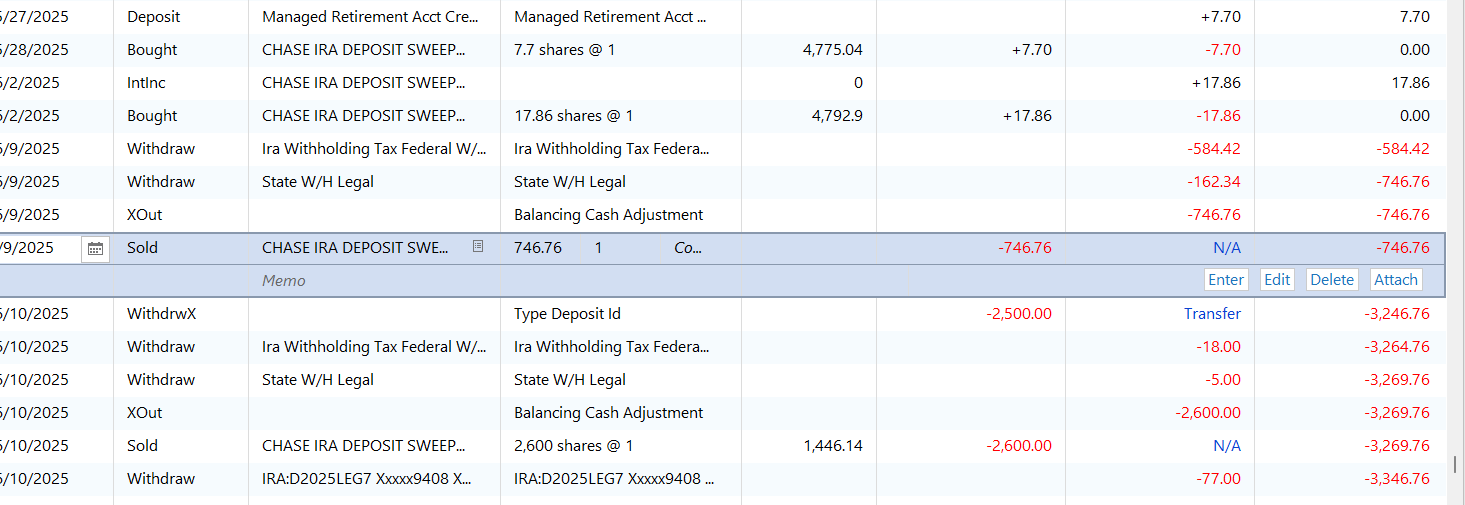
Hopefully you can give me suggestions. Support desk could not
0 -
Those Balancing Cash adjustments are almost certainly generated automatically when you enter or download a transaction for an earlier date than a Placeholder in the account for the same security.
Placeholders prevent new transactions like Div, Bought and Sold prior to the security’s Placeholder date from affecting the account’s cash balance. This shows up as N/A in the Cash Amt column of the transaction list. Quicken does this by creating a linked Cash Balance Adjustment just before the affected transaction. Deleting one of the transactions will delete them both.
To allow the cash balance to change when entering missing transactions that affect the cash balance, you must first delete all the Placeholders in the account for this security that have later dates than the transaction you are entering. Because of this, if you are entering a series of missing transactions it will be easiest to work in reverse chronological order.
Always back up your data file before changing historical transactions.
QWin Premier subscription1 -
THANK YOU!! THANK YOU!!! THANK YOU!!! I spent hours trying to figure this out on my own and a least an hour with customer support. I appreciate the help.
0 -
@Don32@ sorry I couldn't get back to you, but I am glad that @Jim_Harman was able to help you solve your issue.
1 -
Thank you so much for assisting this user with resolving and for sharing so that any other users experiencing this issue may find this thread!
-Quicken Jasmine
Make sure to sign up for the email digest to see a round-up of your top posts.
0 -
@Quicken Jasmine I am happy to help.
I have always wondered why Quicken makes these adjustments, preventing the cash balance from changing when there is a Placeholder and you enter missing transactions. It has been doing this for years and it is apparently by design, but the Help makes no mention of the adjustments and they seem to cause a lot of customer confusion.
I suspect we will see a lot of customers with questions like this as they recover from the recent Fidelity issues.
QWin Premier subscription0
