Fidelity Elan credit card download failure
Answers
-
Need to apologize a bit for some of my postings above. Especially after hearing that the connection was working with Fidelity but not Elan, I "assumed" this was yet another example of the changes going on with Fidelity gone bad. It may not be.
There are other threads on this issue I did not see when I looked before starting this one. And it really may be just a breakdown with Elan and their login process and nothing more. Not an anticipated in the switchover for the credit card as well as the other switchover to EWC+ for investments that is so problematic. I think we will soon see. So my accumulated frustration got the better of me.
Will see what today brings. For now, I am working with the Visa connecting to Fidelity. As @Boatnmaniac points out in another thread, perhaps the downside is that the transactions take a day longer to post with the Visa card and Fidelity than they do with the card and Elan. If so, I can live with that. At least for now until this all settles.
1 -
I do not have an Fidelity account so when I use the steps here to connect to Elan, Quicken takes me to the Fidelity website which says I don't have account.
Has anyone here contacted Elan and asked them about the quicken connection?
0 -
I get a 503 error that says Elan services doesn't recognize my password, even though it is correct. I now am in a loop when trying to set up download option
0 -
I don't have the "deactivate" option and it takes me to the Elan login that doesn't work.
What is the workaround for this? Do I hit "delete account"? Through Set up now it takes me to Elan login that doesn't work. What am I deleting when I delete account? Will I loose all of the past transactions?
Thanks
 0
0 -
Advise against deleting the account as that will remove access to your history of transactions for the account, unless it doesn't matter to you.
IF you press the + in the Account Bar to add an account, can you select Elan FI as one of the accounts to add?
If yes, when the login works, it will let you sign into Elan should provide a popup showing ability to link to the existing account in Quicken.
Deluxe R66.23, Windows 11 Pro
0 -
This morning still getting the CC-503 error from Elan FI connection.
I did a reset account and that reconnected with Elan FI successfully and downloaded transactions.
Just to be sure, I tried another download and it worked.
Then, I exited Quicken, restarted it and tried a download again and it reported no errors, although there were no transactions to download.
So, the Elan connectivity issue appears resolved for me.
Deluxe R66.23, Windows 11 Pro
1 -
problem resolved
1 -
Hello All,
We appreciate you taking the time to report this!
For those that are still experiencing this error, this is now considered a known issue that has been escalated internally, though we do not have an ETA at this time. While the investigation remains ongoing, please refer to this Community Alert for any and all available updates.
Thank you!
-Quicken Anja
Make sure to sign up for the email digest to see a round up of your top posts.0 -
I did sign up for the Laert for the CC-503 error. Just curious…do we have an ETA for a fix?
Thx
0 -
Use your Fidelity account login and pw.
0 -
I deactivated and reactivated via Elan. It restored the connection. I tested to see if another update worked. It did. I continue pull my transactions from Elan rather than Fidelity. If the problem reoccurs, I'll deactivate and try to set it up as a Fidelity link.
1 -
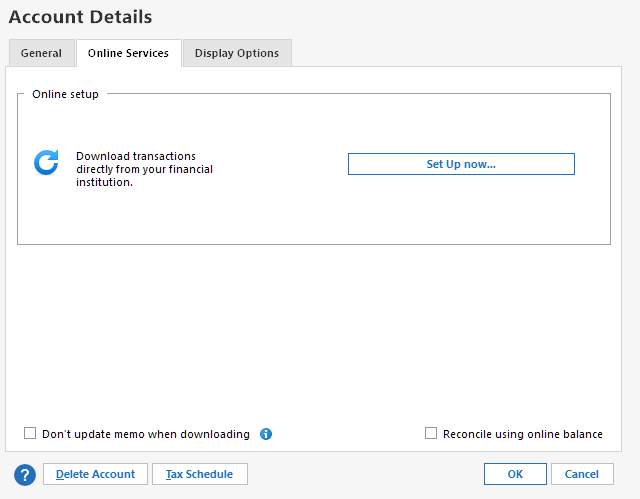
Go to the account in Quicken. Press Ctrl-Shift-E to get to Account Details. This will show three tabs. The second tab is Online Services. Click it and you'll find the Deactivate button.
1 -
There have been several significant download connection issues wrt to the Fidelity credit card over the last 3 years (I think this is the 3rd time in the last 12 months). Sometimes the Elan connection works well and sometimes the Fidelity connections have worked well. I have always valued the ability to easily switch the connection between Elan and Fidelity whenever there are significant connection issues because usually when there is an issue with one the other works well. Eventually the connection issues will be resolved and everything works well, again….until they don't.
For me, I am still getting the CC-503 error code with Elan.
Because of this I can choose to either manually download and import the QFX files from Elan or I can change my downloads connection to Fidelity Investments.
I have opted to switch my downloads to Fidelity Investments and I have experienced no download issues with Fidelity other than there being the very minor <1 day delay in posted transactions downloading. NOTE: This does require that you have an online account with Fidelity. The Elan login will not work with Fidelity Investments nor vice versa unless you have set up the same logins for both.
Quicken Classic Premier (US) Subscription: R66.23 on Windows 11 Home
0 -
Thank you everyone for your help. After numerous tries, I left the account deactivated on August 21.
This morning I setup the online services and, BOOM, it worked.
🤷♀️
0 -
Having had no recent connection error codes, I gave the Fidelity Investments EWC+ connection to my Fidelity Rewards Visa (Elan) a try for the last few days. It seems to work OK, but I consider the 1-day delay in transaction download to be a significant concern. I like to be very proactive when it comes to identifying issues/potential fraud on my financial accounts.
So I switched back to Elan Financial Services EWC connection. To my satisfaction, several recent posted transactions that I wanted to see download but would not download moments ago when using the Fidelity Investments connection did download when using the Elan Financial Services connection! This includes the monthly payment of my balances, matches to manually entered transactions and 1 new transaction.
I value the Elan Financial Services' more timely connection to my Fidelity Rewards Visa and will stick with it until I have good reason to use the Fidelity Investments connection.
0 -
I resolved by CC-503 error with my Fidelity Elan account. But how I fixed it is a mystery – to me, at least.
Pardon the long-winded post….
First, some history:
- Last year (i.e., 2024), as Boatnmaniac mentioned, the Elan Fidelity Visa had issues with OSU. Financial Institution: Elan Financial Services.
- To address it I started using the manual download process (i.e., qfx files) and created another Quicken account for the Fidelity Visa account using Fidelity Investments as the Financial institution.
- The Elan OSU issue got resolved, but I continued the Fidelity Visa downloads to both the Elan Financial Services and Fidelity Investments Quicken accounts. As folks have noted, the transaction updates to the Fidelity Investments account lag by about a day.
- All was well until the week of 08/17/2025…
Chronicle of events:
Early in the week of 08/17/2025 the Elan OSU updates failed with CC-503 errors, but the Fidelity Investments OSU updates worked!
- I could log into the Elan website with no issue (https://www.myaccountaccess.com/).
- I could not log into the Fidelity Rewards Visa website (https://login.fidelityrewards.com/). It would not recognize my UserId/Password, but the Quicken OSU updates worked.
- I could access the Fidelity Rewards Visa site if I used the account link in my Fidelity Investments Brokerage account.
I tried to reset my password on the FidelityRewards.com site using the “Forgot username or password” link, but it would not recognize my UserId. Strange!
I received an email from Fidelity informing me that my "account was locked due to numerous failed authentication attempts". Was the CC-503 Quicken error on Elan associated with the FidelityRewards website authentication issue? The email told me to call Elan Visa support. I called Elan Visa support and got escalated to a web savvy tech….but that person was stumped as well.
I continued to try to add/reactivate the Quicken Elan Visa account for the past week and all actions failed with a CC-503 error. Just for the heck of it, I went back to the FidelityRewards website a few days ago….The reset password link worked! I changed my password on the Elan website as well. Magic! Now Quicken OSU works on both the Elan Financial Services and Fidelity Investments Quicken accounts. No more CC-503 errors for the past two days!
Coincidence? I doubt it. But how is the Elan Quicken authentication linked to the FidelityRewards.com website? Recall that Fidelity Investments Quicken OSU update worked, but direct login attempts to the Fidelity Rewards website failed and Elan OSU failed but logins to the Elan website worked!
Sorry for the convoluted post, but I hope I explained the issue and mysterious solution. Thoughts welcomed!
0 -
It has been my experience that the CC-503 error "disappears" for a few days and then one execution of Quicken brings it back, only for it to disappear in future instances in a repetitive behavior.
Deluxe R66.23, Windows 11 Pro
0 -
I have my account set up directly with Elan Financial Services and have been dealing with the outage posted in the Alerts part of the community. I decided to use the QFX import and was able to pull in the transactions I was missing due to the outage. I wasn't sure exactly when it started, so I pulled in all transactions in August. To my surprise, they all matched correctly and I did not get any duplicates. I'm giving up on One Step Update and will just continue with the QFX import from now on. Sometimes old school ways are the better option.
0 -
@Bluesgorilla I am using Elan Financial Services download without problems. Maybe an Account Reset would remedy the issue.
Deluxe R66.23, Windows 11 Pro
0 -
After about a week of CC-503 error codes with the Elan Financial Services connection I switched to the Fidelity Investments connection. It's been about a week since doing that and downloads from Fidelity are trouble-free.
Since the start of this issue I have been trying to set up a new connection with Elan in a unique test file. Every time (almost every day) I get the same CC-503 error code….never get any connection set up.
Quicken Classic Premier (US) Subscription: R66.23 on Windows 11 Home
0 -
Thank you @tfhoughton. I see the announcement says they're releasting it to a subset of users. I must not have been one of the chosen ones. Help > Check for updates wasn't picking up the latest release. I grabbed the manual patch and installed it.
0 -
I too have played with the fidelity < - > Elan yoyo with Elan working at the moment.
EXCEPT: The very next reconcile brought up the "reconcile" dialog with a ~$600 mismatch! Quicken wants to add an entry to balance it. I have reconciled to the penny forever, and I even downloaded all my 2025 transactions and manually matched them. They all match, nothing is missing, and yet the online balance is almost $600 more than my register.
I thought this might be realted to the list of pending transactions I now see, but there're nowhere near this amount.
Now, this may all resolve itself. I think it was Elan a while ago that was trying to download transactions rounded to the nearest dollar, which resulted in sub-dollar reconciliation transactions every time. This was fixed and all was well from then on.
Maybe this will be too?
-Brian
0 -
A couple of known issues that sometimes happens when changing or updating a download connection, especially with EWC and EWC+ accounts:
- OPENING BALANCE WAS CHANGED: Check your opening balance to see if it has been changed. You might need to restore a backup file to see what the Opening Balance amount should be. Correct it if it was changed and then check your account balance to see if it is correct (without that balancing adjustment). SUGGESTION: You might want to enter and save the correct dollar amount of the Opening Balance transaction in the Memo field of that transaction. Then if this issue ever does happen in the future it will be easy and fast to identify and correct.
- If the account register is still out of balance, scroll backard from the current date looking for duplicate transactions. If you find any, delete of the transactions and retain the other. If there are duplicates it is likely that they will be present within the last 90 days but you might need to scroll back further than that.
Quicken Classic Premier (US) Subscription: R66.23 on Windows 11 Home
0 -
Regarding the first issue, I have suggestion that has worked for me in the past.
I always create a dummy opening balance transaction dated very early of $0.00 in my accounts. If Quicken changes the opening balance, I just restore the $0.00 transaction and verify the current balance is correct. That eliminates the need for me to have to figure out the opening balance transaction.
Deluxe R66.23, Windows 11 Pro
1 -
A good suggestion. I know some of the other SUs do that, as well, and it's worked for them, too.
Quicken Classic Premier (US) Subscription: R66.23 on Windows 11 Home
0 -
I switched from Elan to Fidelity Investments and it's downloading….but I'm not getting transactions that posted yesterday. I've seen comments elsewhere that when using the Fidelity Investments institution, transactions are sometimes delayed and looks like that's what's happening in my account.
1 -
I do a little different take on the opening balance problem….I just put the initial opening balance total into the memo column of the opening transaction in the register so that I will always know what it was. If you do not use the memo field for other purposes you can just hide it until you have a question about the opening balance and then just include it again for info,
0



