zzz-Fidelity Updates
Comments
-
Thanks @HKB.
It is true however that, once Fidelity forced to use EWC+(by saying that they would stop supporting DC on August 20th, before that was postponed), the onus was on Quicken to make it work, and they obviously didn't do a good job of that. Both Quicken and Fidelity have non-liability clauses in their terms and conditions that would prevent them from being forced to pay if it doesn't work. If they choose to offer compensation, that would be a gesture of good will, it doesn't hurt to ask nicely privately.
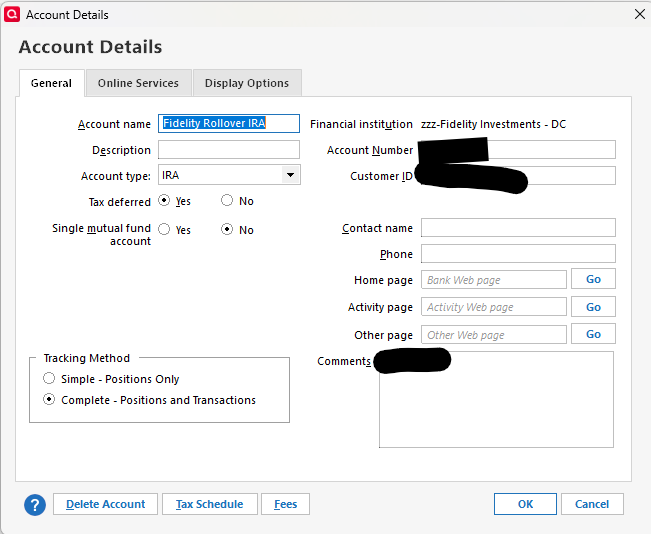
I wasn't able to get Quicken to download the last 100 days, as was asked earlier by @bdantes but I was able to revert to DC and still use Complete Tracking by following the steps I outlined earlier in this thread by deactivating all my Fidelity accounts, blanking out the FI name on the first tab, closing the tab, reopening it and entering "zzz-Fidelity Investments - DC" or "zzz-Fidelity NetBenefits" (for 401k only), then doing "File>Copy or Restore>Create a Copy or Template". Some caveats:
(1) This deactivates all your accounts, so you have to reactivate them again. It also deactivates any online bills you may have.
(2) Make sure that you note all your account balances to ensure they match when you open the copy. If they don't, then this method won't work for you.
(3) Your file will have a new name.
(4) There may be other issues by doing this that I am not aware of.
Barry Graham
Quicken H&B Subscription1 -
@bdantes said -
I and others have heard from Fidelity that they changed nothing — my source is a supervisor in Fidelity Electronic Channel Support, who told me they conferred directly with Fidelity's engineering team responsible for OSU integration.
If they told you this they were either lying to you or they know nothing about EWC+ nor the issues with Fidelity's EWC+ connection. Each connection method has specific/unique data formatting and downloading requirements so Fidelity must have made changes…no ifs, ands or buts about that. And the complexity of this is even greater because each financial institution has some uniqueness from other financial institutions. So, there is no such thing as a simple download connection.
Also, solely blaming Quicken for this is not logical because the financial institution solely owns determining which connection method(s) they will support. EWC+ would not have been made available if Fidelity had not required it.
When I talked with the Quicken Development Team about this I was told that there are issues caused both by Fidelity and by Quicken which is likely a very truthful answer. I was also reminded that there is a 3rd party involved in all of this…Intuit (the aggregator)…although I was not told anything about how they might be impacting the issue.
I find it absolutely ridiculous to finger point and trying to blame one party or the other. Focus on the downloading and data issues, inform Quicken and Fidelity of them and let them work with each other (and Intuit?) to resolve the issues. Focusing on the blame game is not productive and solves absolutely nothing.
Quicken Classic Premier (US) Subscription: R66.23 on Windows 11 Home
1 -
I tried this method you cited above earlier — but it forced me into Simple Tracking.
0 -
Well, if Fidelity electronic channel support is lying or knows nothing of EWC+ (and that certainly was not the case with the person I spoke to in their electronic channel support, fyi), then how do you explain that multiple people in Quicken support (including one who was actively playing "telephone" with an actual engineer) confirmed what Fidelity said? Your and others' "no ifs and ors buts" don't cite actual source or evidence.
But I do agree with you that the finger pointing is useless — and my apologies for contributing nothing productive with the frustrated rant. I appreciate the various workarounds the Quicken community has attempted to offer — far more productive than anything Quicken has directly done. It's just so tiresome to have breaking changes like this go into production and stay this way for weeks on end. This has happened repeatedly with Quicken — it's really very clear they have terrible QA and engineering practices.
The bottom line is that this thread and hundreds if not more like it on the Quicken community, Reddit, etc. obviously demonstrate how poor the quality is. Breaking changes should NEVER be introduced into a production system upon which so many users pay for management of vital data. The apologies of "oh let's just be patient and wait for them to figure it out" really frustrate — as a professional software engineer myself, I would expect to be fired for letting stuff like this happen — especially more than once. There's just no excuse for this kind of thing.
4 -
Btw, I notice that your sig says you're on 64.19. QWIN H&B tells me that I'm on the latest at 63.21. Did you have to manually download the update?
0 -
My assumption at this point is that while Fidelity has dictated the change from DC (but not necessarily the timing), the issues being discussed are mostly Quicken's problem. My evidence? Contrary to the above assertion that "…These transitions away from DC have occurred ONE AT A TIME ….", Merrill Lynch is going through the same transition RIGHT NOW, and it's having many of the same issues. It's unlikely that both brokers would have made the same errors.
Interfaces can be complex undertakings and they no doubt require changes be made by both parties (and perhaps by Intuit as well). What Quicken IS 100% responsible for are rollout and communication to the end users. Suffice it to say, it has not done well with either of those tasks despite multiple suggestions on how to improve NOW, particularly with regard to the latter.
Tossing in a new version (r64.xx), is just a poor decision that doesn't help the situation at all. While the revision change and conversions may affect different sub-sets of users, they still draw on the same engineering and support resources, resulting in spreading already stressed teams even thinner. I mention it only because it's indicative of the type of thinking that results in the problems we're seeing.
At the end of the day, what @Boatnmaniac and others have said is true - pointing fingers gets us nowhere. Giving the best, most detailed feedback hopefully will. Following all the discussion going on in this and other threads, it seems to me that most, it not all of the problems have been sussed out and described pretty well. It's now up to Quicken to get them fixed and properly tested before rolling out.
(FULL DISCLOSURE: I have not done the conversion. I attempted to early on, but ran into one of the first bugs, which was that the connection to Fidelity failed. Quite happy for that).
3 -
Quicken is arrogant! They abuse their customers by using them to debug their software. They haven't discontinued the EWC+ connection allowing more users to have irreversible issues. There is no company email to users on the issues, status, progress, or resolution. The Quicken webpage doesn't have "Contact" in the footer. Phone support tries their best. But the highest you can escalate is to their supervisor.
The Better Business Bureau Better Business Bureau says Quicken, Inc. is "NOT a BBB Accredited Business." They deserve their rating of "F" for not being responsive.
For support, we are left with several tediously long user discussions like this 16-pager to read. Thank you to the contributors. I spent many hours recovering from the Schwab connection update years ago. I'll stay with my Fidelity DC connection until these forums confirm it's safe to update.
0 -
@bdantes said -
Well, if Fidelity electronic channel support is lying or knows nothing of EWC+ (and that certainly was not the case with the person I spoke to in their electronic channel support, fyi), then how do you explain that multiple people in Quicken support (including one who was actively playing "telephone" with an actual engineer) confirmed what Fidelity said? Your and others' "no ifs and ors buts" don't cite actual source or evidence.
My source? I did state that he is a Quicken Development Engineer. He is directly involved with Fidelity and other Quicken engineers in the identification of the EWC+ issues causes and the resolution of them.
I have worked with him directly before on other development projects including the testing and implementation of US Bank's EWC+ migration (which they were much more successful with than this Fidelity one). He's proven himself to me to be quite trustworthy and forthcoming.
He is the one who told me that both Fidelity and Quicken share responsibility for the issues we are seeing and that is likely far more accurate/truthful than what others have been saying, especially since those others (like that Fidelity channel support person and Quicken Support folks) do not have direct working knowledge of the issues themselves. Unless they have direct working knowledge of the issues then it is highly likely that their understanding is something less than complete and perhaps something less than unbiased.
Regarding the "no ifs, ands or buts": That was pulled a bit out of context. I said that in reference to, and only in reference to, Fidelity telling you that they made no changes. Their saying that is 100% untrue because Fidelity absolutely had to make significant changes in order to accommodate EWC+ or this migration would never have even gotten started.
Enough of this. I will not be posting about this, again, because it is not productive and serves no purpose in resolution of the issues.
Btw, I notice that your sig says you're on 64.19. QWIN H&B tells me that I'm on the latest at 63.21. Did you have to manually download the update?
When the software tells you that your installed version is the latest but there are others who have installed a more recent version, it generally means that the more recent version is still a staged (limited) release. Once a certain number of users have installed a staged release further version updates via the Quicken software are halted until such time that engineering has approved it to become a general release.
So, yes, I manually downloaded and installed the Manual Patch Update file for R64.19 from Quicken for Windows: Manual Patch Update | Quicken. You can see which version of Quicken the link there will download by hovering your cursor of the download link.
I generally will not permit Quicken to do version updates because my perception is that downloading and installing the Manual Patch Update file produces a more trouble-free version update. That might be a mistaken assumption but that's my story and I'm sticking to it! 😉
I never updated to R63.21 because of the many reports of numerous issues with it. Normally I am not an early adopter but R64.19 has some important updates to Tax Planner that I really wanted and needed to see at this time and it resolves many of the identified R63.XX issues so I jumped on it as soon as the Manual Patch Update file download link was made available.
If you have not already done so, you might want to read the Announcement about R64.19 at Windows R64.XX Release (US). It has not yet been updated to state that R64.19 is now a general release but I'm guessing that will happen fairly soon and then you can use Quicken to update your installed version.
FYI: R64.19 has been reported to have some issues with the new eBills protocol. I do not use that feature so it is of no concern of mine but if you do then you should know about this before doing the update yourself.
Quicken Classic Premier (US) Subscription: R66.23 on Windows 11 Home
1 -
I did it myself today and it worked for me. Did you use "Create a Copy or Template"? If you used "Create a Complete Backup" then it wouldn't work. If you did use "Create a Copy or Template" then you would need to blank out the Financial Institution before doing this, then save the change, then open up the details tab again and change the FI to zzz… then do the copy. If you change it directly from Fidelity Investments to zzz-Fidelity Investments - DC without blanking it out first and saving, then the change doesn't work.
This is proof that it worked for me. If it doesn't work for you then I don't have more ideas.
 Barry Graham
Quicken H&B Subscription0 -
explains how the different connection methods work.
Barry Graham
Quicken H&B Subscription-1 -
I had seen your advice on blanking out the financial institution and then manually overriding with "zzz-etc" — but I had not seen that you were doing this on a copy, much less a template. I'm definitely looking for a way to get my entire data file back on track.
And when you say, "save the change," what exactly do you mean? Press "OK" on the Account Details window? Close the Quicken file entirely? Something else?
Clearly there is something very specific about the order of operations here. If I could trouble you to list them out in what may see like glaringly obvious detail, I would appreciate. I assume this has to be done for every Fidelity account before attempting to reconnect any of them?
0 -
i
This does do a complete copy in a different way. The difference is that it breaks the electronic link with the original file by creating a new identifier so you can run two files side by side (on two different PCs) without them interfering with each other, and have two separate cloud accounts that are Independent. As you probably know, you can't run two copies of the same backup at the same time as they interfere with each other.
Barry Graham
Quicken H&B Subscription1 -
Well, that appears to work… but it also means having to reconnect every other non-Fidelity account to their online services too. :-( Did that happen to you?
0 -
Yes, which is why I held off doing it. The good thing is that you can go back to your previous version if you don't want to have to reconnect. I thought I mentioned this issue but maybe I forgot.
Barry Graham
Quicken H&B Subscription0 -
Go back to my previous version? You mean the "zzz-…" Fidelity connections will now start working again in the original file that was copied??
0 -
No. When I enter my paycheck in Quicken I record the contributions to my 401K. In the past, those contributions are "zeroed out" when I download the shares they were used to purchase. Thus, for example, I contribute $500 and my Total Market Value is temporarily $500 higher than my Securities value until that $500 is used to purchase shares, after which point the two values are the same until the next paycheck. Does that make sense?
0 -
No, I am sorry to get your hopes up. I meant that if you don't want to have to reconnect all the institutions, you can revert to the previous file with EWC+and continue using that (with EWC+) without having to reconnect the institutions, since they are two independent data files. Personally it's worth it to me to reconnect the institutions (and online bills if you use that feature) in the new DC version and not have to deal with EWC+ until it works properly.
Barry Graham
Quicken H&B Subscription0 -
I appear to have gotten things all reconnected — we shall see if at least Fidelity securities and cash transactions come in tomorrow with a normal OSU without having to "Reset Account." Especially telling will be the month-end Div/ReinvDiv/Int across most of the other Fidelity accounts too (even with DC, those would go sporadically/intermittently missing — been reporting that bug for the better part of a year).
Will OSU (via any method) bring in "New" (duplicate) transactions that need to be rejected — if matching transactions have already been manually entered and reconciled? I'm perplexed that with this reconnection to DC hack — I still didn't see any of the security OR cash transactions coming in from June 30 or July 31 that should have been in the feed.
And a final glitch — I also have Fidelity's VISA (serviced by Elan). Ironically, that was in the EWC+ feed with no issues from the get-go. But it's not in the "zzz-Fidelity - DC" feed. I have to connect it directly to Elan. (Perplexingly, that Elan feed does bring in "New" transactions for ones already reconciled in the register - unlike Fidelity.)
0 -
I hope it goes without saying (even though I'm saying it anyway :-P) — that these acrobatics are absurd. Quicken should not be putting us through this just to maintain functionality. And it's all so flaky and fragile — there is zero trust.
1 -
Quicken tracks a special "checking" account (to hold all the cash transactions) separate from my Fidelity Cash Management account (which holds all the security SoldX/BoughtX/ReinvDiv transactions). It worries me that the "Account List" says "zzz-Fidelity Investments - DC" by the security account as expected, but still says, "Fidelity Investments" beside the specially managed coupled checking account.
0 -
You are 100% right that we shouldn't have to be doing this.
Barry Graham
Quicken H&B Subscription0 -
I hear you, and now you mention it I noticed the same thing when I figured this all out a couple of weeks ago. That account is not an online account so hopefully it doesn't matter. Actually I just went back and checked mine (the cash account linked with my HSA) and it DOES say zzz… - not sure what I did differently this time. Either way I don't think you have to worry, but keep an eye out when you do the next download that is supposed to update this account.
 Barry Graham
Quicken H&B Subscription0 -
Aside - another glitch that annoys me… that Copy File operation has a similar bug to Super Validation. It asks if one wants to set a password on the new data file. However, after working with that file, closing it and reopening it — the password is rejected. One is forced to go through the whole password reset mechanism with the Quicken ID and multi-factor authentication to get back into the file. Only then can you successfully set the password on the file again. This is quite reproducible with Super Validation — and I've reported it for years. Another one of those bugs that never gets fixed.
And the fact that the file can get corrupted requiring validation at all has always struck me as amateurish. They should be using an actual database with verified commits, etc. It all just feeds into why this product makes me nervous and always has. I keep archives and archives of the archives — because I just don't trust the engineering in this software.
1 -
The real problem here is moving from proven, working methodology (direct connect) to EWC+. What are the motivations? Quicken apparently charges financial institutions much less for EWC+, so likely receiving kick backs from Intuit since Intuit gets all the juicy account info.
I strongly disklike this direction and I will be disabling all accounts requiring EWC+ moving forward. I've been looking into manually downloading transactions and importing them, but Quicken makes this difficult to say the least. If a means to make manual importing simple is beyond the tool, then I'm likely out and moving to a free tool. I'll pay an annual sub even with manual imports because I have a LOT of history here, but if I can't even do that this is the end of the road for me.
Connection disruptions over the years have happened but now that they're starting to happen just to push us to what I consider an inferior solution… this isn't looking out for customers, this is beginning to milk a captive population.
1 -
I also restored from a backup (I had one from July 28th) and everything is working as it should. I have 7 accounts at Fidelity (including crypto, IRA's, TOD's, and a MM account) and was not getting transactions for any of them with EWC+. I had to go back and repopulate some credit card transactions, but it was well worth the time to have everything accurate again. All my non-Fidelity accounts had no issues after the switch.
2 -
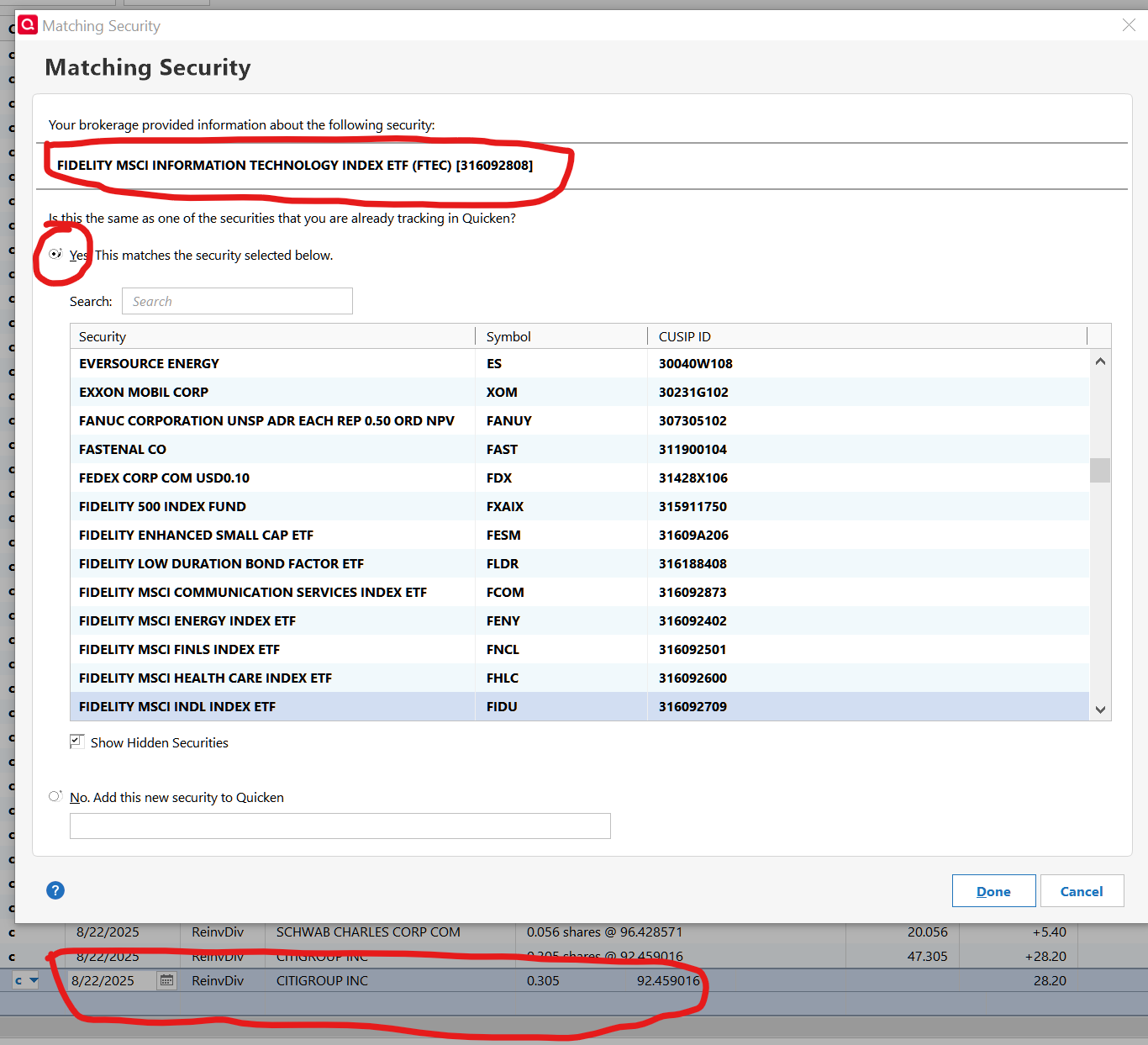
I decided to include Fidelity in my One Step Update. I'm using DC and have two data files, each with 2 Fidelity accounts. After updating, my wife's showed a transaction and popped up the Matching Security dialog. The transaction was from CitiGroup but the dialog mismatched it to Fidelity MSCI. I clicked the X in the upper-right corner to abort the dialog. Quicken deleted the downloaded transaction.
In the 2nd data file, I changed the security to CitiGroup and clicked Done. It popped up "Your Quicken account and your Brokerage Holdings are in agreement." But it added the transaction as "unknown."
After fixing the CitiGroup transactions, I reconcile my July statement. It was off by a few pennies. The statement has the share quantity to 3 decimal places and the share price to 5 decimal places. The 5th place is always zero so it's actually 4 decimal places.
The transaction download file also has 3 for the quantity but only 2 decimal places for the price. Share price times quantity doesn't always match the downloaded total by a few cents.
In Quicken, transactions can display up to 6 decimals for share price but the 3rd and higher differs from those in the statement. It's false accuracy and sloppy programming.
1 -
Has Quicken indicated at all what the mitigation steps are going to be once they and Fidelity get this resolved, much less how we will know when it has been fixed? The only transactions I seem to get as part of a download to my 403(b) are the Employer Match, which is already accounted for in my paycheck. So currently the cash value of my account represents the past three paychecks employee/employer match totals. No fund purchases since Aug 1st have downloaded. I tried creating a new file and new accounts, it downloaded placeholders for the current holdings (mind you it says as of 08/30/2023 instead of 08/25/2025) and a bunch of contribution transactions that netted out to 0
Already supervalidated and had no errors.
1 -
One-Step-Updates returned to reporting CD Shares in different increments, while downloading Quote/Price in the format following the EWC+ migration change - resulting in a Market Value mismatch for CD's. Not a major issue, yet both data formts will have to correspond with each other, going forward, in order to calculate correct Market Values in Quicken:
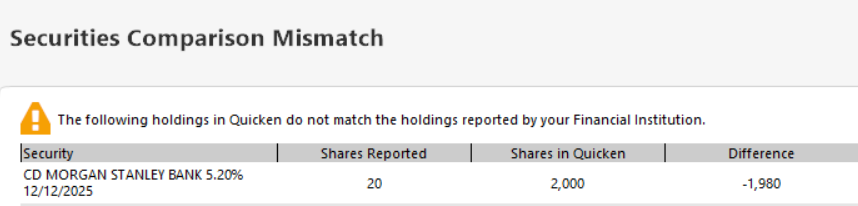
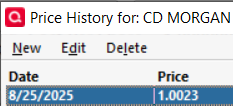
For now I will simply stay with higher Quicken CD share increments, if and until CD Price update formats may reverse back.
0 -
I tried this and was able to get my FIdelity acconuts back to DC. However my Vanguard accounts which were disconencted (even if I deactivated first before copy) now only offer Simple tracking. Any idea how to keep complete tracking on a Vanguard account after this method?
This is so frustrating - why should we pay subscriptions only to be used as debuggers!
0 -
Go to Account Details for each of the Vanguard accounts and on the General tab for Tracking Method select Complete - Positions and Transactions.
Does this resolve the Simple Tracking issue for you?
Quicken Classic Premier (US) Subscription: R66.23 on Windows 11 Home
0




