How to maintain one account on two laptops?

I have Quicken Classic. I would like to maintain the single file on two laptops as I am often away from home and have two laptops. I was able to load the file on the new computer but the file doesn't seem to be updating across the two machines. What do I need to do? Thanks!
Best Answers
-
I have placed my Quicken file in a folder that syncs with OneDrive. I can open on multiple computers so long as I make sure the upload/download completes prior to opening.
4 -
Like @Dan Houghton I keep my datafile on a cloud service. I use Dropbox instead of OneDrive since DB data is encrypted at rest and in transit, where OneDrive is not encrypted at rest ( just based on my research so check it out). I've done this for MANY years. Be sure as @Dan Houghton says, that DB has synced the file before opening it on another PC. Many might be wary of having financial data stored on a cloud server, and that's OK (everyone has to make their own decision on that, but even Quicken has cloud storage for backups and mobile files so there's plenty of precedent.
2 -
Regarding running data files from cloud storage sites like Dropbox and OneDrive: See this Support Article… .
It is strongly recommended by Quicken to not run working data files from cloud storage sites because of the risk of data file corruption from which there often is no possible recovery. Quicken Classic is designed so backups of data files can be saved there but it is not designed to support running the working data files from there.
I can't tell you how many times I've heard the moans and groans of users, many of whom are quite technically experienced, who ran their working data files from cloud storage sites, some for months or even years, who all of a sudden found their working data files are no longer functional and they have lost years or decades of data and cannot recover it. Do yourself a big favor and only run your working data files on your local drive. Otherwise, IMO, there is a high probability of when, not if, data file corruption will occur.
This Support Article does say how you can use cloud storage to share working data files between computers. But just keep in mind that all it takes is one little misstep and the data file could be toast.
Quicken Classic Premier (US) Subscription: R66.12 on Windows 11 Home
4

Answers
-
The safest method to do what you are inquiring is to MOVE your Quicken data file from one laptop to the other (using a USB thumb drive as one example). I highlighted "move", meaning once you launch it on one laptop, the one on the prior laptop is obsolete and you should delete it. Point being, you need to keep track of only the latest file, and I cannot stress enough on the importance of this. Otherwise you risk data corruption and issues may compound further if you have Sync enabled.
I have been doing this on a regular basis for the past 15 years without issues. Does this answer your question or have you tried this method and ran into challenges? If so, please elaborate.
ADDING: Please review this support article we well.
- Q Win Deluxe user since 2010, US Subscription
- I don't use Cloud Sync, Mobile & Web, Bill Pay2 -
IF, (this relies on a big if), you had a USB portable drive (not a thumbdrive) and when you plugged it into the laptops, (this is the big if part) they both always assign the same drive letter to it, you could just move the portable drive between the laptops as needed and work from the portable drive.
You would have to make sure that you routinely make backups to other media in case the drive was damaged or lost.
-splasher using Q continuously since 1996
- Subscription Quicken - Win11 and QW2013 - Win11
-Questions? Check out the Quicken Windows FAQ list1 -
I have placed my Quicken file in a folder that syncs with OneDrive. I can open on multiple computers so long as I make sure the upload/download completes prior to opening.
4 -
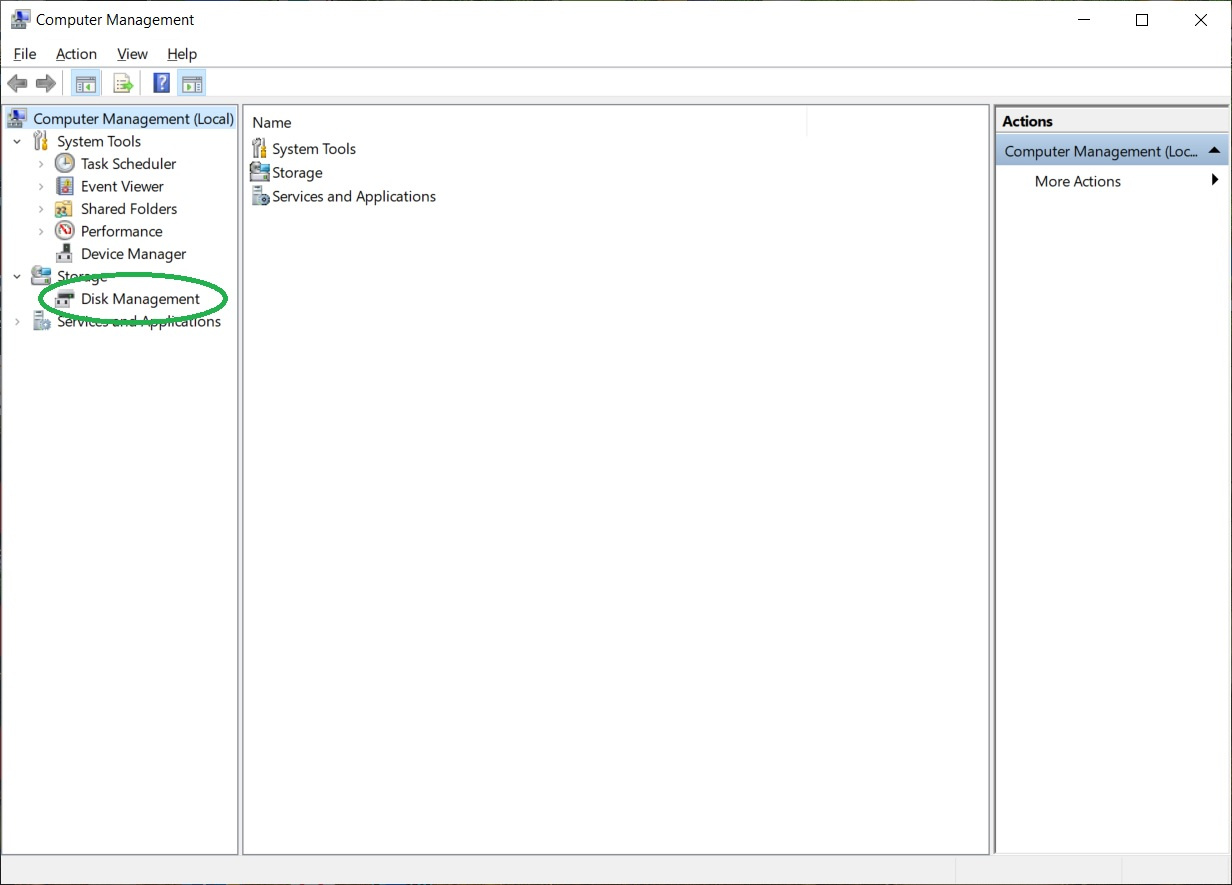
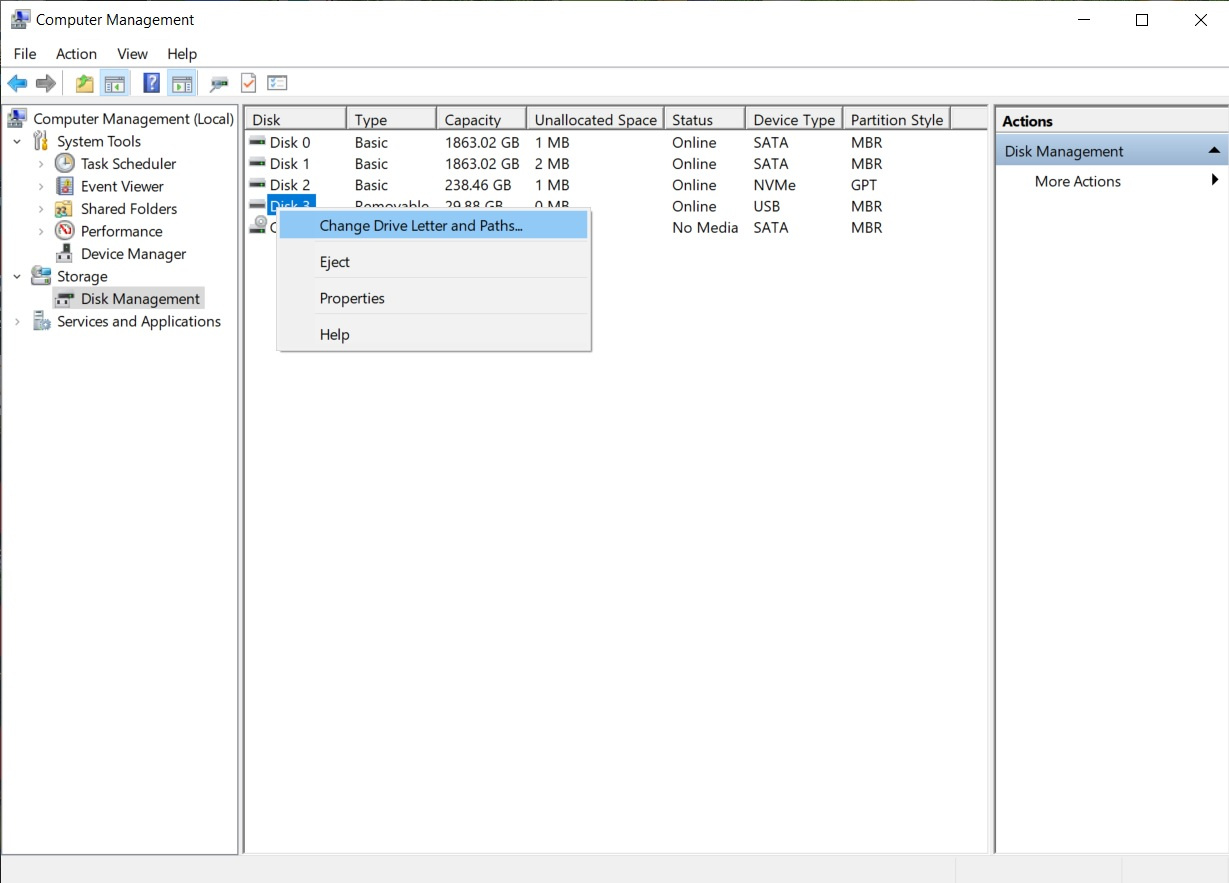
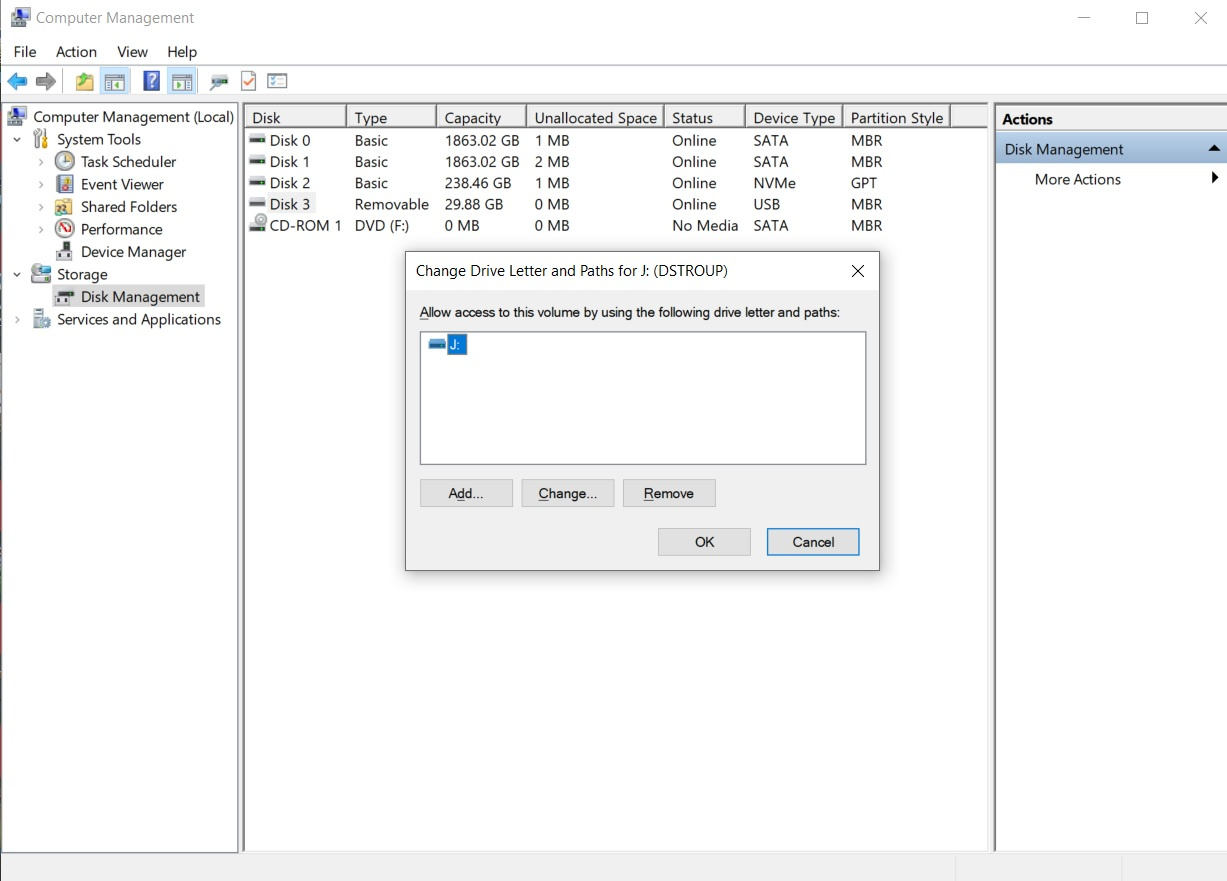
@splasher @CNESTER You can assign a drive letter to a flash drive, just like a regular drive, and it will maintain that letter until changed again by the user. This is done as an Administrator in the Windows Administrative Tool, Computer Management. Open Computer Management and click on Disk Management on the left side (Under Storage). Right click on the drive to assign, reassign, or remove the drive letter. You don't have to hope that the laptops will randomly align the drive letter. I'd suggest Q: - for Quicken - so the addition of another temporary drive likely would not upset your systems' normal drive organization (typically in the lower alphabet letters A: - F:). Here's an example using a 32GB flash drive (disk 3), already with a drive letter, J:.
 0
0 -
Like @Dan Houghton I keep my datafile on a cloud service. I use Dropbox instead of OneDrive since DB data is encrypted at rest and in transit, where OneDrive is not encrypted at rest ( just based on my research so check it out). I've done this for MANY years. Be sure as @Dan Houghton says, that DB has synced the file before opening it on another PC. Many might be wary of having financial data stored on a cloud server, and that's OK (everyone has to make their own decision on that, but even Quicken has cloud storage for backups and mobile files so there's plenty of precedent.
2 -
I use Dropbox and it works well but requites some forethought. Because Dropbox syncs consistently, I prefer turn of sync when I use Quicken and turn it on when I am done. I maintain three active files this way across three computers (two PCs and a laptop) with no trouble at all.
1 -
Regarding running data files from cloud storage sites like Dropbox and OneDrive: See this Support Article… .
It is strongly recommended by Quicken to not run working data files from cloud storage sites because of the risk of data file corruption from which there often is no possible recovery. Quicken Classic is designed so backups of data files can be saved there but it is not designed to support running the working data files from there.
I can't tell you how many times I've heard the moans and groans of users, many of whom are quite technically experienced, who ran their working data files from cloud storage sites, some for months or even years, who all of a sudden found their working data files are no longer functional and they have lost years or decades of data and cannot recover it. Do yourself a big favor and only run your working data files on your local drive. Otherwise, IMO, there is a high probability of when, not if, data file corruption will occur.
This Support Article does say how you can use cloud storage to share working data files between computers. But just keep in mind that all it takes is one little misstep and the data file could be toast.
Quicken Classic Premier (US) Subscription: R66.12 on Windows 11 Home
4 -
I've been doing this also (keeping my Quicken data file on OneDrive) for over five years now and never had a problem. I know it's not recommended, and I do make backups often just in case. But it's been trouble free.
2 -
I agree with @Boatnmaniac , you have to be very careful using it directly in cloud storage drives. What I do is run it from my Quicken folder and copy it regularly to the cloud drive folder so it syncs to my other computer. Then when I want to use it on my other computer I copy it from the cloud drive folder on that computer to my Quicken folder. I've never had a problem using it that way. You just have to remember to copy it back if you do anything you want to keep (I mostly do it for testing but occasionally will decide it is something I would like to keep as my main file).
Quicken Windows user since 1993.
2 -
I also agree with @Boatnmaniac to not run Quicken directly from a cloud drive. It is a disaster waiting to happen. We have seen many reports on this community about it and Quicken has warned us as well.
- Q Win Deluxe user since 2010, US Subscription
- I don't use Cloud Sync, Mobile & Web, Bill Pay2 -
I too keep use Dropbox and do a upload/download from the PC to Dropbox to Laptop and visa-versa never running it from the Dropbox cloud itself. One user didn't like the idea of their data in the cloud which is understandable. Supposedly, Dropbox data is encrypted, but their TOS does indicate they will access your data with a legal mandate from authorities. So what I is locally encrypt and decrypt the Quicken data prior to and from uploading/downloading via zip file that is the storage medium on Dropbox. Yes, it's a secondary step, but that way the data on their storage can not be seen by anyone else since in effect it is doubly-encrypted and I hold one of the keys.
0 -
I have been using one Quicken data file on two computers by syncing the data file via OneDrive on both computers. Ensure that your OneDrive settings allow files to be updated immediately on all connected devices.
Hope this helps.
0 -
It is interesting that this thread has gotten so much attention given that @CNESTER hasn't commented since the original post.
I'm not going to comment on moving the data file around since there seems to be plenty of suggestions on that. 😉
But I will "point out the obvious" that hasn't been directly mentioned:
I was able to load the file on the new computer but the file doesn't seem to be updating across the two machines.
Quicken doesn't sync Desktop data files between machines automatically.
The only "syncing of data" is some partial data to the Quicken Cloud dataset, which the Mobile and Web application are the "GUI"s which are intended as "temporary away from home use".
2 -
"Quicken doesn't sync Desktop data files between machines automatically."
The only "syncing of data" is some partial data to the Quicken Cloud dataset, which the Mobile and Web application are the "GUI"s which are intended as "temporary away from home use".
Exactly! I find the "Sync" function of Quicken to be relatively useless, but that's a topic for its own thread. It has absolutely nothing to do with this thread.
What does have a place in this thread is the relatively new "Quicken Online Backup" service. It could be used in place of One Drive, Dropbox, etc. The advantage that I see, correct me if I'm wrong, is that by using Quicken Online Backup, you can set it up to automatically put a copy of your data file in the cloud every time you exit Quicken….without any user input. Now, supposedly, according to Quicken, you can load that file directly into Quicken. If you are using One Drive or Dropbox, you have to go through a few steps to put the data file in the One Drive or Dropbox cloud. With Quicken Online Backup, it can be set to automatically do that for you. I figure less steps, less room for errors.
The question of whether or not to load a data file directly from the cloud (One Drive or Dropbox) is another relevant point. It seems widely accepted that would be just asking for problems. I tend to agree as it just introduces the potential for more issues, but why? In theory, it should work, right?
Why is it ok, according to Quicken, to load a Quicken Online Backup file into Quicken, but with One Drive and Dropbox, everyone strongly emphasizes, to download the file to a local drive before using in Quicken?
Finally, what function under the "File" menu in Quicken should be used to open your cloud file (whether downloaded locally or not)? A lot of what I read here says to not use the "View/Restore Backup…" due to some internal counter maxing out??? The "Open Quicken File…" menu item is the other alternative and supposedly doesn't cause issues with that counter problem that gets mentioned.
I'm a 30 plus year Quicken user, and want to start using Quicken on two different computers. I would appreciate any insights on the above from individuals that are actually using Quicken Classic on multiple computers. Thanks so much.
0 -
I don't think online backup is anything special. There isn't an automatic "restore". So, basically you would be opening Quicken and then restoring the copy on top of the current one. And as for the automatic backup part of that, you can also setup just to have any automatic backup to a "cloud folder", and then when you get to the second machine do this restore in the same manner.
Personally, I wouldn't do it that way. For a few years now I have noticed that the Restore does more than just copy the data file and open it. It "syncs" with the Quicken Cloud dataset, which has been known at cause problems at times.
What I would do instead is just use a script to copy the Quicken data file from/to the "Cloud folder" of your choice.
@echo off
set DATA_FILE=Current.qdf
set DATA_DIR=c:\Quicken
set QUICKEN_BACKUP_DIR=%USERPROFILE%\OneDrive\Documents\Quicken\IF EXIST %DATA_DIR% GOTO DIR_EXISTS
mkdir %DATA_DIR%
:DIR_EXISTScopy "%QUICKEN_BACKUP_DIR%%DATA_FILE%" "%DATA_DIR%%DATA_FILE%"
IF %ERRORLEVEL% == 0 GOTO COPY_PASSED
start /wait cmd /C "ECHO %QUICKEN_BACKUP_DIR%%DATA_FILE% copy of data file failed. && PAUSE"
GOTO END:COPY_PASSED
"%ProgramFiles(x86)%\Quicken\qw.exe" "%DATA_DIR%%DATA_FILE%"copy "%DATA_DIR%%DATA_FILE%" "%QUICKEN_BACKUP_DIR%%DATA_FILE%"
IF %ERRORLEVEL% == 0 GOTO END
start /wait cmd /C "ECHO %DATA_DIR%%DATA_FILE% copy of data file failed. && PAUSE":END
You put this in a file created by Notepad, and change its type to .cmd (name it whatever you like), and if you like you can create a Desktop shortcut to it. Note that you need to change the DATA_FILE name, DATA_DIR and QUICKEN_BACKUP_DIR to the right file name/locations.
The reason people are warning against not using the data file directly in a "cloud folder" is that there is the potential of the Cloud service interfering with Quicken trying to read/write the data file at times. And it isn't really straightforward of "when" this will happen, it might never happen to a given person or cause problems for another and be hard to track down. Note that if the cloud service is paused while using Quicken, then that basically also serves as "not putting the primary data file in the cloud folder", because you are eliminating the possibility of this conflict.
It looks like this when running (black icon is the script):
 0
0 -
Am I to understand that you do NOT need the Quicken application on the 2nd computer? Just the file?
0 -
No, you need the Quicken application on both machines. It is what opens the Quicken Desktop data file that you are transferring between machines. Note that the Quicken Subscription allows you to install the Quicken application on as many machines as you like.
1 -
Thanks so much Chris.
0 -
Thanks all! I'm looking at the OneDrive / Drop Box option.
0 -
Hi @CNESTER ,
If both have a USB Ports, you can make a backup from one Laptop Quicken Windows installation onto a USB Thumb Drive.
Eject the Thumb Drive, before removing it, then take the that USB Thumb Drive and plug it into the other Laptop and open Quicken and restore the Backup.
Or you can have your own Cloud storage and Back it up to a folder, called Quicken Backup. Make sure to Add Date and Time to the Backup.
thecreator-bTesting Quicken Subscription Beta B63.19 (Nov. 2023) Installed 24/7.
in Windows 10 Pro 64-Bit Build 19045.3693 Quicken Classic Business & Personal0 -
The best advice with using either of those cloud storage/backup processes is to disable them while you are using Quicken (have a data file open) so that they will not try to grab control of the data file while Q has it open and mess things up. Re-enabling it when done with Quicken will then allow them to sync the data file to the cloud.
-splasher using Q continuously since 1996
- Subscription Quicken - Win11 and QW2013 - Win11
-Questions? Check out the Quicken Windows FAQ list0




Categories
- All Categories
- 18 Product Ideas
- 34 Announcements
- 246 Alerts, Online Banking & Known Product Issues
- 19 Product Alerts
- 518 Welcome to the Community!
- 682 Before you Buy
- 1.5K Product Ideas
- 55.7K Quicken Classic for Windows
- 16.8K Quicken Classic for Mac
- 1K Quicken Mobile
- 834 Quicken on the Web
- 127 Quicken LifeHub