Fidelity Annuity updates on the following date.

I have Quicken Mac. This issue (I think) started with the last update, but I can't say that for sure. I just know it started recently. I reached out to Support but haven't heard anything. Here's my situation.
My Fidelity Annuity consists of mutual funds. Typically at the end of the day for me in CA with the time difference, that account shows a zero gain/loss because we all know mutuals don't update at the same time that stocks do. So, I typically update Quicken the next morning and it updates to show what the gain/loss was for, let's say, Monday etc.
Now, when I update the account on Tuesday morning, the gain/loss for Monday shows up on Tuesday (this is even before the markets open on Tuesday) and a zero for Monday. It never did this before, it would always update the gain/loss for Monday, on Monday. This goes on all week, except for Friday will still show Thursdays numbers but nothing is recorded for Friday on Saturday.
Any suggestions? TYIA!
Best Answers
-
Were you at some point in the last few weeks prompted by Quicken to reauthorize your Fidelity account? This is where Quicken pushes you to the Fidelity website to log in where you authorize Fidelity to download your account data to Quicken.
If so, then your connection method was changed from Direct Connect (DC) to Quicken Connect (QC) which is also called Express Web Connect+ (EWC+) in QWin.
With DC, Quicken connects directly with the financial institution and generally the data that gets downloaded is real time. So when you do OSU the data that is downloaded is current as of the time of the OSU.
But with QC/EWC+ Quicken does not connect with the financial institution at all. Instead, Intuit (the aggregator) connects with the financial institution on our behalf and that generally is done at night. What Intuit gets is a snapshot of what the account data is at the time of the connection and then saves that data on their server. When we do OSU Quicken downloads that saved data on Intuit's server which is from the prior night. So, when we run OSU on Monday, we are downloading data from Sunday night and when we run OSU on Tuesday we are downloading data from Monday night.
You can read more about the various connection methods used by Quicken in this Support Article: Connection Types in Quicken | Quicken.
So, check the connection method your Fidelity account is set up with. If it shows it is connected with QC then that is the likely reason why you are getting prior day data during OSU.
But if it shows it is connected with DC then something else is occurring.
Quicken Classic Premier (US) Subscription: R66.12 on Windows 11 Home
0 -
Fidelity is in the process of eliminating download support for DC and migrating to QC. This process started at the end of July on a voluntary basis and was supposed to have a hard cut-in today (8/20). But there have been many problems encountered with this migration so the hard cut-in has been delayed to an undefined date in the future. You might want to read some of the following:
- UPDATED 8/19/25 Fidelity Cut-Over Migration: Quicken Support Article regarding this change. You might want to bookmark it by clicking on the ribbon bookmark to the right of the Title so you are kept informed of updates that are made to it.
- Fidelity Investments going to EWC+?
- Merged: Fidelity Cutover Migration
As you can see, there have been many issues with downloads, data integrity, etc., with QC/EWC+. The only clean way that I and others have been able to reliably revert to DC is to restore a backup file from shortly BEFORE when you reauthorized your account for QC.
If you decide to do this, make sure to back up your primary file first. Then if you do not like the results of restoring the DC connection you can restore this new backup file and all will be as it is now.
Your DC connection should still be intact and functional in that restored file. However, all of your accounts will be missing downloaded data after the date of that backup file so hopefully when you run OSU all of your accounts will update and fill in the missing data. A couple of comments:
- Some or all of your QC accounts might need to be set up for downloading again. Restoring backup files can sometimes break those connections so they will need to be reestablished.
- It used to be that most financial institutions will download the last 90 days of data. Nowadays it seems that many financial institutions will download only the last 2 weeks - 30 days so there is the possibility that some missing data will not download and will need to be manual entered.
Some have reported some limited success reverting their primary data files from QC to DC instead of by restoring a backup file but most have reported it is a very troublesome and problematic process that has not been very reliable. You will find some posts regarding this in the 3rd thread link posted above.
Of course, it is your choice about whether to stay with the QC connection or to restore the backup file to get a DC connection, again. For me, I would restore the DC connection because I have lost all trust in the QC connection and both Fidelity and Quicken have stated that DC will continue to be supported until the QC issues are resolved. For me it is critically important to have good Fidelity data so DC is of utmost importance to me, especially since we do not know how long it will take Fidelity/Quicken to resolve the QC issue….could be days, weeks or even months.
Quicken Classic Premier (US) Subscription: R66.12 on Windows 11 Home
1 -
When you restored your backup file you do not need to set up a new DC connection (for any and all DC connected financial institutions) because it should have remained intact and working so you just start the normal downloading process without needing to do any account dowloading set up. The reason why the DC connection was grayed out is because the account was already set up with DC and Quicken will not let you set up a new DC connection with Fidelity.
For other financial institutions that were set up with Quicken Connect you will need to set up those connections, again.
Regarding the Quicken Cloud: Do you use Quicken Mobile and/or Quicken on the Web? If so, then that message is really applicable and you will need to Reset Quicken Cloud because it is way out of sync with the restored backup and not doing the Reset will likely mess up your data in Quicken Mobile, Quicken on the Web and, I would think, also possibly the data in your primary QMac file.
If you use Quicken Mobile and/or Quicken on the Web: Resetting the Quicken Cloud will reset all of your data there meaning you will lose the data that is there and will need to set those up for Syncing, again. I think (not sure) setting them up, again, will upload the last 2 yrs of data.
If you do not use Quicken Mobile and/or Quicken on the Web you should still Reset the Quicken Cloud because the restored file is so far out of date. This will break any remaining Quicken Connect connections that remain (I do believe that most, if not all, will need to be set up, again, anyway because restoring a backup file will often break those connections).
Regarding annuities: I have had annuities with Fidelity in the past (they have all matured and are closed out now) but they never downloaded for me. The account would set up but no financial information was ever downloaded. Some have posted they have experienced the same with their annuities but others have posted they get downloads for their annuities. There are so many different kinds of annuities and so many different annuity issuers that Fidelity offers that I'm thinking whether or not data gets downloaded depends a lot on which type of annuity one has and who the annuity provider is.
As a final caveat: I am a QWin user and have limited knowledge of QMac. But I think everything I stated here is pretty generic to both QWin and QMac. Hopefully, if I stated anything incorrectly someone with more knowldege of QMac with step in here and set the record straight.
Quicken Classic Premier (US) Subscription: R66.12 on Windows 11 Home
0 -
To see the account type in Quicken Mac, click on the account in the sidebar, then click on Settings in the bottom menu bar (or from the menu: Accounts > Settings), then click on the Downloads tab. The Connection Type is shown. If you hover your cursor over the Connection type, it displays some additional information:
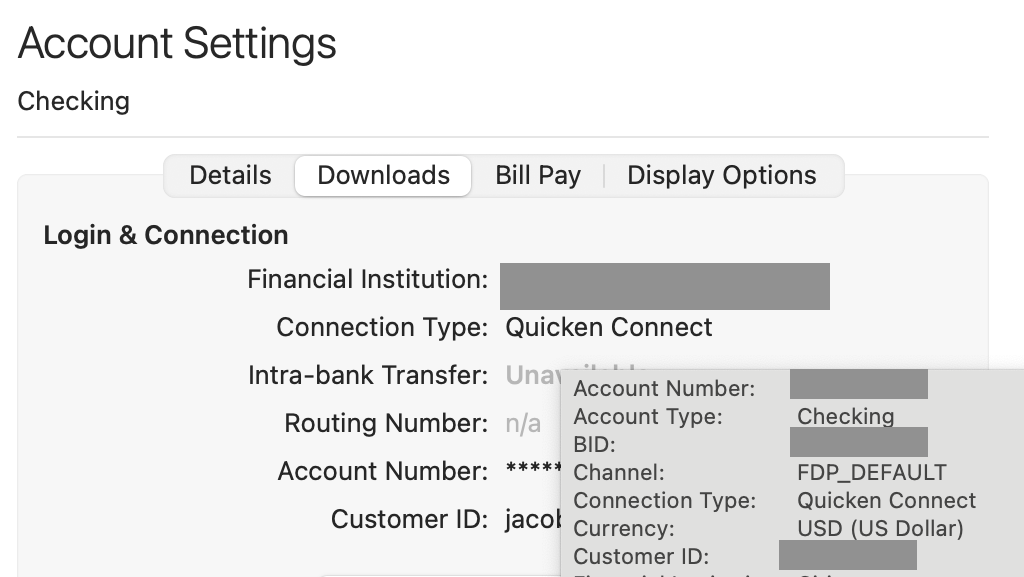
In this screenshot (which is not a Fidelity account), the line which shows "Channel: FDP_DEFAULT" indicates an EWC/Quicken Connect connection. If it showed "FDP_DIRECT", that would indicate the newer EWC+/Quicken Connect connection.
0


Answers
-
Were you at some point in the last few weeks prompted by Quicken to reauthorize your Fidelity account? This is where Quicken pushes you to the Fidelity website to log in where you authorize Fidelity to download your account data to Quicken.
If so, then your connection method was changed from Direct Connect (DC) to Quicken Connect (QC) which is also called Express Web Connect+ (EWC+) in QWin.
With DC, Quicken connects directly with the financial institution and generally the data that gets downloaded is real time. So when you do OSU the data that is downloaded is current as of the time of the OSU.
But with QC/EWC+ Quicken does not connect with the financial institution at all. Instead, Intuit (the aggregator) connects with the financial institution on our behalf and that generally is done at night. What Intuit gets is a snapshot of what the account data is at the time of the connection and then saves that data on their server. When we do OSU Quicken downloads that saved data on Intuit's server which is from the prior night. So, when we run OSU on Monday, we are downloading data from Sunday night and when we run OSU on Tuesday we are downloading data from Monday night.
You can read more about the various connection methods used by Quicken in this Support Article: Connection Types in Quicken | Quicken.
So, check the connection method your Fidelity account is set up with. If it shows it is connected with QC then that is the likely reason why you are getting prior day data during OSU.
But if it shows it is connected with DC then something else is occurring.
Quicken Classic Premier (US) Subscription: R66.12 on Windows 11 Home
0 -
Yes, yes, yes, I do recall having to re-log into Fidelity a few weeks ago, I wasn't sure why. You're a genius, thank you! But now, I still need your expertise. First I went into the account settings, and clicked on the download tab. It shows it's using QC. I clicked on Change connection and a pop up says that Classic uses QC. I then disconnected the account and tried to set it up again, it doesn't offer DC - that is greyed out. Do you know of any workarounds? TYIA!
0 -
Fidelity is in the process of eliminating download support for DC and migrating to QC. This process started at the end of July on a voluntary basis and was supposed to have a hard cut-in today (8/20). But there have been many problems encountered with this migration so the hard cut-in has been delayed to an undefined date in the future. You might want to read some of the following:
- UPDATED 8/19/25 Fidelity Cut-Over Migration: Quicken Support Article regarding this change. You might want to bookmark it by clicking on the ribbon bookmark to the right of the Title so you are kept informed of updates that are made to it.
- Fidelity Investments going to EWC+?
- Merged: Fidelity Cutover Migration
As you can see, there have been many issues with downloads, data integrity, etc., with QC/EWC+. The only clean way that I and others have been able to reliably revert to DC is to restore a backup file from shortly BEFORE when you reauthorized your account for QC.
If you decide to do this, make sure to back up your primary file first. Then if you do not like the results of restoring the DC connection you can restore this new backup file and all will be as it is now.
Your DC connection should still be intact and functional in that restored file. However, all of your accounts will be missing downloaded data after the date of that backup file so hopefully when you run OSU all of your accounts will update and fill in the missing data. A couple of comments:
- Some or all of your QC accounts might need to be set up for downloading again. Restoring backup files can sometimes break those connections so they will need to be reestablished.
- It used to be that most financial institutions will download the last 90 days of data. Nowadays it seems that many financial institutions will download only the last 2 weeks - 30 days so there is the possibility that some missing data will not download and will need to be manual entered.
Some have reported some limited success reverting their primary data files from QC to DC instead of by restoring a backup file but most have reported it is a very troublesome and problematic process that has not been very reliable. You will find some posts regarding this in the 3rd thread link posted above.
Of course, it is your choice about whether to stay with the QC connection or to restore the backup file to get a DC connection, again. For me, I would restore the DC connection because I have lost all trust in the QC connection and both Fidelity and Quicken have stated that DC will continue to be supported until the QC issues are resolved. For me it is critically important to have good Fidelity data so DC is of utmost importance to me, especially since we do not know how long it will take Fidelity/Quicken to resolve the QC issue….could be days, weeks or even months.
Quicken Classic Premier (US) Subscription: R66.12 on Windows 11 Home
1 -
Thank you so much for the information. I'm scared to try it as I'm not as savvy as you are with Quicken, but I'll just keep re-reading what you wrote to help me understand what to do. So, when you say to back up my current file, are you referring to backing it up with the Quicken backup?
0 -
Yes, by "backup", both in reference to restoring and to saving, I am referring to the Quicken backup feature.
The whole file restoration process is actually quite simple and is pretty safe provided you first backup the current file before you try to restore the older backup file.
The worst part about it, especially since that backup file might need to be dated from before 7/29, is that there will be about 25 days of data in the restored backup file that will need to be reentered and that can be a bit time consuming, especially if you have a lot of manually entered data, in the accounts.
If don't do much manual data entry or no manual data entry then the downloading process can make it much easier. But even then you will need to review the transactions to make sure they have the correct categories assigned to them.
So it can be somewhat time consuming. But then going forward you will have good data downloading from Fidelity.
If you don't restore a backup file then you will need to deal with bad or suspect Fidelity data going forward and who knows for how long….it could be days, weeks or even months before the Fidelity Quicken Connect downloaded data issues get resolved.
It's a personal choice about what to do but my recommendation is to restore the backup file.
Should you have any questions please be sure to post them here. I am no expert with QMac so if I can't answer a QMac-specific question I'm sure that someone with QMac expertise will be more than happy to provide assistance.
Quicken Classic Premier (US) Subscription: R66.12 on Windows 11 Home
0 -
Thank you for your suggested work-around. I thought I would touch base with Quicken Support before going forward with your process. I was told that since I have already opted-in for Quicken Connect (QC), I would not be able to return to Direct Connect (DC), even when using a file dated before the July 29 migration. I would have to re-establish all of the connections, but all will be handled through QC.
I have decided to wait for a fix from Quicken. In the meantime, my bank and credit card accounts are working as expected and both use QC. I'm disappointed and exploring alternative solutions. But as a long-time Quicken subscriber, the inertia to hang-in for a resolution from Quicken is strong.
0 -
@NorthernExposure said -
I thought I would touch base with Quicken Support before going forward with your process. I was told that since I have already opted-in for Quicken Connect (QC), I would not be able to return to Direct Connect (DC), even when using a file dated before the July 29 migration.
Either you misunderstood what Support said or you were given some bad information by them.
What is true: Once you have opted-in for QC you cannot set up a NEW Fidelity connection with DC. Any NEW connection setups with Fidelity will be with QC only.
But if you restore the backup file your DC connection in there should still be intact and should be usable without needing to go through the DC setup process, again.
And if in that backup file you have DC connections established with any other financial institutions then those DC connections should be intact, as well.
I would have to re-establish all of the connections, but all will be handled through QC.
In the restored file, you MIGHT (likely but not always required) need to set up the QC connections for your non-Fidelity accounts, again.
Of course, you can do what you want and wait for Fidelity to fix the QC download issues. You would not be be first person to take this approach. The main issues with this from my perspective:
- We have absolutely no idea of how long it will take Fidelity/Quicken/Intuit to resolve the issues.
- We have absolutely no assurances from Fidelity/Quicken that the downloaded data issues of the past month and going forward will ever be fixed and corrected for us.
If you do the following you can avoid much of the risks you are concerned about:
- Make a backup of your current active file (the one with QC set up for Fidelity).
- Then restore the backup dated from before the QC migration. During the restoration process you should be able to rename the file so you can keep it from overwriting your current active file.
- If the restored file doesn't do what I told you above your can then reopen your current active file and it should be just like you last used it. Or you can restore the back up file you made of it in step #1. And all should be as it is right now.
Quicken Classic Premier (US) Subscription: R66.12 on Windows 11 Home
1 -
I am as certain as I can be about what I was told but I appreciate your response and your guidance on the workaround. I tried this approach on the phone with Customer Support during the first week in August, but the QC connection was the only option the appeared in the workflow. (I realize now that I'd restored from a file dated August 5, which I understand now is after the migration.)
That said, I agree with your comment about the current situation and I'm going to give it another try. I will let you know how it goes!
1 -
I'm still wanting to restore an old file and do what you outlined, but honestly, I don't know how to restore. I know that I use that backup button at the top right of Quicken to back it up and when I open it up, it only shows backups going back to 8-11; I've been backing up for months….
0 -
It worked just as you said - many, many thanks for the extra effort getting me on board with the fix.
I restored from a file dated July 7. I did need to restore connections to non-Fidelity accounts; these were all accomplished via QC - which is expected. The Fidelity connection was precisely as I left it in early July, all data logged since was downloaded and auto-reconciled (which is one of my favorite time-saving features). All errant data present in the file I had been using for the past month was removed.
The sun is shining through my window again!
1 -
I can't offer specific processes for QMac since I do not use QMac. My responses are more general in nature that are or should be applicable to both QMac and QWin.
For the specific steps to restore a backup file using QMac, perhaps a QMac user will pipe in here and provide assistance. Or you might find this Support Article helpful which does provide some step-by-step guidance: .
Quicken Classic Premier (US) Subscription: R66.12 on Windows 11 Home
0 -
Yay! I'm glad it worked for you!
Quicken Classic Premier (US) Subscription: R66.12 on Windows 11 Home
0 -
Ok, thanks for your help anyways. I thought that the cloud backing up was what I could use to restore, however, based on the info you sent, it's not. Therefore, I apparently have never actually done a real 'backup' of quicken and certainly not before the Fidelity change and the end of July, so I'm stuck with the QC instead of the DC. Serious bummer for me, but I appreciate you sharing your knowledge to us less fortunate with the understanding of it, lol!! Have a nice weekend.
0 -
Sorry to hear that. You might want to set your backup preferences to automatically backup you data file on a regular basis. I have mine set to backup my data file after every session closes and to save the last 40 backups (I do usually on & close Quicken 2 or more times a day so that's amounts to 2-3 wks of backup files being available at any given time. I can't tell you how many times that has saved me when something undesired or, even worse, something catastrophic has happened.
One last comment: There is a post by someone who said he found a way to restore DC from a file that had already been migrated to EWC+ (QMac's QC). I don't know if it works and I don't know if or how well it might translate for QMac users but you might want to take a look at it to see if it might be helpful.:
Quicken Classic Premier (US) Subscription: R66.12 on Windows 11 Home
0 -
Thanks @Boatnmaniac - my method works for Windows, I haven't tried it for Mac. In any case I've been asked to tell people that at this stage it would be better to wait for the EWC+ issues to be resolved since people will have to switch back again once it's working.
I also backup my file every time I except, and keep lots of copies (40 is good, I keep 30).
Barry Graham
Quicken H&B Subscription1 -
Good morning @Boatnmaniac, I was traveling so I obviously haven't done anything to fix this solution. I did call Quicken today and the guy told me it's impossible to go back to DC. I suggested he read the community comments as it is being done. Having said that, I now know how to pull an old backup file that my mac desktop backed up. My question is, would you suggest I use the 7-19 or the 7-29 backup; I don't have one between those dates. I wonder if the 7-29 was a forced backup because of the transition to QC. I'm deff going to try it this weekend when the market is closed so I can update transactions. As always, TYIA!
0 -
@SCPat - I had success using the approach suggested by @Boatnmaniac. It really doesn't matter how old your back-up is so long it is one with a direct connection to Fidelity. The more recent the better because you can minimize the number of transaction you'll need to review between the back-up date and today, but that's a small price to pay to get DC up and running again. May the wind be at your back!
1 -
No problem on the delay in getting back to me. I've not been able to spend as much time working on Quicken as I'd like to for a little over a month because we are downsizing and made a cross-country move. I must say I almost think working on Quicken issues is a more pleasant experience than that! 😏
Regarding your question: Why not try restoring the 7-29 file first? Then take a look at the connection in it that is set up for Fidelity. If it shows that it is set up with DC for downloading then you are good to go using that file.
If, however, it shows Fidelity is set up for downloading with Quicken Connect then close it and restore the 7-19 file.
Quicken Classic Premier (US) Subscription: R66.12 on Windows 11 Home
0 -
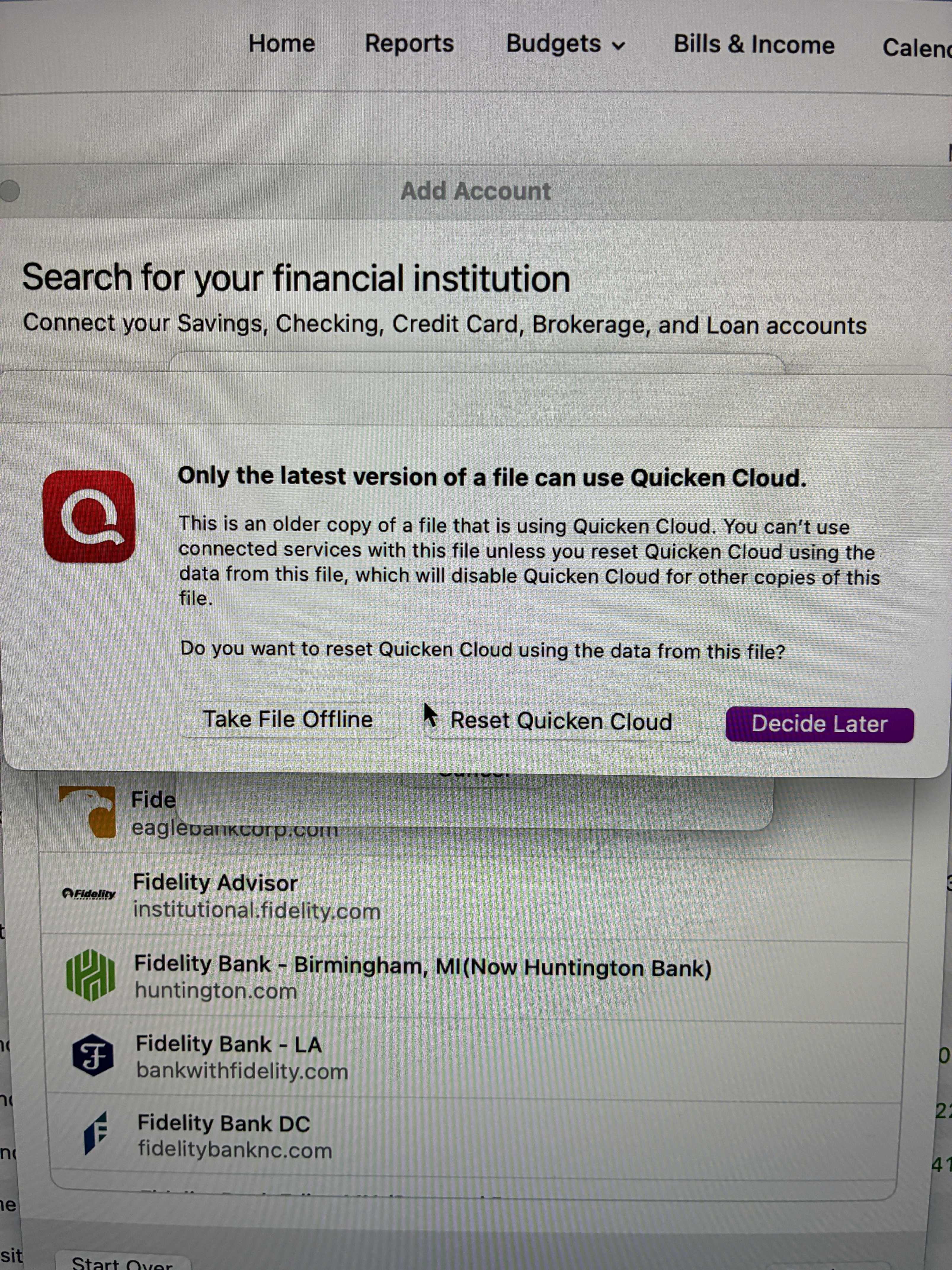
Wow @Boatnmaniac, it sounds like you're super busy, a major move like that can be quite daunting with unexpected issues arising! I appreciate you taking the time when you can to help me out, I feel like such a dunce, lol. So I tried it last night, I opened up the 7-29 file, went to the + to see if the Fidelity showed dc or qc - and this is what popped up. I'm not sure how to respond to that, so I just backed out and put the latest version back on until I find out what I am doing. As always, I totally appreciate your assistance!
 0
0 -
@Boatnmaniac Well, I decided to grow a set and try it out. I opened the 7-29 backup and tried to activate Fidelity - Quicken popped in and said Quicken uses Intuit to connect. So, I got out of that, tried 7-19 - same thing, tried 6-30 with no luck either. I'll try that other approach but I'll need to contact him with questions.
Thank you for your time tho, not happy with quicken mac…..
0 -
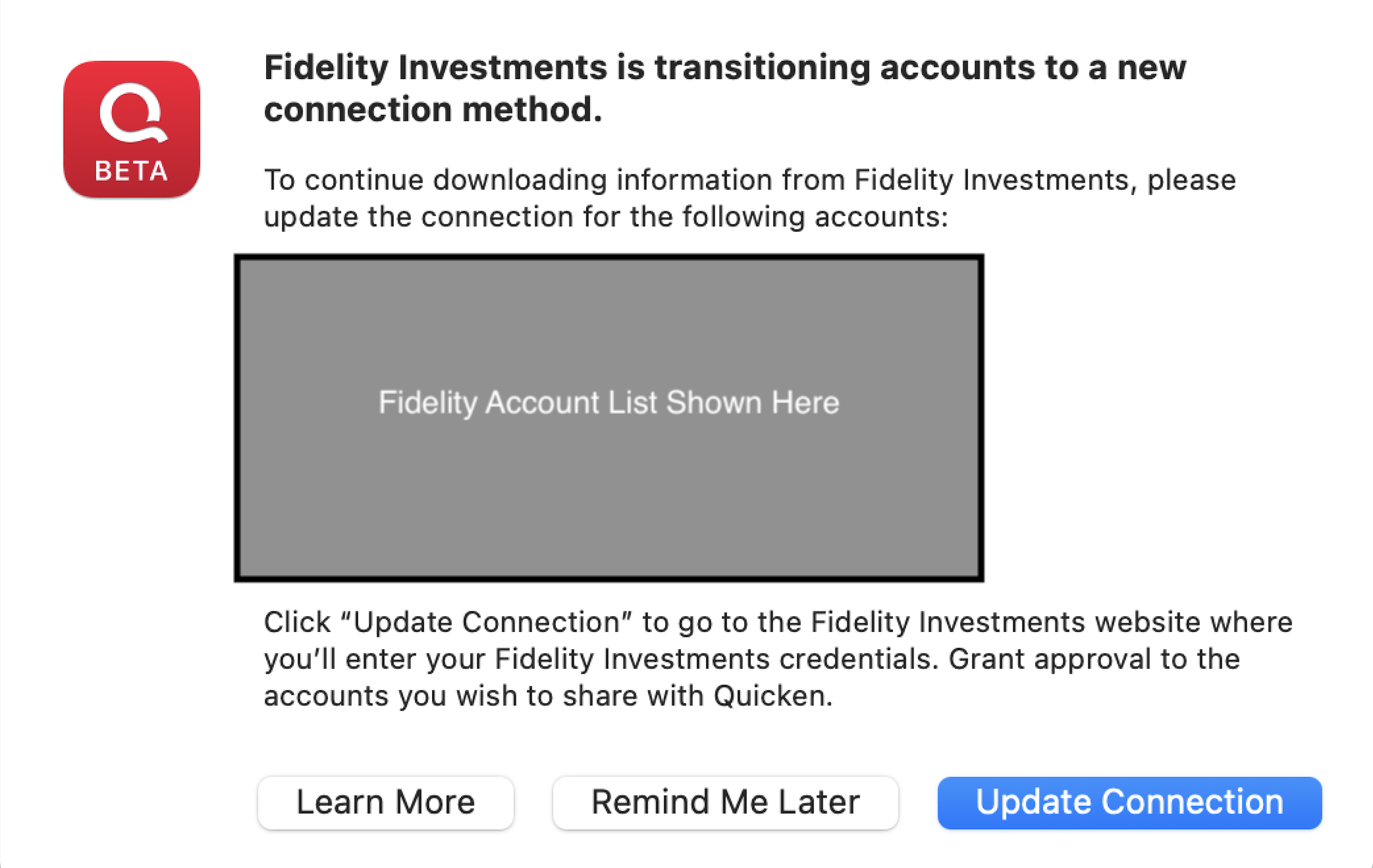
@Boatnmaniac - Before you go away … I believe that message is coming up for everyone who has not made the transition to Quicken Connect. Did your message look similar to the screen shot below? If so, click on "remind me later." In my case, after doing that it connects to Fidelity as it did before. Hope this works for you.
 0
0 -
Unfortunately, I updated the connection at the end of July and now my Fidelity doesn't update correctly. I tried to fix it by going to an earlier saved backup - even went to 6-30, but it doesn't give me an option to choose which connection, the DC is greyed out. I can't tell you how bummed out I am. In an annuity, the gain/loss for the mutuals always reports on the next day erronously, instead of the day it actually happened.
0 -
Bummer … sorry to hear that. Hopefully the Q team will get a fix in place soon.
0 -
I get the reauthorization popup message is different but very similar. And, yes, clicking on the "Remind me later" (in QWin it now says "Remind me next time") is what should be clicked on in order to retain and continue using the DC connection. It has worked very reliably for me ever since the original prompt to reauthorize occurred on 7/29.
Quicken Classic Premier (US) Subscription: R66.12 on Windows 11 Home
0 -
When you restored your backup file you do not need to set up a new DC connection (for any and all DC connected financial institutions) because it should have remained intact and working so you just start the normal downloading process without needing to do any account dowloading set up. The reason why the DC connection was grayed out is because the account was already set up with DC and Quicken will not let you set up a new DC connection with Fidelity.
For other financial institutions that were set up with Quicken Connect you will need to set up those connections, again.
Regarding the Quicken Cloud: Do you use Quicken Mobile and/or Quicken on the Web? If so, then that message is really applicable and you will need to Reset Quicken Cloud because it is way out of sync with the restored backup and not doing the Reset will likely mess up your data in Quicken Mobile, Quicken on the Web and, I would think, also possibly the data in your primary QMac file.
If you use Quicken Mobile and/or Quicken on the Web: Resetting the Quicken Cloud will reset all of your data there meaning you will lose the data that is there and will need to set those up for Syncing, again. I think (not sure) setting them up, again, will upload the last 2 yrs of data.
If you do not use Quicken Mobile and/or Quicken on the Web you should still Reset the Quicken Cloud because the restored file is so far out of date. This will break any remaining Quicken Connect connections that remain (I do believe that most, if not all, will need to be set up, again, anyway because restoring a backup file will often break those connections).
Regarding annuities: I have had annuities with Fidelity in the past (they have all matured and are closed out now) but they never downloaded for me. The account would set up but no financial information was ever downloaded. Some have posted they have experienced the same with their annuities but others have posted they get downloads for their annuities. There are so many different kinds of annuities and so many different annuity issuers that Fidelity offers that I'm thinking whether or not data gets downloaded depends a lot on which type of annuity one has and who the annuity provider is.
As a final caveat: I am a QWin user and have limited knowledge of QMac. But I think everything I stated here is pretty generic to both QWin and QMac. Hopefully, if I stated anything incorrectly someone with more knowldege of QMac with step in here and set the record straight.
Quicken Classic Premier (US) Subscription: R66.12 on Windows 11 Home
0 -
@Boatnmaniac When I restore an old version, it says Quicken uses Intuit to connect (or visa versa, can't recall). Is that saying it's preventing a DC connection?
0 -
No, Intuit is not preventing a DC connection….at least not directly. Intuit sets up the parameters for the Financial Institutions Directory List which tells Quicken which connection method(s) the financial institution supports. The xxx-Fidelity - DC FIDIR listing still exists but Fidelity and, therefore, Quicken have blocked our ability to set up new DC connections with DC. But they are still permitting already existing DC connections to continue to function. That's why restoring a backup file still works with DC because the DC set up still exists in that file. But if you deactivate/disconnect or try to change that DC connection then the DC connection setup will fail to complete.
With DC the Quicken software connects directly with the financial institution for downloading (and, if they support DC Bank Bill Pay, for sending Bill Pay and internal account transfer commands to them…something Fidelity does not support).
With QC, the 3rd party aggregator is Intuit. Intuit downloads data from the financial institutions usually at night and saves that data on their servers. Then when we do OSU Quicken will download that data from Intuit.
If you are interested, there is a good Support Article about the various connection methods used by Quicken at Connection Types in Quicken | Quicken.
FYI: It is the financial institution that determines which connection method(s) they will or will not support. It is Fidelity that decided to discontinue support for DC and to change their downloading support to QC, instead. There is a LOT of design coordination that must occur between the financial institution, Intuit and Quicken to implement such a change.
Quicken Classic Premier (US) Subscription: R66.12 on Windows 11 Home
0 -
BTW, I am assuming that your backup file(s) have a DC connection already established. If DC is not set up in those files, then you will not be able to download with DC.
Quicken Classic Premier (US) Subscription: R66.12 on Windows 11 Home
0 -
Ok, I'm going to try it again but perhaps I should wait until Tuesday. The reason I say this, is I don't know how to tell if it connected by DC or QC, other than the mutual funds that are in the annuity update several hours after the market closes and get erroneously reported on the next day - except for Friday - it just doesn't get reported period.
0 -
This is a question regarding QMac that I cannot answer. @John_in_NC, can you tell @SCPat how they can tell what connection method they have set up with a financial institution?
Quicken Classic Premier (US) Subscription: R66.12 on Windows 11 Home
0

Categories
- All Categories
- 18 Product Ideas
- 34 Announcements
- 246 Alerts, Online Banking & Known Product Issues
- 19 Product Alerts
- 518 Welcome to the Community!
- 682 Before you Buy
- 1.5K Product Ideas
- 55.7K Quicken Classic for Windows
- 16.8K Quicken Classic for Mac
- 1K Quicken Mobile
- 834 Quicken on the Web
- 127 Quicken LifeHub