My experience, issues and questions after update to 8.3.0

@Quicken Kristina I am sure some of this will interest you.
I updated to 8.3.0 tonight. MANY changes. Some very welcomed. I have already sent my comments and thoughts in to Quicken. But some may be helpful to mention here.
- I cannot Add Wells Fargo Visa as an eBill if Wells Checking is connected as DC. Would be VERY nice for this to change. I am not surprised it does not work. Has not for many months in Windows since the time when Wells CC would be added as a DC biller. That no longer works and now confirmed in Mac as well as Windows.
- The duplicate biller entries when the amount due in the series is set to 0.00 has been fixed! No more duplicate entries.
- No more pdf statements with billers. Column is gone. I am not surprised this is no longer supported though it was useful and I'll miss it.
- Tabs on Bills and Income have changed. Not sure I prefer the new arrangement but can work with it. And my columns for all Bills and Income tabs have been rearranged and changed. Not a big deal.
BUT…most of my issues are here. After updating to the new Bill Provider I have:
- 3 sets of duplicated Payees. It was tricky to find where to delete or hide them and which to retain as active.
- 3 Elans in Bills and trouble linking any of them to Billers and Payees. I have one Fidelity Credit card I was try to link to Elan as that is who gets the bill payment. This was the trickiest for me to sort out, but I have now. One things is older Payees that have been used previously but not currently were appearing in the new tabs for Payees. I had to delete any unused and hide any used that are not CURRENTLY being used.
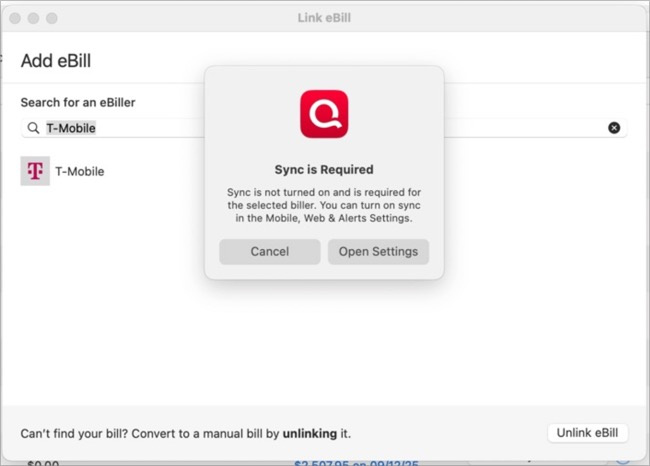
- 2 Billers require Syncing to use and I need much more info on that. I do nothing Mobile or in the Cloud and do not know the ramifications. T-Mobile and Progressive Insurance are asking for this.
What happens if I say yes to allowing syncing?
I do not want my financial data in the cloud. if JUST T-Mobile and Progressive, I'd be ok. Please help me understand why these two Billers need this and what my choices are. - Manual bills have no FI identifying icon. Hard to tell what they are. All are a generic white “document” icon. Hard to differentiate.
- Had to close and reopen Quicken before OSU would work. First try was not successful.
So there you are. A few hours work Some new features I like. Some I will not use, some a tad confusing. But this is the meat of my update. Appreciate insight on the Sync. I shall search for that here next.
Comments
-
I don't remember eBills ever being available for credit cards connected via DC, so I don't think that's new.
There's a View Statement option if you click on the circle with three dots next to the button in the Action column. none of my connected bills have a statement available yet but I would expect that option to bring it up.
As for Sync, once you turn that on in Settings there's an Accounts tab where you can select which of your Quicken accounts are synced. It appears you can turn them all off without affecting eBills.
0 -
I had Wells Visa connected via DC in Online Billers Windows for at least 10 years. Maybe more, Jon. It stopped a year or 18 months ago. I could research the exact month, but likely not important.
Did not see the view statement. will go look. thanks.
I'd like to learn a bit more before trying turning on Sync. As mentioned, no desire to have my finances in the cloud. Will see.
0 -
No statements available, but if that is the PDF, its terribly hidden. Would have never found it :) the PDF column was so much more obvious.
0 -
I don't know if there's a more obvious indicator once the statement comes in. I should have one credit card issuing a statement in the next few days, so I'll find out soon.
0 -
Please let me know. Thanks.
I am having trouble understanding this from Quicken instructions on Sync:
To enable sync on your Mac:
- Open Quicken.
- Choose Quicken > Settings.
- Click the Mobile, Web & Alerts tab.
- In the left panel, turn on Mobile, Web & Alerts.
- Click the Accounts tab.
- Select the accounts you want to sync.
Quicken Connect accounts are always included in sync. They cannot be turned off individually because they rely on Quicken’s background services to update account information.
What does that mean? Which accounts are Quicken Connect and cannot be turned off?
0 -
If you have accounts set up to automatically download transactions there are two ways that can happen. There's Direct Connect where Quicken Mac connects directly to the bank & downloads account info, and Quicken Connect where the transaction into is downloaded from the bank to Quicken's cloud service and then from there to your Mac. You can right click on an account in the sidebar and select Account Settings and then look at the Downloads tab to see whether an account is set up to download transactions and which connection type it uses.
BTW, I don't see that message about Quicken Connect accounts; it makes sense that you can't entirely turn those off because of the way Quicken Connect works but it didn't come up for me (I have both QC and DC accounts).
0 -
Ahh, so Quicken Connect must be EWC or EWC+ as named in Windows. So yes, I have a savings and many credit card accounts in Mac that say Quicken Connect and a few DC (which is really another topic :) And Sync is turned off yet these all download transactions !
So what would/might change by enabling Sync?
This is the new biller message in Mac tonight:
Enough for one night. I'll get back to it in the morning. Tired :)
0 -
Well, before sleep had to try enabling sync :) Several issues.
I enabled and it took 3-5 minutes then did an OSU and I saw all the accounts available. Not a one I would want to enable nor any that were T-mobile or Progressive which are the two billers showing Sync is Required.
I disabled all of the shown accounts.
I then set up Alerts and got 121 alerts in Quicken and Notifications on Mac. Got rid of them all. They were from anywhere from yesterday to months ago. I turned off for Mac Notifications and pruned my list of allowed alerts.
OK…
Then went to link T-mobile as shown it is needed and got this!:
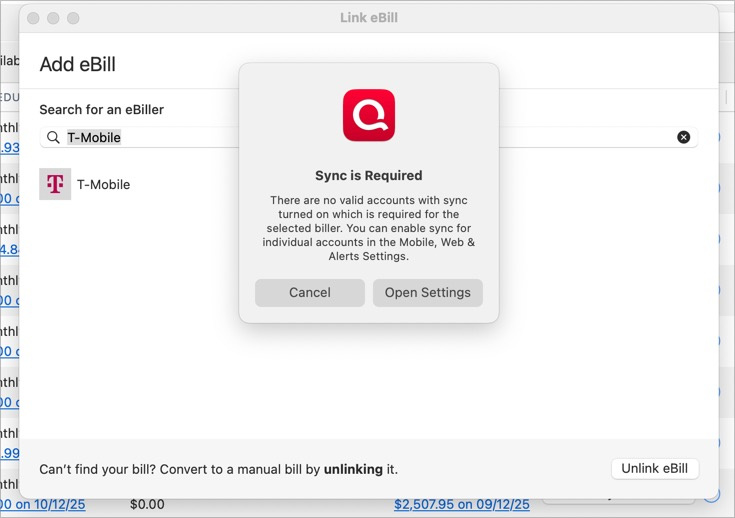
Now what does that mean? There is nothing obvious to relate to this. What do I do now?
It appears that Sync settings and Alerts are something i can live with now as none of my Banking or CC accounts are in the enabled to sync list, but how to I get these last two billers working?
0 -
Just a morning note: I have updated both Windows and Mac. Interesting they react differently to billers in regard to T-mobile and Progressive Insurance. Mac will not add either without Sync and then still has issues. Win added T-mobile easily, has Progressive Pending. Same new provider.
Also note for Mac, as I am still new to using Quicken Mac, I do not recall the Watchlist before this update so unsure if it changed. But I really prefer how it is displayed in Windows rather than Mac which I find diffcult to use and hard on the eyes.
Hoping someone pops by today to help with the Sync of T-mobile and Progressive.
0 -
Hi @Bob.
Currently, the new eBill services in Quicken for Mac 8.3 require that sync be turned on to function. When you turn on sync, it will be enabled for all accounts. After that, you can choose to turn it on or off for individual accounts. At least one account must be enabled for sync in order to set up a new eBill.
When setting up an eBill, a new scheduled transaction will be created. As part of this process, you will choose one of the sync-enabled accounts in which the scheduled transaction will be created. We expect that sync will remain enabled while you have eBills connected to scheduled transactions in your accounts. Turning off sync may cause the eBill service to not work correctly now or in the future.
If you would like to use the new eBill service but do not wish to sync your accounts there is a workaround you could use. You can create a new account to hold the new eBill services scheduled transactions and sync only that account.
When creating or editing the scheduled transaction, set "Mark as Paid" to "I'll do it myself." Then, when you're ready to record the next instance of the scheduled transaction, from the three-dots action menu for a bill in the Bills & Income > Bills tab, select "Edit and Mark as Paid…" (instead of just "Mark as Paid"). In the editor window, you can then choose the account in which the new transaction will be recorded.
I hope this helps answer some of your questions!
0 -
Thanks for the reply, @Quicken Michael. Not sure I agree totally with your explanation.
The New Biller does not require sync in Windows. Why is it different in Mac? Same bill provider.
ALL but 2 billers in Mac work fine without Sync. Why are these two different?
Turning on Sync did not help those two billers.
OK, that out of the way, which ONE to enable? And what happens when I do? The accounts in Sync are my checking, savings, credit cards and investments. Does it matter which is enabled? And what are the risks.? What information am I sharing with whom that I neither need to in Windows nor have even shared with Sync before?
So, I already HAVE the scheduled transactions. Are you saying that the account that pays that biller must be the one that is enabled? It does not appear so, but I'd like a little clarity there. And as well as Create New Account? Of what type? And how does that get tied to enabling these two billers requiring sync?
Also note, I have never used Quicken on the Web nor do I have the Mobile App, just in case that matters.
I appreciate your reply and would appreciate just a little more clarity before I enable one exiting account (likely a credit card) or create a new, bogus account for this purpose. Hopefully my questions are well enough explained.
0 -
OK, I just enable a credit card a rarely use. When I went to Link the Biller I now get this:
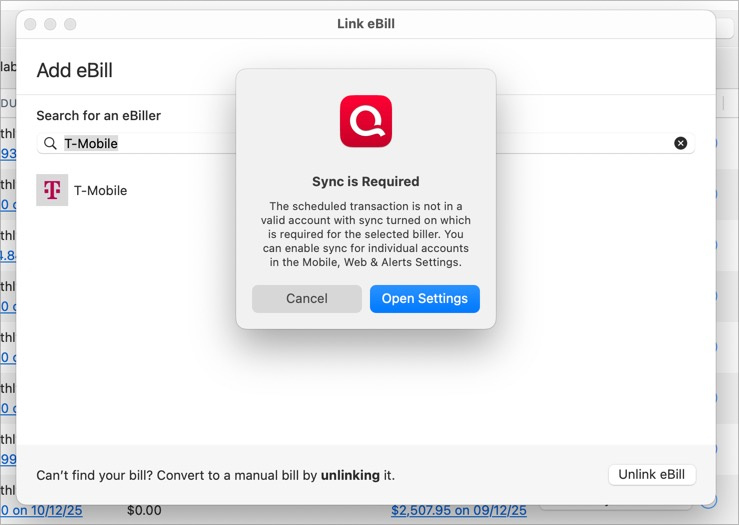
So did not work.
So, once again, these two are outliers. There are other similar billers not showing this problem.
T-Mobile is an autopay from debit card tied to my checking account. Progressive is paid from my checking account. I will not sync my checking account in the cloud. At least until I know a lot more.
All of my credit card billers that are working are paid the same with the exception they are all transfers! b Could this be the issue? An EFT to T-mobile is not a transfer, no? Nor to Progressive - as neither are an "account"? But this is a difference between the ones that work and the ones that do not.
0 -
The new eBill service is implemented in Quicken Cloud. When the service receives a new bill, it updates the eBill scheduled transaction in Quicken Cloud and then that transaction is synced to Quicken Mac when you do a One Step Update. That's how Quicken Mac gets the bill: it comes via syncing with Quicken Cloud.
Said another way: in order for the scheduled transaction to be updated by the eBill service, it needs to exist in Quicken Cloud. Which means that the account that contains the scheduled transaction for the eBill needs to be enabled for sync, so the scheduled transaction will exist in Quicken Cloud.
Does that make sense?
I imagine Quicken Windows is doing something similar to the workaround described above (where you create another account that exists just to store the scheduled transactions for eBills, and enable sync for that account) but hiding the details behind the scenes. We considered and rejected that approach (doing things behind the scenes) because there were many corner cases that wouldn't work properly, and we want to ensure that the eBill feature is a rock-solid as possible, since getting timely and accurate information about your bills is a critical part of managing your finances.
0 -
Thanks but, no, not making sense. Forgive me.
I do not understand if what you say is true, why ALL 10 other Online Bills in MAC do not have this issue and why NONE of the Online Bills in Windows have this issue.
And what exactly do you mean by "account that contains the transaction"? If you are saying that my Checking must be synced, I'm done. Will not do. And then why do 6 others paid with checking NOT require this "sync"? Where is a setting for this? Category?
Does that make sense? Let's start there. Then perhaps details on creating the "phantom" account for these two billers. And again, why no other might require that. And it does not seem like Windows is doing anything of the sort. At least not visibly.
Thanks. And apologies, but this is NOT making sense. And thanks again for you folks jumping in. Getting Payees and Billers working for some of the other accounts was tricky. This is not understandable for me. And I consider myself an informed user.
Got a half hour before I need to leave then return later today….
~Bob
Sorry had the wrong @Chris..
0 -
Small update:
I have a banking account for cash in my pocket which has no ability to pay any bills. I enabled sync for that assuming that was as good as any for a "phantom" account.
I then changed the account that pays the bill from checking to this account in the scheduled transaction. Call it Bob's Cash.
I did not get the Sync Error Message. I did get the form to fill out for Progressive Insurance. Have not done that yet as I wanted to post this. About to try that. BUT, if that works to add the Biller, How do I pay that from my real checking account when I pay the bill?
UPDATE": Doing that removed the option for Bank Billpay and only allows "I'll pay the bill directly."
0 -
And still baffling why no other online bill which is paid from checking requires this. What IS different about these two?
0 -
BIG update:
Briefly, decided to delete Progressive totally and start that Biller from scratch. It seems to have worked, no sync and now Pending!
Will try T-mobile the same. Back later. I also will turn off sync as I do not think it is needed. And an afterthought, perhaps you were saying sync is required for Quicken Billpay? If so, I never use that. I pay my bills through my bank's checking account in direct connect.
Back in a bit.
PS. I should have thought of this sooner.
0 -
OK, I don't know if I made things better or worse. Sync is off. Progressive is pending. The eBills column is blank except tor the Progressive pending. Had to add T-mobile as manual as it still asks for Sync.
Really need to do errands now :)
0 -
I still cannot get out the door :)
The eBills column on Bills and Income populated again. AND note, Sync is disabled.
So Progressive Pending, T-Mobile manual only. If Progressive connects then the ONLY outlier is T-mobile, which IS connected in Windows.
Still craving explanations :)
0 -
OK, appreciate folks trying to help. I shall write up again latest findings/understanding in the morning. But for now, if anyone is on 8.3.0 and can try something for me, would be appreciated. At this point I cannot tell if it is Quicken or my file in some way so this could could be very helpful:
- Be sure Sync is off in Settings-Mobile and Web
- Try to add a new Online eBill in Bills and Income
- Search or choose T-Mobile
- Tell me what you see
Could be a form to fill for the account number and details for a T-mobile account. Or could be a dialog that Sync is required for this biller. Or…?
Most bills just work as expected. T-mobile does not for me. Nor Verizon. Nor Dish. Your experience will help me in my next steps.
I'll post more in the morning.
Thanks!
~Bob
0 -
OK. So far this morning I created a new "TEST" file with an offline cash account and nothing else. Tried to add T-mobile to online billers and got the Sync issue. So, perhaps the good news is I know it is not my LIVE Quicken file as the problem. But something still remains odd.
If anyone can add T-mobile without the Sync error I would love to know and chat about it.
Other than that, will post more later today.
0 -
I got the synch error also when trying to add T-mobile. I also tried with a dummy account synched and got the same error. Apparently the T-mobile account itself needs to be synched in order to work. I would also love to hear why some billers work no sync and others will not. All of my credit card accounts connected with no synch errors. All of my other billers got the sync error. Although the vast majority of those others are not even in the system yet.
0 -
Thanks @Dennis@1 It actually is a relief to know it is not just me!!!
I have more thoughts to come as I am working on this today, but for now this is good info just discovered:
I created a new "TEST" file with an offline cash account and nothing else as mentioned above. Tried to add T-mobile to online billers and got the Sync issue. BUT I turned Sync on with the new file and only synced this Manual Cash Acct.
Went to add T-mobile. It worked!! It presented me with the form to enter T-mobile details. New data!
So why does enabling SYNC in my LIVE file and syncing the manual cash account not work in LIVE? I have a theory.
Need more testing time. There must be some sort of oddity with some working and some not. As I said, a relief to know it is not just me!
I will post a long set of details when I am done testing today. But for now, @Quicken Michael or @Quicken_ChrisC can you help? New data. Why does the TEST file allow T-mobile with Sync yet LIVE does not? And can you post an image of where you are putting the "dummy" account in scheduling dialogs so if I get that far that will be answered?
0 -
HUGE PROGRESS!!
Turned on Sync. Long tome to enable. Disabled all BUT my Manual Cash Account.
Got this:
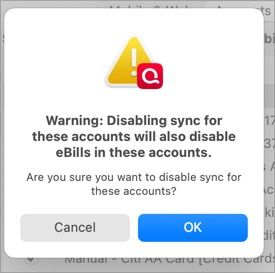
I do not believe I HAVE any eBillers in these accounts. I have not had sync on before and all but T-mobile are working. I clicked OK.
Big test!!
First tried a new eBiller I do not have - like Dish. Networks. IT WORKED!!!
OK, now to delete all things T-mobile and try that again.
Progress.
I DID NOT have to disable all T-mobile. I just had to change the Scheduled Transaction series ACCOUNT field to the synced Manual Cash Account!
Now I get!!!!!

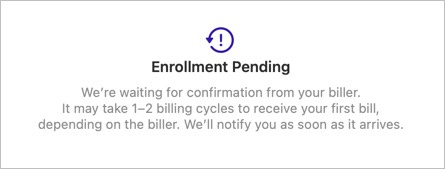
My g_d. What a lot of work to get to this point. Perhaps error messages that are more clear would be helpful! Id id not understand what some were trying to tell me.
I am now going to look at all my other billers. I think they are all good. AND I think they are all good because they are TRANSFERS!
OK, future question:
I have MANUAL bills now simply because the Biller is not yet available for an eBill to be added. They are paid from various account that ARE NOT synced. When they become available, I would not want them tied to the Manual Cash Account. What will happen then?
0 -
Hello @Bob.,
Quicken Connect is for both Express Web Connect (EWC) and Express Web Connect+ (EWC+) in Quicken for Mac. The way to tell which is which is to select the account, navigate to Accounts>Settings, then select the Downloads tab. It will show Connection type Quicken Connect, but if you click on the words Quicken Connect, it will show more information. Quicken Connect (FDP_DEFAULT) = EWC.

Quicken Connect (FDP_WSI_OAUTH) = EWC+.

To answer your question, you should be able to edit the reminder to have it associated with whichever account you intend for the funds to come from.
If you already have the reminder set up, you should have an option to edit the reminder. If you don't have the reminder set up, then you will have an option to Create Schedule, which will allow you set up the reminder as well as choose the payment account. You'll also have the option to specify if you pay it yourself or intend to use QuickPay, CheckPay, etc.
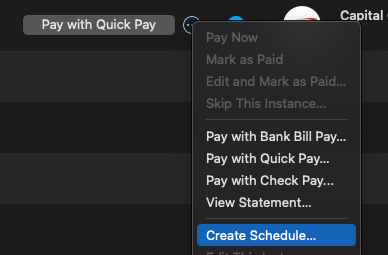
In the screenshot below, the top linked biller already has a reminder set up, while the bottom one does not.
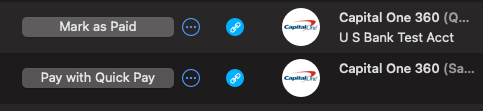
I hope this helps!
Quicken Kristina
Make sure to sign up for the email digest to see a round up of your top posts.
0 -
Thanks @Quicken Kristina.
A little trickier for the reminders than you state. If I choose where to pay the bill, that account must be in SYNC to the Web and Mobile. Since I choose not to sync my checking account, for example, and only sync a phantom cash account, my only choice to is to choose that phantom account and make the bill "I pay the bill directly".
For eBillers that are Transfers from my checking to a credit card company I have in my accounts, I do not have to have anything Sync'd to Web or Mobile. But for T-Mobile, which is not a credit card but a service bill, either have the payment account sync'd (I choose not to) or pay manually - which is OK.
A little hard to explain, but this was today's revelation!
Make sense?
1 -
Here is what I have found to be the easiest way to check to see if a biller has been added to the supported list.
- Create a manual bill for the desired biller
- Hover the generic Manual Bill icon in Bills and Income

- The icon will change. Click it
-
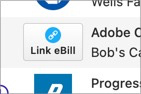
- You will get this popup
-
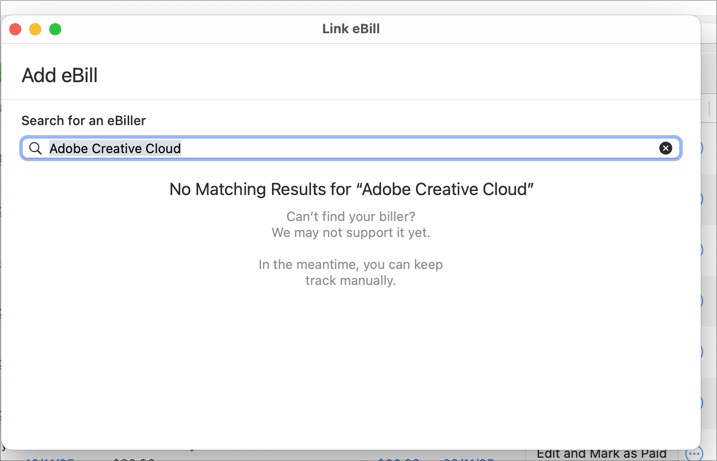
No need to close this dialog if you have more to check. Simply move your mouse over the next Generic Manual Bill icon, click and the Add eBill dialog will be refreshed with that biller.
There are other ways to do this, but I find this very quick.
0 -
New bug. Repeats about every two days.
I setup Progressive as a biller. Looks good. Shows as "Pending". Then two days later give or take:
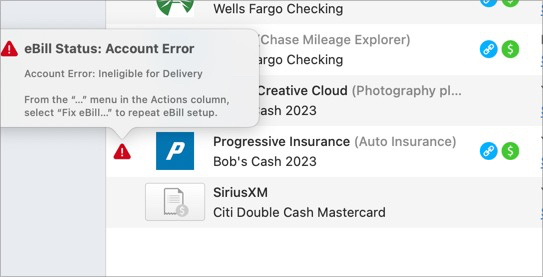
No idea what "ineligible" means. Used to work in Windows before new Biller.
I go to Fix It and get:
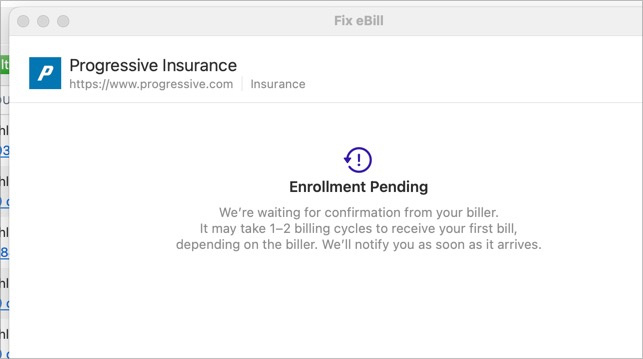
OK, but I'll bet folding money it does it again in about 2 days.
Ideas?
0 -
I'm getting the same "Ineligible for Delivery" after 2-3 days on my SoCalGas ebill. I did the fixit thing and it's back into pending mode now. I guess I'll see what happens next week.
0

