Cash Flow Report-error with budget totals

When I run the Cash Flow report I am getting a error in the "Total" amount for the "Budget" column.
In the report the "Actual" and Budget" amounts for the individual categories are the same, i.e. zero difference for each category. However for the total amounts the "Budget" column is $8,136.17 more than the total for the "Actual" column. This error is affecting the Income categories. I have checked the expense categories.
I have run the report for each month this year and the error appears in the 1/1/2025 - 4/30/2025 report and continues through the 1/1/2025- 1/1/2025-8/31/2025 report.
Any ideas about what might be causing the error.
Comments
-
Hello @rmk28027,
Thank you for providing the details about the Cash Flow report issue. To help us better understand and investigate the discrepancy in the Budget totals, could you please provide screenshots of the report showing the error?
If needed, please refer to this Community FAQ for instructions on how to attach a screenshot. Alternatively, you can also drag and drop screenshots to your response if you are not given the option to add attachments.
Please redact any personal or sensitive information before sharing. This will allow us to provide more targeted guidance.
Thank you!
-Quicken Anja
Make sure to sign up for the email digest to see a round up of your top posts.0 -
Can you please confirm what report you are running when you get this error?
The built in Cash Flow report does not have a Budget column but the Current Budget report does. The Current Budget report looks like this:
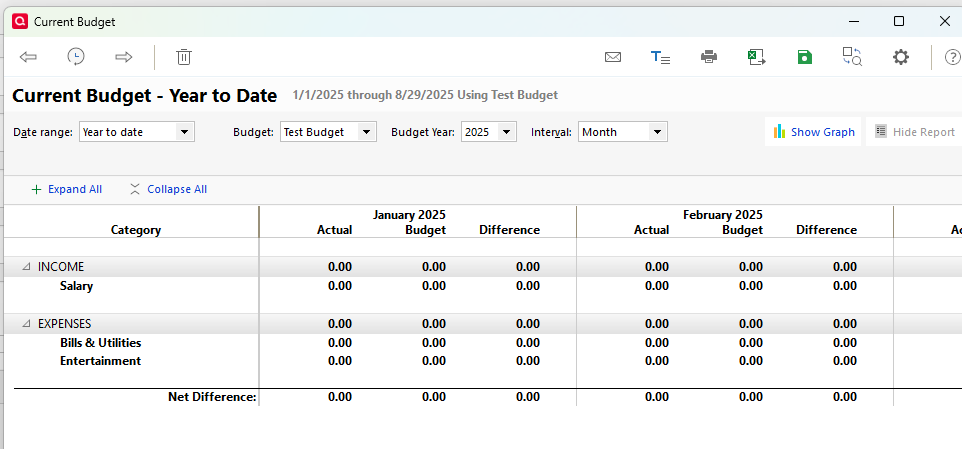
The Current Budget report can be set to show "Cash flow basis," in which case the section headings are labeled "Inflows" and "Outflows." Is that what the problem report looks like?
I believe there are issues with the Budget reports if you have a mixture of Income and Expense Subcategories under the same Category. Does that situation apply to you?
QWin Premier subscription0 -
Jim: Yes, the report is the Current Budget Report and it fits the your description of the known issues.
Based on your comments I will just accept that there is a known issue and leave it at that.
Thanks
0 -
I went back and deselected all of the income categories and the report still shows an $8,137.17 income amount with no supporting detail. Since the report finds an $8,137.17 amount with no income categories I assume there is nothing I can do.
0

