Quickbooks to Quicken?

Hello Community- Many thanks in advance for your insights.
General Question: Can Quickbooks Handle These Business Needs and if so, which one?
Background:
- I'm not a bookkeeper but currently using Quickbooks and really want off of it for various reasons. Excited about the potential of Quicken for its simplicity and ability to manage both business and personal.
- Have four rental units and two personal businesses and we file a separate 1099 for each of these six entities plus our personal income taxes (seven entities total).
- Because our rental units are located in three different states, we file state tax returns in three states.
- Each year, we provide our accountant with a P&L and balance sheet for each of the seven entities. We provide these documents in a PDF.
- I'm on a Mac
Can quicken do this and if so, which version is best? Looked online and it get confusing with Quicken online, only business, desktop pro, desktop business, rental property. If it's a bit much for Quicken, Zoho is my runner up for bookkeeping.
Any thoughts, insights, expertise to share?
Thank you again for the help!
- Bill
Best Answer
-
You can create as many separate Quicken Mac data files as you want to, so you can have separate data files for each of your 6 businesses plus one for personal. That's if you have separate bank accounts and credit cards for each entity. But if your bank/credit card accounts are used for multiple businesses, then you'd have to have one Quicken data file, and set up each business within Quicken. (The software is built to do this.)
In terms of generating 1099s, as you know, Quicken doesn't do that. Are these for contractors who work for your businesses? As long as you use Tags to denote which payments to a contractor are for which business, you should be able to get a report for each contractor for each business separately.
The state tax returns have nothing to do with Quicken. As you note, you'll be able to generate income statements for each business.
But Quicken Mac does not (yet) have a balance sheet report. I know it's something the developer have talked about but I don't know if it is planned, or when it might be released. IF you have separate bank accounts for each business, then you can create a Net Worth report of those account balances at the start and end of the year, and this should be adequate for your accountant. (The Net Worth reports list assets and liabilities, but don't have an owner's equity section as a balance sheet would.)
Quicken Mac Subscription • Quicken user since 19930

Answers
-
I'm not a QMac user, so I'll let one of them answer your specific questions … but the biggest challenge that you'll probably face in such a switch is that Q can't read a QB data file.
SO, you'd need to start from scratch with Q. Probably at the beginning of your fiscal/tax year would be the best time to make the switch, but you could get Q before that and begin setting things up and running in parallel for a while until you get the feel of QMac.
Q user since February, 1990. DOS Version 4
Now running Quicken Windows Subscription, Business & Personal
Retired "Certified Information Systems Auditor" & Bank Audit VP0 -
If you want something that's entirely online similar to QuickBooks then you'll want to use Quicken Simplifi. They have a Business & Personal subscription level for that as well as their own forums, so if you think that's what you want you'd be better off asking about Simplifi over there.
Quicken Classic runs on your Mac; you would need the Business & Personal subscription to get access to business features. There's an option to sync your accounts to the cloud so you can access them on line or from a mobile app but I don't know how well that works with the business features; you might be restricted to accessing your business accounts on your Mac. It doesn't have any features specifically related to renting houses, but you can set up multiple businesses so you could keep the accounts for each house & business separate. There are business reports including profitability and income statements, but it does not generate 1099s.
0 -
What you might want to consider doing is to order, download and install QMac Business & Personal. You'll have 30 days to play around with it and try it out. If within 30 days you decide it won't meet your needs or you simply don't like it for whatever reason, you can request a full no-questions-ask refund: .
Quicken Classic Premier (US) Subscription: R66.12 on Windows 11 Home
0 -
Many thanks for the quick response. Couple immediate thoughts:
- No need to import from Quickbooks. Will transition starting ~Oct/Nov.
- Running locally on the Mac is preferred for various reasons the biggest being that it looks like it's more powerful/flexible.
- Noticed a mention that there is no specific features related to rental business. Strange how the Quicken Web site specifically calls out rental management. Looking through this lens, it's actually not a version but it's suggesting that if rental property is the business, they're recommending the desktop version.
It's looking like it comes down to: Quicken Business & Personal (Simplify) or Classic Business & Personal (Desktop version). For maximum power/flexibility, it looks like Classic Business & Personal Desktop is the likely the way to go.
This leaves me to the last question: Can Classic Business & Personal handle these needs:
- Have four rental units and two personal businesses and we file a separate 1099 for each of these six entities plus our personal income taxes (seven entities total). - Knowing Quicken can't generate 1099s (not a deal killer).
- Because our rental units are located in three different states, we file state tax returns in three states. - Don't think this matters since they'll be different P&Ls for each LLC.
- Each year, we provide our accountant with a P&L and balance sheet for each of the seven entities. We provide these documents in a PDF.
Many thanks for all the attention!
- Bill
0 -
I've never needed to track that many businesses at the same time, but my late wife and I each had a separate consulting business (her's: strategic planning. Mine: systems) and Q had no problems with that.
They weren't LLC/etc, so they just went on our Schedule C.
You'll probably want to create a separate Q data file for each business just to make sure that the finances for each don't get inter-mingled, since they file separate tax returns.
Q user since February, 1990. DOS Version 4
Now running Quicken Windows Subscription, Business & Personal
Retired "Certified Information Systems Auditor" & Bank Audit VP0 -
If I'm not mistaken, Quicken Windows has some specific features related to managing rental properties like keeping track of tenants & rent for each property; those features have not made it into Quicken Mac yet.
0 -
You can create as many separate Quicken Mac data files as you want to, so you can have separate data files for each of your 6 businesses plus one for personal. That's if you have separate bank accounts and credit cards for each entity. But if your bank/credit card accounts are used for multiple businesses, then you'd have to have one Quicken data file, and set up each business within Quicken. (The software is built to do this.)
In terms of generating 1099s, as you know, Quicken doesn't do that. Are these for contractors who work for your businesses? As long as you use Tags to denote which payments to a contractor are for which business, you should be able to get a report for each contractor for each business separately.
The state tax returns have nothing to do with Quicken. As you note, you'll be able to generate income statements for each business.
But Quicken Mac does not (yet) have a balance sheet report. I know it's something the developer have talked about but I don't know if it is planned, or when it might be released. IF you have separate bank accounts for each business, then you can create a Net Worth report of those account balances at the start and end of the year, and this should be adequate for your accountant. (The Net Worth reports list assets and liabilities, but don't have an owner's equity section as a balance sheet would.)
Quicken Mac Subscription • Quicken user since 19930 -
@Chris_QPW It doesn't look like it. When I edit a Net Worth report the Tags tab is disabled, as are the Categories & Payees tabs. The only thing you can modify is the date range and which accounts are included in the report.
0 -
@jacobs Can Quicken Mac create a New Worth report that is restricted to a set of tags?
No. Just conceptually, they don't go together. Net Worth reports on account balances as of a specified date. Tags are on transactions.
A net worth report would be functionally good enough for a balance sheet if there are separate accounts for each business. If funds from different businesses are commingled in accounts, I'm not sure how you'd generate separate balance sheets for each business.
Quicken Mac Subscription • Quicken user since 19930 -
Thanks guys. The reason I asked is because I got figured by your previous statements that Quicken Mac didn't have this. Quicken Windows' net worth report can be filtered by tags.
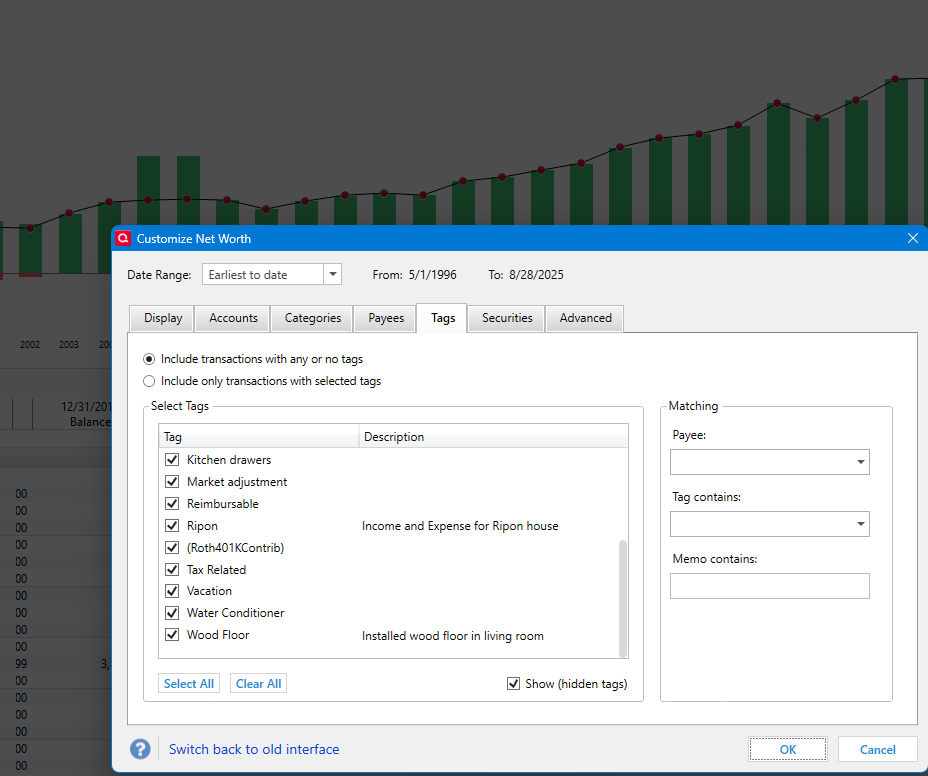
And the reason this struck me as important is that even though I have only used Quicken Windows Business for a short time in a beta, it is easy to see that tags are fundamental to how it separates out businesses (you have "business tags").
I do remember though that from other threads that it being mentioned that Quicken Mac took a different approach.
The filtering by tags is in pretty much all the reports that aren't investment accounts. But very few actually report on separate tags. You would create a report with the given accounts, categories, and tags and then save a report like that for each business. This could be done even in the Deluxe edition, but of course the business edition would already have reports tailored for getting the right information for reporting on businesses.
But clearly the better approach would be to just keep the different businesses separate in the first place.
0 -
Hey Gang- This is all helpful and thank you for the assistance. Reads like Quicken Business can't do Balance Sheet which is a challenge. Bummer, was really hoping this would work.
Thank you again! Forum is hugely helpful.
0 -
Actually, I'm back 🙂… Thought about this even more (thanks to all of your assistance) and realized that in Quickbooks, I had a separate file for each business entity so it doesn't need to fold in. So I believe that in the end, I think I just need to print a P&L from each business (aka file in Quicken) and let the CPA handle the Balance Sheet she generates on her own based on my submissions.
Does this sound sane?
Thank you again!
0 -
@AnotherUserNameHere As I wrote above, if you have a separate Quicken data file for each business — which would indicate you have separate bank accounts, credit cards, etc. — for each business, then Quicken's Net Worth report is a reasonable alternative to a balance sheet. It would show your assets and your liabilities; your account would need to fill in the small missing equity piece (e.g. retained earnings + net profit).
@Chris_QPW I'm still trying to wrap my head around a balance sheet based on transactions limited by tag. It just doesn't make sense to me from an accounting standpoint, irrespective of what Quicken can or can't do. Again, a balance sheet shows the balance for each account: assets like checking account balance, liabilities like credit card balance, as well as assets like receivables and liabilities like sales taxes due. How would it work to include only transactions using certain tags? For a checking account, for instance, would it calculate a sum of all deposit and withdrawal transactions with the selected tags and report it as the fake balance or net worth for the checking account as of the ending date?
In Quicken Mac, you can only specify which accounts to use in a Net Worth report, and that doesn't seem like a limitation in Quicien Mac; it seems fundamentally correct to me. What am I missing?
I have only used Quicken Windows Business for a short time in a beta, it is easy to see that tags are fundamental to how it separates out businesses (you have "business tags").
Quicken Mac doesn't use that approach. You can create one or more businesses, and reporting can be for one or more or all businesses. Income, expenses, and invoices can be assigned to any business. Perhaps you can think of it as some form of super tags, but it's implemented as a separate and important field in the database. Actual Tags are the same as in non-business editions of Quicken Mac or Quicken Windows, and are completely optional on business transactions.
Quicken Mac Subscription • Quicken user since 19930 -
Don’t worry about it my thinking on it is probably wrong.
0



Categories
- All Categories
- 16 Product Ideas
- 34 Announcements
- 248 Alerts, Online Banking & Known Product Issues
- 20 Product Alerts
- 517 Welcome to the Community!
- 682 Before you Buy
- 1.5K Product Ideas
- 55.6K Quicken Classic for Windows
- 16.8K Quicken Classic for Mac
- 1K Quicken Mobile
- 834 Quicken on the Web
- 126 Quicken LifeHub