My experience, issues and questions after update to 8.3.0
Comments
-
Thank you for your reply,
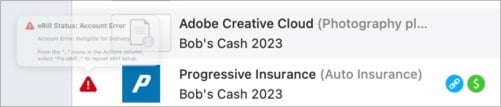
That error looks like the Quicken for Mac version of the "ineligible for delivery" error you saw in Quicken for Windows (reported in CTP-14278).
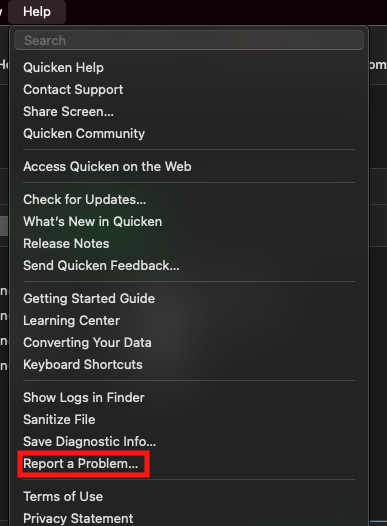
If the error returns @Bob. & @Dennis@1, please send a Problem Report with log files attached. You can do this by navigating to Help>Report a Problem and filling out the information as appropriate. Note - it allows 10 attachments maximum. If you need to send more than 10 attachments, you can unselect files with OLD in the filename, or you can send a second problem report with the extra attachments.
Thank you!
(CTP-14278)
Quicken Kristina
Make sure to sign up for the email digest to see a round up of your top posts.
0 -
Yup. The good thing about posting here is I know know that at least one other user has the same issue and with a different biller. So it helped to gather data. And it is cross platform, so likely an issue with new bill provider?
Will send Kristina. Likely Monday :)
1 -
Well, feels like Monday after the holiday. New issues this morning:
- The easy one:
Windows does not have alerts like Mac versions seems to. I selected a small set of alerts to send to email and got my first this morning that I have a new bill. Interesting. Problem is, I got TWO identical emails on this bill. Can find no setting that might trigger two alerts. Not mission critical, but an annoyance. Ideas? - Progressive. Went Ineligible again this morning. Report sent.
- OK, the big one:
Above we talked about getting new billers into Mac required a phantom account and of all my billers that needed this, T-mobile and Progressive were the only two. ALL my rest work as expected and pay from account that are either transfers OR from Credit Cards as EFT's. These two would no do that.
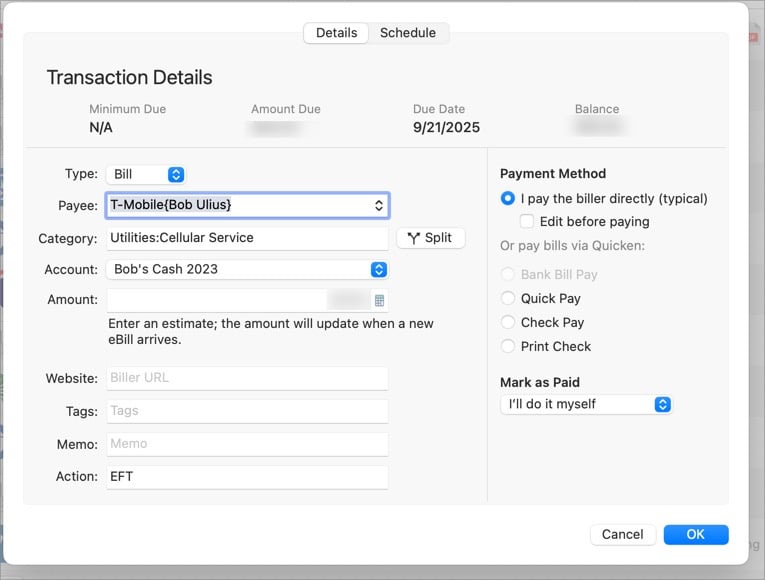
ALL other billers but T-mobile and Progressive allow me to change the account the bill is paid from. These are LOCKED to "Bob's Cash", a phantom account.
Today T-mobile bill came in. That's good. BUT my only choice was to mark as paid which debits the Bob's Cash (actually an account that shows cash on hand, so not so phantom - but totally manual), then I must:
Mark as Paid
Delete the new debit transaction in Bob's Cash
Manually enter an EFT transaction into Checking where the bill is actually paid as an EFT
This will be required with ONLY the T-mobile and Progressive insurance. All other billers will work as expected. Since I cannot edit the account that pays these bills, how can I fix this or at least make it easier? If under "edit this instance" I could change the paying account, would be good. But I cannot.
Ideas?
0 - The easy one:
-
OK, thinking further:
The only account I have setup in Sync is the phantom cash account.
IF I were to add my Checking Account to Sync, I bet this would work as expected, however, I really do not want my real financial information "in the cloud". So again, IF I were to do this, what exactly happens to my checking account information that does not happens in Windows where I have no sync yet these billers work or in MAC where they are not sync'd now?
0 -
Another option would be to go to T-mobile and Progressive's websites and set them up for autopay to one of your credit cards. (preferably one that pays cash back) Then the transactions will download normally into your CC account and be paid from checking when you pay your CC bill. I've been doing this for years. It's nice getting a little kick back from the CC every month. You can then unlink those billers from the bogus account and leave them as manual billers or reminders.
0 -
Thanks @Dennis@1 but T-mobile will not EFT from a credit card, only bank account. And I want to review Progressive and maybe switch insurance companies depending on the Bill.
Interesting that Adobe is incredibly similarly setup as T-Mobile, yet Adobe WILL let me select ANY account to pay the bill. T-Mobile and Progressive are locked to the phantom cash account. And that appears to be the ONLY way to get those bills in Online Billers. Unless I sync another method - perhaps.
0 -
OK, when I Google for more info on Sync, I find:
What is the Quicken Cloud?The Quicken Cloud is a secure online system that temporarily stores a copy of your synced data. It enables communication between your desktop Quicken file and the Quicken Mobile or Web interface.
So, what does temporarily mean? If I do not have Mobile or Web enabled, but my checking selected in sync, when is that stored? For how long? And how is that different than my checking account data now without it being selected in Sync?If I could feel more confident in the security of my checking account data, enabling it might fix my online biller issues. But then again, a bit baffled why Quicken Windows does not require this yet Quicken Mac does.
0 -
Even more baffling to me is, why only certain billers require sync in Mac and others do not. I would love to hear an explanation for this behavior. Maybe this is something that can and will be sorted out over time as more billers are added. I certainly hope so.
Like you, Bob, I'm reluctant to put my financial info out into the cloud. Unfortunately Quicken has put us into a position of deciding which is the lesser of 2 evils regarding the desire for eBill functionality vs our comfort level with putting financial info out into the cloud.
1 -
OK, another thought:
If you notice above, the T-mobile Bill has no option for Bank Bill Pay since it is sync'd to a phantom account which is the ONLY account I have synced. However, clicking the ellipsis brings up that option for Bank Bill Pay!
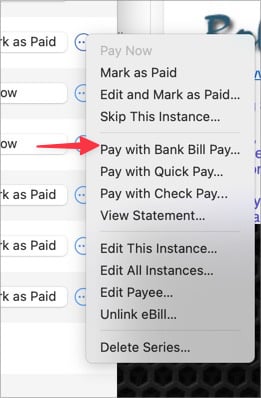
I have not tried this as I have the payment already manually entered as an EFT, BUT if clicking this brings up a dialog that allows me to select my checking account and EFT for each monthly bill from T-mobile then that would work. I just do not know what will happen clicking that for something sync'd to the phantom account that cannot be changed.
Thoughts?
0 -
Hi @Bob.,
You are almost have the workaround solution that I mentioned initially.
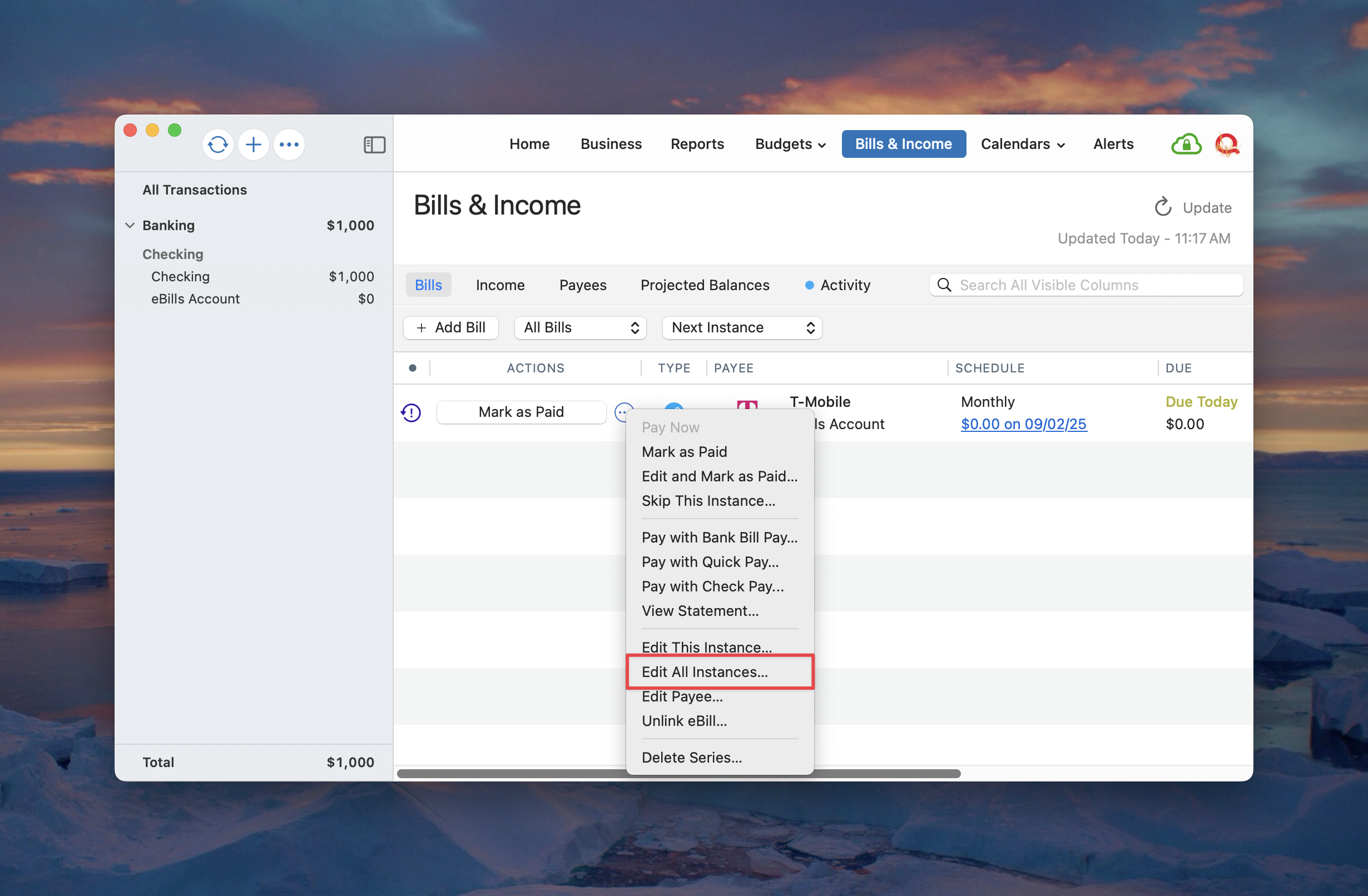
You first need to Edit All Instances… of the scheduled transaction.
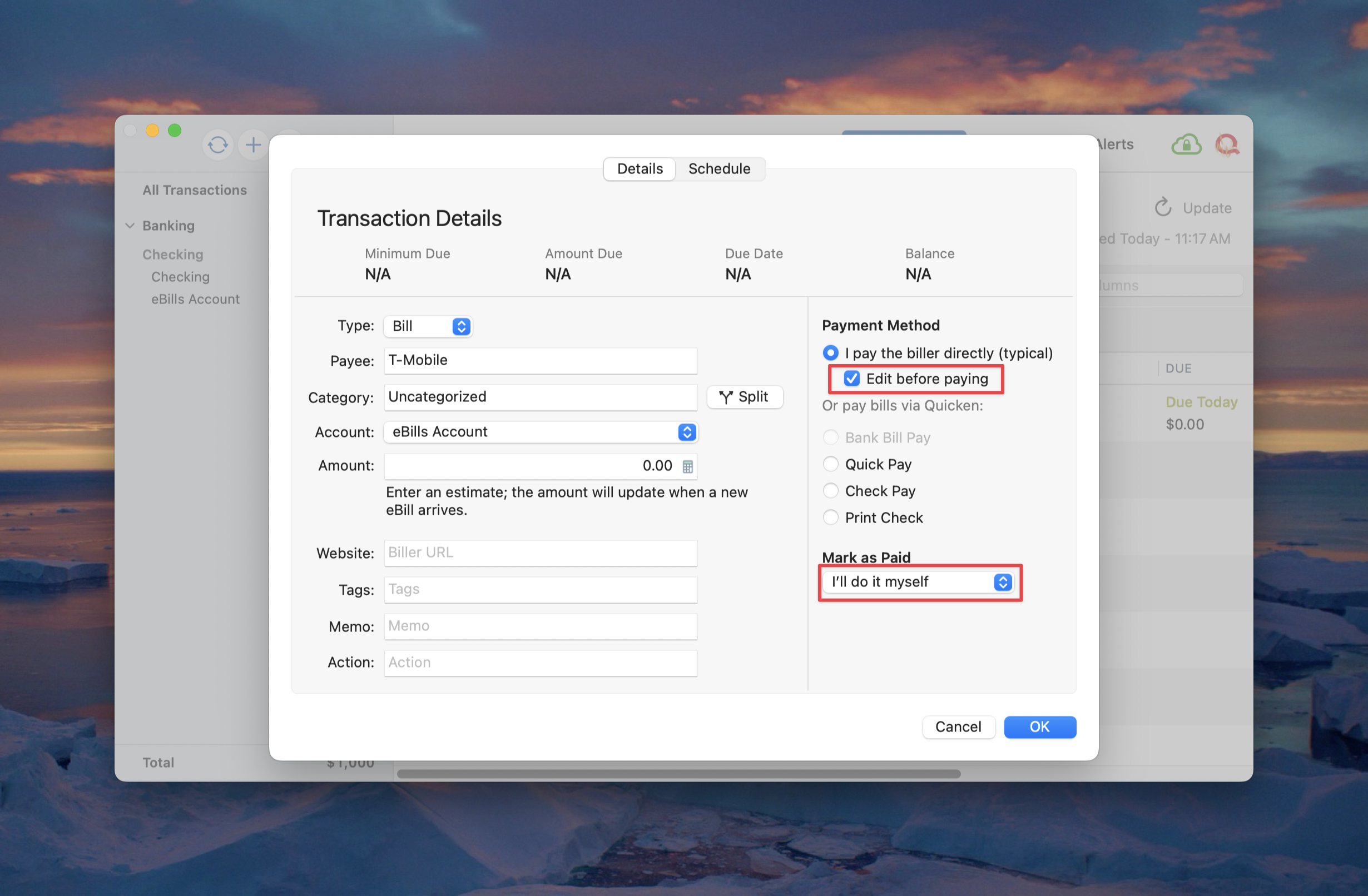
Select "I pay the biller directly (typical)" and check the "Edit before paying" checkbox and set "Mark as Paid" to "I'll do it myself."
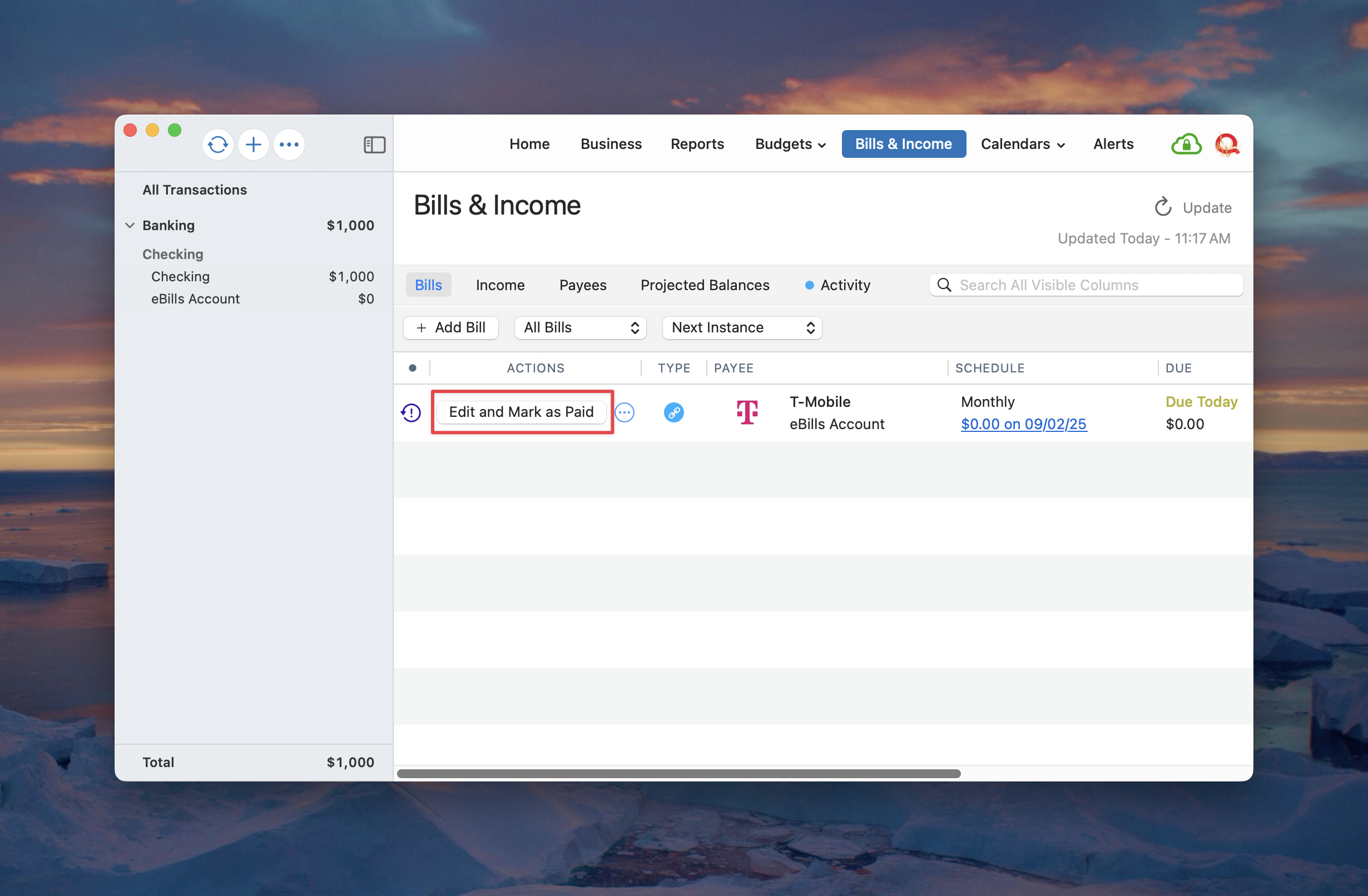
Then, when you're ready to record the next instance of the scheduled transaction (after the bill comes in) click the "Edit and Mark as Paid" button or from the three-dots action menu (instead of just "Mark as Paid").
In the editor window, you can then change the account in which the new transaction will be recorded. Finally, you will click "Save & Mark as Paid."
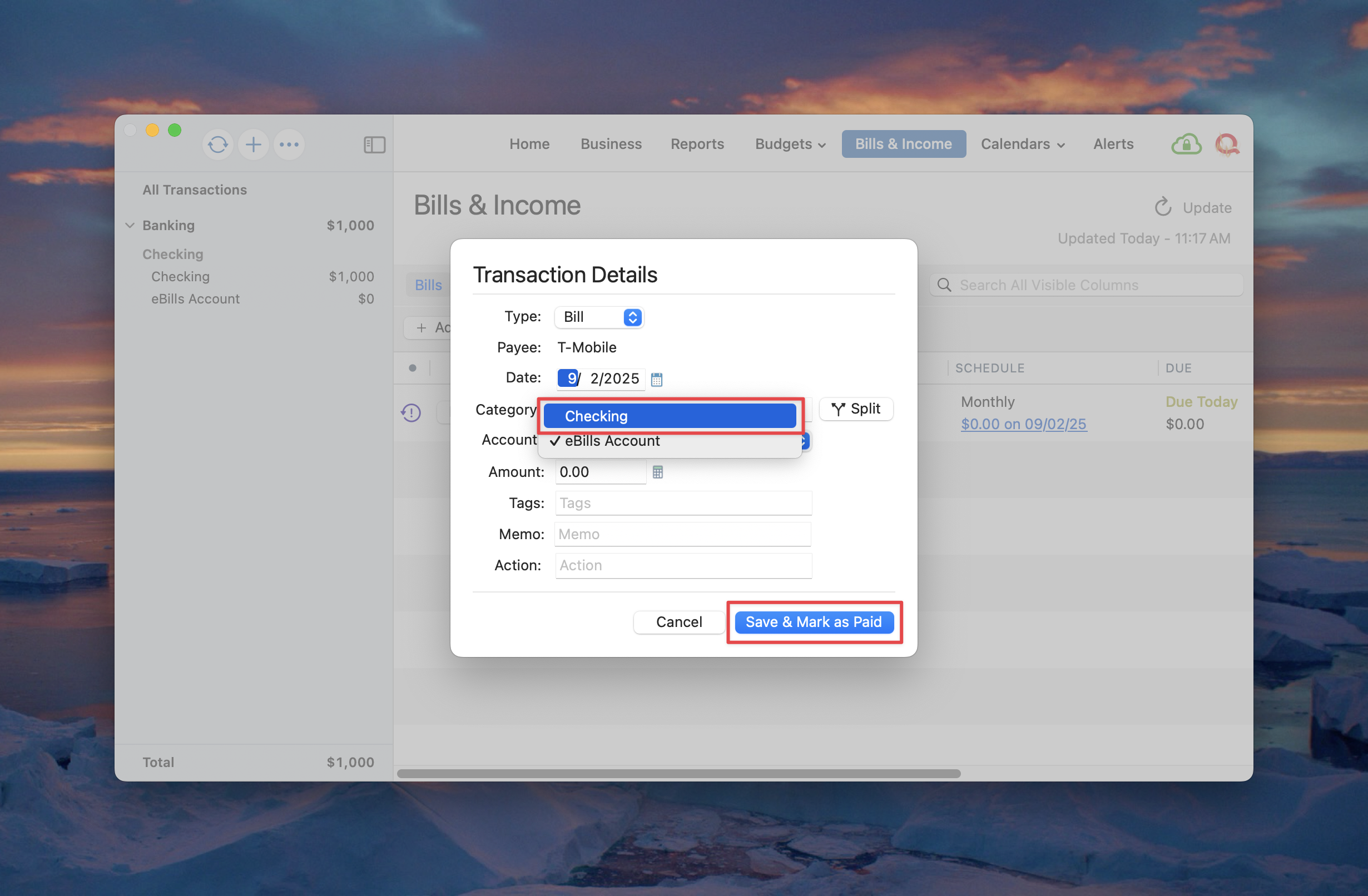
I hope this helps!
0 -
Thanks for popping by @Quicken Michael I have setup exactly as you show now changing to check Edit Before Paying.
Since I "hand entered" the bill into my real checking, i think I will delete that in that register and try again.
Let's see…
Absolutely perfect. Just what I wanted yet had trouble understanding. Thanks Michael! Appreciate your patience.
0 -
Wow. Nice to feel that is working!
Michael, as you can see both Dennis and I are confused why only some Online Billers require syncing. In my case, just two of 12 billers and one other looks like it is identical to the two that require syncing, but yet does not.
If you can comment on that, would be great. But will understand if not.
Thanks again!
0 -
Thanks Bob. Yes I did see that. I don't use Bill Pay any more as Chase Bank has done away with Direct Connect, and therefore, Bank Bill Pay. My biggest issue now is the fact that most of my billers are not in the new eBill system yet. And of course, my SoCalGas keeps getting the "Unable to Deliver" error every 2-3 days.
0 -
I reported the Ineligible to Deliver both in Quicken and to my contacts there. Hopefully it will get some attention.
I dread the day that might happen with Wells. How are you paying bills now Dennis?
1 -
I've set up my billers to auto pay. Most of them allow me to auto pay with my cash back credit card and I get a little kick back every month. The few that won't take the CC, I auto pay with EFT from Checking.
0 -
While I’m not absolutely certain this is the problem The error messages you are receiving may be related to already being enrolled in paperless billing. This enrollment could be directly with the biller or it might be through another entity such as your bank.
Once you identify the source of your paperless billing, try turning it off. After it is disabled, you can attempt to enroll your eBill using Quicken.
If you do try this please let us know what happens and whether you're successful.
0 -
Hi @Quicken Michael In the only bill I have this issue, I am NOT enrolled in paperless billing. But I can see what you are thinking.
The most unique thing about this biller is tied to phantom sync'd cash account. But then there are two more just like that that do not have the biller issues.
0 -
Hi again @Quicken Michael I just went to look and was amazed I AM paperless with progressive!! I don't ever recall setting this particularly as it is my auto policy and I always have a printed copy handy to refer to.
I changed to paperless. Let me know if I need to try anything else now that that change has been made.
0 -
I am enrolled in paperless billing on every account I have. SoCalGas is the only biller giving me this "Unable to Deliver" error. I doubt that is the problem.
0 -
Hi @Bob.,
You should try enrolling again in Quicken now that you have turned off the paperless billing on Progressive Insurance.
Hopefully this time it will work successfully! Let us know what happens.
0 -
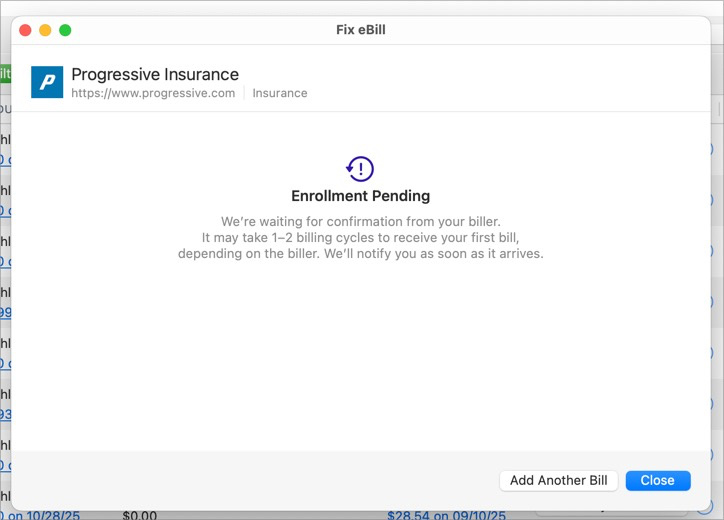
I did and "Enrollment Pending". I have seen this often so no way to tell "yet" if this will be any different. Will see what happens over the next couple of days.
Thanks.
0 -
0
-
AND new error on next OSU:

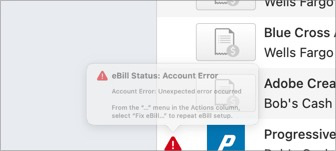 0
0 -
@Quicken Michael Even worse now. This happens EVERY OSU where it would happen every two days or so with "ineligible". Something shifted. Advice?
0 -
-
Update and New Issue:
Progressive remains PENDING in both Windows and Mac. Has not errored in either in 5 days or more. Unusual, so something improved perhaps.
BUT, I'd appreciate comments form someone @Quicken and others here.
I pay credit card bills from my Checking through Quicken. In the last few days two bills cleared. In Windows BOTH the debit from checking and credit to the CC account cleared virtually immediately. BUT, in Mac the checking debit cleared and the CC credit has not yet been downloaded. In one case, today is the third day waiting.
In Windows there is a RESET ACCOUNT which would be the first thing I would try. But I do not see this in Mac.
Willing to wait, but if Windows gets the credit immediately and Mac not for three days, it causes some concern.
What do you all think?
0 -
My SoCalGas has not errored for 5+ days also. It hasn't connected. Still pending.
0 -
OK, reaching out a little deeper: @Quicken Kristina or @Quicken Michael any suggestions? One Credit Card credit came in 3 days ago, the other this morning in Windows. Just did my last daily OSU and neither in MAC. How does one correct for that?
Both are Quicken Connect but another account that is Quicken Connect got today's updates. And Yesterday's. So not that. But still being new to Mac, I have no idea how to correct the two accounts not getting current transactions.
0