Find and Find/Replace with Account filter
![[Deleted User]](https://us.v-cdn.net/6031128/uploads/defaultavatar/nTYA6S0SVB4GN.jpg)
Is there a product idea out there for the ability to filter by account when using the Find or Find/Replace function in Quicken? Currently, there is no way to use these functions for just a specific account. When you use these functions, the results are global and return a large number of transactions which makes the functions difficult to use and renders these functions not useful in a lot of situations.
A related issue for reports. It seems like even though the Find/Replace icon is in the report header, it is really a stand alone function and is not related to the report created.
Yesterday, I created a report of transactions for an account and clicked on Find/Replace in the report header thinking it would search just the items in the report. Instead it returned over 90,000 transactions which took a hour and a half to complete. There was no way to cancel, so I had no choice but let it run until it finished.
Comments
-
Ditto …seems so reasonable I was embarrassingly surprised to see it continuing past the account I was working in. Hopefully soon come a fix.
0 -
With a bit of a workaround, that's already possible … yes, of course, with an added Account Filter it would be even better.
So, while this Idea makes its way thru congress, hoping that it will receive enough votes for eventual implementation …
Do your Find command as usual, let it generate hits across all accounts.
Sort the results by account.
Scroll to and block select only those results within the desired account.
Set up to replace the selected transactions as needed.If you only want to see a list of transactions containing the selected values within the desired account, go to the account's register view and use the Search field on top of the register. This Search mode will return transactions containing the search string in all fields … so you may get more than expected.
0 -
It would be very useful if the Find and Replace (Ctrl+H) could be restricted to one or more accounts.
0 -
Until there is some action by the programmers, which could take little while ...
why not sort the result of your Find command by Account and select only the transactions you really need to change?
For example: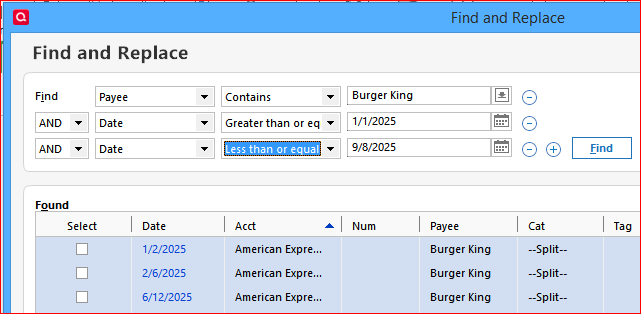
Please note: There is no Undo command available in Quicken to fix results of a bad / incorrect Replace action.
Do be sure to have a backup of your Quicken data file available created just before you start making changes which impact multiple transactions.2 -
It would also be helpful if the Find and Replace button in reports used the report's filter parameters, so that the results are restricted to the date range, accounts, and other settings specified in the report customizations.
Currently the button opens the same unfiltered window that you get by hitting Ctrl-H.
QWin Premier subscription1 -
voted
- Q Win Deluxe user since 2010, US Subscription
- I don't use Cloud Sync, Mobile & Web, Bill Pay0 -
I already submitted this enhancement request back in April 2025 -
I even mentioned @Jim_Harman 's idea in the enhancement request.
😞
0 -
-
@Jim_Harman - thanks but I am only back temporarily. I shouldn't have commented on this post but I felt compelled to, I guess. Take care.
0 -
@Chris_QPW The Ideas and votes have been merged.
Thank you!
-Quicken Anja
Make sure to sign up for the email digest to see a round up of your top posts.0 -
@Quicken Anja Thank you.
0 -
You’re welcome!
-Quicken Anja
Make sure to sign up for the email digest to see a round up of your top posts.0 -
I hope this excellent Idea post will not be deleted if and when @CaliQkn's posts are deleted.
QWin Premier subscription0 -
use case:
I want to find all instances of Burger King in several spending accounts/credit card accounts and
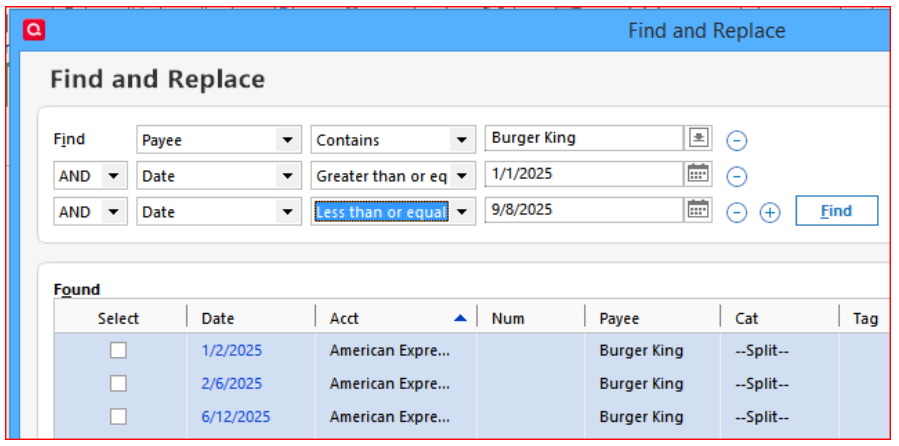
Then I want to sort on payee so that I can find the many permutations of "burger king" and manually edit groups of transactions to fix the payee name to "Burger King". Since I work for Burger King, I want to exclude the account that has my paycheck deposit, and want to also treat my transactions in the company cafeteria separately
0 -
Not sure about round about ways to replace the now ancient original Quicken, but it would certainly be helpful for unidentified/uncatagorized
input. Thanks
0