My experience, issues and questions after update to 8.3.0
Comments
-
If it makes any difference, they are "match" transactions where the credit is already in the register waiting to be matched and cleared with a downloaded transaction. In both cases, both accounts.
UPDATE: I tried signing out and back in again with no change.
0 -
If I'm not mistaken Quicken Windows gives you the option to get transactions as soon as they post while Quicken Mac doesn't download them until they clear. I know I can sometimes wait 3-4 business days for a credit card transaction to show up in my downloads. Personally I prefer the way Quicken Mac does it since seeing it get downloaded lets me know the transaction is really done.
0 -
Well @Jon These have cleared. Posted at the accounts online, etc. On one account Quicken downloaded a purchase timely, but not the payment for the monthly statement. Both missing are monthly payments. And I have not seen this before in the roughly 6 months I have been using the Mac version side by side with Windows.
0 -
OK, 3 days since Windows has downloaded my cleared Citi Card payment and Mac has not. I went ahead and disconnected the Citi account, then reconnected Quicken Connect ( which it was) and still no download to match the payment.
I'd appreciate more ideas. This is one of two CC accounts in Mac with the same issue. Working as expected in Windows for both.
0 -
BTW, I got a bill today in the mail for turning off paperless billing for Progressive. That is not a working or welcomed solution. I turned it back on. progressive still showing as Pending. At least not erroring for 5 or 6 days now.
0 -
Must say I am amazed at the speed, accuracy and email notifications for my new bills in Quicken Mac. Was surprised to be notified by email (did not see a setting for that and those accounts are not in the Cloud!) and unlike Windows, some accounts which were ALWAYS off by.01 are spot on in Mac.
1 -
Since the latest updates, my Credit Cards are not getting payments downloaded to the accounts in MAC. They ARE in Windows. This is now 3 cards that had recent cleared payments. Checking shows them cleared. Each CC never downloads and matches them. Some over a week now.
This is recent! Since latest update.
0 -
My SoCalGas was in pending mode for about 2 weeks. It is now failing every 2-3 days again with the previous "Ineligible for Delivery" message.
0 -
My progressive fails now as well in MAC, but still stays solid Pending in Windows. Who knows….
0 -
Hello @Bob.,
Thank you for continuing to share your experience.
To clarify, is it only in the Bills & Income section that your credit cards are not updating, or are the transactions not downloading into the accounts at all? You mentioned that this has been happening since the latest update; did this issue start immediately after the most recent update to Quicken for Mac (8.3.1)?
I look forward to your reply!
Quicken Kristina
Make sure to sign up for the email digest to see a round up of your top posts.
0 -
It is the actual account registers for the credit cards. And now not only payments, but EFT's as well to a credit card.
My Visa has $100 due. I schedule it from my DC Checking account. A week later perhaps, it clears the Checking account, but the clearing of the payment in the Credit Card register never happens. even after 2 weeks! It clears almost immediately in Windows.
Add to it, a streaming service bill is automatically paid with a credit card. It clears (nowhere visible as the streaming service has no account of its own) but never shows as paid in the CC register that paid that EFT bill.
ALL credit cards.
Mac only. Windows has a whole new set of issues after today's update :(
Now it may and may not be a result of the update in Mac. Dawned on me, as I have been testing Mac, that I had been paying my bills in Windows and hand entering "placeholders" in Mac to keep all in balance. Mac would immediately see the scheduled Checking transaction. Then would pick up the CC payment and I would delete the placeholders. THESE now may be the first I have even actually paid from Mac, and the automatic entries into the credit card registers do not clear.
Now, maybe somehow how they are set for Transfers? That was something confusing when first setting up. But right now I would NOT say it was an update issue.
Here's an example of the reminder I use to pay the bill. The Checking side works as expected. The CC side never gets cleared.
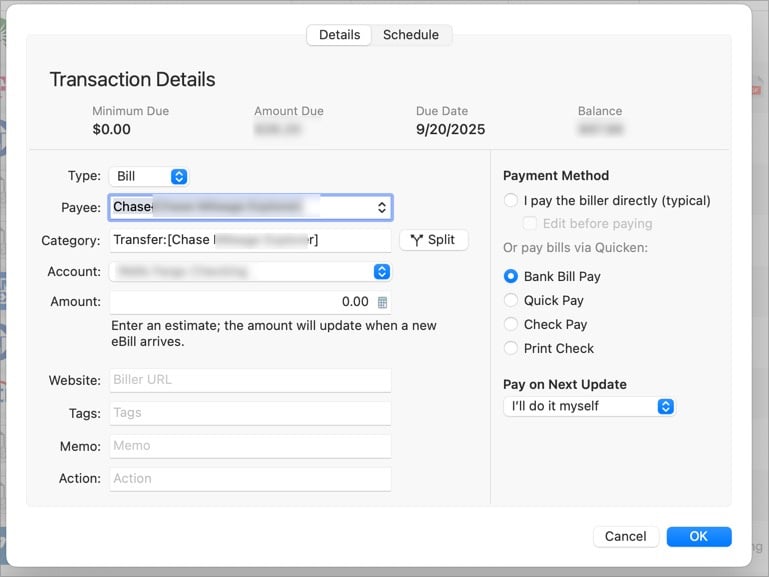
Thanks, as always…
0 -
Still, no bills that have cleared Windows for this month's payments appear in MAC CC registers. They have all posted to the Checking Account. This is a decent sized issue. Could really use some help with it.
0 -
Thank you for your reply,
You mentioned that the transactions are appearing in your checking account. What category do you see for those transactions in your checking account? Is there any other transaction that they might be erroneously matching to in the credit card accounts?
Thank you!
Quicken Kristina
Make sure to sign up for the email digest to see a round up of your top posts.
0 -
Not sure what you mean, Kristina. Which is why I posted the image I did.
They definitely have not matched ANY credit transaction anywhere. Every one which has cleared checking shows awaiting match. Every one. And even the EFT from debit card.
I really see only two choices:
I set these up incorrectly and likely how the category is set above, or there is a Quicken problem. But I have not seen anyone else mention it!
Just realized what you are asking. in the case of my Citi Card, cleared in Checking the category is Transfer:[Citi Double Cash Mastercard]. I do suspect that might be the issue but this is what I was lead to believe is the proper way to categorize these. No?
0 -
Thank you for your reply,
The category you mention sounds like a correct transfer category. Is it reflecting the correct account name (as you have it set up in your Quicken file)? Do you see the little arrow icon to the right of the category?
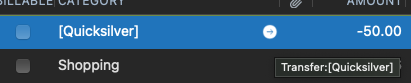
Clicking on that arrow icon should bring you to the other half of the transfer.
Thank you!
Quicken Kristina
Make sure to sign up for the email digest to see a round up of your top posts.
0 -
How funny. I never noticed that arrow and yes it does bring me to the other half. So they must be correct. Thanks for that.
In the case of the Hulu EFT that has not cleared, there is no arrow or other half, of course,
0 -
Thank you for the follow-up,
I'm glad to hear that they are correct transfers. Since you said you weren't seeing them on the credit card side, are the transfers linking to the correct accounts? Is the other half of the transaction showing cleared, or does it have that orange pencil by it (indicating manual or automatically generated transaction)?
For the reminders, does the Payee showing in the reminder match up with the payee on the checking or credit card side? Do the amounts match? You may need to set up renaming rules to make the downloaded transactions more closely match the reminder, since that can help with matching to them.
Thank you!
Quicken Kristina
Make sure to sign up for the email digest to see a round up of your top posts.
0 -
They all appear to be linking to the correct accounts. And yes, orange pencil:


Looks right, no?
Here's the reminder side. Which worked! I was notified. Previous to new biller, I think.
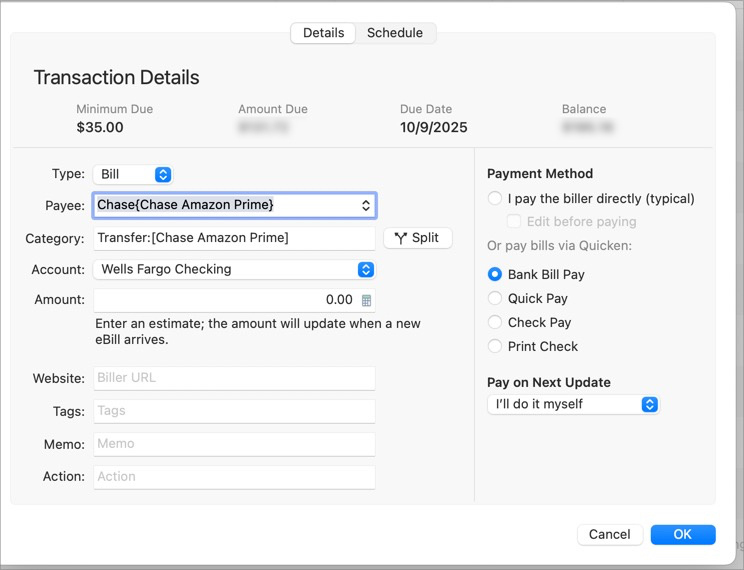
All looks good, no?
0 -
Thank you for your reply,
It looks correct.
The orange pencil on the credit card side does indicate that either the transaction is not downloading on the credit card side, or it's not matching to the transfer transaction (if it was matching, the pencil should be blue). Are you missing any other transactions in your credit card registers, or is it only the payments that aren't showing up? Are your payment transactions functionally identical every time, or does the amount vary?
Thank you!
Quicken Kristina
Make sure to sign up for the email digest to see a round up of your top posts.
0 -
Amounts vary. Which is why I set them to 0.00. (Wondering what if I went back to the hack fix of 0.01????) And aside from CC payments, the EFT from CC to Hulu does not clear as well. I sent a report this morning on this. Also not getting new bill amounts downloaded from the new biller. I am virtually convinced both issues are from a broken New Biller.
I did misreport in the Error Report in a moment of frustration that the NOT CLEARING is both Mac and Win. It is Mac only. The not retrieving new bills is BOTH Mac and Win.
Going to try the .01. Will report if it works :)
1 -
Really interesting info!!
Chase emailed me a new statement today. Usually takes a day or two to get in Quicken. BOTH Mac and Windows got it today!!
So at least for Chase, the new biller is working. But not for Fidelity now 5 days overdue to show. So its either Fidelity itself or an issue with the new biller and Fidelity.
No more bills due for a few weeks. Most come in around the 12th.
Will pay Chase tonight for as quickly as it can, then see if it clears BOTH Checking and Chase. My guess is it will in Windows, but only checking in Mac.BTW, OSU in both Mac and Windows too 6-8 minutes this morning. Must be Quicken server side issue.
0 -
OK I think I am on to something with Fidelity Credit Card. You might recall that prior to the New Biller one could download the account successfully two ways:
- Fidelity Visa Rewards Credit Card or…
- Elan visa Rewards Credit Card
When the New Biller arrived, many Online Bills transferred automatically over. I recall I only had two, maybe three that required any manual intervention. Fidelity was not one of them So it remained.
I have neither received a new bill (now VERY late) in Mac or Windows and never received a downloaded payment in the CC register in Mac since the change over.
So somehow inspired, I decided to unlink, delete and readd Fidelity as an Online Bill tonight. In BOTH Mac and Windows. Neither of the above options were available in either Quicken. and the ones that were are slightly different in Mac and Windows. If I recall I needed to use Fidelity in Mac and Fidelity Inv and Retirement in Windows.
I made the best logical choice in each and now have different Fidelity online billers than I did. I created new reminders for each. In fact, Mac did not recognize this credit card as a biller at all and had me fill in account, address, etc as if it were never there. Windows did not.
So it feels like this might be positive. I have a bill that should have appear 5 days ago and is still not there. Hoping tonight or tomorrow it appears.
@Quicken Kristina please note. Will post if it works. But more data for the issues.
0 -
I had hoped Fidelity would pop up, but not in either Quicken yet. Still feels like it might have been the problem. Will see what happens overnight.
0 -
OSU's both Windows and Mac incredibly slow last two days. Molasses.
Still cannot get Fidelity Visa in Mac or Windows. Seems to be correct in both, just will not grab the online bill. Will have to pay tonight with or without.
0 -
I had to pay Fidelity tonight so edited the instance and paid since Online Bills was not getting a new bill due.
After that, I felt compelled to “tidy up” so I reviewed and cleared all those CC payments that had cleared checking but not the CC registers. I then did OSU and got NEW ACTIVITY for each and even one of those just edited and cleared bills. But the activity blue icon was on each account, not at all in each register.
Must be indicative of something. Has to be a clue.
So I Uploaded a report
In short, after manually reviewing and clearing, each account showed new activity, but no indication of what the activity was in the registers. So odd. Hoping next month activity works as expected and paid CC bills actually clear in Quicken when the clear the FI.Fidelity Online Bill did not arrive.
0 -
Thank you for the updates,
The super slow One Step Update (OSU) was a known issue for a couple days, but should now be resolved. Are you still encountering the issue?
Thank you for the update on the billers. Based on your post in a different discussion, you don't expect to see any more bill information showing up until around 12 October. Is that when your Fidelity bill should also be available?
It is interesting that you got the new activity indicator without any obvious new activity. Did you scroll up to see if any manual/automatic transactions (red pencil icon) updated to have a blue pencil icon?
Thank you!
Quicken Kristina
Make sure to sign up for the email digest to see a round up of your top posts.
0 -
Hi Kristina.
The next Fidelity bill usually is notified to me from Fidelity on the 19th or 20th. So we have a wait. OSU's atre back to normal today.
I check years back in all the accounts showing new activity. None to be found. I also thought that interesting. And triggered by checking CLR and accepting as Reviewed. I have to think somehow that's a clue why those payments never clear yet all charges do.
1 -
Thank you for the follow-up,
Please let me know what happens on the 19th/20th!
Quicken Kristina
Make sure to sign up for the email digest to see a round up of your top posts.
0 -
Progressive Online Bill appears to be fixed today in BOTH Mac and Windows.
One small step for Quicken….
1 -
Thank you for the follow-up,
I'm glad to hear that Progressive seems to be working now!
Quicken Kristina
Make sure to sign up for the email digest to see a round up of your top posts.
0


