10 years with a corrupted uncloseable account with unreconcilable transactions

I have been using Quicken for since 1994 and had the problem with an inability to close one corrupted account because it has unreconciled transactions that are not visible. I have tried everything to reset or find these transactions since 2015and finally gave up and just marked the account "hidden" and just live with it hoping Quicken would fix this issue. Unfortunately it is a Fidelity account and now a new annoyance with this is that every time I do a Fidelity download on any accounts I get a pop up saying "The following financial institutions are transitioning to a different connection method. To continue downloading information, please update the connection for the following:" with a Reauthorize button and a "Remind me next time" button. Reauthorize with Fidelity does not find the old account since it was closed in 2015. So I am now living with this popup every time I download.
I have tried:
- Validate and Repair
- Super Validate and Repair
- Attempted to Reset account
- Over the years have done many reinstalls of Quicken
- Have the latest version of Quicken
- Turned on Auto-reconcile
- Turned on Manual reconcile
- Deleted a few transactions and added them back unreconciled and do a manual reconcile
One suggestion was to create a new account and copy all transactions to that account and then delete corrupted account. This account is loaded with transfers to active accounts I use currently and has hundreds of transactions. The highlight all and move did not work and only partially transferred and really just created a mess so I had to restore from backup.
I'm at my wit's end and suspect that either:
- Quicken support has some tool that can clear these hidden unreconciled transactions
- I have to live with this forever
Any help would be appreciated
Comments
-
It appears that Quicken is still set up for transaction downloading for that account.
Try going to Tools > Account list and clicking on Edit next to the account name. On the Online Services tab, is there a Deactivate button?
If so, what happens when you click on it?
QWin Premier subscription0 -
Yes, both Deactivate and Reset exist, but clicking on either returns a message of "Account Fidelity Smart Cash can not edit because there are downloaded transactions that must first be accepted in the account register or transaction list. Finish accepting the downloaded transactions, and then try again."
The underlying problem is that I cannot see these "downloaded transactions" or automatically clear or reconcile them.
0 -
Hello @gbronc,
Thank you for letting us know you're encountering this issue with being unable to deactivate or reset your account due to downloaded transactions that you can neither view nor accept. Unfortunately, this is a known issue. See this Community Alert for more information:
To troubleshoot, please start by closing and reopening your Quicken program (if you haven't already done so since this issue started).
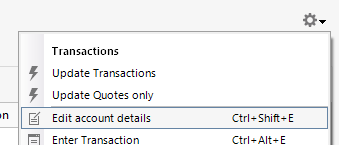
If restarting the program does not correct the issue, then from the register of the problem account, please click the gear icon, and choose Edit Account Details.
In the Account Details window, select Online Services, and click the Automatic entry is: link.
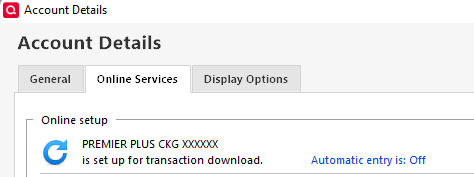
If Automatic entry is: OFF, turn it ON.
If it is ON, Turn it OFF, then close and reopen Quicken and turn Automatic entry back on.
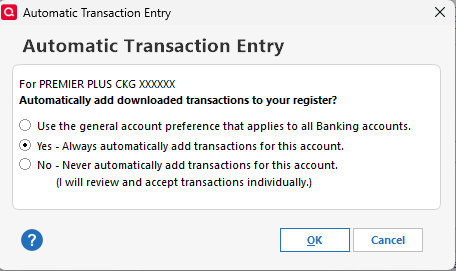
Check to see if the downloaded transactions are now visible in your register.
Please let me know how it goes!
Quicken Kristina
Make sure to sign up for the email digest to see a round up of your top posts.
-1 -
One file repair method you did not mention is the Copy template option. Using the copy template will disconnect all accounts from online services and make a record-by-record copy of your data file. It should leave the corrupted transactions behind but regardless will disconnect the old account from online services.
Try closing the account in the copy and if it works, set up online services again and leave the old file behind.
2 -
That suggestion from markus1957 worked! Thought I knew every Quicken trick, but was unaware of this one. Worth the time to re-connect every online account and side benefit was a 7 mb reduction in file size, so probably some other crap got removed by this process. Going to remember this.
Thanks so much for this!
2 -
What didn't work was all the steps that Quicken Kristina had suggested. I had already tried that set of steps many times over the years.
1 -
Thank you for the follow-up,
I'm glad to hear that @markus1957's recommendation helped you correct the issue!
If you need further assistance, please feel free to reach out!
Quicken Kristina
Make sure to sign up for the email digest to see a round up of your top posts.
0


