new method direct connect to merrill lynch from quicken windows

I just went thru the steps to direct connect to quicken which seemed to work OK. I have some questions. My issue has always been that the cash holding accounts within each of my 12 quicken accounts were not showing up in my holdings, however the transactions that were to go into those accounts were on my transaction page within each account. Was this supposed to be corrected by the change in the download method? I ask that because those holdings still do not show up.
Did I do something wrong when I changed the connection method?
Another thing that I noticed was that when I do a one step update, it does not update my merrill lynch accounts. How do I go about doing that?
Just need some clarification and guidance here.
Thanks
Dennis Freeman
Comments
-
Hello @Dennis Freeman,
Thank you for sharing your experience. To better assist, please provide more information. Which connection option are you using with Merrill Lynch? You should be able to see this by navigating to Tools>Account List. The Financial Institution column should show the connection option you are using for the account.
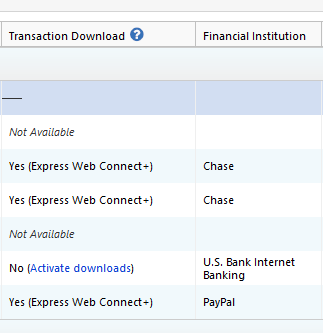
You also mentioned that your accounts are not being updated. Are the problem accounts using Simple Investment tracking or Complete investment tracking? You can check this by navigating to Tools>Account List, and clicking the Edit button next to the account. On the General tab, near the lower left, it will show you the Tracking Method.
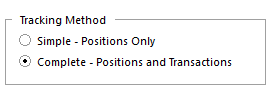
If it is set to Complete and you're not receiving any new transactions, please start troubleshooting by making sure your register is sorted by date. If the transactions did download, but are hidden by sort order, that will resolve the problem.
I look forward to your reply!
Quicken Kristina
Make sure to sign up for the email digest to see a round up of your top posts.
0 -
Thanks for the reply Kristina,
The transactions that go into the various holding accounts are mostly cash and show up on my ML accounts printed out online are titled either Bank of America, NA RASP, BLF Treasury Trust, or ML Bank Deposit Program. These are holdings along with the stocks or bonds that are listed on the ML website within my accounts, but are not displayed in Quicken under holdings. The deposits that go into those accounts do show up on the transaction list, but there is no indication as to where they are being deposited. Is there any way to manually create those items in an existing account? I did go to Tools>Account List> Edit, and the tracking method does show complete in all 12 of my ML accounts.
Any ideas on how to fix this issue? I hope that I am explaining it in a comprehensable way.
Thanks,
Dennis Freeman
0 -
Thank you for your reply,
Are they reflecting in the cash balance in your account in Quicken, or are they completely missing?
Thank you!
Quicken Kristina
Make sure to sign up for the email digest to see a round up of your top posts.
0 -
How would I be able to tell. The transactions merely state the amount of the transaction and the holding it is supposed to go into. There seems to be no way to tell if it is recorded to the cash balance.
0 -
Thank you for your reply,
Typically, if they are reflecting in your cash balance in Quicken, but not on the financial institution side, it would cause the cash balance in Quicken to disagree with what the financial institution says the cash balance should be (it would typically be higher, by the amount that should be in those holdings). Are you seeing that, or does your cash balance in Quicken match the financial institution?
Please post a screenshot of what these transactions look like in your Quicken (with any personal information redacted). That may help to identify why the holdings aren't reflecting properly. If needed, please refer to this Community FAQ for instructions on how to attach a screenshot. Alternatively, you can also drag and drop screenshots to your response if you are not given the option to add attachments.
Thank you!
Quicken Kristina
Make sure to sign up for the email digest to see a round up of your top posts.
0 -
I am sending screen shots from one of 12 accounts that I have at Merrill. The holdings in the account, the transactions in the account, and the printout from Merrill Lynch that shows what they show as my holdings. Clearly, the data from Merrill is not being accurately transmitted to Quicken Windows.
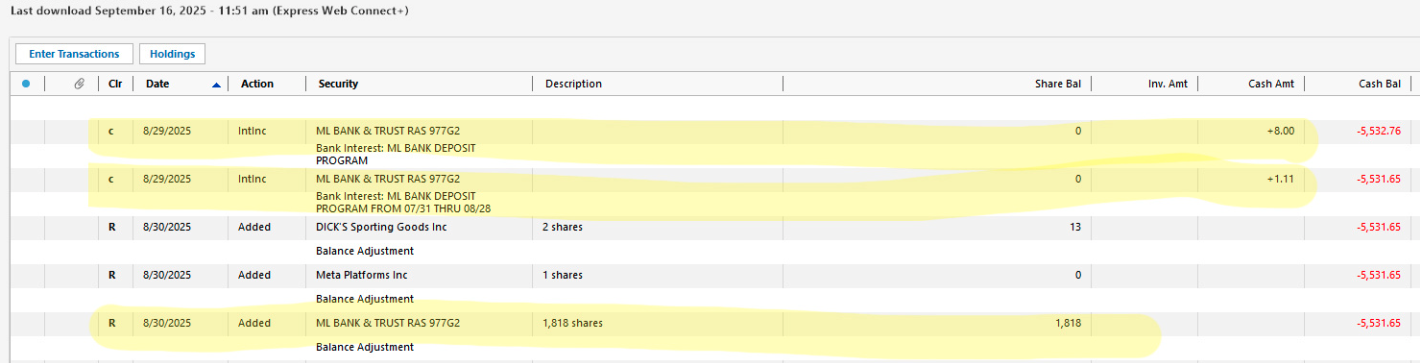
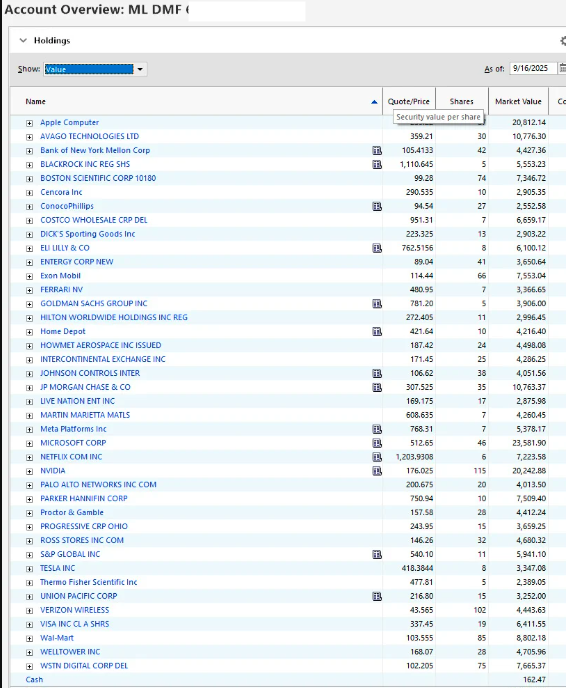
Hopefully this will clarify what I am experiencing.
Dennis Freeman
[Edited - Removed partial account number]
0 -
Thank you for your reply,
Since these securities are not being automatically added when the transactions download, have you tried manually adding the securities and checking to see if Quicken is correctly updating the shares as the transactions download?
Thank you!
Quicken Kristina
Make sure to sign up for the email digest to see a round up of your top posts.
0 -
I cannot find any tutorial about how to manually add a security to an existing account, nor whether or not Quicken would recognize it as the same one shown on their website. Any help available for this type of thing?
Dennis Freeman
0 -
Thank you for your reply,
First, navigate to Tools>Security List. If the correct holding is not already showing there, please add it. You should see an Add Security button near the lower left corner of the Security List window.
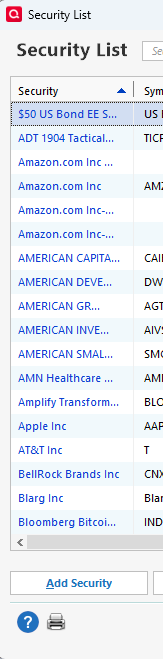
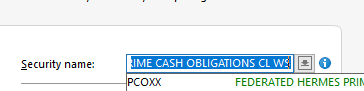
Once the security is in your Security List, you would then need to make sure it is associated with the proper transactions in your investment account register. To do this, backup your Quicken file, then find those transactions, select Edit, and make sure that the correct security is reflecting in the Security name field.
If you prefer to have someone walk you through the process, you can reach out to Quicken Support directly for assistance. The Quicken Support phone number can be found through this link here. Phone support is available from 5:00 am PT to 5:00 pm PT, Monday through Friday.
I hope this helps!
Quicken Kristina
Make sure to sign up for the email digest to see a round up of your top posts.
0 -
Hi Kristina,
I started with one of my ML accounts. Went to the Securities List, and the holdings are already there. They have no associated ticker symbol associated with them as they are classified as OTHER. Since there is a discrepancy between the cash holding shown in Quicken does not match what is on the website, I assume that ML Bank Deposit Program deposits are going to cash. If I click on that holding in Securities list it takes me to the holding and indicates there is just a few dollars in it.
That said, How do I get that holding from the Securities List to show up in the specific account that holds it?
Thanks,
Denny
0 -
Thank you for your reply,
To get the holding to reflect in the account, you would need to have transactions associated with that holding. If you are able to find the transactions in the account register, you would need to edit the transactions and fill in the correct security in the security name field.
Thank you!
Quicken Kristina
Make sure to sign up for the email digest to see a round up of your top posts.
0
