Target Downloading Issues - changing to Target Circle Card

My Target Red Card has not updated since August 17, 2025. Someone posted that once they changed the name of their account from Target Red Card to Target Circle Card, they were then able to download as Target is now calling the Red Card the Circle Card. Can someone explain the procedure for doing this? Do I delete my Target Red Card Account, edit the account and just change the name or set up a whole new credit card account calling it Target Circle and leave my existing Target Red Card account alone? I want to make sure I don't wind up deleting all of my previous downloads from the Target Red Card.
Comments
-
Hello @Liz Renninger,
Thank you for reaching out! You mentioned seeing a post that suggested changing the account name from Target Red Card to Target Circle Card. Could you please let me know where you saw this posted? If it was here in the Community, would you be able to share a link to that discussion?
That way, I can review it directly to gain a better understanding of the steps they followed, and then guide you through the correct process to avoid losing any of your existing Target Red Card history.
Thank you!
-Quicken Anja
Make sure to sign up for the email digest to see a round up of your top posts.0 -
I am still setup as Target Red Card and a couple of days ago, Target seems to have finally got it right. I downloaded charges and payments without having to modify the downloaded transaction file.
1 -
My Target Red (Circle) Card simply stopped downloading.
I went to the Target Red Card website, logged on, and updated my security information and verified my email and mobile number.
Then I went back to Quicken Target Red Card register and for Online Services clicked "Set-up now". Entering my correct Target Red Card credentials, it failed and would not set up the downloads.
0 -
Hello @Larry the Tax Guy,
Thank you for sharing your experience. To help troubleshoot, I checked our internal tools, and on our end, it looks like you were able to successfully connect. Were you able to successfully connect? If not, what error message/code are you seeing? Are the transactions downloading now?
I look forward to your reply!
Quicken Kristina
Make sure to sign up for the email digest to see a round up of your top posts.
0 -
Quicken Classic has not allowed me to Connect with my Target account for almost 3 weeks now. There is another ticket on this, which gets updated only by the Quicken person every couple of weeks, but there is no action or activity.
This is getting ridiculous. And before this, it made me verify by text each and every time I accessed the account through Quicken.
Will this ever come back??
1 -
Dear Quicken Team, obviously there are issues with Quicken connecting to Target, Target changed their protocol a while back that created this same issue. This is apparently an issue for a lot of users again, me included, and appears that you need to work with Target to resolve the connection issue. It is a bit ridiculous that your support team would not have a direct communication with Target for a quick resolution. This most recent issue is now several weeks old and should have been escalated already. Quicken is a great program and very useful, but it is not free, and, as paying subscribers, I'm sure we would all appreciate if your team would be more pro-active in resolving these connection issues with a sense of urgency!!
2 -
Same issue. Just reset my Target Circle Card account in Quicken and still no transactions are being downloaded.
0 -
We would appreciate an official update from someone at Quicken. The silence is quite frustrating.
Is this ever going to be fixed? As suggested above, a call from someone at Quicken with someone at Target should be able to quickly resolve this. What is or isn't going on here? It's been weeks!
0 -
Hello @DLCPhoto,
Thank you for reaching out. We have not received any new updates. If you haven't already done so, I recommend that you bookmark the Community Alert linked below to be notified of any updates, once available, and know when the issue is resolved.
We apologize for any inconvenience and appreciate your patience.
Thank you!
(Ticket #11769008/ CTP-13069)
Quicken Kristina
Make sure to sign up for the email digest to see a round up of your top posts.
0 -
While I appreciate the reply @Quicken Kristina , this doesn't tell us anything we didn't already know. I bookmarked that Community Alert perhaps 2 weeks ago.
This is not directed at you personally, but I am increasingly disappointed with Quicken, especially since they forced us into a subscription model several years ago. It shouldn't take weeks to get something like this resolved.
0 -
I've also been having this issue for over a month. What is Quicken doing to get this resolved?
0 -
Hello @aosser1,
Our teams are working to resolve the issue. If you haven't already done so, please bookmark the Community Alert linked earlier in this discussion, so that you will be notified of any updates, once available, and know when the issue is resolved.
Thank you!
Quicken Kristina
Make sure to sign up for the email digest to see a round up of your top posts.
0 -
@Quicken Anja noted in the other alert thread that this has been resolved.
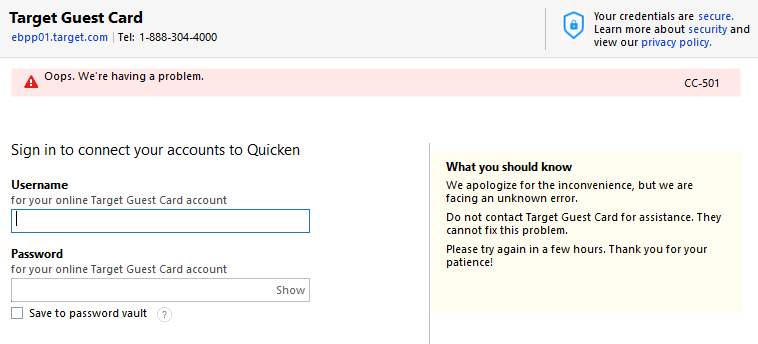
I just tried again, and at least in my setup, it is not.
 0
0 -
Hi @DLCPhoto,
Thank you for checking back in and for sharing the screenshot. I do see that the error you’re encountering is a CC-501. This type of error generally indicates that Quicken was unable to connect to the financial institution, and it’s most often caused on the bank’s end blocking Quicken’s connection.
Usually, these errors are temporary. The best next step is to wait 24 hours and then try again. If the error still persists after that timeframe, we recommend contacting Quicken Support directly so they can review your logs and escalate if needed.
You can find more information in this support article.
Thank you!
-Quicken Anja
Make sure to sign up for the email digest to see a round up of your top posts.0 -
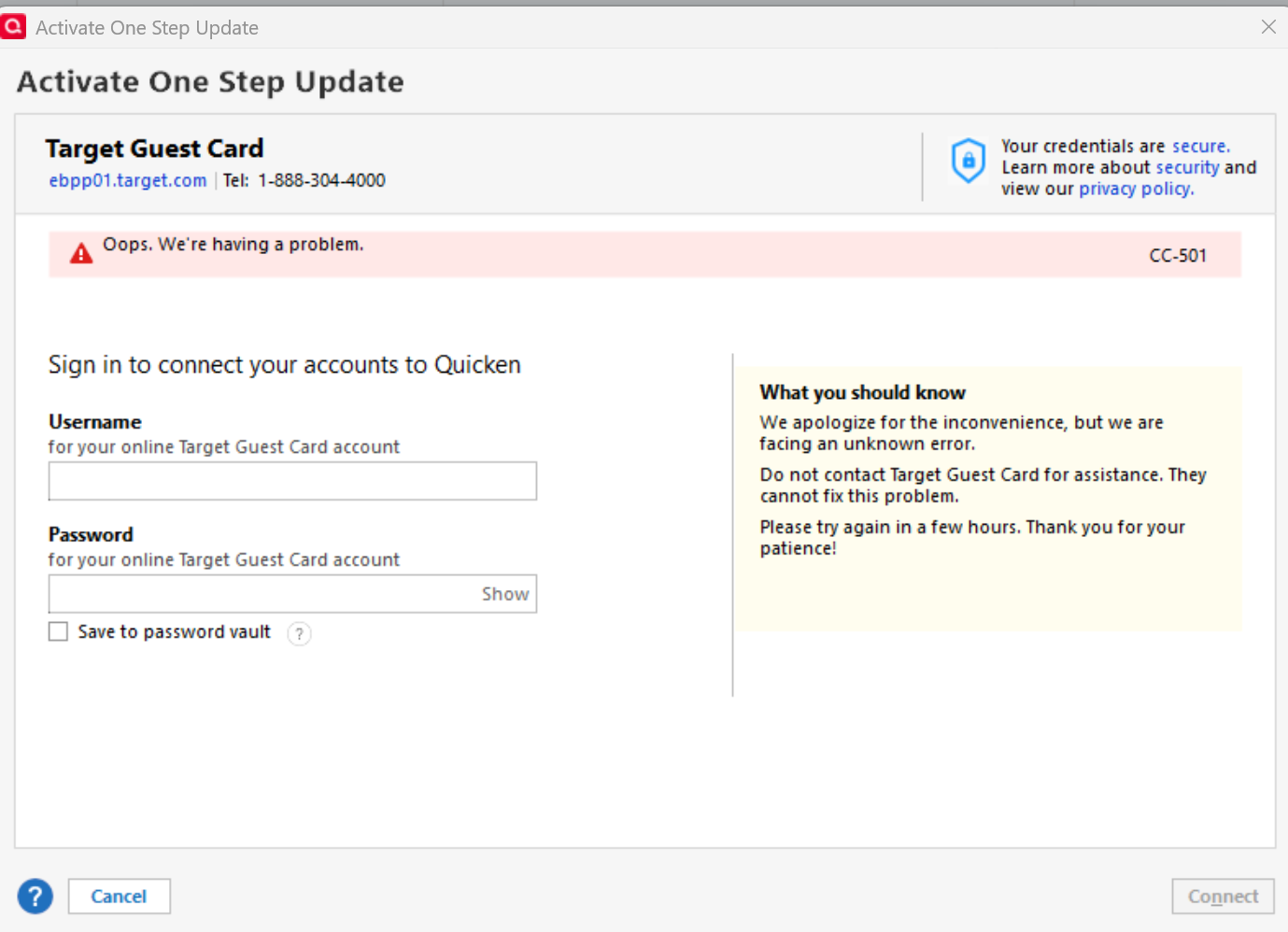
My Target card simply stopped downloading. I tried a "reset" (didn't work) and then disconnected followed by trying to Activate One Step Update which gave the following results (clicking "Next" brought me back to the beginning screen):
This has been going on for weeks now. My Username and Password are correct and work with the Target website.
Here is my screenshot:
 0
0 -
@Quicken Anja - well I tried again today - no change.
Has this "fix" restored functionality for anybody? I have yet to see a single post from anyone to suggest that anything was done.
0 -
Hello @Larry the Tax Guy & @DLCPhoto,
Thanks for following up and for sharing the screenshots.
From our side, we aren’t seeing any errors occurring internally with your accounts, so there are a couple of things I'ld like you to check:
- Are you only seeing the CC-501 error with the Target Guest Card, or does it occur with other financial institutions as well?
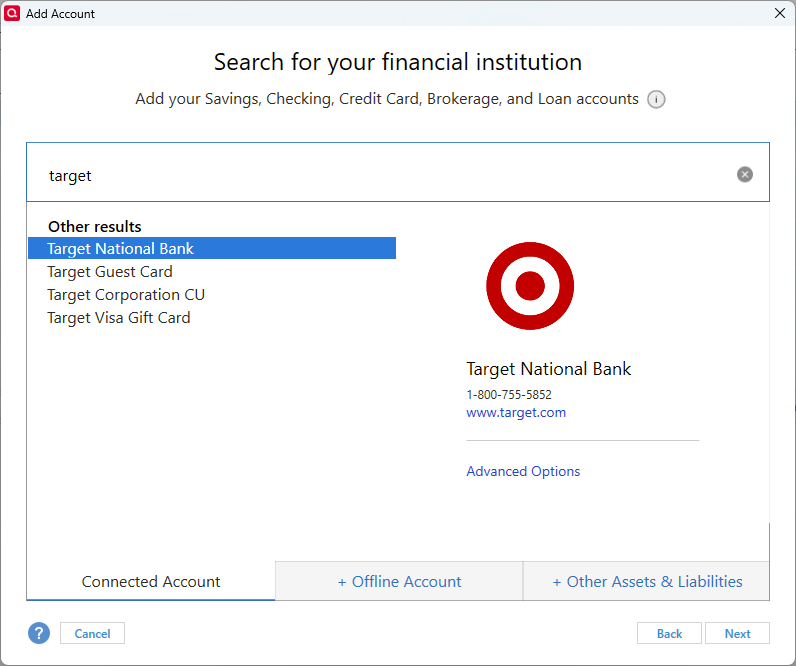
- Have you tried connecting via Target National Bank instead to see if the behavior is different?
For some context, in another thread, a user mentioned that they were recently able to successfully connect their Target accounts after this ongoing issue, so it may be intermittent or account-specific:
If this error continues to occur after trying the above, I would advise proceeding with reaching out to Quicken Support so they can review your logs and escalate as needed.
Thank you!
-Quicken Anja
Make sure to sign up for the email digest to see a round up of your top posts.0 -
Hi quicken users, Just wanted to share that I was able to successfully connect my target circle card (red card) by connecting to 'Target National Bank' instead of Target Guest Card (same personal log-in credentials). (I used the 'add account' feature in Quicken, then just linked it to my 'existing account' in quicken and it connected and updated my target card account in quicken as normal). Just fyi .. I had tried this several times over the past few weeks and it didn't work, but today it was successful. Hope this is helpful…
1 -
@Larry the Tax Guy I have a target credit card and, for downloading transactions, it is connected to Target National Bank. Currently transactions are only downloading monthly after each statement period.
 2
2 -
Ok, so when I went to my existing Target account in Quicken, and chose the option to set up online access, but there is no opportunity there to change it to Target National Bank.
So I went to Add an Account, which did give me that option. I entered my login info, got the text to get the code, and it then connected, giving me the opportunity to link it to the existing Target account already in Quicken.
It appears I'm good to go. And it also makes me wonder if this could have been done weeks ago, since the problem was not using the correct Banking ID/server.
I guess time will tell, but before connection was lost completely, I had to get a confirmation code by text each and every time I did an online update (no other accounts require this). A real pain because it interrupts the whole update process until I complete that step.
Maybe this will no longer be needed each and every time?
2 -
@AAlbury & @Snorkle Thank you both for chiming in and sharing your experiences! We really appreciate you taking the time to let the community know what worked for you and what you’re seeing with your Target card connections.
@DLCPhoto Glad to hear you were able to get connected through Target National Bank and link it to your existing account in Quicken, and thanks for laying out the steps; that’s helpful. Regarding the repeated text codes, hopefully, this new setup reduces those prompts, but just to note, MFA requirements are controlled by the bank, not Quicken.
Thank you!
-Quicken Anja
Make sure to sign up for the email digest to see a round up of your top posts.1 -
@DLCPhoto and @Quicken Anja MFA is a requirement. I remove Target from OSU and update manually once a month when my statement closes.
1 -
Target Card Connection Solved Today 9/22/2025
Up till now my Target download was connecting to ebpp01.target .com which hasn't worked at all for some time now.
TODAY I used Tools \ Add Account and selected Target National Bank (www.target.com):
- I entered my Target Card username and password
- It found my Target Card account
- It offered to Link to Existing and so I chose my Target Card already in Quicken
- A Perfect Update followed.
Now my Target Card "Account Details" show "target.com" and no longer show "ebpp01.target.com"
No longer having any Target Card problems at all.
1 -
@Larry the Tax Guy - great! Exactly what I did, posted above, which worked fine as well. Hopefully we won't have to mess with this for a while!
0 -
I always had my target card connected to target national bank and I also had the issue of transactions no longer downloading. I reset my account this am and it did reconnect and downloaded missing transactions. I did not however receive a bill update on the bills & income tab even though I have a bill due 10/2. So no idea if that works for the red/circle card or not. Take that last point with a grain of salt because since the recent billing update my whole bills and income tab is not usable. Going on two weeks of attempting to fix it.
0 -
I followed the suggestion by AAlbury above and it worked for me. I have Quicken Classic.
- Disconnect your Target account
- Edit account details
- Choose the Online Services tab
- Disconnect
- On the Tools menu
- Add Account
- In the popup window's search bar, search for Target National Bank
- Then follow through with the rest of the procedure.
I was sent a code and entered it, but I'm hoping that's the only time I have to do that. All of my transactions downloaded. I did another update, knowing I wouldn't get more information, and I did not have to enter a code.
Thanks to AAlbury for finding the solution! At least it worked for me.
2 - Disconnect your Target account

