What is the proper procedure to change the Fidelity core MMF?

After updating to EWC+ connection, what is the proper procedure to change the core MMF selection for a Fidelity account? Here's what I have tried so far:
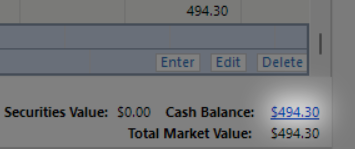
I accessed the Cash Balance link in the account register and selected Cash Representation. Nothing happened until the next OSU at which time a pop-up appeared requesting selection of SPAXX as cash or treating it as security.
The pop-up did not state for which account it was trying to change. So, if Cash Representation is selected for multiple accounts before doing an OSU, it becomes a guessing game as to which account the multiple pop-ups refer.
What if a different MMF is desired to be used going forward as the core MMF than the one the pop-up is recommending? How is that selected?
If a different core MMF was used for a period of time even though the current core MMF was owned as well, how does that affect cash balance?
I've noticed that Quicken attempts to change all buy and sell transactions in the register matching the current core MMF regardless if it was the core MMF in past transactions and this has led to mismatched cash balances to Fidelity's website. I've had to manually correct months of transactions due to Quicken's programmatic assumptions.
Does Quicken know what the current core MMF is in Fidelity if there are multiple MMF's in the account?
Is there any detailed documentation of how Cash Representation is supposed to work?
Deluxe R66.23, Windows 11 Pro
Answers
-
Please clarify what you mean by the "Cash link in the account register".
Q user since February, 1990. DOS Version 4
Now running Quicken Windows Subscription, Business & Personal
Retired "Certified Information Systems Auditor" & Bank Audit VP0 -
Does this help? I should have been clearer and called it the Cash Balance link. I corrected the earlier post.
Deluxe R66.23, Windows 11 Pro
0 -
@leishirsute Thanks for the correction, but now I've got another question.
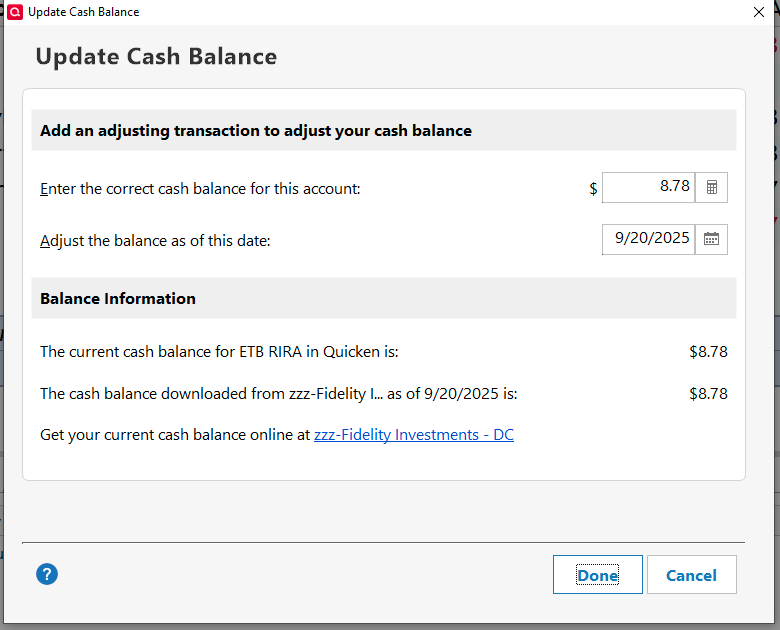
When I click on that link, in either taxable accounts or IRA accounts, and without regard to whether "Show Cash in a checking account" is turned on, I get the following. Which doesn't reference a "Cash Representation". And, as stated in your signature line, I'm running R64.25 also.
Q user since February, 1990. DOS Version 4
Now running Quicken Windows Subscription, Business & Personal
Retired "Certified Information Systems Auditor" & Bank Audit VP0 -
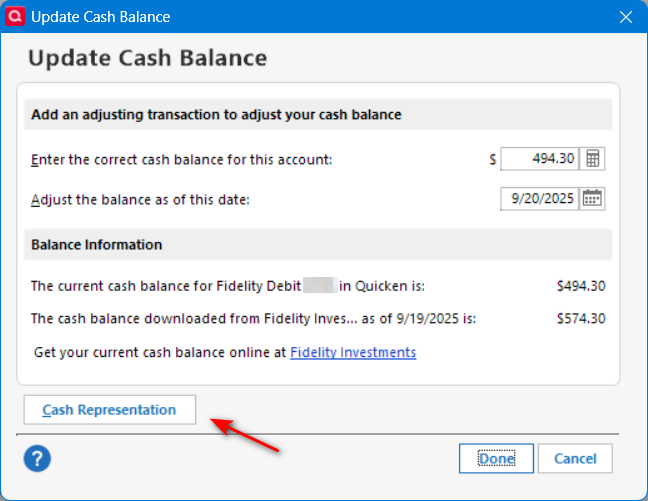
I have read posts that some folks do not see the Cash Representation selection. I only see it when first starting Quicken or after running an OSU. It disappears if selected until an OSU is performed. It is confusing behavior and the reason for this post seeking more info about it. It appears for all IRA and non-IRA accounts for me but not for the investment side of a linked cash account. I don't know how to force it to appear.
Deluxe R66.23, Windows 11 Pro
0 -
I didn't see the Cash Representation button in any of my Fidelity or ML brokerage or IRA accounts. After migrating the Fidelity connection to EWC+, I now see it in all those accounts, but still not in ML. Will they be there tomorrow? Only The Shadow knows.
0 -
That "Cash Representation" wouldn't show in an account with a linked checking account makes sense, since the cash is represented in another account.
But, after reading your reply I started Q and went straight to a non-linked, non-retirement account and clicked on the "Cash Balance" link … and that add'l link still wasn't there, nor in a non-linked retirement account.
Then, I did an OSU … and no change.
Then, just now, I upgraded to R64.29 … and still nothing changed.
So, I can't explain WTH is happening, unless for some crazy reason it's tied to EWC+ in some way, which would make very little sense to me. And, I don't know if you noticed that my accounts are at Fidelity also.
Going back to the last 2 sentences in your original post, I doubt that Q has anyway of distinguishing between the Core MMF and another MMF in the same account.
Re: documentation, have you tried looking in Q Help, that's the only place where I'd know to look.
Q user since February, 1990. DOS Version 4
Now running Quicken Windows Subscription, Business & Personal
Retired "Certified Information Systems Auditor" & Bank Audit VP0 -
I think the Cash Representation is totally related to Fidelity having an EWC+ connection.
Help for Cash Representation seems to indicate the Quicken can determine the current core cash position and recommend keeping as security or treating as cash with the Cash Representation selection.
From Quicken Help:
"If you set up your investment account for transaction download, the first time you download, Quicken identifies your financial institution's money market fund security and prompts you to use it for cash tracking. "
Unfortunately, I don't see Help regarding the results to expect from using Cash Representation but important to note:
"If the option to track a money market fund as a security is available for your financial institution, and you initially choose to track the money market fund as a security, you can convert the fund to cash later. However, once you select to convert a money market fund to cash, you may not be able to convert it back to a money market fund later."
Deluxe R66.23, Windows 11 Pro
0 -
The "Cash Representation" isn't new to Express Web Connect +, it is available in Direct Connect too. Example Chase had it with Direct Connect before converting to Express Web Connect + and still has it.
The main reason there is a problem right now with Fidelity is that Fidelity is changing what it sends creating inconsistent results for different people over different times.
Fidelity was a "don't send mutual fund buys/sells" financial institution. That means back with Direct Connect you had no choice money was withdrawn/deposited in the Quicken register balance. Now with Express Web Connect + they have changed sending that but also doing it in very inconsistent manner.
Whatever method Quicken uses to identify the money market fund security has not been ever posted on here, and clearly it is hit or miss with the financial institutions.
As for "converting back" to cash" and why it might not be possible. One reason might be if the financial institution like Fidelity is inconsistent with their data and basically Quicken stops identifying that security as the money market fund. But a more basic explanation is the same reason why flipping between Complete and Simple might result in problems. If you have told Quicken to treat a given security as the money market fund that means it will be removing the buys and sells for that security. As such if you switch back you will be missing the transactions transferred that cash in and out of that security and when you do the compare to securities you might get a mismatch. Note that besides removing the buys/sells Quicken also ignores this fund when doing the security comparison to what the financial institution sent.
I fully expect eventually Fidelity, Intuit and Quicken Inc to figure this out and go with one or other methods consistently.
But in the meantime, it highlights why this should be something in the user's control, not the financial institution's or a "Quicken guess".
1 -
I don't see any conflict between using a linked checking account and the "Cash representation".
All transactions go into the investment register first and "cash transactions" are pushed to the linked checking account.
If you choose to treat the money market fund as a security, you will get buy/sell transactions in the investment register. If you choose to treat it as cash Quicken removes the buys/sells and as such just has a cash balance to sweep in an out of the linked checking account.
0 -
The issue with using a linked checking account when cash is held in a MMF is that the checking account's balance is always zero after the MMF Buys and Sells have cleared. That is not very convenient if you are recording payments in the linked account - it will look like the account is overdrawn until the corresponding MMF Sell clears.
QWin Premier subscription0 -
The cash balance has gone negative on about 11 transactions. When they did, money was taken from another MMF. There were never any buy and sell transactions for the core money market fund with the DC connection in the linked cash account. The core MMF didn't show as a security either for the linked investment section. The end result is there has been no problem reconciling statements each month.
The running balance for the linked cash account got messed when converting to EWC+ because there were buy and sell transactions for a MMF that was eventually changed to the core MMF. Those transactions were removed by the conversion, even though the MMF wasn't the core MMF at the time.
Deluxe R66.23, Windows 11 Pro
0 -
I was unfamiliar with Cash Representation and only saw it when using EWC+ for Fidelity.
It seems that, for Fidelity, Cash Representation only appears for EWC+ connection.
Deluxe R66.23, Windows 11 Pro
0 -
@leishirsute Sorry, I was unclear in my earlier post. When I said "when cash is held in a MMF" I meant "when cash is represented with Buys and Sells in a MMF". This is the only option that is available with Vanguard accounts.
For example, I can set a Vanguard account to show cash in a checking account. Then when I sell a security, I see a balance in the linked account for a couple of days but the balance goes to zero when the Buy for the MMF is recorded. If I record an expense in the linked account, the balance goes negative until the corresponding Sell in the MMF is recorded. This makes the linked account pretty much useless because I can't see the available balance.
QWin Premier subscription0 -
I understand. For the DC connection, it appears Fidelity's core MMF is not treated as a security for any of my Fidelity accounts. After the EWC+ conversion, the core MMF's still don't show up as security in any of the accounts.
Does the core MMF display as security for the Vanguard accounts?
Deluxe R66.23, Windows 11 Pro
0 -
Does the core MMF display as security for the Vanguard accounts?
At Vanguard, you have two options:
- Cash is swept to the Federal Money Market fund VMFXX. Buys and Sells for VMFXX are always downloaded to Quicken, the holding is recorded as shares, and dividends are recorded with ReinvDivs.
- or, Cash is swept to an FDIC insured "Cash Plus" account. This is a relatively new offering for Vanguard. It is set up as a separate account, not a holding in your brokerage account. Cash Plus currently pays a lower interest rate than than VMFXX, but offers access to Paypal and Venmo for payments. As far as I know, this does not work smoothly with Quicken.
QWin Premier subscription0 -
In the past I have had both Vanguard and Fidelity (but I have no experience with the new Vanguard Cash swept account), so I'm quite familiar with how each of them has performed.
I have not seen the actual specifications for FDX (which is what Express Web Connect + is based on) because it isn't available to the public (you have to sign a non-disclosure agreement just to see it, and that would defeat the reason for me to look at it), but I suspect it is very similar to the OFX protocol.
As such, the "turn it on or off" of what transactions to put in, in the first place, or how to mark a given fund so that Quicken treats it as the money market account (which currently they allow for only one) is entirely up to the financial institution. But when you have a major conversion from different protocols, they aren't going to know these details and have to learn them the hard way. I suspect that Fidelity is a bit harder than the rest because they are so flexible in what they are allowing the user to use as the money market fund (But in truth Chase's is more complicated and they got it right), and due to the fact, they did change their policy from not sending the money market fund transactions to sending them, but hit and miss on letting Quicken know which one is the money market fund.
As such I can describe times with Vanguard that things don't balance. This might not be your 11 transactions with a negative balance, that might just be a Fidelity problem, but I will say that the financial institutions don't keep things consistent all the time.
And in some cases, like with investment transactions it even makes some sense.
Say you have sell today. You get those shares in your account today, but in reality, the transaction hasn't closed yet. With Vanguard this shows up as sell transaction comes down for that day, but the sell of the money market fund doesn't happen until the transaction settles. This does result in a negative balance until the transaction settles. Also note here that there are two sets of data in any download. The transactions and the "summary information". It isn't that uncommon that these are inconsistent for some period of time (leading to placeholders if you aren't careful) For instance, if "USDOLLAR" has a share compare error in my Chase investment account, I just ignore it, because that is one of their cash sweep accounts.
It's this kind of details of why I really like to have control over dealing with it as cash. It is just much less complicated.
1


