Hidden downloaded transactions?

I have an account Fidelity Cash (which is in fact a brokerage account)
When I look at its financial institution is shows as Charles Schwab and that's incorrect.
This account has downloaded transactions, but they are not visible.
So now I am stuck, I can't reset or deactivate this account as QW requires me to accept downloaded transactions

and I don't know how to re-associate this account with Fidelity instead of Charles Schwab
I'd like to avoid deleting this account.
Any help is appreciated!
Best Answer
-
Thank you for the clarification,
Currently, the closest we have to such a tool would be making a copy of your Quicken file, since in the copy of the file, all online services are disconnected. For information on creating a copy of a Quicken file, see this article:
If that's not quite what you're looking for, you can also create an Idea post to request a new feature or improvements to an existing feature. For information on creating Ideas, please see this post:
I hope this helps!
Quicken Kristina
Make sure to sign up for the email digest to see a round up of your top posts.
0

Answers
-
Hello @yuriw,
Thank you for reaching out. To troubleshoot the issue with downloaded transactions you can't see, please follow these steps from this article on when Quicken says there are transaction to review, but you can't see any:
Before you begin
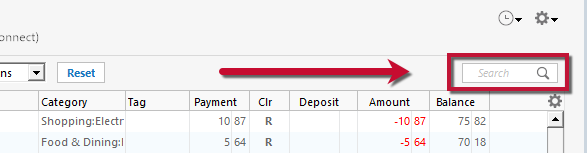
Ensure the Search bar above the register is cleared. Text in the Search bar will adjust the register to only show transactions that match that text.
Turn automatic entry off (or on if it's already off)
1. Press Ctrl+A on the keyboard to bring up the Account List, then click the Edit button next to the affected account in the list.
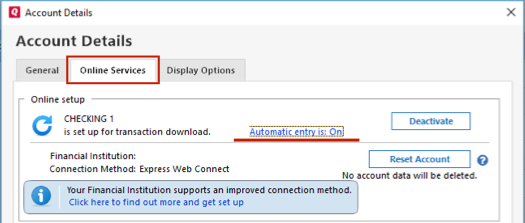
2. In the Account Details window, click on the Online Services tab then click Automatic entry is.
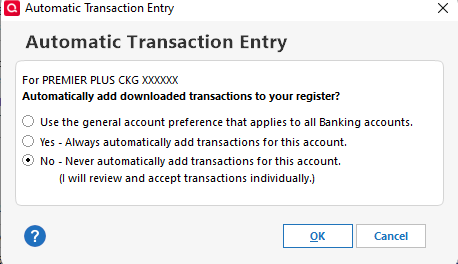
3. Select No on the next dialog box and click OK. Automatic entry should show as "Off" now. If it's already off, select Yes to turn automatic entry on.
4. Click OK to close the Account Details window, then click Done on the Account List.
5. Close Quicken, wait a few seconds, then re-open it. The transactions should appear upon re-opening Quicken.
Note: If you have multiple accounts affected by this issue, you can make the change outlined above to all the accounts at once by going to Edit > Preferences, then going to Downloaded transactions and unchecking the box next to Automatically add to banking registers.
Please let me know how it goes!
Quicken Kristina
Make sure to sign up for the email digest to see a round up of your top posts.
0 -
Thank you for the reply @Quicken Kristina
I can't even go thru these steps as my Account Details box does not have those options.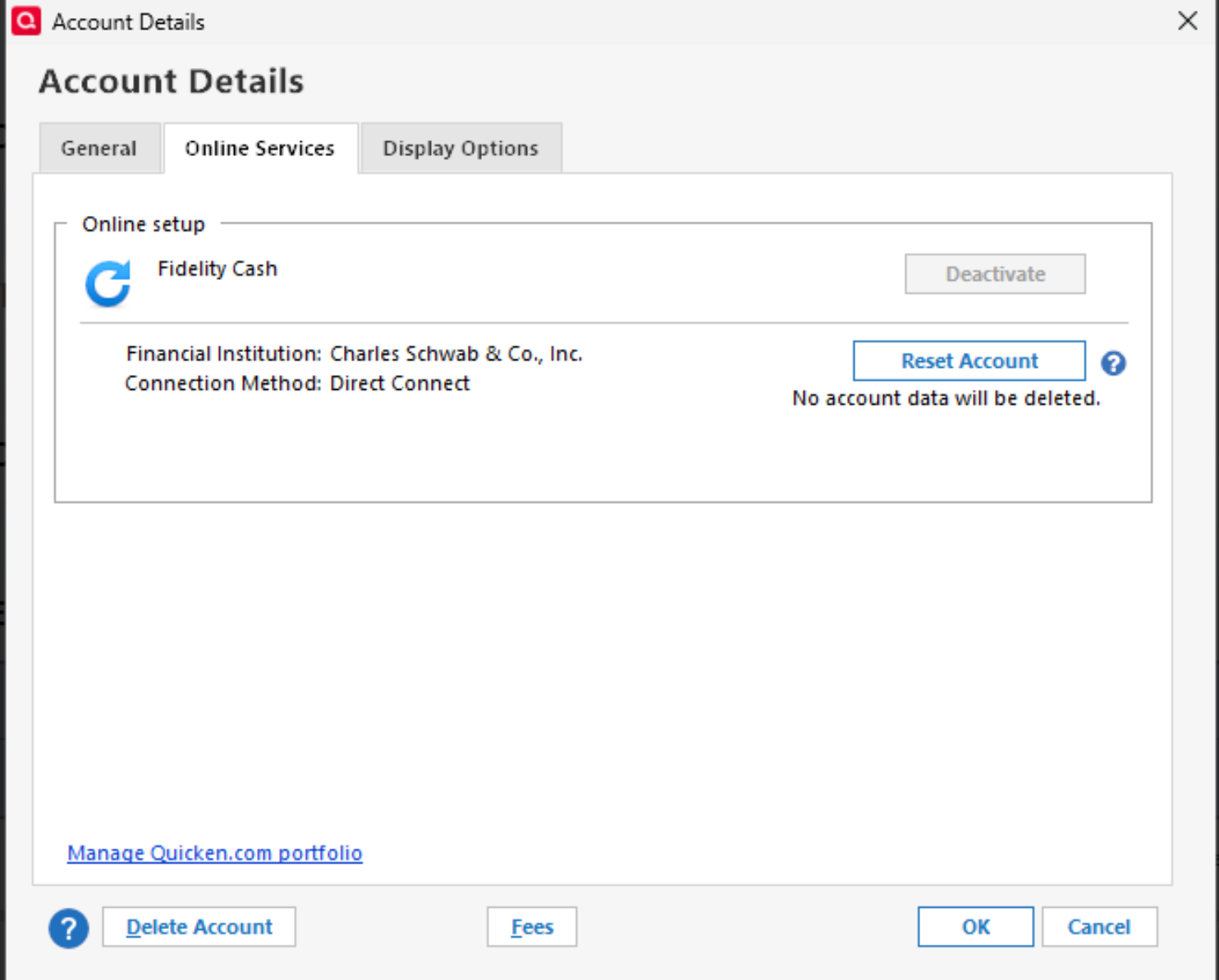 0
0 -
Thank you for your reply,
To clarify, is this a linked cash account? If it is, you may need to do the troubleshooting steps listed in my earlier post through the investment account that it's linked to.
If it is not, then the lack of that option in you Account Details window may indicate a file specific issue. To troubleshoot, I suggest that you try validating your data file. Please save a backup file prior to performing these steps.
Validate:
- File
- Validate and Repair File...
- Validate File
- Click OK
- Close the Data Log
- Close Quicken (leave it closed for at least 5 secs)
- Reopen Quicken and see if the issue persists.
I hope this helps!
Quicken Kristina
Make sure to sign up for the email digest to see a round up of your top posts.
0 -
unfortunately validating did not help either
I need to find a way how to removed downloaded transactions that are not visible
0 -
Thank you for your reply,
When did this issue first start? If it's a fairly recent issue, you may want to restore a backup from before the issue started.
Thank you!
Quicken Kristina
Make sure to sign up for the email digest to see a round up of your top posts.
0 -
That is a great idea @Quicken Kristina
I wish I asked you earlier.I found a month old backup from autobackups and I think I can fix it, altho I'd have to reenter a month worth of transactions.
Now, when I restored it it named a file MY_QW_2017-R-63.21-2025-09-03, but my original file name was MY_QW_2017
How do I manage this? And may it mess up my online settings if use it as is?TIA
0 -
Thank you for your reply,
It automatically applied the date of the backup to ensure you didn't accidentally overwrite your original Quicken file. If you want to rename the file, and you know where the file is saved, then you can close out of your Quicken file and rename it. It should not mess up your online settings.
Thank you!
Quicken Kristina
Make sure to sign up for the email digest to see a round up of your top posts.
0 -
Thank you for your help @Quicken Kristina
It was painful but I was able to restore, re-accept and match transactions and fix the file
IMO what is missing in QW and a global way to fix/change accounts - financial institutions relationships0 -
Thank you for the follow-up,
I'm glad to hear you were able to fix the file.
You are not the only one who would like a better tool to fix issues, when they happen. There is an Idea post requesting such a tool, and it is currently in Planned status (which means our teams intend to add it in the future, but we do not have an ETA):
Thank you!
Quicken Kristina
Make sure to sign up for the email digest to see a round up of your top posts.
0 -
Ack @Quicken Kristina
I actually see it not from Validation/Fix angleI'd prefer some powerful way when all online accounts and their options can be reset/changed
In my case, we found no remedy how to change bank association and had to restore old backup!0 -
Thank you for the clarification,
Currently, the closest we have to such a tool would be making a copy of your Quicken file, since in the copy of the file, all online services are disconnected. For information on creating a copy of a Quicken file, see this article:
If that's not quite what you're looking for, you can also create an Idea post to request a new feature or improvements to an existing feature. For information on creating Ideas, please see this post:
I hope this helps!
Quicken Kristina
Make sure to sign up for the email digest to see a round up of your top posts.
0