Quicken requests account re-authorization for Fidelity on every one step update
Comments
-
I received the reauthorization last week and spent hours deleting several 100 duplicate transactions from being added to my quicken accounts covering around 3 months. I thought I was fine until around Friday when the reauthorization came up again. I have managed to have it reauthorize my credit card account successfully, and it is working properly. I have no idea why that one account is working properly. However, none of my other 14 Fidelity accounts are getting updates since Friday. Now the one steep update ignores all of the other 14 accounts so instead on one of them, click Update tranactions and am in the reauthorization loop.. Fidelity says it is successful on all accounts in the web browser. In quicken, the one it complains about initially gets a reauthorization successful message, but it does not really work and just asks for it again after the next attempt to get transaction updates. I have gone on the fidelity site and disabled and reenabled quicken access to all accounts with no luck. I am using windows subscription and am on the new connection method with no recent updates to my system in over two weeks. I will try the suggested HORRIBLE disable and reenable process which someone has already had no success with later today. I have used this product for 34 years and this issue is the most annoying to date.
IMMEDIATELY after typing the message above, I tried transaction update again and received no reauthorization error. However, I did not receive any updates either. I attempted yet another time and received 39 updates so I think something was fixed around 9/29 at 12:40ish eastern time. I am good now.
0 -
Hello @FidelityReauthIssue,
Thank you for adding to this discussion, and I'm happy to hear you are good to go.
If that changes, feel free to reach out!
Thank you!
Quicken Alyssa
Make sure to sign up for the email digest to see a round up of your top posts.
0 -
I spoke with a Fidelity high-level tech representative, specifically on the team that manages the Fidelity-Quicken technical relations. Fidelity was very clear that the problems reside on the Quicken side, with corruptions in the files occurring.
Additional observations: My wife and I have a "retirement" file on Quicken that contains account information from both my Fidelity accounts and my wife's Fidelity retirement accounts. After clearing the corrupted runtime.dat file in Quicken, all information is downloaded via one step update. However the next time the exact same "one step download" is run, the download errors out with the CU 506 error code, for all of my accounts, but not my wife's. (We each have separate account numbers and logins). And sometimes it will be the other way around my wife's accounts all error out, but none of mine.
I did call QUICKEN technical support, and was told it might take 3-4 weeks for Quicken to fix. That's clearly not acceptable.
[Removed-Disruptive]
Someone on the development side of Quicken needs to speak up — its a very bad look for the reputation of Quicken at the moment.
[Edited-Readability]
1 -
Hello @Matthew Boone,
Thank you for contacting support and following up!
I have sent you a direct message. Please navigate to the inbox in the top right-hand corner of the Community page and check your inbox.

Thank you.
Quicken Alyssa
Make sure to sign up for the email digest to see a round up of your top posts.
0 -
@Matthew Boone , thanks for contacting Fidelity and Quicken and posting their response.
Quicken needs to provide an official response to this problem along with a timeline for when a fix is expected. The risk for Quicken reauthorization messing up my many years of Fidelity transactions and accounts is too great. And I don't have time to sort all of the problems this may cause. As a paid subscription customers we deserve an informative and timely response.
Strangely enough, Quicken One-Step update did not prompt me for account reauthorization this morning and the update completed. Something changed.
1 -
Hello @DaveQN,
Thank you for adding to this discussion with your thoughts and concerns.
While I cannot provide an ETA for resolution, I can reassure you that our teams are working hard to resolve the remaining Fidelity issues.
I am happy to hear that your accounts updated without prompting for reauthorization today, and I hope it remains that way.
Thank you!
Quicken Alyssa
Make sure to sign up for the email digest to see a round up of your top posts.
0 -
I've been having problem with Fidelity for months. Bonds mispriced, lost transactions. This has been an issue for months!
0 -
Hello @mrhenry1,
Thank you for adding to this discussion with your experience, though I am sorry to hear you have been having issues with Fidelity for months.
I do see that you have already migrated to the new connection method, so that's a good start.
You said you have "lost transactions". Does that mean they were in your file at one point in time, and they are now lost? Or did they never download from the bank?
Additionally, providing screenshots of what you are seeing can be helpful as well. If needed, please refer to this Community FAQ for instructions on how to attach a screenshot. Alternatively, you can also drag and drop screenshots to your response if you are not given the option to add attachments.
Thank you.
Quicken Alyssa
Make sure to sign up for the email digest to see a round up of your top posts.
0 -
I keep getting Fidelity reauthorization messages. I followed the instructions to validate and repair the file.. was able to check the "Authentication Block will be fixed" box. The file was validated, I then had to sign back in using my quicken ID. I still am getting the Reauthorization message. The file list shows zzFidelity investments and "direct connect". I do not want to go through the reauthorize again, it totally screwed up my accounts. What can be done? I am on version R64.30
0 -
Hello @justNana,
Thank you for adding to this discussion, and I am sorry to hear you are experiencing difficulties.
If you have not yet migrated, or don't want to, then you should be able to check off a box at the bottom of the prompt telling it "Do not remind me" or something along those lines.
There could also still be some accounts connected to the new instance from when you tried the migration previously. To check this, you will want to go to Tools>Account List. Look to see what is listed in the Financial Institution column for each of the Fidelity accounts.

If you don't have a Financial Institution column, you can enable it under the Options button in the bottom left of the box. Then select "Show financial institution".
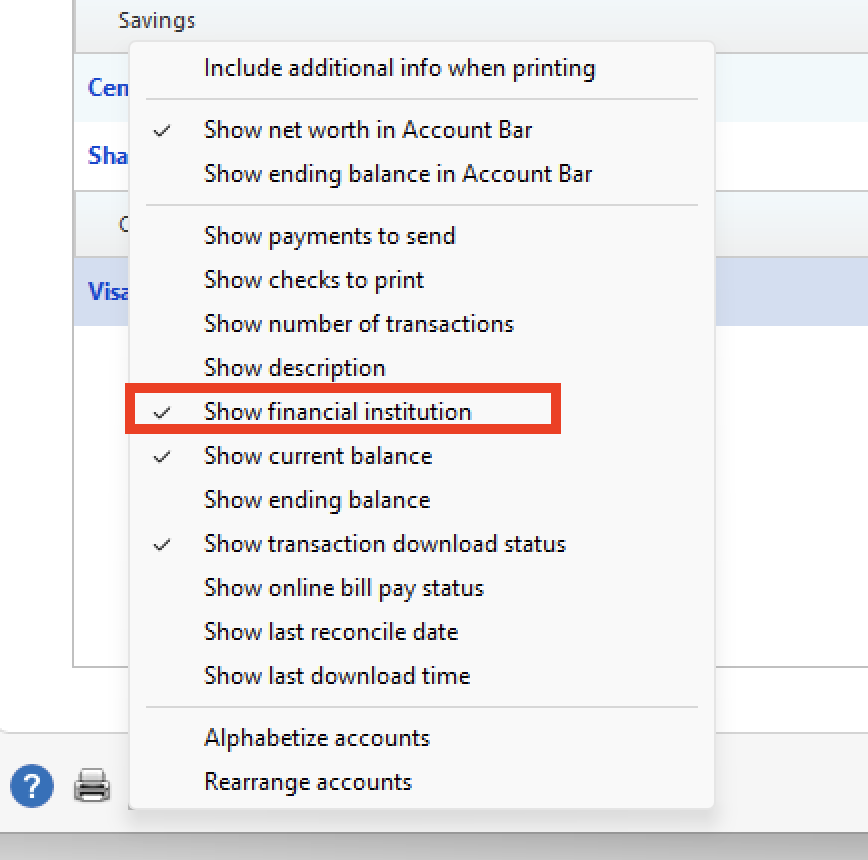
If you see Fidelity Investments in this column, you will want to deactivate those account(s). Note: This will remove them from the One Step Update, and you will need to update them manually going forward.
Hope this helps!
Quicken Alyssa
Make sure to sign up for the email digest to see a round up of your top posts.
0 -
I did the re-authorization , it screwed up all the data, files. Then I got back to the correct data in the files, and it asked me to re-authorize again. Is there someone who can chat me through the steps to fix this? There is no box to check that says don't ask me again.. just remind me later. I do NOT want to do the updates manually.. it is too much information to handle that way
0 -
Hello @justNana,
Thank you for following up with additional details.
I can totally understand it being too much to update manually, and yes, there is absolutely a chat option for Quicken Support. You can also call. Whatever is easier for you. They can go through the process with you if that helps.
We can also provide guidance from here, but we won't be able to see what's happening in real time with you.
Let me know if you need more help!
Quicken Alyssa
Make sure to sign up for the email digest to see a round up of your top posts.
0 -
Hi Alyssa. To answer your question about "lost transactions," I never received any download from Fidelity. As of today I still am not receiving any updates. I have six accounts with Fidelity. I also noticed just now that I have stopped receiving equity option quotes. All quotes stopped as of 9/25/25. I've been counting on the quotes in Quicken along with reports to manage covered calls written. This can have huge impacts on my portfolio! I am going to stop relying on Quicken and instead use Fidelity's online system along with Excel. This is a poor substitute for Quicken, but the missing quotes is the last straw. Thank you for any help getting this resolved.
0 -
Hello @mrhenry1,
Thank you for adding to this discussion, though I am sorry to hear that you are having issues.
After reviewing your account, I can see that you are getting an internal FDP-350 error.
To resolve this, please do the following:
1. Save a Backup. Steps can be found in this article if needed.
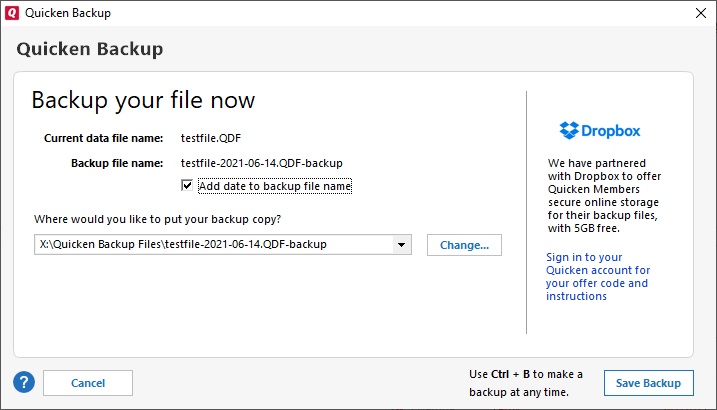
2. Disconnect ALL Fidelity accounts in Quicken. Here are the steps on how to do that.
3. Revoke Quickens Third-Party Access from the Fidelity website.
4. Add accounts back into Quicken
Once back in Quicken, you will want to make sure you choose the "LINK to existing" option for any of the accounts that were already in Quicken.
Do let us know if this resolves the issue you are having.
Quicken Alyssa
Make sure to sign up for the email digest to see a round up of your top posts.
0 -
Hi, mrhenry1
I had a terrible time, but finally figured it out. Make a back up of your quicken account before you do this.. just in case.
GO to Tools- Account List- then I chose one to EDIT. Be sure the account you are looking at has the box checked for "Complete" Positions and Transactions" Then tap OK.. follow the prompts and select all your Fidelity Accounts. Then tap NEXT. Chose Link to Existing.
Be prepared, it will take a little time with 6 accounts, AND it will download a lot of transactions. I had a LOT of transactions that were downloaded which were already in my files. I just tapped EDIT then chose delete.
My Quicken now is working normally. No issues so far so good!
0 -
Hello @justNana,
Thank you for following up and letting us know what worked for you!
Your experience may be helpful to others in the future.
Thank you!
Quicken Alyssa
Make sure to sign up for the email digest to see a round up of your top posts.
0 -
Quicken Alyssa, Is there a way to change the update process so that I am REQUIRED to put a password in before it will update? Right now it automatically updates so the PW must be stored somewhere?
Thank you
0 -
Hello @justNana,
Thank you for your question.
Unfortunately, there is currently no way to force Quicken to prompt you for a password every time you update your accounts.
To request this feature to be added in the future, what you can do is create an idea post. This way, other users who have the same or a similar request can vote on your idea.
Our Development and Product teams frequently use our idea posts in order to improve Quicken and implement new features requested by customers.
I hope this helps!
Quicken Alyssa
Make sure to sign up for the email digest to see a round up of your top posts.
0 -
I can no longer bypass the reauthorization process by selecting Remind Me Next Time., Quicken no longer updates my Fidelity accounts and shows error code QL-297-A. So I assume Quicken is forcing me to reauthorize, even with all the problems associated with this process. I would have thought Quicken & Fidelity would have extended their final conversion date until the bugs are resolved.
[Edited-Readability]
0 -
Strangely enough I was able to update my Fidelity accounts this morning after choosing Remind Me Next Time.
0 -
I am having the same issue. Went as far as to delete all my Fidelity accounts and re-adding them, that still did not help.
0 -
Hello @DaveQN,
Happy to hear the issue resolved itself.
When you say you are having the same issue, are you referring to getting a reauthorization every time you do a One Step Update? Did you try these steps?
If not, please do and then let us know how it goes. There are also some other fixes mentioned in this thread that worked for others. You are welcome to try those as well. Either way, we are happy to help if those don't work.
Thank you.
Quicken Alyssa
Make sure to sign up for the email digest to see a round up of your top posts.
0 -
@Quicken Alyssa I tried that but no success. I had already completely deleted my accounts to see if that would fix it but no luck there either
0 -
Hello @sandyvelez,
Thank you for following up with those additional details.
Please contact Quicken Support directly so they can further investigate this issue and escalate if needed.
Thank you.
Quicken Alyssa
Make sure to sign up for the email digest to see a round up of your top posts.
0 -
I did notice that I have two entries for Fidelity in One Step Update. one is zzz-Fidelity Net Benefits and the other is Fidelity Investments. All my accounts are linked to Fidelity Investments but the one asking for reauthorization is zzz-Fidelity Net Benefits and it is asking for two accounts I have deleted. I tried to Verify and Repair the file but that did not help.
Edit - update:
The chatbot at Quicken Support was actually very helpful. This is how I fixed my issue. I am now up and running with no more Reauthorize requests! 😁Thanks for your help!
The issue is likely caused by hidden accounts still trying to update. You need to deactivate the "zzz-Fidelity Net Benefits" connection that's asking for deleted accounts. (https://www.quicken.com/support/quicken-performance-troubleshooting/)
Go to Tools > Account List, check Show Hidden Accounts at the bottom, then find any hidden Fidelity accounts and click Edit next to each one. On the Online Services tab, click Deactivate to stop them from updating. (https://www.quicken.com/support/error-message-when-updating-accounts-cc-800/)
This should eliminate the reauthorization popup since those deleted accounts won't try to connect anymore. (https://www.quicken.com/support/mac/deactivate-and-reactivate-online-banking-services-quicken-account/)0 -
Hello @sandyvelez,
Thank you for following up to let us know how you resolved the issue, as this could be helpful for ithers experiencing the same or similar issues in the future.
If you need more help, don't hesitate to reach out.
Thank you!
Quicken Alyssa
Make sure to sign up for the email digest to see a round up of your top posts.
0

