Error When Importing OFX File from Merrill Lynch

Comments
-
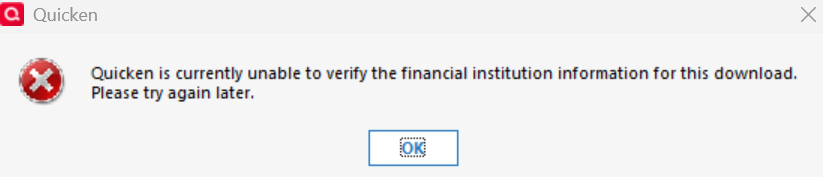
For the past 10 years, I've been manually downloading an .ofx file from my Merrill Lynch 401k to Quicken with minimal issues. Suddenly on Saturday, September 27th, 2025 I received the following error. "Quicken is currently unable to to verity the financial institution information for this download. Please try again later." This issue is continuing to persist. Does anyone know how to resolve?
1 -
Hello @HawkeyeMan,
I have sent you a direct message. Please navigate to the inbox in the top right-hand corner of the Community page and check your inbox.

Thank you!
Quicken Alyssa
Make sure to sign up for the email digest to see a round up of your top posts.
0 -
Hello @HawkeyeMan,
Please try the steps outlined in this Support Article. If they do not resolve your issue, please contact Quicken Support directly so they can escalate the issue if needed.
Thank you!
Quicken Alyssa
Make sure to sign up for the email digest to see a round up of your top posts.
-1 -
Merrill Lynch no longer supports Web Connect/QFX file importing into Quicken even though they still allow exporting of the QFX file (which is a mistake on their part) as I have explained here:
And for what is worth the same thing happened to my wife’s 401K account.
0 -
Hello @Chris_QPW,
Thank you for adding to this discussion.
Merrill Lynch reports that this feature should still be working for them, but will soon be discontinued. We updated the alert as well.
Anyone who is getting an error while importing from Merrill Lynch, should follow the standard Web Connect troubleshooting steps outlined in this Support Article and then contact Quicken Support directly if the issue is not resolved, so they can escalate if needed.Thanks again!
Quicken Alyssa
Make sure to sign up for the email digest to see a round up of your top posts.
-1 -
Well, they are certainly wrong about the 401K accounts, and the other thread that I referred to has the same problem for BofA which isn't surprising. And note that the current Quicken CSV import can't import investments transactions.
And here is my own:
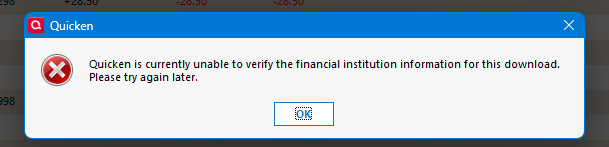
Which isn't surprising given:

And in:
07791077910779zzz-Merrill Lynch Retirement Grouphttps://www.benefits.ml.comNAhttps://www.benefits.ml.com/login/login.aspxACTIVE NOT_QBPNA
Notice no 401K or Web-Connect for any account types.
0 -
Entering this here just so everyone is on the same page. As I noted in this thread:
The 401K accounts have a different URL/login that only every had Web Connect/QFX file exports. That has now been disabled.
I for one would welcome importing with Express Web Connect +, but that is only available on the standard Merrill Lynch site for their brokerage accounts.
0 -
I am experiencing the same issue. The quicken "support" article is of no use if Quicken and Benefits Online don't have an agreement to support. Why post a support article that explains how to import a file that is not supported?
0 -
Hello @Chris_QPW,
Thank you for narrowing it down with the URL's and providing additional context for us all.
Thank you for adding to this discussion, though I am sorry to hear you are experiencing this issue as well.
To clarify, Merrill Lynch has communicated to Quicken that QFX downloads are still supported at this time. With this being the case, the first response is the article that pertains to these issues. We do realize that the steps won't apply if the service is in fact discontinued. At that point, we need customers to contact Quicken Support directly to report the issue.
Thank you!
Quicken Alyssa
Make sure to sign up for the email digest to see a round up of your top posts.
-1 -
Hello @VanusWong,
Thank you for sharing your experience.
Please try the steps outlined in this Support Article. If they do not resolve your issue, please contact Quicken Support directly so they can escalate the issue if needed.
Thank you!
Quicken Alyssa
Make sure to sign up for the email digest to see a round up of your top posts.
-1 -
The virtual assistant says:
When Quicken cannot verify the financial institution, this typically means your bank no longer supports Web Connect in Quicken, preventing file authorization during import.First, verify that Merrill Lynch Benefits Online supports Quicken Web Connect downloads and that you're downloading a QFX format file.If Merrill is saying that QFX is still supported (and I am able to download the QFX) why is Quicken saying that it can not verify the financial institution?
This stopped working with the latest Quicken release.
The support article is of no assistance.
0 -
Another Virtual Assistance response:
Web Connect files require access to online services to validate the file and transactions for security purposes.
Even if Merrill Lynch Benefits Online supports QFX downloads, Quicken may show a verification error if:
The financial institution no longer supports Web Connect authorization in Quicken (even though they provide QFX files)
The verification process is separate from the file download capability - your bank can provide QFX files but may have discontinued the authorization service that Quicken requires to validate them.
Quicken Alyssa—can you confirm if Merrill Lynch Benefits Online has discontinued the authorization services even though they are still providing QFX download capability?
0 -
Another virtual assistance response:
Our documentation doesn't contain specific information about Merrill Lynch Benefits Online's current authorization service support for QFX downloads.
Financial institutions can provide QFX files for download while discontinuing the authorization service that Quicken requires to validate them - these are separate functions. When a bank no longer supports Web Connect authorization in Quicken, the file cannot be authorized when importing, even if QFX downloads are still available.
Which specific error message are you seeing when trying to import the QFX file from Merrill Lynch Benefits Online?
Quicken is unable to verify the financial institution
The "unable to verify the financial institution" error occurs when your bank no longer supports Web Connect authorization in Quicken, even if they still provide QFX downloads.
This happens because Web Connect files require access to online services to validate the file and transactions for security purposes. The verification process is separate from file download capability - banks can provide QFX files but discontinue the authorization service Quicken needs.
This issue can only be resolved by contacting Merrill Lynch Benefits Online directly, as they control Web Connect support and provide the QFX file.0 -
Hello @Q Info,
Thank you for sharing all of your findings in the thread.
I can confirm that Merrill Lynch informed Quicken that QFX downloads still work for them and would eventually be discontinued. It would seem that is not the case, as many people have reported that it does not work. With that being the case, we need to report the issue. Please contact Quicken Support directly so they can escalate the issue.
Thank you!
Quicken Alyssa
Make sure to sign up for the email digest to see a round up of your top posts.
0 -
I suspect that the people you were talking to were downloading the QFX files from www.ml.com not www.benefits.ml.com.
After all it is still active for Web Connect:055500555005550Merrill Lynch Investmentshttps://www.ml.com/1-800-637-7455https://www.ml.com/ACTIVEINVESTMENT&DIRECTINVESTMENT&WEB-CONNECT BANKING,CREDIT,ACCOUNTINFO,INVESTMENT&EXP-WEB-CONNECTNOT_QBPNA
This is what they will probably discontinue in the future.
But they have already told Intuit to disable the one for the benefits site.
07791077910779zzz-Merrill Lynch Retirement Grouphttps://www.benefits.ml.comNAhttps://www.benefits.ml.com/login/login.aspxACTIVE NOT_QBPNA
0