Fidelity and missing transactions

I see I'm not the only one struggling with the recent "upgrade" with updating Fidelity accounts. I've seen references to the missing transactions problem being resolved but I haven't yet come across the resolution. Perhaps I'm just not looking in the right place. I've tried resetting the online service as well as deactivating and setting it up again. The end result, according to Quicken/Fidelity, is that the transactions from the last 723 days have been downloaded but nothing is showing up in the downloaded transactions window and I'm still missing 10 transactions from 5 days ago. Somebody please point me in the right direction? Thank you!
Answers
-
Hello @Gerry Blue,
Thank you for letting us know you're having an issue with missing transactions. To help troubleshoot, please provide more information. Are the 10 transactions from 5 days ago the only ones that are missing, or is this an ongoing issue with more transactions failing to download?
If you haven't already done so, it's a good idea to check that the Sort Order in your account register is by Date. To check, click the top of the Date column in your account register. It's possible that the transactions are in your register, just not where you thought they'd be.

Are the missing transactions showing as pending on Fidelity's website? Is there any chance that they may have improperly matched to existing transactions in your account register (this is most likely to happen if there are similar transactions where everything but the date is identical)? Did you delete any transactions in your register? Is there any chance they may have downloaded into an incorrect account (for example, if the account got linked to a wrong account, and then you went back and corrected it)?
I look forward to your reply!
Quicken Kristina
Make sure to sign up for the email digest to see a round up of your top posts.
0 -
I had all my 401k transactions from one fund wiped out in the update. Everything from 3/9/2021 to 12/12/2023 is missing and Quicken shows a cost basis of zero and the shares added today.
0 -
Hi Kristina,
I double checked and the transactions are in fact sorted by date in ascending order. The 10 transactions in question are on the Fidelity website and are no longer pending. They are dated 9/15/2025. They should be at the bottom of the account register in Quicken (sorted by date ascending) but there is nothing more recent than 8/29/2025. There should be 5 interest income transactions and 5 principal payment deposits. There is a decent possibility that the transactions downloaded were identical to previous transactions but all of those are reconciled transactions and I would hope that Quicken would not match them to reconciled transactions without alerting me. This account was working flawlessly prior to the migration. No other transactions are missing as the reports through 8/29 match my month end reports that I printed prior to the migration. Every time I've reset or reauthorized the account since the migration, I've double checked the account number and the correct accounts were matched.
What I'm thinking is that something internal to Quicken thinks I've already accepted the transactions on that date and when they're received from Fidelity, they're skipped. I'm hoping there's a way to tell Quicken that they're new and need to be reviewed by the user.
0 -
Hello @pshuman,
Thank you for sharing your experience. Based on your description of the issue, it sounds like that 401k may have been added as new instead of linked to the existing account in your Quicken file. Please navigate to Tools>Account List. If you see the option to show hidden accounts (at the lower left corner of the Account List window), make sure it is selected.
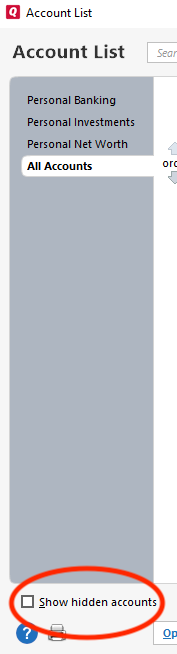
Then, review the list and check to see if there are any duplicate accounts.
Please let me know how it goes!
Thank you for your reply @Gerry Blue,
If this was a one-time issue, then the simplest fix may be to manually fill in those missing transactions. If you'd like to continue troubleshooting, then, before manually entering any missing transactions, navigate to Help>Report a Problem and send a problem report with log files attached.

Provide information for at least 3 of the missing transactions (either in the problem report or in this discussion) so that we can check the logs to see if that transaction information was sent by Fidelity or not.
If you do send a problem report, please notify me by posting to this discussion.
Thank you!
Quicken Kristina
Make sure to sign up for the email digest to see a round up of your top posts.
0 -
Hello Kristina,
I'm going to wait until tomorrow to see if the 76 transactions that are currently pending in Fidelity come down. Hopefully they do and if so, I'll manually enter the 10 missing transactions unless you'd like the log files to try to head off this happening to anyone else.
1 -
Thank you for the follow-up,
Please let me know whether those currently pending transactions download as expected tomorrow. If they don't, then we'll definitely need to investigate further.
Thank you!
Quicken Kristina
Make sure to sign up for the email digest to see a round up of your top posts.
0 -
Well, the 76 expected transactions did download. I checked the number of transactions waiting to be accepted and it said there are 76. When I accepted all, only 74 transactions made it to the register. I analyzed what was missing and found the missing transactions. There were 2 transactions for $0.80 and 2 for $0.62 which left me with a cash balance of $1.42 less than what Fidelity has. I'll have to manually enter those. I'll also manually enter the 10 missing transactions that started this thread.
This is a little off-topic so maybe it needs to be moved to a new thread but I've seen this curious behavior happen several times before and I had assumed that the fault lay with Fidelity in that they weren't preparing the download properly and never paid attention to there being a difference between the number of transactions downloaded and the number posted. I'm guessing there is some logic behind the "Accept All" button that attempts to recognize duplicate transactions and skips them when posting. If that's the case, I'd like to request that the process be modified to leave the assumed duplicates in the downloaded transactions list with some sort of flag indicating that they appear to be duplicates but giving me the option to accept them if I'm sure they're valid transactions.
0 -
Thank you for the follow-up,
If you saw 76 download, but only 74 went into the register, then I suspect that the two transactions that went missing incorrectly matched to something that was already in your register. When you reviewed those transactions in the section below the register, did all of them show "New", or did a couple show "Match"?
Thank you!
Quicken Kristina
Make sure to sign up for the email digest to see a round up of your top posts.
0 -
To be honest, I didn't scroll the whole list so I can't say for certain. I do know, however, that all of the transactions already posted had been reconciled with a capital R. Would Quicken match a downloaded transaction with a previously accepted and reconciled transaction? Please say no.
0 -
Thank you for your response,
Downloaded transactions should not match to transactions that are already reconciled.
If, for some reason, they did inappropriately match to a reconciled transaction, you should have received a pop-up to verify that you wanted to change a reconciled transaction.
Thank you!
Quicken Kristina
Make sure to sign up for the email digest to see a round up of your top posts.
0 -
"…should not…"
"…should have…"
I'd like to feel more confident but I guess that's a lot to expect. Thank you for the clarification.
If I entertain the assumption that some transactions are not mistakenly getting matched to reconciliated transactions, either Fidelity or Quicken is losing transactions in the online update process and I don't know of a way to determine which it is.
0 -
I'm not sure but maybe what you're experiencing is similar to my missing transaction discovery. I thought I was only missing SPAXX transactions, but it turned out, I was consistently missing any transactions that happened at the end of the month if I ran OSU between approximately 8pm and 10pm (Pacific Time). I was eventually able to see what was happening by comparing csv files to OFX log files. I found that end of month transactions would vanish from the Fidelity web site for a couple of hours then return later (very early) the next morning. For me, it only happened on the last day of the month during the times I would typically be running OSU. Subsequent OSUs wouldn't pick up the missing transactions because Quicken only request transactions that occurred after the last OSU but when those vanishing transactions reappear the next morning in Fidelity's Activity and Orders tab, they reappear with their original dates. That's why the transactions were missing and had to be manually entered. The solution for me was to avoid running OSUs on the last day of the month. For all other days, I'd wait until after 10PM (pacific) to run OSU. This may all change after the transition to EWC+ but I'm still on Direct Connect for now).
Take a look through my thread here to see if it helps you to troubleshoot your case of missing transactions. Open the OFX files in notepad or a text editor. They are hard but not impossible to follow.
0 -
Fidelity typically does daily transaction processing between appx 12-2am ET, give or take. That window may extend during EOM processing. During that time, there is a multistep and/or multisystem process that has to complete for transactions to be ready for download. Should you attempt to pull transaction data during this time, transactions may become "lost" in the system. This is particularly prone to happen during EOM, and Fidelity branded funds, both MMs and MFs, are particularly prone to be affected, although I've seen others from time to time. It's been going on for years. IMO, its best to wait until the following morning, but if you experience the problem, the easiest fix is to go to backup and dload in the morning. Does the trick every time.
1 -
To my recollection, I don't think I've ever updated between 12-2am ET. I pretty much only update during daylight hours - maybe early evening but not often.
To provide a little more information, the account is an inherited IRA that contains 43 GNMA notes. Each of those yields an interest payment as well as a principal payment so there are predictably 86 GNMA transactions every month. 10 of them drop on or about the 15th and the other 76 show up around the 20th of the month. Most months, there is at least one missing transaction and it's always a principal payment and it's generally one of the ones that drops on the 20th. I've thought that it might have to do with situations where there's an interest payment and a principal payment of the same amount but that doesn't always hold true.
0 -
@Gerry Blue This sounds like a separate, but possibly related issue to the one I described (which is likely what @Geobrick described in their post). Have you tried downloading a couple of days later than your normal schedule to see if that makes a difference?
0 -
Maybe. I'm in the habit of updating every day but there are occasions (vacations) when my books get neglected for a few days.
0 -
That makes sense and explains what I found in my experiment.
I never liked doing updates during market hours because I thought it would use the current day's prices for stocks at the time I initiate the update, but maybe it just uses the previous day's closing price.
0 -
@Gerry Blue, if you're curious about what's happening, you can compare the ofx logs to a downloaded csv file covering the period where you know there are missing transactions, it could help you see what's happening.
The csv file should contain every transaction (unless you download it during the times when Fidelity is doing the daily transaction processing @mrzookie explained, then the csv could be missing some of that day's transactions).
The csv files are very easy to read. The ofx logs have a record of the back-and-forth communications between Quicken and all the financial institutions where you have accounts. They use unique IDs for each security and detailed date/time stamps for each transaction being downloaded. The ofx log seems to go back at least a month and if you need look at something prior to that, you can look at the old log (the option for looking at the old log will be at the bottom of the window displaying the current log file). Go to "Help:Contact Support:Log Files" to see the ofx log. If you are able to figure out the details of the OFX log, you'll be able to find the time and date for the suspected missing transaction. If the transaction is missing, it's likely because of what @mrzookie explained. If it's not missing but was missing in your register, one possibility is it was mistakenly matched with something already in your register. In my case the missing transactions were always missing in the ofx log. In my experiment, I was able to demonstrate that transactions would go missing if downloaded during the Fidelity end of month processing. Avoiding downloads during the daily processing times (and especially the last day of the month processing) should prevent any issues (without needing to dive into the ofx logs).
0
