How to fix recent quicken errors.

ALMOST every time I 'upgrade' Quicken something goes wrong with my data file. This time, I keep getting issues where transactions from Fidelity are assigned to 'Unidentified Security'. Also, I keep getting the red slashed '0' icon on two accounts in the account list and can't download transactions, though I've 'fixed' them SEVERAL times.
Last January I had to completely start a new file, losing years of tracked data because of the numerous errors infesting this program.
Comments
-
Hello @JDPINC,
I completely understand how frustrating it can be to experience recurring errors, especially after updates. To help determine what’s causing the issues with your Fidelity transactions and the red slashed “0” icons in your account list, I’ll need some additional details:
- Where is your Quicken data file stored — is it on your local hard drive (C: Drive) or on a cloud-based/external drive (OneDrive, Dropbox, USB, etc.)?
- Have you attempted any troubleshooting steps so far? If so, what specifically did you try?
- Are you using a VPN while updating your accounts? If so, does disabling it make any difference?
- Do you have any antivirus or malware protection software running that could interfere with Quicken? If so, have you tried temporarily disabling it?
- When did these issues first start occurring?
- What is the name(s) of the financial institution(s) for the other two accounts with the red slashes icon?
- Could you provide screenshots showing the “Unidentified Security” transactions and the red slashed “0” icon in the account list?
- If needed, please refer to this Community FAQ for instructions on how to attach a screenshot. Alternatively, you can also drag and drop screenshots to your response if you are not given the option to add attachments.
Once we have this information, we can better determine whether this is a data file corruption issue, connection problem, or something else and recommend the appropriate steps.
Thank you!
-Quicken Anja
Make sure to sign up for the email digest to see a round up of your top posts.0 -
- Where is your
Quicken data file stored— is it on your local hard drive (C: Drive) or on a cloud-based/external drive (OneDrive, Dropbox, USB, etc.)?- C-drive
- Have you attempted any
troubleshooting stepsso far? If so, what specifically did you try?- Several times tried to 'fix' the connection error.
- Repairing data file
- Reinstalling quicken
- Are you using a
VPNwhile updating your accounts? If so, does disabling it make any difference?- No vpn
- Do you have any
antivirus or malware protection softwarerunning that could interfere with Quicken? If so, have you tried temporarily disabling it?- Nothing that should interfere
- When did these issues
first start occurring?- Right after 'upgrading' to the latest version R64.30 build 27.1.64.30
- What is the name(s) of the financial institution(s) for the other two accounts with the red slashes icon? Capital One and Toyota Financial
- Could you provide
screenshotsshowing the “Unidentified Security” transactions and the red slashed “0” icon in the account list?- The symbol is correct, TXT for Textron, but its name is now Unidentified Security
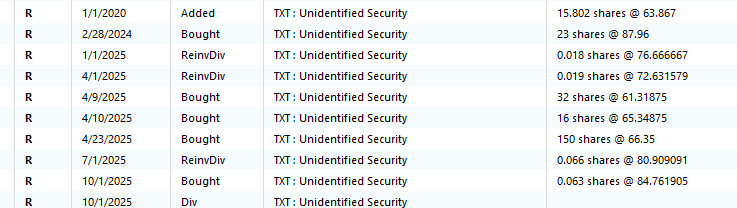
- The symbol is correct, TXT for Textron, but its name is now Unidentified Security
0 - Where is your
-
@JDPINC Thank you for the detailed information and the screenshot—it really helps clarify what’s happening.
For the “Unidentified Security” issue: can you confirm if this is occurring with a Fidelity 401(k) account? If so, there is an open alert for this issue. While there’s currently no ETA for a resolution, you can refer to this Community Alert for updates and guidance to resolve it.
Regarding the Capital One and Toyota accounts showing the red slashed “0” icon, this is likely a CC-800 error, which typically happens when an account was deactivated or a backup was restored. Please review this support article that covers this in detail. In short, it involves deactivating the affected accounts and then reactivating them through Quicken, making sure to link them back to the existing accounts where appropriate. Following that flow should restore proper download functionality.
If you try these steps and still experience issues, please contact Quicken Support for further assistance.
Thank you!
-Quicken Anja
Make sure to sign up for the email digest to see a round up of your top posts.0
