Fidelity Transactions not downloading to Quicken Classic on Windows

yesterday, when updating Fidelity accounts on Quicken Classic Personal and Business on Windows, i received prompt forcing update to 27.1.64.30, which I did. Transaction update thereafter showed prompts asking selection options for cash balance displays in Fidelity, but downloaded no transactions. The Fidelity data file in the One Step Update Summary was dated 12 AM Sept 24. I updated again this morning, no transactions downloaded. The One Step Update Summary shows no errors and shows connection to a Fidelity data file dated 12 AM Sept 25
Comments
-
Hello @will66pu,
I understand how disruptive it is when your Fidelity card transactions stop coming through—thank you for laying out the details.
Please try the following steps below and see if it resolves the issue:
- Create a backup of your Quicken file first.
- Deactivate all Fidelity accounts in Quicken.
- Revoke Quicken’s third-party access from your Fidelity account on their website.
- Reactivate the accounts in Quicken. When you’re redirected to the Fidelity site and then return to Quicken, make sure to select “LINK to existing” for any accounts that were already in your file.
Let us know how it goes!
-Quicken Anja
Make sure to sign up for the email digest to see a round up of your top posts.0 -
Quicken Anja - Since September 12th my downloading from Fidelity has not worked. I have the same problem as will66pu. I have deactivated and reactivated several times to no avail.
How do you "
Revoke Quicken’s third-party accessfrom your Fidelity account on their website." I tried searching for it and nothing pops up.I have multiple accounts linked to Fidelity and since 9/12 have been doing a lot of manual entries. I'm about ready to call it quits on Quicken.
Please advise.
0 -
Hello @ha_amin,
Thank you for reaching out!
I believe that Fidelity puts the ability manage 3rd party app access on their Data Sharing Dashboard. If you're unsure where to find that, you may need to reach out to Fidelity directly for assistance.
I hope this helps!
Quicken Kristina
Make sure to sign up for the email digest to see a round up of your top posts.
0 -
I'm noticing that the problem is with Quicken. Even Citi Card is not downloading. You mentioned Revoke 3rd Party Access as if it was a no brainer.
0 -
Anja
Repeated the steps you suggested re transactions not downloading, i.e. deactivated Fidelity accounts, revoked Quicken third party access on Fidelity website, reactivated Fidelity accounts in Quicken. Reactivation process completed, apparently successfully. Was asked to confirm handling of cash balances in Fidelity account, reactivation process completed and NO NEW TRANSACTIONS WERE DOWNLOADED from the FIdelity accounts. Manually doublechecked new transactions that were missing, and entered manually in Quicken file for time being. Mystery why Quicken would implement WebExpressConnect for this institution before debugging the connection method.
1 -
Thank you for your replies,
If you haven't already done so, per our article on missing transactions/transactions not downloading, please follow these troubleshooting steps:
- Verify that the missing transactions are showing as posted on the financial institution website.
- Verify that there are no nearly identical (same payee and amount, for example) transactions that the missing transactions may have matched with.
- Double check that the missing transactions did not download into an incorrect account.
- Make sure your account register(s) is sorted in date order, just in case the transactions did download, but are hidden by sort order.

If the troubleshooting above does not resolve the issue, then please contact Quicken Support for further assistance as they have access to tools we can't access on the Community and they're able to escalate the issue as needed. The Quicken Support phone number can be found through this link here. Phone support is available from 5:00 am PT to 5:00 pm PT, Monday through Friday.
Thank you for your reply,
Is this impacting all of your accounts, or just some (for example, only Fidelity and Citi)? Are you seeing any error messages/codes when you try to update your accounts? If not, what is happening in your Quicken? When did the issue start? Did the issue coincide with anything else, such as a program/computer update or an unexpected program/computer shut down?
If you haven't already done so, I recommend following the troubleshooting steps in our article on missing transactions/transactions not downloading, to see if it helps resolve the issue:
Thank you!
Quicken Kristina
Make sure to sign up for the email digest to see a round up of your top posts.
-1 -
Kristina, the Fidelity account not downloading transactions is a brokerage account. There is only one Fidelity account and it is the only account with this problem. I have directly, online, confirmed the missing transactions were posted.by FIdelity. Transactions are in proper date order in the Quicken transaction register for this account, and I have reconciled the register with online balances up to the point of missing transactions,
The ongoing no downloading transaction issue with Fidelity accounts started September 24 after installing the latest Quicken update, Verion 64.30, Build 27.1.64.30, Since begin August I have been using WebExpressConnect with Fidelity and that connection had been downloading transactions from the FIdelity account without issues until that update.
0 -
Thank you for your reply @will66pu,
If the troubleshooting did not resolve the issue, then please contact Quicken Support for further assistance as they have access to tools we can't access on the Community and they're able to escalate the issue as needed. The Quicken Support phone number can be found through this link here. Phone support is available from 5:00 am PT to 5:00 pm PT, Monday through Friday.
I apologize that I could not be of more assistance!
Quicken Kristina
Make sure to sign up for the email digest to see a round up of your top posts.
0 -
Additional detail to my last post: the date of the last successfully downloaded transaction from the Fidelity account was September 19, so the downloading issue started no earlier than that date.
0 -
I echo everything will66pu has said. My download problems started on September 12th and have not consistently been resolved. To be clear I have been a Quicken user since the 90's and have been through a few hiccups along the way. This is the worst that I have seen it. I will call customer service to see if they can help. Thx.
0 -
Kristina - Followed your recommendation - deactivated, revoked, reactivated, lined to existing" and nothing is working. Call customer support?
0 -
Thank you for your reply @ha_amin,
Yes, if the troubleshooting steps did not correct the issue, then I recommend contacting Quicken Support directly. They have access to tools we can't access on the Community and they're able to escalate the issue as needed. The Quicken Support phone number can be found through this link here. Phone support is available from 5:00 am PT to 5:00 pm PT, Monday through Friday.
I apologize that I could not be of more assistance!
Quicken Kristina
Make sure to sign up for the email digest to see a round up of your top posts.
0 -
I'm getting no Fidelity Downloadsfor any investment accounts since 9/26
0 -
Same here. I have several Fidelity accounts and the last successfully download was Sept 22. Have tried de-activating and setting up the downloads again. The process works fine, but no transactions are downloaded.
0 -
Thank you for letting us know you're also seeing an issue with transactions not downloading. If you haven't already done so, please try to troubleshooting I listed in my earlier post.
If that troubleshooting does not resolve the issue, then I recommend that you contact Quicken Support directly for further assistance, as they have access to tools we can't access on the Community and they can escalate the issue as needed. The Quicken Support phone number can be found through this link here. Phone support is available from 5:00 am PT to 5:00 pm PT, Monday through Friday.
I apologize that I could not be of more assistance!
Quicken Kristina
Make sure to sign up for the email digest to see a round up of your top posts.
0 -
Multiple reauthorizations finally got all accounts to download.
1 -
Thank you for the update,
I'm glad to hear they're finally downloading!
If you need further assistance, please feel free to reach out!
Quicken Kristina
Make sure to sign up for the email digest to see a round up of your top posts.
0 -
Called Quicken Support concerning Fidelity brokerage transaction downloads after doing all of the "trouble shooting" actions described above, they were no help either. Sent me an email concerning "Fidelity net benefits!"
0 -
This is appalling - they roll out software without going through testing, and when I called and spoke with a supervisor Douglas he was inquiring why I called 30 minutes before they shut. This needs to be escalated to higher management in Quicken. I have been using Quicken for over 20 years and am evaluating whether to continue given the lack of concern for this widespread problem.
0 -
Hello @theodoredyer,
Thank you for sharing your experience! I'm sorry to hear that Support wasn't helpful when you contacted them. Are the problem accounts with Fidelity NetBenefits?
To help troubleshoot, I checked our internal tools, and it looks like you have been getting a lot of CC-800 "account not found" errors with multiple financial institutions. Are you seeing those errors on your end? Those errors may be the reason your accounts aren't updating.
If you haven't done so already, I recommend following the steps in this article on CC-800 errors (linked below) to resolve the issue:
Hello @viraf,
Thank you for sharing your experience. I'm sorry to hear you had a negative experience with Support. I can see you've had a few recently contacts with them. Do you have the ticket number handy for the one you're referring to? I do see that the issue you reported with being unable to download Fidelity transactions has already been escalated and is being worked on (CTP-14734).
Thank you!
Quicken Kristina
Make sure to sign up for the email digest to see a round up of your top posts.
0 -
I echo everyone's sentiments here. I haven't been able to download from Fidelity since 9/12. About ready to give up on Quicken. I called customer service and they said there is an open ticket on Fidelity and that they already know about the issue. They did not provide ETA. I have gone through all the suggested fixes by professionals on community support and none of them have helped.
Today - I got a message that 26 transactions had been downloaded across multiple Fidelity accounts, but I could not see them in my download window, or anywhere else. Has anyone else come across that problem.
I have other issues with Fidelity and the classification of Cash. After 20+ years - these are all new issues. Any suggestions are welcome.
0 -
Thank you for your reply @ha_amin,
There was a known issue with missing transactions from Fidelity, but that issue was marked resolved on the 15th of September. See this alert for more details:
If the issue is still persisting, please navigate to Help>Report a Problem and send a problem report with log files attached.

In addition to the log files, in order for our teams to investigate this issue, they will need the following additional information:
- At least 3 transactions (date/payee/amount) from each problem account that are showing posted on the financial institution website, but are not in Quicken at all (not even manually entered)
- The last 4 digits of the affected account numbers.
- A screenshot showing the missing transactions as they appear on the financial institution website.
- A screenshot showing that those transactions are not in your Quicken.
Note - Problem reports allow a maximum of 10 attachments per report. If you need to send more than 10 attachments, please use a second problem report for the additional attachments.
I have other issues with Fidelity and the classification of Cash.
Please create a new discussion to address the additional issues you are seeing.
Let me know when you send the problem report.
Thank you!
(CBT-869)
Quicken Kristina
Make sure to sign up for the email digest to see a round up of your top posts.
0 -
I spoke to Fidelity yesterday and according to them, nothing has been resolved. Unless you know something that they don't know, they claimed they are getting a lot of calls with people complaining about the Quicken's link to Fidelity. He said Fidelity was working collaboratively with Quicken programmers to reestablish the connection. Fidelity changed its connection requirements to Web Connect +, to be more secure, which threw everything into disarray. It would have been nice to know this from day one, as opposed to be given solutions that clearly don't work. Fidelity gave an ETA of months end and said the change was rolled out over time and didn't impact every Quicken account at the same time. I have had problems since 9/12. We'll give it some more time. If the connection doesn't get fixed, the value of Quicken won't be there for me.
0 -
I am also having issues with complete absence of transaction downloads into multiple Fidelity brokerage accounts in Quicken since late July when I transitioned them to EWC+. For several days in late September a few transactions did download. I have de-activated and re-activated my Fidelity accounts in Quicken so many times that I think can now do it blindfolded! I have no issues with my other accounts that use EWC+ (Schwab; TD Bank). I am using Version R64.30 on Windows
0 -
Hello @AndrewLC,
Thank you for reaching out. To start troubleshooting, please follow these steps from our article on missing transactions/transactions not downloading:
Be sure to follow these steps in order:
1. Go to Edit > Preferences > Downloaded Transactions. The option Automatically add to investment transaction lists needs to be unchecked.

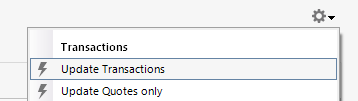
2. Refresh your online account information by clicking the Actions Gear Icon on the upper right of the register, and select Update Transactions. Follow the on-screen instructions to complete the update.
3. Confirm that the Sort Order in your account is by Date; just click the top of the Date column in your account register. It's possible the transactions are in your register, but not where you thought they'd be.
4. Try refreshing your login session: To do this, go to Help > Refresh Sign in. After completing the log-in process, trying running a One Step Update again.
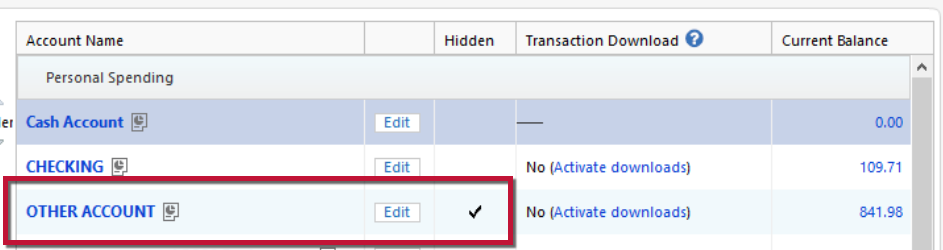
5. Go to Tools > Account List and check Show Hidden Accounts at the bottom left. Confirm the missing transactions haven't been added to a hidden account by clicking on the name of any account that appears with a check mark in the Hidden column.
Please let me know how it goes!
Quicken Kristina
Make sure to sign up for the email digest to see a round up of your top posts.
0 -
Hi @Quicken Kristina Thanks for the suggestion. Unfortunately this was not successful. I also had a long and very helpful session with Pablo M from Customer Support yesterday. We tried a lot of strategies which, sadly were not successful. He left with some screenshots of my accounts for further study.
0 -
Thank you for your reply,
I can see that you worked with Support more yesterday (24 October) and the issue was marked resolved. Are your transactions downloading now?
Thank you!
Quicken Kristina
Make sure to sign up for the email digest to see a round up of your top posts.
0 -
I have 11 accounts with fidelity which worked fine up until Quicken's debacle over the past two months. I have deactivated all accounts via quicken and via fidelity website and reset them all multiple times but NOT ONCE can I get them all to download transactions. There's always at least two random accounts that don't download after the reset. [Removed - Rant]
0 -
Hello @Anony1,
Thank you for letting us know you're seeing an issue with missing transactions. If you haven't already done so, please try the troubleshooting steps from my earlier post (linked below).
Please let me know how it goes!
Quicken Kristina
Make sure to sign up for the email digest to see a round up of your top posts.
0 -
I've tried the variety of troubleshooting steps floating around and this is not resolved for me- haven't been able to download fidelity transactions since 9/30
0

