zzz-Fidelity Updates
Comments
-
For what its worth, I created a template copy of my current Quicken file, installed Quicken on a second desktop, and used the new copy file to run Quicken and update my Fidelity accounts. After deleting the duplicate transactions from the past few months, my accounts and share balances match exactly whats on my Fidelity page. (I have 7 accounts. 1 brokerage and 6 IRAs.) All of my cash balances at the bottom of the register are correct, as well as when I click on "holdings". I initially got a message stating my money market securities in Quicken and from Fidelity did not match, but I ignored it and it hasn't reappeared since. Its possible in the future I may have to manually change those transactions to appear as cash and not a security, but I won't know till next month.
BTW I also reconnected the OSU for all of my banking accounts with no issues. My account pages load much quicker on this second computer, especially the investment accounts. I think in a few days I may completely uninstall Quicken from my original computer, then re-install it and use this new file. Hopefully it will be as snappy.
0 -
I was forced to switch today. A nightmare. Hundreds of security mis-matches in several equity accounts that had 0 mis-matches before the change to EWC+. I purposely delayed the switch to EWC+ due to all the warnings on the the community forum and now I am stuck as well. Have no idea how to reconcile so many mis-matches.
0 -
Here's a Sold transaction for FIGXX money market fund in my IRA which hasn't been downloaded yet (I'm using EWC+):
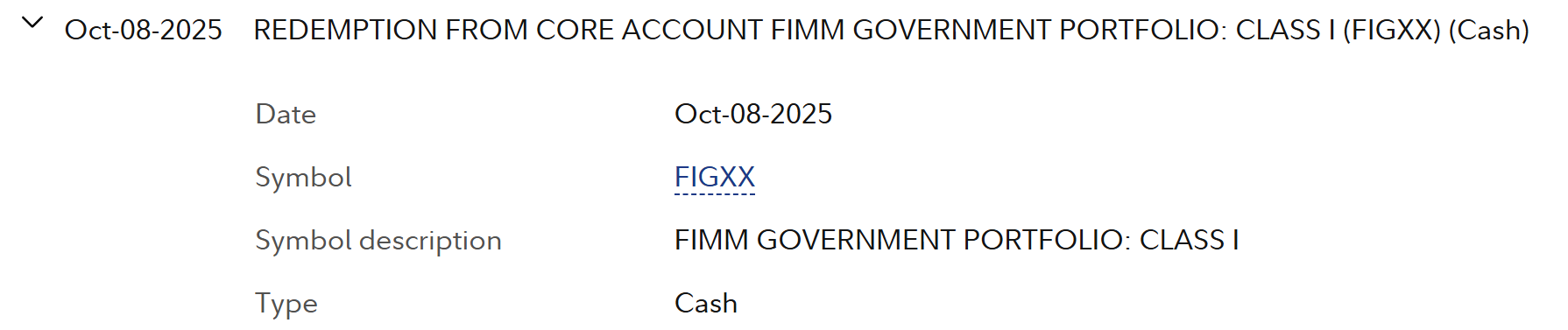
Something fishy was going on, though, because there was a security mismatch with this fund I needed to resolve.
0 -
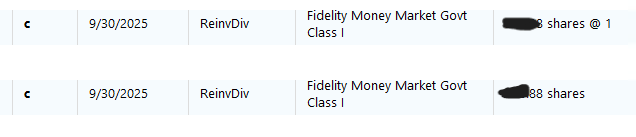
I just discovered that a transaction downloaded to my 401(k) was duplicated twice in an old account I'd long closed:
 1
1 -
Most of the security mis-matches are due to duplicate entries. An there are hundreds. This will take days to resolve. Totally unnecessary. This migration was not handled properly.
0 -
This afternoon 3pm pt, I too received error OL-297-A on my zzz-Fidelity DC connected accounts.
In my EWC+ connected file the recent OSU still has problems with incorrect "Action" and missing Categories.
All of my International Stocks are being downloaded as Deposit with no Category assigned. My US Stocks are correctly being downloaded/posted as DIV and assigned to _DivInc category.
This is a real problem and requires a manual intervention each day or my Dividends total for tracking and tax reporting are incorrect.
How do we get these real examples to Quicken development. These are clearly a serious issue that needs attention. I have posted a similar message on the (https://community.quicken.com/discussion/comment/20514719#Comment_20514719) thread and included a couple of the Quicken moderators.
Sample below:
 "No Matter Where You Go, There You Are"Windows 11 Pro, Quicken SubscriptionIntel Core i7-12700, 32GB Ram0
 -
I believe you may know everything is ok if you check the "Online Center" "Holdings" tab to ensure that "Your Quicken and Brokerage Holdings are in agreement" for each Quicken account. Also check "Account Details" "Online Services" tab for the "Reset Money Market securities/cash options" box for each Quicken account.
0 -
I tried this process and no success on updating my DC Fidelity connected accounts.
"No Matter Where You Go, There You Are"Windows 11 Pro, Quicken SubscriptionIntel Core i7-12700, 32GB Ram0 -
After having a horrible experience in the beginning of this process and falling back to my DC backup, I finally bit the bullet and converted today: an investment account, a cash management account with, among other things, quite a few CDs and an IRA (NetBenefits). Thanks to all of you on this forum, it SEEMS to have concluded much better than the first attempt. The jury will remain out on that for a few days, but fingers crossed.
In hopes of helping those who follow, I'll lay out what I did and what I found. As far as process, I had just completed a full third-quarter reconciliation process, so I knew that Quicken, Fidelity online and the Fidelity monthly statements were all in 100% agreement as of September 30. Knowing that makes the rest of the process MUCH simpler.
I first did a final one-step update using DC. I then accepted all those transactions, compared holdings successfully, and created a "before conversion" backup file. So I knew before converting that Quicken and Fidelity online were in agreement as of the moment before conversion. Again, quite helpful information.
I then did the conversion process. It recognized the two Fidelity accounts but not the IRA, which I had to match manually. Be sure you know the last 4 digits of each account number (e.g., the investment account is 0324) so that you can get this right.
It claims to have brought down transactions for the previous 6477 days. Fortunately, only the last 30 days of those showed up in Quicken. So there were only several hundred of them…each one of which SHOULD have a corresponding entry in Quicken already from DC. I didn't count, but subjectively I'd say that 10% of them "matched" or "near matched." For many of the others, a two-day difference in the date may have accounted for nonmatching (although why wouldn't that be a "near match"?) but the majority of them LOOKED identical in all regards (date, transaction type, security, amount) yet didn’t match…showing up instead as “new” transactions.
Logically, it SHOULD have been safe to simply delete all of these transactions; however, since I'm suspicious of these conversions, I looked at each one individually to ensure that they did, in fact, have a match in the Quicken file. Other than date variances (e.g., came down from DC as 10/4 but came down from EWC+ as 10/6), all but a few were confirmed to match; thus, safe to delete.
The two clear mismatches in my accounts were (a) a problem with foreign dividends and (b) a change, possibly unintentional, in FDIC cash handling in the cash management account. The dividends on foreign stocks, such as Chubb (CB), came across as “Deposits” rather than dividends and would have required manual correction if they hadn’t already been there from DC. In the cash management account, the FDIC holdings are shown as “cash” but now come across in EWC+ as a new $1 security (for those with larger cash balances than I, it might well be multiple securities). I had to manually enter a transaction to buy this security out of my cash balance. Doing so left $0.02 unaccounted for in my cash balance. I’ll have to wait for the October statement to see where those pennies went, or should have gone.
In the NetBenefits account, it didn't recognize one of the five funds as a match, so I had to hook them together manually.
At the end of each account, I created another backup file so that I could fall back only one step instead of all the way back if I messed up during the process. At the end of the final account, I compared all Quicken holdings to all Fidelity holdings and got across-the-board matches. I’m still holding on to the DC-fed backup just in case something unexpected rears its head next week, although I suspect falling back again won’t be a viable option at this point.
@Quicken Anja @Quicken Kristina Quicken and Fidelity need to figure out the foreign dividend bug – that will be a perpetual problem until fixed.
I’m guessing that the FDIC cash handling in the cash management account may be a permanent artifact that doesn’t match the monthly statement. It would be good if it did (matching the monthly statement SHOULD be the goal, I think), but we can work around this if necessary.
This has been quite a major train wreck for all of us, but perhaps the car with the instantly-fatal toxic gas may not have ruptured. MAJOR thanks to all of you who helped make this survivable.
5 -
Thank you for the follow-up @BrittMayo,
I'm glad to hear that things went more smoothly this time.
Is the foreign dividend bug you're referring to an issue where foreign dividends are reflecting as deposits instead of dividends? If not, then please provide more information about what you are seeing.
Thank you!
Quicken Kristina
Make sure to sign up for the email digest to see a round up of your top posts.
0 -
The issue mentioned by @BrittMayo is the same one I have posted on this and another thread.
Note the screen shots I provided
"No Matter Where You Go, There You Are"Windows 11 Pro, Quicken SubscriptionIntel Core i7-12700, 32GB Ram2 -
Thank you for confirming @Movie Nut,
I can see that specific issue is being discussed in this separate discussion:
To contribute to the investigation of this issue with foreign dividends downloading incorrectly, please navigate to Help>Report a Problem and send a problem report with log files attached. Please also include screenshots showing how the problem transactions appear on Fidelity's website and how they are downloading into your Quicken. Please note that problem reports are limited to 10 attachments. If you need to send more than 10 attachments, please use a 2nd problem report for the additional attachments.
Thank you!
(CBT-862)
Quicken Kristina
Make sure to sign up for the email digest to see a round up of your top posts.
0 -
@Quicken Kristina Thanks for pointing out the other discussion thread. I have posted a response there.
"No Matter Where You Go, There You Are"Windows 11 Pro, Quicken SubscriptionIntel Core i7-12700, 32GB Ram1 -
OK, with one exception Quicken Mac is seemingly working as expected and matches Fidelity online. But Windows has placeholder issues.
All the accounts, etc match Fidelity online but I have three placeholders I have no idea how to resolve. These are the same as above, just all now saved as placeholders.
I have tried deleting one, then it throws balances off. I cannot figure out how to edit these without affecting the CORRECT balances.
So look at this:

The two in green were corrections that are made and were needed to balance accounts. How do I fix that placeholders now without changing anything?
The first one I do not understand. Makes no sense that it would need this large an adjustment to be accurate, but accurate it now is. How to I fix this one and clear it? The cost is $1 a share, but if I do that it adds more to the balance that then becomes inflated. In fact it looks like all three errors are missing costs. Can I enter $0.00? Any other way to clear the placeholders?
I never did understand placeholders. Fortunately it has been years since the last ones and hopefully years until I see another.
0 -
I have never reconciled my investment accounts.....I just compared to online balances and until this, have never had issues.
I see the advice to reconcile accounts before converting (which I continue to wait to do).
I did look at reconciliation documentation which assumes something current, but I have years of transactions..closed positions, etc. How would it work? Just tieout existing positions and it will mark all?
Very familiar with the reconciliation concept, just not sure what it will do in Quicken given all the history.
But if quicken downloads transactions to the download area after conversion which is how I have it set (and what happens now), perhaps I don't have to worry about it? I can ignore duplicate or old transactions?
Thanks
0 -
OK, I read more. Still confusing.
The first above IS my CASH account. Would Reset in account details for how cash is handled fix this without changing cash balance.
The other two now have the proper number of shares. If I adjust shares and accept these values will that clear the placeholder and keep an accurate value?
I could try those, but seems no way to "undo" so been restoring from backup when what I try is not what I need.
0 -
Yesterday evening I was forced to switch from Direct Connect to Quicken Connect. I've had really bad experiences in the past, and stayed on DC for as long as I could. I tried to connect last night, and was unsuccessful, as the Fidelity page I was sent to by Quicken wouldnt render properly and hung. This morning before calling Quicken help, I tried one more time, and to my surprise I was able to connect to Fidelity. The downloads occurred on all my accounts, I was expecting the worst, as in the past I had issues with the way mutual funds such as FZDXX were handled caused mismatches in my actual balance and those reported by Quicken. I reconciled my account after the download, and to my immense surprise all of my accounts reconciled perfectly. Keeping my fingers crossed.
1 -
OK, some progress.
The bottom two were duplicate transactions created from the EWC+ conversion. Deleting one of each dupe and deleting the placeholders cleared the errors and kept accurate balances.
BUT, although I see dupes for the Cash Account as well, it APPEARS that deleting the dupe WILL change the proper balance.

Blue is the proper balance.
Green are the dupes.
Red i have no idea how was created, but was needed for the proper cash balance.
If no one can tell me best what to do, I'll assume I can delete the dupe, delete the placeholder and edit the XLN to make the cash balance accurate again?
Much too much work for us Beta testing cash paying customers. I'm exhausted.
If no better ideas, i will try that in the morning.
0 -
The biggest really big issue problem I had when I converted to EWC+ (on 9/20) was literally hundreds of duplicate charges in my Cash Management Account (CMA) and all were entered automatically in the register and marked "cleared" despite the fact that my registers are set to never enter transactions automatically. I decided to go to the backup file that I had made right before the conversion and then do something I had never done before for my CMA. I reconciled the account like a credit card account. I put today's date as date of statement and closing balance equal to what the quicken register showed (which was the same as Fidelity website). After the reconcilation, every single transaction showed the "r" for "reconciled". Then I converted again to EWC+. Again, I get hundreds of old transaction downloaded, but I sorted on the "clr" column which resulted in all the new transactions regardless of date being listed together and then I deleted all the transactions marked "c", keeping all the ones marked "r". I think I also got a few new placeholders which I simply deleted. I then compared the result to Fidelity's web site and determined that all was well. Totally messed up way to work around a major problem, but it worked and since then all is well. Some of the other accounts also had some duplicate transactions downloaded, but the quantity wasn't many and they were not entered automatically into the transaction register so it was easy to delete them. So reconciling investment accounts before converting to EWC+ may be called for.
One more suggestion — after EWC+ conversion, check every account before you spend time fixing things. If anyone looks totally messed up, you can go back to your backup before you spend much time correcting anything. And ALWAYS do a full backup before the conversion.
3 -
@Robert, thanks that is outstanding! I don't have CMA just regular brokerage so maybe I will be lucky.
0 -
Speaking of Cash Management, that seems to be root of this last Placeholder issue. Here it shows lots of transactions that may have been before this Money Market became my cash account. Placeholder seems to be bringing the Gov Money Market holding to 0 while keeping the cash accurate. If I delete the placeholder, It adds back Gov Money Market as a security, not cash.
So true, I do not own shares any longer. And cost is correct. Just a placeholder that I cannot seem to modify to close or if I delete creates more errors than leaving it there.
Make sense? All the rest I solved. Just this one.Seems I should be able to tell Quicken that which once was in a security is now in Cash. Stumped though.
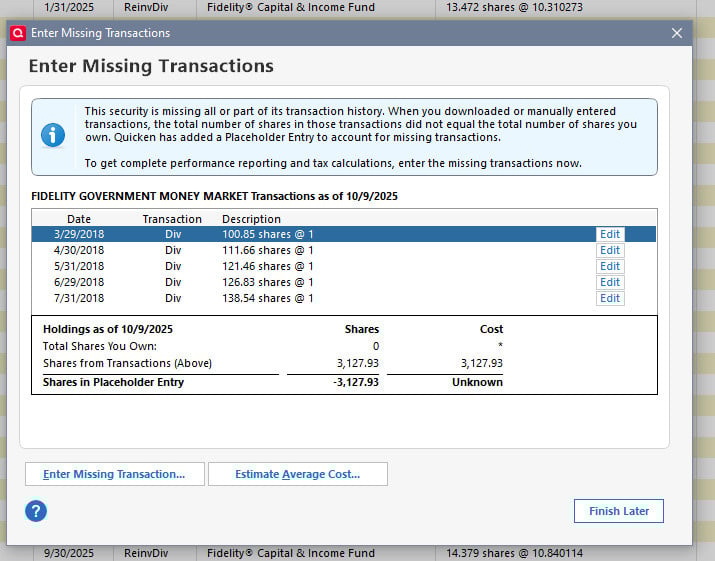
BTW, converting Mac Quicken did not do this. No dupes, no placeholders, accurate balances. Interesting, eh?
0 -
I get new CUSIP ID for one of 5 holding now. This is after change to EWC+
How do I replace all prev years of transactions to use this new Security?
I can't replace one by one as too many transactions.
Best Regards0 -
Here we go again… I was finally forced to switch to EWC+ (again) on Oct 8 due to Fidelity shutting down DC. And the latest SoldX transaction in my Cash Management account is missing. Quicken tracks my Fidelity Cash Management account as two Quicken accounts - "XXX and XXX-Cash." Fidelity automatically sells off mutual fund shares for debits — and these come down as SoldX transactions in XXX account and deposits into the XXX-Cash account (along with debits in the XXX-Cash account, obviously). Worked just fine with a DC connection. Now, I'm just getting the debit transaction, with no matching SoldX and deposit transactions.
It just boggles my mind that over two months later and 40 pages in this thread and this is still buggy. Even a "Reset Account" didn't work this time. I'm sorry… but yes, RANT!
0 -
Today is the second day after conversion to the new method for me. I AGAIN got duplicate historical transactions that I had to delete manually, one by one clicking on the dropdown since no keystroke seems to work.
3 of 4 IRA accounts do NOT have the Details/Online button option to reset cash and I have a MMF issue on all accounts.
Using a separate data file I got the old zzz method to work yesterday morning at 7:30 AM EDT even though I know the email said it had been retired. This morning early I'm getting an error with that method again but will try later.
[Removed - Rant/Language]1 -
Yes and no. For my core MMF that is FDRXX, holdings are shown as correct even though FDRXX is not the designated cash balance.
Deluxe R66.23, Windows 11 Pro
0 -
I suspect I just bought a little time during the forced cutover.
Deluxe R66.23, Windows 11 Pro
1 -
Rollover IRA:FZDXX, which is not a Core Account option, was being identified as the Core Account for this account. As of a week ago, this is no longer an issue. However, FDRXX, which is the Core Account MMF for this account, is being downloaded as Shares and not as Cash Balance…but the total account value is correct. In addition, there is no option to reset the Core Account for this account."
FDRXX is incorrectly as a security rather than the core MMF for my traditional IRA as well as of 10/10/2025.
Deluxe R66.23, Windows 11 Pro
0 -
Good news! I My non-public NetBenefits 401k Friday prices updated at 8:20am EST today. This is the earliest update I've seen since my switch to EWC+.
1 -
OK, as some of you know I run Quicken both Mac and Windows. Long story why and may not be forever but it is VERY interesting now seeing how they react differently to this Fidelity EWC+ change.
Ironically, the 10th is always a big day for me in Fidelity. So my issues are:
- The above mentioned Placeholder in Windows I would love to resolve. All details in previous posts above.
- Categorization of transactions - and different in Windows and Mac
This is Mac this morning:

I have to assume that Payment/Deposit and Transfer is just wrong for the LTCG. I was able to change this to Long Term Capital Gain and edit the security to match Fidelity Balanced. But it came in worng…
I shall also "assume" that The Dividend and Buy ARE correct.
In Windows, same transactions:

Here I WAS NOT able to make the change in the drop down to LTCG. Anything for "Long-Term" is not in the drop down. How to fix this? I do not seem to have choices available
Let me know if my thinking is incorrect.
0





