New Fidelity Connection - Incorrect # of Shares/Missing Investment Accounts [Mac]
Answers
-
Further update: The share counts on the two funds we own are both off—one by about 8%, the other by not much but still wrong (0.2%).
0 -
My DC connection stopped working this morning. All other accounts updated through OSU but not Fidelity.
So I'm now moving to manual updates.
I've sent an email to my Fidelity advisor letting him know that if the issues are not resolve soon, I'll be moving my Fidelity investments to ETrade where I don't have these problems.
0 -
What a horrible experience. I got an email TODAY telling me that the DC had been shut down on the 8th. Got an email on 6/30 saying it would happen but no date yet. Now Quicken shows double the number of shares. It keeps downloading updates as a new security (even though they're the same).
0 -
OK, still could use help with what to do with my Transfer Errors I posted a dozen or so posts back. Also would be nice to know where the choose cash account is in Mac. But, believe it or not, with the exception of those errors. everything SEEMS to be working in Mac and matched Fidelity online. Not so in Windows, so will post for help over there.
0 -
Hello @phil,
Thank you for reaching out! If you're having issues with duplicate securities inflating values in your account(s), you may want to backup your Quicken file and try merging the duplicate securities with the original securities. That should force Quicken to recognize that those securities are already in the account. For information on merging securities, please see this help article: .
Hello @Bob.,
It's possible that the transaction downloaded with the wrong category because the new connection type has the data formatted differently, which can change the way Quicken sees newly downloaded transactions. Manually correcting it and creating memorized payees can help teach Quicken the proper way to handle such transactions in the future.
For the transactions in your screenshot (several posts back, to view the post, click here), did they change when you had to update the connection type for your accounts, or were you just re-examining them? Most of the transactions in that screenshot look like balance adjustments. Those typically reflect as transfers back into the same account, so I would assume that the category for those is correct. Since I don't know the story behind the misc income transactions, I wouldn't be able to weigh in on whether they are categorized correctly or not.
I hope this helps!
Quicken Kristina
Make sure to sign up for the email digest to see a round up of your top posts.
0 -
Thanks Kristina.
On those I honestly do not know. Never saw them before, but might have been there. Can;t imagine what a "balance correction" would be or why so many. One I could almost understand.
You'll find my other experiences peppered around the threads here. And the differences between how Mac and Windows handled the EWC+ transition. Mac much easier. A few recent dupes. A miscategorization. Windows was tricky to correct. Needed the help of the folks here, but got it. Even the best of the Placeholder FAQ's by Kathyrn would not have had me deleting the XIN without help here.
Once the frustration subsided, I find it interesting that QWIN and QMAC handle the identical accounts and data so differently.
And even feature sets do not match - such as choosing which fund is to be treated as cash.
I am hoping I shall be stable now. No way to tell until a month of things get under the belt. I'm doing some buys and transfers Monday so will be a good test day Tuesday.
1 -
On those I honestly do not know. Never saw them before, but might have been there. Can;t imagine what a "balance correction" would be or why so many. One I could almost understand.
A balance correction would normally be done during a cash reconciliation. Generally investment accounts go out of balance because some transaction didn't get downloaded, or got recorded incorrectly. If the missing transaction is recent and can be found in the FI's website or statements, it's generally best to correct the data - supply the missing transaction. But if the variance is small, and you have confidence the bank's information is correct, or you haven't reconciled in a LONG time, it's sometimes better to just let Quicken fudge the numbers.
When you do a reconcile, and you're out of balance, Quicken gives you the option to adjust your balance. If you click Done indicating the Statement Ending Balance is correct, and your Cleared Balance is wrong (intentionally or by accident), it then offers to generate the balance correction record. I always choose "Finish Later"
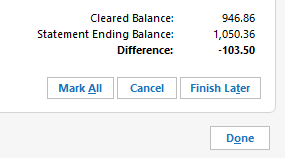
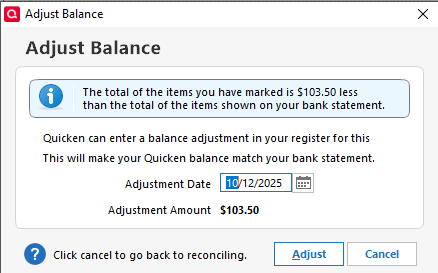 0
0 -
Thanks Bob. Notice these are all 2018 if I recall. And I have never reconciled and I have always matched Fidelity online. So keeps me confused.
0 -
OK, found some of this!!
A few were Cash Back credit card deposits miscategorized. Cleared a few.
Some as you will see, are art the beginning of opening this account. seems like with the new info, populated from reconciling (thanks!) I should be able to straighten this out. Just not sure how.

Surprises a 0.00 opening balance needs correction. The others should balance out, but need "something" to clear the errors. this HAS to be since EWC+ I'll play some more. Progress.
0 -
Made the opening cash value CASH and fixed that one.
Just these now and two small dividend incomes I cannot correct.
0 -
Thank you for your reply @Bob.,
It looks a lot like those balancing cash adjustments were done to correct the cash balance after those shares were purchased. If you've never reconciled the account, is there any chance those were added manually? Should those buy transactions have been Add Share transactions to correct the share balance without impacting cash?
Thank you!
Quicken Kristina
Make sure to sign up for the email digest to see a round up of your top posts.
0 -
Reconciled the account now, Kristina. All done except for these.
Windows seems to show the same, except no errors in the same transactions. No matter how I try to change the Mac side,, it will not clear the transactions.

Point being, they may be exactly right/ Just showing an error I cannot clear with the red arrow fields.
0 -
OK, made the two "Balancing Cash Adjustments to "Cash" and error cleared. Looking at the last one now. But we shouldn't have to do this. Agree?
0 -
I even though that could have been an RMD but that won't remove the error either.
0 -
OK. I made it a Payment/Deposit and it cleared. But I have no idea if that is correct. And if it is, it differs from QWIN.
All reconciled, all errors cleared.
2 -
Although there are some inconsistencies, I believe my issues with the new connect method seemed to be fixed. I have waited awhile to post this.
In a brokerage account, proceeds from sales go FCASH - which is a consumer unfriendly move since it has a low interest rate - my broker will manually transfer FCASH to FDRXX for me. FCASH shows up as "Cash" in Quicken and now FDRXX shows up in the Quicken register (it was totally missing before). When the dust settled there was a $36 difference between Fidelity and Quicken. I adjusted the balance and so far so good.
In an IRA account, proceeds in Fidelity go to "Cash" which is held in FDRXX - no FCASH monkey business. I see the FDRXX in Quicken now. Again I had to adjust the balance once, but everything has been stable for a couple of weeks.
I think I will always check both Quicken and Fidelity registers for the foreseeable future to make sure there are no more issues.
I'm not a very active trader or use Fidelity like a checking account, so for how I use Quicken, I'm in an OK place.
0 -
@Quicken Kristina I am still experiencing problems. Briefly, my Fidelity holdings in two retirement accounts that I track via Quicken Classic Mac connection, have swung from being overstated by roughly $1M to understated by a $1M, a $2M swing. This is a mess. I am frustrated that there seems to be no fix.
0 -
This content has been removed.
-
Conversion worked ok but some transactions come in wrong which might not having to do with the new download method.
Examples: Some dividends come in as merely a deposit transaction instead of a dividend transaction. In which case the name of the security is in the comment field.
In another case a Long term CG (reinvested) came in the the LT CG. (ok)
But instead of a Buy transaction with that cash to buy more shares, the 2nd transaction came in as a Withdrawal of that cash.
0 -
Hello All,
I am closing this discussion because it is overly long and has multiple issues mixed together, which can make it difficult to follow.
If you are having issues with Fidelity accounts in your Quicken, please review this alert:
If the issue you are encountering is not listed in the alert, please start a new discussion.
Thank you!
Quicken Kristina
Make sure to sign up for the email digest to see a round up of your top posts.
0


