zzz-Fidelity Updates
Comments
-
Hello @berryjt,
I'm not able to replicate the issue you describe with checking for updates claiming R53.32 is the most current. This may be a program issue. If you haven't already done so, I recommend that you uninstall Quicken, then redownload and install it again.
Please let me know how it goes!
Quicken Kristina
Make sure to sign up for the email digest to see a round up of your top posts.
0 -
@Boatnmaniac My first OSU attempt with the DC connected file failed. I then executed the steps described in -
Next OSU with Fidelity DC File processed normal.
"No Matter Where You Go, There You Are"Windows 11 Pro, Quicken SubscriptionIntel Core i7-12700, 32GB Ram1 -
@berryjt - Perhaps the reason why your QWin installation is showing 53.xx as the current version is because it is out of sync with your Cloud Account or your Quicken.com account. Have you tried going to Edit > Preferences > Quicken ID & Cloud Accounts > Sign in as a different user > yes > Sign Out > then sign back in using your current Quicken ID and PW? Doing this will resync your Quicken installation, your Cloud Account and your Quicken.com account with each other.
If that doesn't fix the issue and give you the opportunity to update to R64.30, then you could download and install the R64.30 Manual Patch Update file from . In that Support Article you can hover the cursor over the US Manual Patch Update link to see the URL which will have the version of the file that will be downloaded. (I actually prefer to update my Quicken installation this way because for me it seems to perform the update more reliably and with fewer update issues encountered.
Let us know if any of this helped you to update your installation to R64.30.
Quicken Classic Premier (US) Subscription: R66.23 on Windows 11 Home
1 -
I came across a very comprehensive explanation of placeholders earlier today - have you seen this?
0 -
I can confirm this as well, with Quicken for Mac using Quicken Connect (EWC+). In my case, the download was done well after the transaction took place, so it had nothing to do with any overnight processing glitch.
At Fidelity, the automatic sale (of FZDXX, my non-core money market fund) is represented as:
"REDEMPTION FROM CORE ACCOUNT FIDELITY MMKT PREMIUM CLASS (FZDXX) (Cash) Amount: +XXXX.XX Cash Balance: $xxxx
The text is kind of confusing - "redemption from core" but then it calls it FZDXX. It's core-ish, a backup fund to the core.
The next transaction at Fidelity is the activity that the money was needed for - in my case, it was a transfer out. It could have been a purchase of something, though.
What remained on the Fidelity positions page was the remaining balance in FZDXX. and no entry for the Cash/Core account (FDRXX) at all - it had been fully emptied. (When the core account has a $0 balance, Fidelity doesn't even list it as a position.)
Quicken just shows a single transaction - the activity itself (in my case, the transfer out). It treats it as if that money was already entirely available in cash, and does not show that any money came out of FZDXX.
The result is that in Quicken, the balance in FZDXX remains too high since Quicken showed no redemption transaction from that fund, while the cash position goes negative - by the same amount that should have been subtracted from FZDXX. (On the Mac, the "cash position" is "Cash" - on Windows, it might be "Cash" or it might be the actual core money market fund.)
So that is Quicken Connect on Mac, behaving just like you describe for EWC+ on Windows.
I would ask:
1. How does Fidelity want Quicken to represent the automatic sale of non-core money market accounts?
2. What transactions does Fidelity think should be appearing in Quicken?
3. What holdings does Fidelity think we should be seeing when the transactions are finished?
4. How does Quicken think it should represent the automatic sale of non-core money market accounts?
5. What transactions does Quicken think should be appearing in Quicken?
6. What holdings does Quicken think we should be seeing when the transactions are finished?
7. Have Quicken and Fidelity had discussions about these things to make sure they agree about how all of this is supposed to work?
1 -
@Quicken Kristina This sounds very similar to what I'm seeing — no BoughtX/SoldX transactions when Fidelity deposits/withdraws into my Cash Management account.
0 -
@Quicken Kristina Bingo. This is what I'm seeing too. Please acknowledge this bug, that it's been reproduced, and engineering is working on it. This worked as expected with DC — EWC+ is dropping these BoughtX/SoldX transactions for the money market funds on the floor.
0 -
That’s the best explanation I have seen. Thanks! I might have even figured it out from there what needed to be done by myself!
0 -
So very odd today (sunday, October 12th) I did my daily update and I got several money market and dividend transactions for July 31st and August 31st on several of my accounts and also activity going back to September 13th of my main account I am an active stock trader for many buys and sells in September. Interestingly, I ran the update yesterday (October 11th) and none of these trades were there.
Very confused.
0 -
I had a similar experience this morning using EWC+, running the latest version R64.30, received duplicate July and August transactions. Converted to EWC+ yesterday (ahead of a forced migration) and had deleted all the duplicate downloads. As others have noted the non-SPAXX MM funds are not reconciling as cash. I expect lots of manual updating until Quicken and Fidelity iron out the remaining issues. Appreciate the community helping each other work through these issues.
0 -
Update.
Thanks to @pablomiller I was able to install the update to QW Classic Premier build 64.3. Once I installed this update, the prompt to move off of Direct Connect for my legacy Fidelity accounts and onto the new API. It took a redownload of the entire program to accomplish this btw.
Yes, it came with some headaches besides having to reinstall the app, dozens of duplicated transactions were imported that had to be deleted, but the update works now and everything seems to be resolved.
Now on to find out what's preventing my aging laptop BIOS from accepting the Win 11 upgrade!
Thanks all!
0 -
@berryjt , glad to hear that you've been able to update, transition to EWC+, and work through the headaches and all seems to be resolved. While I encouraged you to update to 64.30, kudos are actually due to @Boatnmaniac who gave the detailed instructions to figure out why you weren't getting the update, and how to work through it.
Good luck on getting Win 11 on your aging laptop … it may just be time to pay the piper on that 😎
2 -
Spent another 2-3 hours !! cleaning up all the transactions going back to 2018 that were miscategorized and showing errors after EWC+ conversion. A few were intuitive why they were wrong or showing an error, but some made no sense what needed to be changed to clear the errors. And then, the SAME transactions in some cases needed different corrections or none at all in QWin! So both programs handled the transition differently.
Right now, no errors and all balance in both. Will see how the next week goes and if they stay in sync and throw no more errors. I can hope.
1 -
Refreshing the Fidelity branding resolved the OL-232 error code issue for me, too.
Quicken Classic Premier (US) Subscription: R66.23 on Windows 11 Home
0 -
DISREGARD - eventually, Quicken reprompted me as if this was a new account addition, and then the reauthorization worked.
……………………………………….
I don't know if this is the appropriate thread for this.
I had shut off OSU for my Fidelity HSA account and decided to try setting it up once again, since the issues are supposedly resolved.
I'm getting "sign in to fidelity investments bank failed. Try again. ... failed due to time out of a connection error" whenever I try to reauthorize the connection. Have tried 3+ times. I can log in to my account independent of Quicken with no problems.
Could it be browser blocking of tracking cookies, or something else?
Quicken Classic Premier (Windows) R65.29 Build 27.1.65.29
0 -
I have been getting OL-232 almost every day since late last week. Forcing a refresh (as you noted) fixes the issues, but OL-232 seems to come back a day or so later. I bet we're seeing the end of DC support for Fidelity.
0 -
There is no doubt about us nearing the end of Fidelity's support for DC. The hard cut-over to EWC+ started this past week with users being migrated on a staging basis. It wouldn't surprise me if everyone is migrated to EWC+ within the next 1-3 wks.
Quicken Classic Premier (US) Subscription: R66.23 on Windows 11 Home
0 -
I am no longer getting DC updates, but also the EWC+ was throwing an error message. Called Fidelity at Quicken's urging (stated it was on their end). Fidelity rep told me that Fidelity has paused conversions for everyone at this time due to all of the issues.
1 -
so if this is the case, why doesn’t Quicken post a notice regarding the issues with Fidelity. Telling us to pause any work on EWC+ would save us a lot of futile unnecessary effort.
2 -
Hello all,
The issue is with my Fidelity accounts and the new connection.
Yesterday, I spent a couple of hours removing duplicate entries and everything looked good.
Today, I perform an update and the duplicates have been downloaded again!
I reverted to a backup and stopped using backups.
I read thru the discussion but I cannot find what I want to know: what to do to stop getting duplicate entries!
0 -
It may not be true for everyone, but I can confirm my zzz DC connection is working again as of Sunday when it caught up with my duplicate quicken file where I'm running the new connection. This DC connection also gets the HSA updates which are now broken (and announced as such) in the new connection. Like everyone else, I can confirm that several of my accounts are not handling cash/mmf transactions correctly with the new connection. I'll continue running both in parallel for a while, but the zzz DC connection is working perfectly for me for now.
Seems like Fidelity realizes they screwed the pooch on the forced update and are backing off. I appreciate all of you who called Fidelity directly. I'm sure you made a difference. I feel like a slacker but have an aversion to talking with customer service reps since they are usually so limited to a script, so good an all y'all who got the message through.2 -
I got an OL-297-A error this morning with the DC connection. The corrective procedure described at
fixed the issue.
Deluxe R66.23, Windows 11 Pro
1 -
@leishirsute You're very lucky. I tried the procedure. zzz-Fidelity Investments-DC acts like it's downloading transactions (it says "Complete") but isn't actually doing it. And zzz-Fidelity NetBenefits is continuing to give an OL-295-A error message even after the procedure (and reentering the Fidelity password).
I had tried to switchover to EWC+ on Saturday and encountered various issues. I then spent an hour on the phone yesterday with two people at Quicken support (sharing my screen with all my financial information with someone in Guatemala City doesn't really seem like the greatest idea). My first call got disconnected after about 30 minutes and the support person didn't call back. The second support person appeared to have gotten OSU to work without error messages. But last night I started to get a CC-800 error message on a Brokeragelink account (which is why I had originally called support). So I reverted to an older file that used DC.
I've used Quicken for 30 years. Like others, I've wasted many hours on this migration. Now neither DC or EWC+ work. What a disaster.
2 -
Agree. It seems more planning and testing was needed for the migration.
Deluxe R66.23, Windows 11 Pro
0 -
Once again I'm not getting Monday's non-public NetBenefits 401(k) fund prices downloaded with EWC+. Actually Quicken has updated today's price with Friday's stale price. Here's one example:
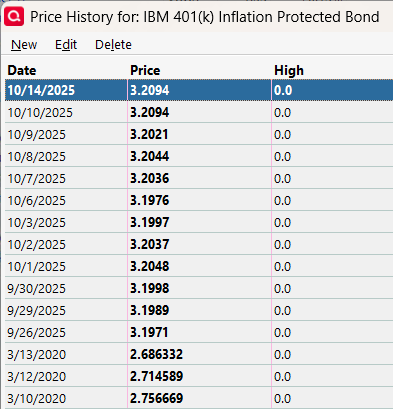 0
0 -
Mine's not working either. Last download was Sat for Fri prices. Disaster.
0 -
Hello @aaconsumer55, @kla4503, & @emhamiltn,
Just to confirm, are you still seeing the OL-297 error?
I look forward to your response!
Quicken Kristina
Make sure to sign up for the email digest to see a round up of your top posts.
0 -
I'm having a similar problem for the first time with EWC+. Yesterday's (10/13) non-public NetBenefits 401(k) fund prices were downloaded as today's (10/14) prices. No prices downloaded into 10/13. Also, old duplicate transactions from 7/22 to 8/15 downloaded again. The only other time duplicate transactions downloaded was the first time I updated with EWC+ on 9/23.
0 -
@Quicken Kristina
No, I converted last Friday or Saturday because I was having that issue.
The issue I'm still dealing with is the FDRXX Mmkt core position in retirement accounts (IRA & Roth IRA) not being treated as cash position.- Quicken user since 1992 (back in the good old DOS Version days)
- I don't use Cloud Sync, Mobile & Web, Bill Pay/Mgr, Budgeting, Tax Planner
1 -
I also see that 401k / 457b NetBenefit funds with symbols have downloaded 10/13 prices into 10/14. And non-public funds have downloaded 10/10 prices into 10/14. 10/14 market has not closed yet. Keeps getting worse.
1