Portfolio Value Error (persists for over 2 years!)

One of my money market fund investments, has had the incorrect value on the Portfolio Value report for over 2 years. I have reported to this issue to Quicken several times over the years. I spent over 2 hours with support on 10/2/2025. They could see the problem and agreed to call me back within 1 hour. Today, is 10/4/2025 and I have heard nothing.
Here is issue:
Money Market Fund- 10,000 shares @ $1 per share = $10,000 value. In Quicken this shows up as the current value. However, when I run a Portfolio Value report, the value is reported as $11,000. The error is that for some reason this holding is showing a $1000 gain (I do not remember where support had me go to look at the detail that showed this gain because on my portfolio holding screen there is no gain) and it looks like the gain gets added when the report is run. This is an error because in a money market account the share price is always $1 so there is no gain. I do not know why the report would not just calculate the current value as shares x current market price.
I became so frustrated earlier this year, that I sold this fund and waited 3 months and repurchased. Yes, the same error returned.
Note, I hold this fund in another account with no issues.
Does anyone know a fix for this or can someone get Quicken's attention to fix this error? I have invested untold hours with support to no avail.
Comments
-
Hello @arlingpj,
Thank you for sharing your experience. I'm sorry to hear that an agent promised you a callback and that promise was not kept.
Reviewing your interaction with Support, it sounds like they were trying to narrow down if the issue is a program issue or a file issue. Since the issue has been going on for 2+ years, restoring a backup would not be a viable troubleshooting step, and you already tried making a truncated copy of your file and validating that copy.
The next step to help test if it may be a file-specific issue is to make a backup of your Quicken file, deactivate the problem account, then navigate to Tools>Add Account, follow the prompts, and add that account as a new account instead of linking to the existing.
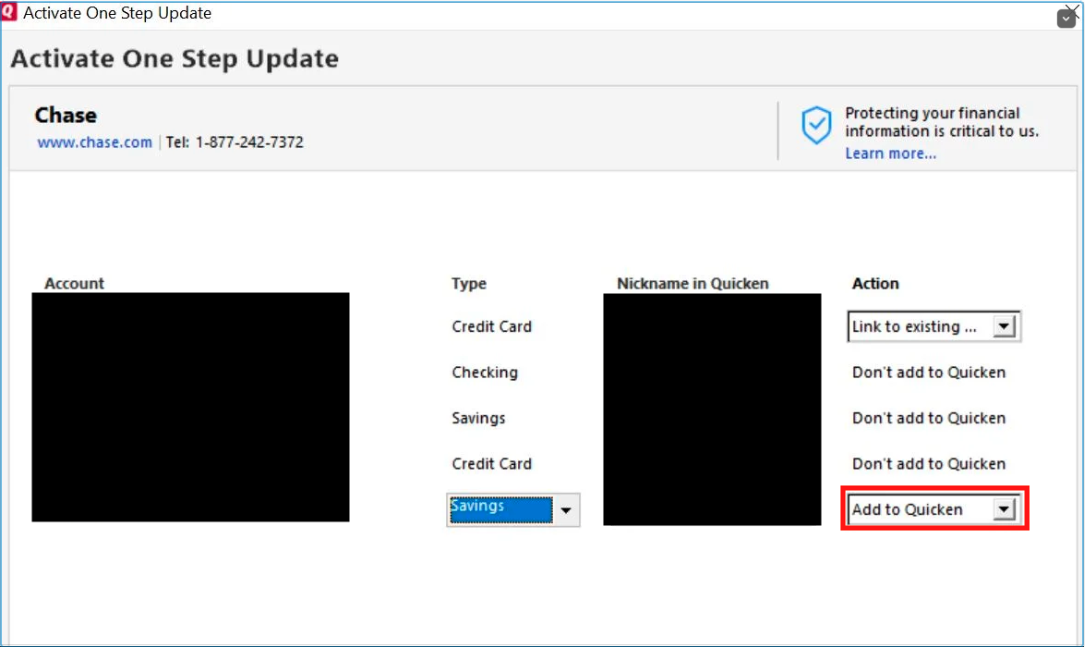
Once the account is added as a new account, test to see if the issue persists (making sure that the report is looking at the data from the newly added account and not the original).
Please let me know how it goes!
Quicken Kristina
Make sure to sign up for the email digest to see a round up of your top posts.
0 -
I followed your directions and the problem persists. Also, Also, I discovered the discrepancy increases each month by the value of the dividend received each month.
0 -
Thank you for your reply,
Is this discrepancy happening exclusively in the Portfolio Value Report, or are you seeing it happening anywhere else in Quicken?
Thank you!
Quicken Kristina
Make sure to sign up for the email digest to see a round up of your top posts.
0 -
I only see it in the Portfolio Value Report. To get the value for an investment, the report should take the shares owned x current price per share. This report is not calculating the value using this formula.
0 -
Thank you for your reply,
I tried to replicate the issue in my own Quicken, but was not able to do so. What is the specific holding that is displaying incorrectly in the report? What type of account is it in (IRA, 401k, etc.). Is this an account that is tracked manually, or is it connected for download into Quicken? If it is connected, which financial institution is the account with? If you're willing, please include a screenshot of the problem security, as it appears in the Portfolio Value Report. If needed, please refer to this Community FAQ for instructions on how to attach a screenshot. Alternatively, you can also drag and drop screenshots to your response if you are not given the option to add attachments.
Thank you!
Quicken Kristina
Make sure to sign up for the email digest to see a round up of your top posts.
0 -
The holding is VMSXX (Vanguard Municipal Money Market). Account type: Brokerage. Transactions are downloaded to Quicken. Note, this holding is held in 2 brokerage accounts within the same Quicken file and only one account has this issue.
0 -
A shot in the dark.
In the account with the problem, what action are you using to record that Dividend?
Are you using the same action in the other account?Q user since February, 1990. DOS Version 4
Now running Quicken Windows Subscription, Business & Personal
Retired "Certified Information Systems Auditor" & Bank Audit VP0 -
I use the same action in both accounts. Rather use the reinvested dividend action, I change it to Miscellaneous Income so that I can assign the income to a "Tax Exempt Dividend Income" Category because I want to track it separately. Again, I use the same method in both accounts but only one account is incorrect.
0 -
Thank you for your reply,
Next, I suggest that you try creating a copy of your data file, which will rebuild all of the internal lists and database tables. If successful, you would then move forward with the copied file. To create a copy, please navigate to File > Copy or Backup File... > Create a copy or template (see examples below) which will also allow you to select a date range to move forward with.
If you wish to move forward with your entire data file, please check the full date range of your entire data file before copying so you can enter the correct date range if you do not wish to "shrink" your file by eliminating certain dates. Note - The only reason to "shrink" your file is if you believe the issue is being caused by older data in your file.
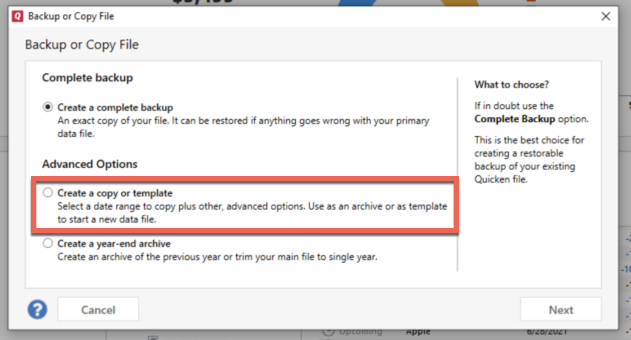
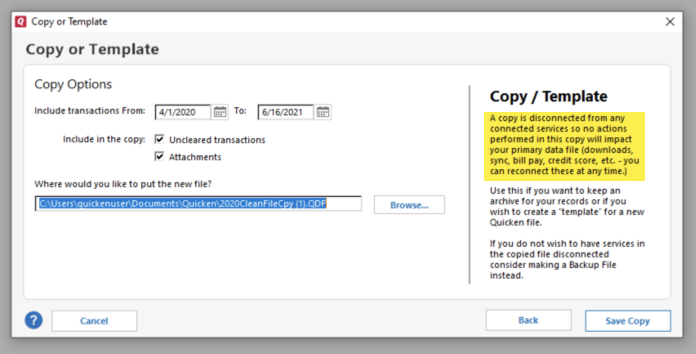
It's important to know that all online services will be disconnected in the copied file, and you will need to sign back in with your Quicken ID and reconnect all of your online accounts, online billers, Quicken Bill Manager services, etc if you plan to use that copied file going forward. The reason for this is that the new copy also creates a new and separate dataset ID.
Connect only what is necessary to test if the issue is resolved in the copied file. If the issue is resolved, then connect all online services and use the copied file as your main file going forward.
If the issue is not resolved in the copied file either, then feel free to switch back to your original file.
Please let me know how it goes!
Quicken Kristina
Make sure to sign up for the email digest to see a round up of your top posts.
0 -
Since you are changing a ReinvDiv to a MiscInc, are you also adding in the Buy shares of the MM fund?
If you leave it as a ReinvDiv, does the discrepancy increase with each such transaction?
Why do you not have the VMSXX (Vanguard Municipal Money Market) set as a tax-free security and thereby avoid the change from ReinvDiv you are undertaking? (Generally, no need for a separate "Tax Exempt Dividend Income" category. There is already a built-in _DivIncTaxFree category.)
0 -
Thank you; your suggestion solved my problem!
0 -
Thank you for the follow-up,
I'm glad to hear the issue is resolved!
If you need further assistance, please feel free to reach out!
Quicken Kristina
Make sure to sign up for the email digest to see a round up of your top posts.
0

