Schwab Retirement Account disabled Quicken Direct Connect

When I contacted Schwab about it they said it was regulations that required MultiFactor Authentication and that is not supported by Direct Connect. Is that really a regulation? I have not had that problem with any other account. I guess it would be nice to have some kind of MFA with Direct Connect but if it is a regulation is that something we should expect to be disabled for more institutions? Is there a fix for that?
Thanks
Eric
Comments
-
I am sorry but maybe it's not a problem anyway. I use Quicken for Mac in the US not Canada. Not sure how I posted this here.
0 -
Hello @Eric Perrone,
Thanks for taking the time to reach out! I’ve moved your post to the correct category since you mentioned you’re using Quicken for Mac (U.S.).
Regarding your question—you’re right that Schwab no longer supports Direct Connect. They transitioned to Express Web Connect+ (called Quicken Connect in Quicken Classic for Mac) a couple of years ago, around 2021, to meet updated security and verification standards. Express Web Connect+ connects directly through Schwab’s secure login system and supports Multi-Factor Authentication (MFA), which is now required by many financial institutions.
So yes, that’s likely what Schwab was referring to. It’s not exactly a new regulation, but rather part of an industry-wide move toward more secure connection methods. Many other banks are making the same change, so this is something we’re seeing more frequently across Quicken.
Can you confirm whether your account is currently connected using Quicken Connect? If not, I can guide you through setting that up.
Thank you!
-Quicken Anja
Make sure to sign up for the email digest to see a round up of your top posts.0 -
Such misinformation abounds!
First of our government doesn’t have any regulations that require MFA that has been one of the main problems all these years, no government regulations to force the financial institutions to follow a standardized protocol!
They put out “recommendations”.
Second almost all current forms of MFA used today are known to be unsecured. For instance texting and email. It it isn’t until you get to rotating security tokens that you are up to the current security levels. This might be a hardware device, an app, or a API built with a protocol like OAuth2 which is what Express Web Connect +/Quick Connect/FDX uses.
And the latest versions of the OFX standard which Direct Connect is based on supports it too, but the financial institutions decided to go with FDX instead, which is much more problematic than Direct Connect/OFX. BTW some financial institutions never upgraded past the first version of the OFX protocol released to the public decades ago.
Direct Connect/OFX is personal finance software connecting directly to financial institution OFX server.
Express Web Connect +/Quicken Connect is Quicken the program “syncing” (the same that is used for Mobile/Web/Quicken Cloud dataset) with Quicken Inc servers (hosted on AWS/Amazon servers) which in turn talk to Intuit servers (on an unstated protocol) which talk to the financial institution’s server using the FDX protocol.
0 -
Hello @Chris_QPW,
Thanks for your detailed explanation! Just to clarify, when I mentioned “regulation,” I wasn’t referring to government mandates—that was shorthand for the industry and institutional requirements Schwab put in place for security and MFA compliance. My intent was simply to explain that Schwab moved from Direct Connect to Express Web Connect+ (Quicken Connect) a couple of years ago, and that MFA is now part of their updated connection process. I apologize for any confusion my wording may have caused.
I didn’t intend to imply any government requirement; the goal was just to explain the industry-wide move toward more secure connection methods, which many other financial institutions are also adopting.
Thanks for providing the additional context you shared about the protocols and differences between Direct Connect/OFX and Express Web Connect+/FDX—that’s helpful for anyone trying to understand the underlying systems.
Thank you!
-Quicken Anja
Make sure to sign up for the email digest to see a round up of your top posts.1 -
Hello Anja,
Thank you for responding. Since my previous connection did not work I downloaded transactions manually and now my connection shows Web Connect in the account settings. If I try to change the connection type there is only one option available Direct Connect and quicken connect is shown but it is not selectable. Maybe this is the only available for Schwab Retirement Plan Services? Any help appreciated.
Thanks All have a great day.
0 -
So I went and tried to change the connection type for the account and got the same error I got a few days ago again I only had one option to choose from which was Direct Connect. The Error was OFX 16503.
Thanks for any suggestions!
0 -
Hello Anja,
I am having the same problem. It's with my Schwab Retirement account and it is NOT connected with Quicken Connect. I severed the link in order to attempt to fix updating the account and now I only get a message to "try again later". I'm confident "later" will not solve the problem.
Can you help me, step-by-step?
0 -
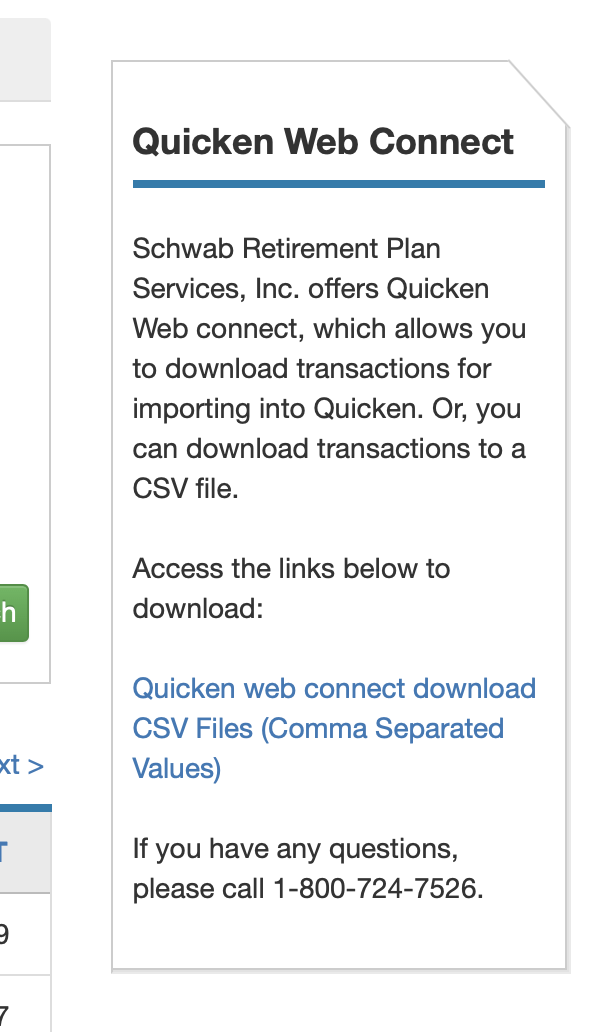
As an experiment I tried adding a new account from "Schwab" instead of "Schwab Retirement Plan services" and that was showing a different connection than the one for Retirement Services. I suspect that while the Schwab Institution does support Express Web Connect+, Schwab Retirement Plan Services institution does not. Seems like we will have to download from the website. To do that you go to your account and go to History and Statements. On the right side of the window there is a link to download "Quicken web connect download". I attached a screenshot of it. Not ideal but at least it's 🙁 something. Post here if you learn anything! Thanks All
 0
0 -
Thanks. I'll give it a shot now.
Found it. Downloading the data. I hope Anja has a better solution.
0 -
Hello @Eric Perrone & @SteveBoone—thanks for the updates and for the details you’ve shared.
After doing some further digging, I have the following information below to share with you:
- Charles Schwab & Co., Inc. has migrated most consumer accounts to Express Web Connect+ (Quicken Connect). However, Schwab Retirement Plan Services (the retirement plan/administrator side) has not been migrated to Express Web Connect+/Quicken Connect. That is likely why you’re seeing limited connection options (Direct Connect and Web Connect only).
- As for the errors you are receiving while connecting via Direct Connect—this is a known issue and it is being caused by Charles Schwab shutting down the Retirement Services (DC) Direct Connect server.
What you can do now:
- For the latest information and updates on this, please follow this Community Alert
- Additionally, there is also this related Windows thread where another user has posted Schwab’s notice regarding this.
- If you need transactions right away, continue downloading QFX files from the Schwab website (manual Web Connect) and importing them into Quicken.
- We recommend that you do not attempt to connect using a different Schwab instance in the bank list, as this may result in duplicate transaction history being downloaded.
I know this situation is inconvenient—thank you both for your patience and for the detailed information you’ve provided. I hope this helps clarify what’s happening.
Thank you!
-Quicken Anja
Make sure to sign up for the email digest to see a round up of your top posts.0 -
Thanks all, I'lll go subscribe to that other thread in case the Retirement side fixes this and enables the other connection type.
Appreciate the help! Have a great day!
0 -
@Eric Perrone You’re welcome!
Thanks again for sharing your updates, and I hope your workflow continues as smoothly as possible despite this limitation.
-Quicken Anja
Make sure to sign up for the email digest to see a round up of your top posts.0 -
Yes, thank you.
0 -
You're welcome!
-Quicken Anja
Make sure to sign up for the email digest to see a round up of your top posts.0 -
I just want to be clear, I do not have a "Schwab retirement account" but I get the error message for my brokerage account. Is the ability to download from Schwab for all accounts or only "retirement accounts? I am getting this error on all 3 of my schwab accounts.
0

