Bills & Income Projected Balances Seems to Stop Working Properly when I exceed 32768 transactions

I use the Projected Balances feature extensively to keep track of cash flow and when to pay certain bills or if I can spend a certain amount and still have money in an account to cover future bills.
I recently noticed that I was entering transactions, balancing my account and moving bill payment dates around and all of a sudden I noticed that a transaction I entered caused the projected balances to stop calculating properly. Any transaction I enter after that will show in the projected balance but it will no longer be used in the calculations.
For instance you might have an opening balance on a certain day of $1000 and it will show a scheduled transaction of $100 and an entered transaction of say $500 (that is at or above transaction number 32768) but that $500 transaction won't be included in the math. So day preview screen shows this:
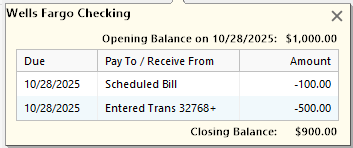
Now - if I go into the register and delete ONE transaction, it will look like this:
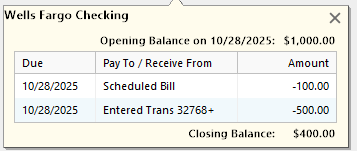
It's clear someone didn't code the projected balances calculations to work with transactions once they exceed 32768….
In looking at the article (HERE) about maximums it pretty clearly says there isn't a transaction limit but categories, subcategories and tags are limited to 32768.
In fairness, the register doesn't have a problem with the entries, only the projected balance function.
Thoughts?
Comments
-
The screen shots you show are what is displayed when you click on one of the dots in the Projected Balances graph, right?
Is the 32K you are seeing the total number of transactions in the file, as shown by Shift - About Quicken, or the number of transactions in the affected account, as shown in the Account List or the More info page?
I do not see the issue you describe. I have over 40,000 transactions total but no more than 10,000 in any one account.
If the problem is account-based, one way you could work around it would be to start a new account in Quicken as a continuation of the big account. You should be able to deactivate the old account from online services and go through the Add Account process to add and connect the new one. To help make the transition clean, you could start the new account as of 1/1/2025 or some convenient date. You may need to do some manual adjustments to move uncleared transactions from the old account to the new one. You would also need to edit any Reminders and account-based Memorized Payees that use the old account to use the new one instead.
Be sure to have a fresh backup before trying this.
QWin Premier subscription1 -
I have over 60,000 transactions with the largest account having over 12,000 transactions.
1 -
Yes, it's what I see when I click on the date but the whole graph is wrong due to the miscalculations from that day on.
I have 32768 transactions in a single account. It's my primary checking account with transactions dating back to 2004 or so.
0 -
I think if you want Quicken to look into this, you would have to contact Support and have them observe the problem. It will be hard to find anyone here who has an account with that many transactions to confirm what you are seeing.
QWin Premier subscription1 -
I do think it's a corner case since it's probably not common to have an account that long with that many transactions but it's not technically supposed to be a limitation.
I'll open a support case and show them but I suspect I'll have to do the new account thing in the meantime since, even if they decide to fix it, I won't be able to wait until they do….
Thanks again for your responses!
0 -
DOS 16 bit signed integer? Please dispel my thoughts that legacy DOS coding still exists in Quicken.😉
0 -
Many programming languages support a 16-bit integer data type, which has a maximum positive value of 32,767. Quicken's code is old, but I'm sure whatever language they are using also supports 32 bit integers.
Apparently this issue appears only in the very unusual case where a single account has more than 32K transactions, and as far as we know it only affects the Projected Balances graph.
QWin Premier subscription0 -
Hello @thesmiths.zone,
Thank you for taking the time to visit the Community to report this issue, though we apologize that you are experiencing this.
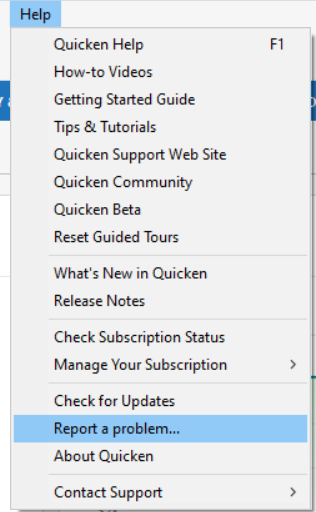
We have forwarded this issue to the proper channels to have this further investigated. In the meantime, we request that you please navigate to Help > Report a problem and submit a problem report with log files attached and (if you are willing) a sanitized copy of your data file in order to contribute to the investigation.
While you will not receive a response through this submission, these reports will help our teams in further investigating the issue. The more problem reports we receive, the better.
Please let me know once you have sent the problem report, so I can add it to the ticket.
We apologize for any inconvenience!
Thank you.
(CBT-894)
Quicken Kristina
Make sure to sign up for the email digest to see a round up of your top posts.
0 -
I've had the exact same problem. When one account I have hit 32768 transactions, the projected balance stopped working correctly. Another option rather than creating a second account is to archive part of your file. I took the first few years of Quicken usage out and the problem immediately went away.
0

