Fidelity EWC+ reinvested month end dividends handled wrong

Using Fidelity DC connection, Quicken clearly showed taxable reinvested dividends for an investment account that has a linked cash account as transactions in the investment register with the Action = ReinDiv. These show up as taxable transactions in the tax reports.
Under Fidelity EWC+ connection, Quicken confusedly shows transactions in the linked cash account adding the dividend amount without any category designation for a taxable Dividend. Then in the corresponding investment account, Quicken adds a BoughtX transaction for the same transactions. The end result, is no taxable event is recorded for what should be taxable dividends.
For the core MMF, Quicken incorrectly labeled the core MMF dividend transaction for the account that has a linked cash account with action DIV instead of a DivX to have the cash show in the linked register. From what I'm reading Quicken/Fidelity has many months of corrections to make before EWC+ works with the equivalent features as DC.
Using Fidelity EWC+ connection, Quicken shows dividends received for some securities the in regular investment accounts with the comment "DIVIDEND RECEIVED…" with no Div designation to correctly categorize the dividends. Please make this work like the DC connections which correctly reports a DIV transactions. The DIVIDEND RECEIVED comment is so truncated, it can be ahrd to determine for to security the dividend belongs. See example below:
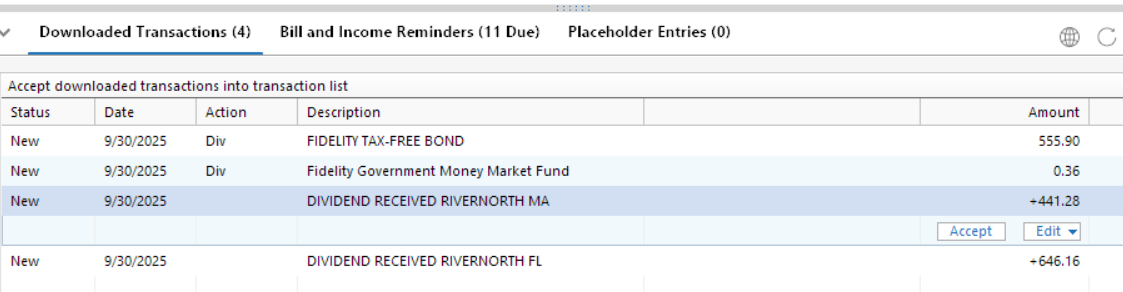
Can Quicken please return the behavior of the DC connection to the EWC+ connection and treat dividends correctly all accounts?
Conclusion: Month end processing was a mess. Core account FDRXX was no longer treated a core after it had been correctly used as core account for about a week. Dividends were incorrectly downloaded as deposits. Reinvested dividends were incorrectly downloaded as dividends. EWC+ connection is not ready for production use.
Deluxe R66.23, Windows 11 Pro
Answers
-
This fix does not work since there are no such CASH REPRESENTATION or Reset Money Market selections for the account using FDRXX as the MMF core cash.
Deluxe R66.23, Windows 11 Pro
0 -
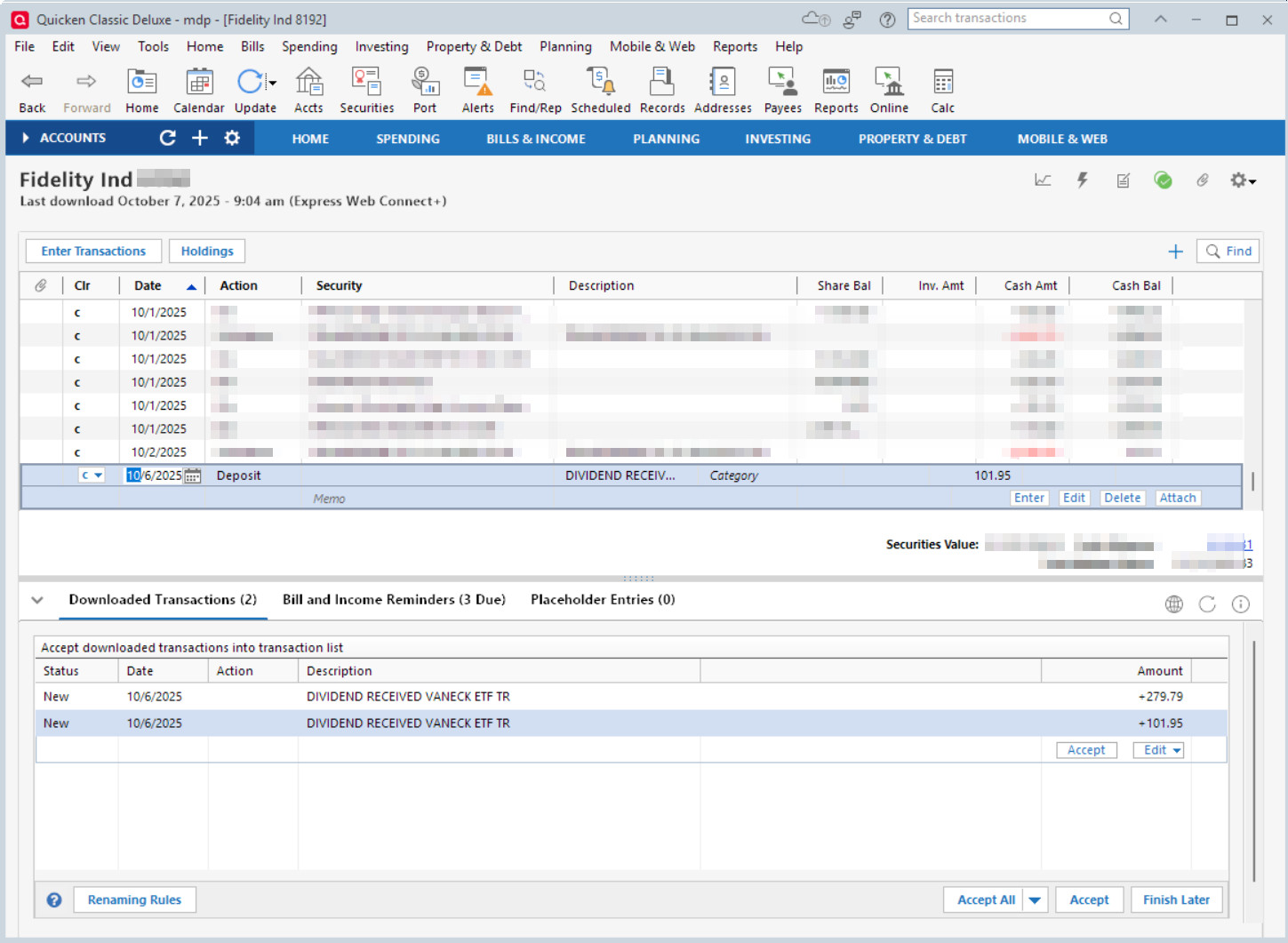
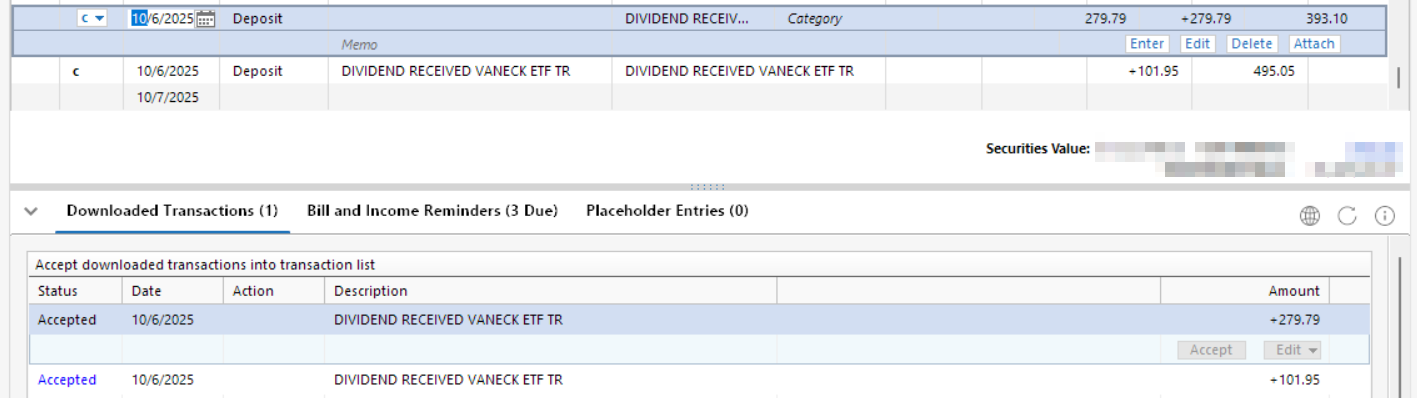
The problem still exists for the EWC+ connection. This problem is evidently showing up for reinvested and nonreinvested dividends into regular Fidelity accounts. For the following example pictures, nonreinvested dividends into a regular Fidelity investment account are treated as deposits instead of action=Div and the security name is truncated in the transaction description with no actual security associated with the transaction action. In the pictured case below, 2 downloaded transactions are listed truncated as "DIVIDEND RECEIVED VANECK ETF TR" when both transactions are for different securities. On the Fidelity website, the Activity for these transactions have the full descriptions "DIVIDEND RECEIVED VANECK ETF TRUST HIGH YLD MUNIETF (HYD) (Dividend)" and "DIVIDEND RECEIVED VANECK ETF TRUST CEF MUNI INCOME (XMPT) (Dividend)" which Quicken is truncating in the description so that it is impossible to determine the correct security matched to the amount.
The correct securities as listed in Quicken should have been "VANECK VECTORS ETF TR HIGH YLD MUN ETF" and "VANECK VECTORS ETF TR CEF MUN INCOME E".
Accepting the dividend transactions, treated them as Deposits with no security associated when they should have been treated as action Div with the correct securities associated.
The DC connection correctly treats the dividends with Action=Div and the proper security name in the transaction.
Before accepting the download:
After accepting the download:
Deluxe R66.23, Windows 11 Pro
0 -
Hello @leishirsute,
Thank you for letting us know you're seeing these issues! Both issues have been reported to our teams for further investigation and resolution, and I added you to both tickets: CBT-841 for the reinvest dividends issue and CBT-851 for the issue where some accounts still aren't allowing resetting cash representation.
Thank you!
Quicken Kristina
Make sure to sign up for the email digest to see a round up of your top posts.
0 -
@Quicken Kristina I also submitted a Problem report with logs for these issues on 10/7/2025.
Deluxe R66.23, Windows 11 Pro
1 -
I am on Windows and Quicken R64.30. I am on the Quicken/Fidelity EWC+. I DO NOT have the option to reset the cash representation (CBT-851) and I am still getting Dividends reported as Deposits (CBT-841). The dividend issue is inconsistent with some securities reporting correctly and others not.
These and the other problems associated with this "upgraded" interface are very frustrating. I have been a Quicken user for many, many years and I now find myself wondering about other applications I could use instead.
0 -
Thank you for the follow-up @leishirsute,
Thanks for letting me know you sent fresh logs! I attached them to the tickets.
Hello @rwaynerogers,
Thank you for letting us know you're also impacted by this issue and for sending the problem report with logs and screenshots attached. I added you to both tickets.
Thank you!
Quicken Kristina
Make sure to sign up for the email digest to see a round up of your top posts.
0 -
Please make sure I am included on this ticket. The problem remains unresolved as of October 16.
0 -
Hello @proflaw,
Thank you for letting me know you're also impacted by the issue with reinvested dividends showing as deposits, and thank you for sending logs. I added you to the ticket.
Thank you!
Quicken Kristina
Make sure to sign up for the email digest to see a round up of your top posts.
0 -
@Quicken Kristina Please add me to both of the tickets discussed here, CBT-841 and CBT 851. Thank you!
0 -
Hello @gdagon,
Thank you for letting us know you're also being impacted by these issues!
Quicken Kristina
Make sure to sign up for the email digest to see a round up of your top posts.
0 -
Hello everyone,
A member of our escalation team has provided guidance for users experiencing this issue. Please follow the steps below to help resolve the problem. Be sure to back up your Quicken file first to protect your current data.
Steps to Follow:
1. Backup
- Save a backup of your Quicken file.
2. Adjust Preferences
- Go to Edit → Preferences → Downloaded Transactions
- Check “Never interpret downloaded money market funds as cash.”
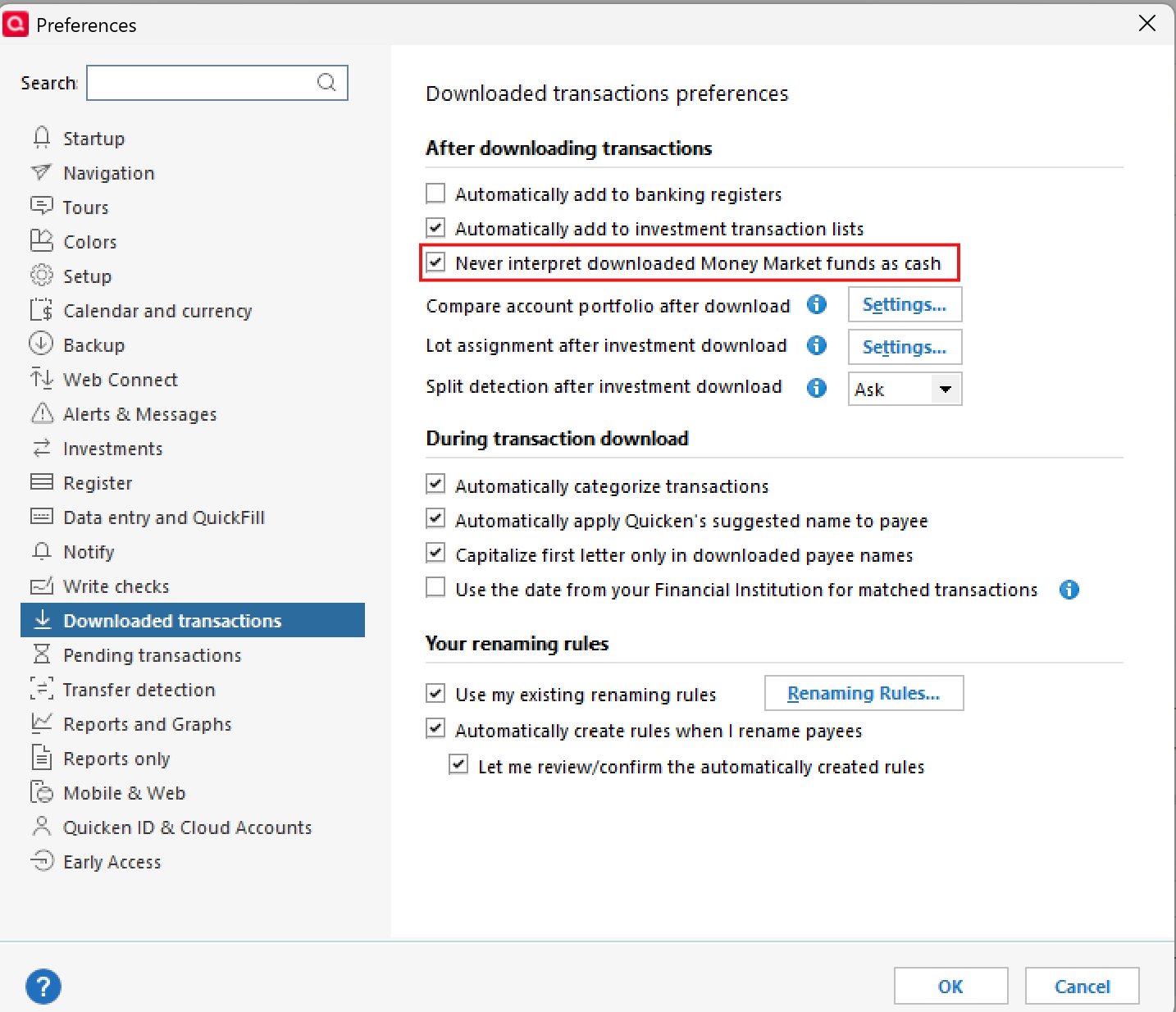
- Click OK
3. Force Transactions
- Run a One Step Update (OSU) on the affected accounts.
- Accept downloaded transactions.
- Review any prompts and make edits as needed.
4. Restore Preferences
- Go back to Edit → Preferences → Downloaded Transactions
- Uncheck “Never interpret downloaded money market funds as cash.”
- Click OK
After completing these steps, you should be able to reset the cash representation for the affected accounts or funds.
Additionally, we are actively working on an official fix for an upcoming update release.
Please let us know if these steps resolve the issue so we can proceed accordingly.
Thank you!
-Quicken Anja
Make sure to sign up for the email digest to see a round up of your top posts.1 -
@Quicken Anja Please clarify.
Are the steps you posted to fix the issue regarding the core cash, or is it for dividends being recorded incorrectly?
Dividends are being recorded incorrectly for assets that are not necessarily the core cash funds.For step: 3. Run a One Step Update (OSU) on the affected accounts.
OSU runs on all accounts. Do you mean just do an individual account update without using OSU?
Will this procedure correct the cash presentation issue if there are no transactions downloaded?Deluxe R66.23, Windows 11 Pro
1 -
What if the preferences are already set to Never interpret downloaded money market funds as cash?
0 -
@leishirsute & @proflaw I have reached out internally for clarification and more info based on the questions you asked.
I will update once I hear back.
Thank you!
-Quicken Anja
Make sure to sign up for the email digest to see a round up of your top posts.0 -
Hello again,
For @leishirsute:
I heard back from our internal team regarding your questions. The One Step Update (OSU) should be run on the individual account where the funds causing the issue are located, rather than on all accounts. The expectation is that this procedure will correct the issue with the cash/dividend presentation. However, this is still actively being investigated, so if it does not fully resolve the problem, please let us know—our teams are still gathering additional information as part of the ongoing investigation.For @proflaw:
We’ve reached out internally regarding your question as well. We’re still waiting for a response, and I’ll update you as soon as we have an answer.Thank you both for your patience!
-Quicken Anja
Make sure to sign up for the email digest to see a round up of your top posts.0 -
Regarding my post:
"https://community.quicken.com/discussion/comment/20513992/#Comment_20513992"
describing dividends downloaded as depositsand the post by @Quicken Janean listing known issues:
"https://community.quicken.com/discussion/comment/20518109/#Comment_20518109"
"Foreign Dividends Downloading as Deposits (CTP-14945) – Dividends for foreign stocks download as deposits instead of dividend transactions.
- Status: Under investigation."
- This problem exists for non-Foreign dividends as well as shown in my post. Please notify support that this issue is not just for foreign dividends. I have already sent in a problem report. Not all dividends are treated incorrectly. It appears to be happening to dividends from assets that are not issued by Fidelity regardless if they are foreign or not.
Deluxe R66.23, Windows 11 Pro
0 -
Thank you for sharing this additional detail. We’ll make sure it’s passed along to the appropriate team.
-Quicken Anja
Make sure to sign up for the email digest to see a round up of your top posts.0 -
This problem appears for me with all dividends, including those from Fidelity investment accounts and 403(b) accounts in Net Benefits.
0 -
I have submitted another problem report for this.
Some Fidelity dividends are still being treated incorrectly by Quicken.
They are missing Div as Action and the correct Security Name in the Description. The end result is that the Div is not mapped to the security for reporting and tax planning purposes.
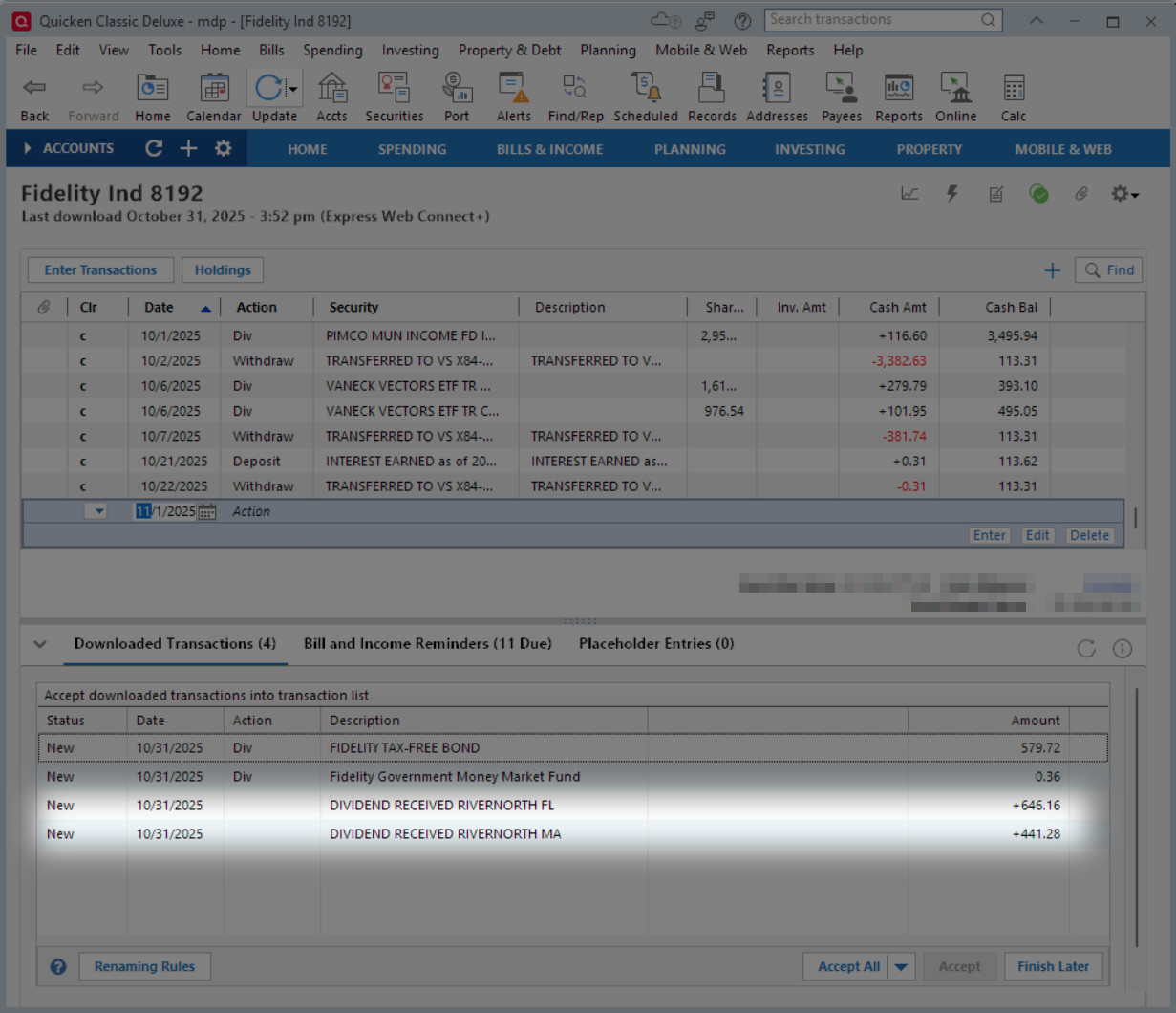
A similar issue occurs for a linked cash investment account where reinvested dividends are incorrectly treated as a Deposit with no security associated into the cash part and and BoughtX for the security into the investment part. The end result is that dividends are not recorded for reporting or tax planning purposes.
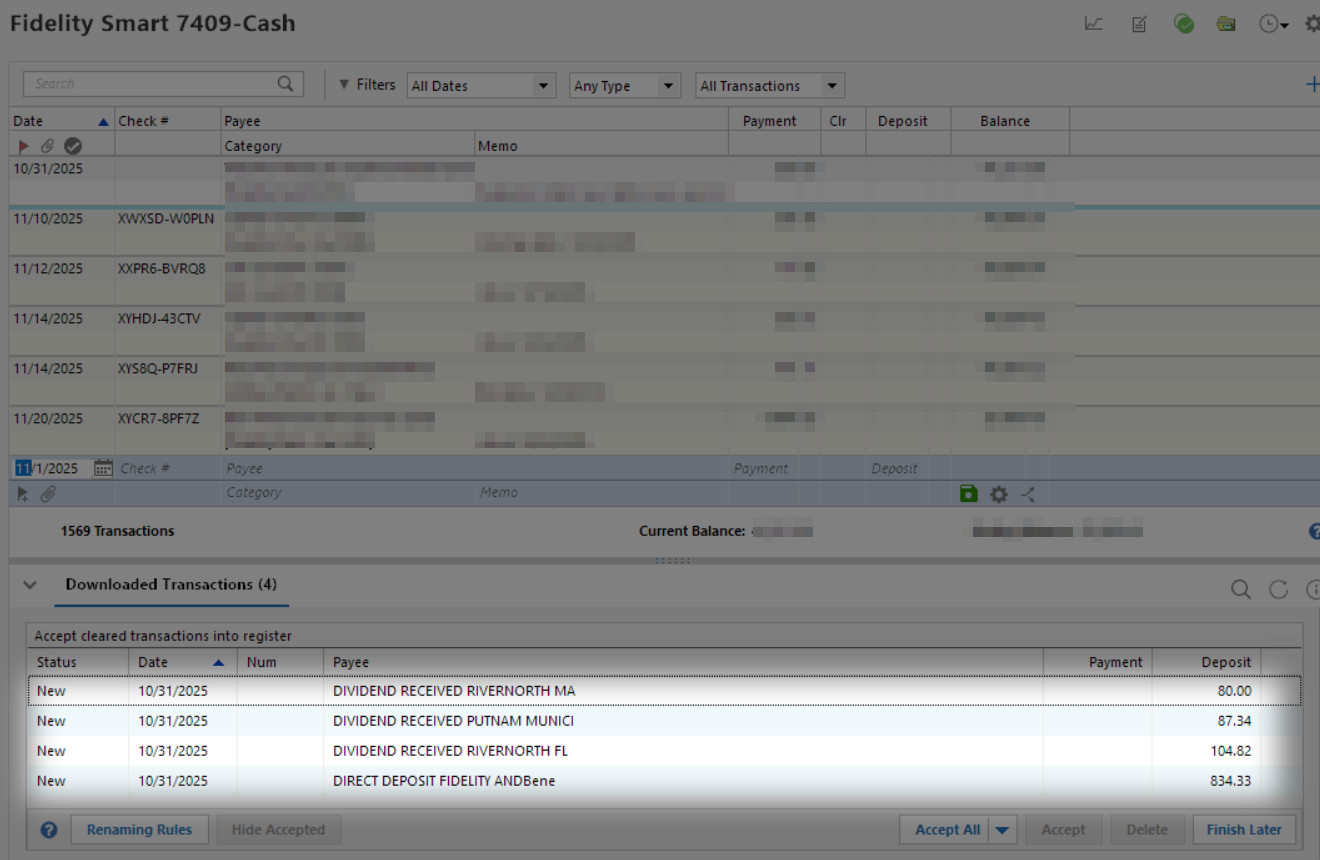
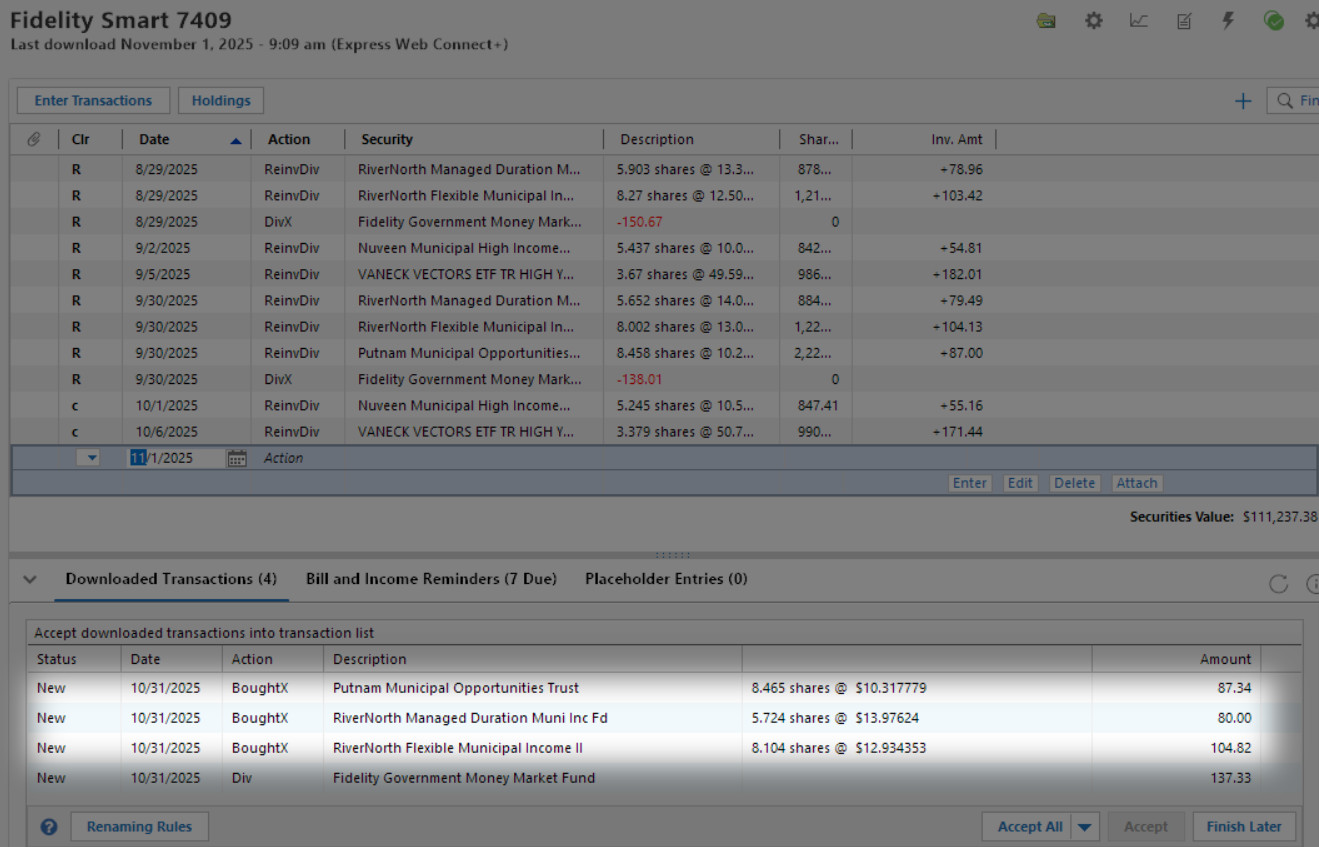
All these problems started after cutting over to EWC+.
Deluxe R66.23, Windows 11 Pro
0 -
Have you heard anything about what to do about the suggested workaround if the preferences are already set to "Never interpret downloaded money market funds as cash"?
0 -
@proflaw Thanks for checking in! We haven’t received an official response yet regarding this. I plan to follow up and check in again after the weekend, and I’ll share any updates as soon as I have them.
Appreciate your patience!
-Quicken Anja
Make sure to sign up for the email digest to see a round up of your top posts.0 -
As of today, reinvested dividends to the core money market account are being double credited with the "Never interpret downloaded money market funds as cash" setting - first as a dividend received in the money market account and second as a purchase into the core account.
- once as
0 -
Well, the good news is that there were no connection errors with Fidelity this morning and transactions (some correctly formatted and some incorrectly format) were downloaded.
As of 11/4/2025, reinvested dividends into a non-IRA Fidelity account that has a linked cash partner are still incorrect. Here's a list of month end dividend treatment by Quicken.
Dividends into a linked cash investment account:
This month end's download brought a reinvested dividend into the linked cash partner incorrectly as deposit transaction with Payee "DIVIDEND RECEIVED NUVEEN MUN HI", which is truncated name of a security, for $55.51. In the investment account, a BoughtX transaction showed for security "Nuveen Municipal High Income Opportunity Fund" for $55.51. The end result is that a deposit for an incorrect partial security name does not reflect dividend income for the actual security so that reports and tax planning are incorrect for this security. Workaround: Accepted the BoughtX transaction and changed it to a ReinvDiv. Deleted the "DIVIDEND RECEIVED…" transaction in the partner linked cash account.Dividends into a Roth IRA account:
Reinvested dividends downloaded for a Roth IRA account, downloaded correctly with Action=ReinvDivDividends into a regular non-IRA account:
Dividends for a non-IRA Fidelity account that has no linked cash partner downloaded with some correctly showing with Action=Div and most incorrectly showing no Action and a truncated Payee starting with "DIVIDEND RECEIVED…" . The end result is that the incorrect dividends are not recorded as dividends in Quicken and are not shown in Reports and Tax Planner. Workaround: Manually fix the incorrect ones i.e. work for Quicken instead of Quicken working for the end user.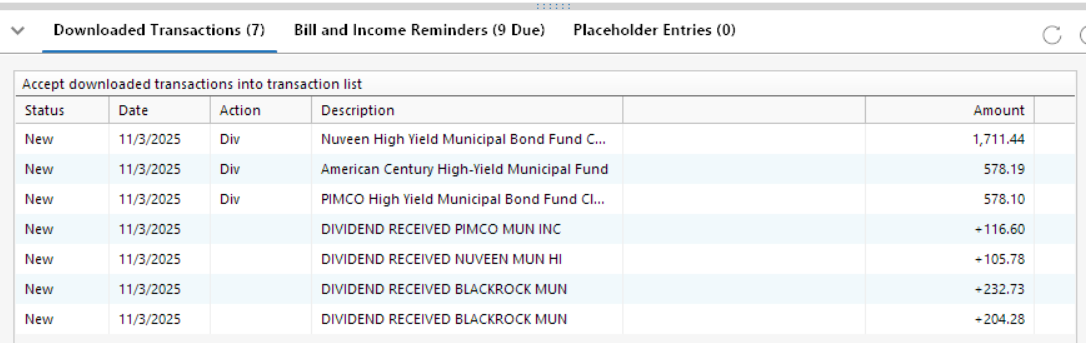
These problems have existed ever since the EWC+ cutover and have been reported. Similar dividends treatment is displayed at every month end so far.
Deluxe R66.23, Windows 11 Pro
1 -
@proflaw I've heard back about your question, and this is the info we received:
The steps will only work for users holding the following securities:
- FDRXX
- FZDXX
- FZFXX
- SPAXX
If users do not possess these funds, the process won't work. For those who do own these funds, and the issue persists, we have a fix planned for money markets that is scheduled for release in an upcoming update release, though we do not have an ETA. We recommend that users continue with manual edits and update to the new version once it's available to check if the problem is resolved.
-Quicken Anja
Make sure to sign up for the email digest to see a round up of your top posts.0 -
I find it odd it does not include all the Fidelity MM accounts. I have other than on the list above. And it is not a unique fund, but a large popular choice!
Can you find out why FZCXX is not on the list?
0 -
Thanks for pointing that out, @Bob. I'll reach out internally to clarify why FZCXX isn’t included in that list and update the thread once I hear back.
-Quicken Anja
Make sure to sign up for the email digest to see a round up of your top posts.0 -
Anja:
- My question was about applying the workaround, which involves changing the setting to "Never interpret downloaded money market funds as cash," if that setting should be changed and reset to make the workaround work.
- I do have one of the listed funds and presently (pre-workaround if that needs tobe applied where the suggested setting is already chosen), it does not work.
0 -
Thank you, I've reached out again for clarification!
-Quicken Anja
Make sure to sign up for the email digest to see a round up of your top posts.0 -
What is the intent of Quicken interpreting securities as cash? Is it only intended for core positions? In which case the only mutual funds for this are SPAXX, FZFXX & FDRXX as far as I can tell.
By the way, I believe you can tell a money market mutual fund by its symbol, 5 letters ending in XX.
0 -
From Fidelity AI chat:
"To view your core position, log in and look for the Positions tab in your Portfolio Summary. Each account has its own core position. When you have uninvested cash in an account, the core position is listed as "Cash" in the positions list. Clicking on "Cash" will display more detail about your core position. Depending on the core positions available for your account, you may see detail for SPAXX, FZFXX, FDRXX, FDIC-insured deposit sweep, or USD, etc."
Deluxe R66.23, Windows 11 Pro
0



Categories
- All Categories
- 20 Product Ideas
- 34 Announcements
- 247 Alerts, Online Banking & Known Product Issues
- 19 Product Alerts
- 518 Welcome to the Community!
- 682 Before you Buy
- 1.5K Product Ideas
- 55.7K Quicken Classic for Windows
- 16.8K Quicken Classic for Mac
- 1K Quicken Mobile
- 834 Quicken on the Web
- 128 Quicken LifeHub