Apple Email: "You requested your purchase details" when downloading AmEx account from Quicken

In the past week, I started receiving an email from Apple titled "You requested your purchase details" every time Quicken does a One-Step Update of my accounts; specifically, my American Express account where I charge my Apple subscriptions.
The body of the email states:
Hello,
Thank you for viewing purchase details associated with the Apple Account (XXXXX) through American Express in the last 24 hours. If this was you or someone authorized to view your American Express purchases, there is nothing more to do. Keep in mind that if you are part of Family Sharing for Apple, your family organizer may have viewed your purchases.
If you or someone authorized did not view your purchase details, please contact American Express.
Regards,
Apple Support
There's a post in the Apple forums about this, too:
Email subject "You requested your purchas… - Apple Community
Why is Quicken requesting additional details about my Apple subscriptions when it does a OSU, and can anything be done here to suppress that or to suppress the email? Perhaps this is just something in the AmEx API, but hopefully Quicken can escalate with them to investigate and resolve.
Comments
-
Hello @seadan,
Thank you for reaching out. To troubleshoot, please provide more information. When did this first start happening? Has this been happening ever since you connected the account in Quicken?
The behavior you describe sounds like a security notification. Have you checked notification options for that account, to see if there's an option to turn off that specific notification?
I look forward to your response!
Quicken Kristina
Make sure to sign up for the email digest to see a round up of your top posts.
0 -
Hi Kristina,
It started happening at the beginning of October. If you do some searching online, you'll see I'm not the only one that started experiencing this in the past month, and the vast majority of users indicate it happens — like me — when Quicken Classic/Simplifi or Quickbooks syncs their American Express accounts that have Apple transactions in them.
I don't see anything in my Apple account that lets me adjust this notification. I was hoping that since you are now using an American Express API to pull data you could raise this issue with your contacts for that and see if they can figure out what's triggering Apple to send this notification as part of the Quicken sync.
0 -
Thank you for your replies,
I forwarded this issue to the proper channels for further investigation. To assist with the investigation, please navigate to Help>Report a Problem and send a problem report with log files attached.
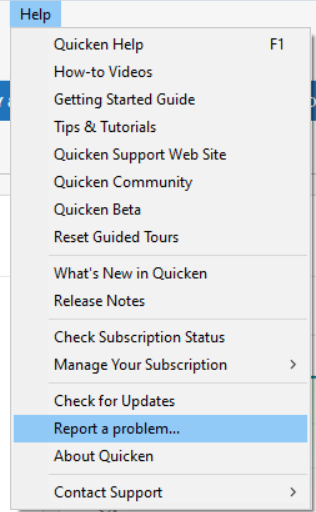
Please let me know when you send the problem report.
Thank you!
(CTP-15110)
Quicken Kristina
Make sure to sign up for the email digest to see a round up of your top posts.
0 -
This really sounds like an Apple issue. Quicken is requesting AMEX transaction downloads containing Apple transactions, but Apple interprets this as an Apple account query. I'd contact Apple and/or AMEX customer support or computer support if the emails bother you. There's probably nothing Quicken can do as Quicken seems to be operating correctly.
0 -
Something that Quicken is doing when it downloads from AmEx is triggering the email. You're right, it is very likely something that Apple/Amex need to fix, but IMO Quicken is well positioned as a consumer of AmEx's API to flag this issue to them for investigation (and it could be something Quicken is doing when it calls the API that triggers it, too). As I'm sure you can appreciate, an individual customer calling AmEx/Apple customer service is unlikely to be fruitful here — but a developer-to-developer API likely has a direct support line to folks who can actually understand and investigate the issue, hence my goal in posting this here.
@Quicken Kristina I have sent the problem report. Thanks for filing and following up on this!
2 -
Thank you for your reply,
Thank you for sending the problem report with log files attached.
It will help our team investigate the issue!
Quicken Kristina
Make sure to sign up for the email digest to see a round up of your top posts.
0 -
For what it's worth, I have also been receiving these emails the last several weeks. Finding this thread has been very helpful! Is there any update @Quicken Kristina on the ticket you filed earlier this month?
Thanks again!
0 -
Hello @KCloonan,
Thank you for letting us know you're also seeing this. I checked the ticket. It's still open and in work. No updates are available yet.
Thank you!
Quicken Kristina
Make sure to sign up for the email digest to see a round up of your top posts.
0 -
@Quicken Kristina - add me to the list. I got my first email like this today. I've been using Amex/Quicken for years, and this is the first time I've received the email. In late October, I did an "in app purchase" that I quickly canceled. I do a OSU at least once a week.
I would like to be updated when this is resolved, as well. Thanks!
Quicken Classic Premier (Windows) R65.29 Build 27.1.65.29
0 -
Hello @EmKay,
Thank you for letting me know you're also impacted by this. I added you to the ticket. Since there isn't currently an open alert for this issue, I recommend bookmarking this discussion. If this discussion gets closed, you can find out the status by creating a post and referencing the ticket number: CTP-15110.
Thank you!
Quicken Kristina
Make sure to sign up for the email digest to see a round up of your top posts.
0 -
I've been experiencing this for a few months also.
For what it's worth, I used to receive these emails when I would login to the amex site, click a transaction with Apple, and click "Show digital receipt." I do not seem to get the email when I do that now.
But as others have stated, I get them whenever I sync my accounts on Quicken. Sometimes I get several.
1 -
I have also been experiencing the exact same issue. Always emails from Apple Support:
===
Thank you for viewing purchase details associated with the Apple Account (<redacted>) through American Express in the last 24 hours. If this was you or someone authorized to view your American Express purchases, there is nothing more to do. Keep in mind that if you are part of Family Sharing for Apple, your family organizer may have viewed your purchases.
If you or someone authorized did not view your purchase details, please contact American Express.
===
There are no links, other than the email address — and I get these for each apple id that's part of my family plan. It may be harmless, but it looks very scary. Please fix this and add me to the list of folks to keep informed.
0 -
Hello @DrewMc & @goestoeleven,
Thank you for letting us know you're also impacted by this issue. I added you to the ticket so that our teams will know that you're also impacted by this.
Thank you!
Quicken Kristina
Make sure to sign up for the email digest to see a round up of your top posts.
0 -
We get this message when Quicken downloads a new payment for iCloud storage.
QWin Premier subscription1 -
Hello @Jim_Harman,
Thank you for letting us know you're seeing this message also. Is the payment made using an American Express card or a different payment method?
Thank you!
Quicken Kristina
Make sure to sign up for the email digest to see a round up of your top posts.
0 -
By the way, we have also be seeing these e-mails since some time in October. I should add a perhaps slightly different situation. The Quicken account is in my name, but I have both my husband's and my accounts tracked. My husband has an Apple account (I do not), so every time I update his AMEX accounts, he gets the Apple message. When I update my AMEX account, he does not get the e-mail. Not sure if that helps with this additional information or not. Hope this gets resolved soon.
1 -
Hello @KarenJG,
Thank you for sharing your experience! I forwarded the information to our teams.
Thank you!
Quicken Kristina
Make sure to sign up for the email digest to see a round up of your top posts.
0 -
@Quicken Kristina said
Thank you for letting us know you're seeing this message also. Is the payment made using an American Express card or a different payment method?
Yes, the payment is for iCloud storage and is paid with my Amex card. The email is from Apple and is apparently triggered when Quicken accesses the card transactions and sees the the payment for my wife's iCloud storage. The email is sent to her. Here is the body of the email
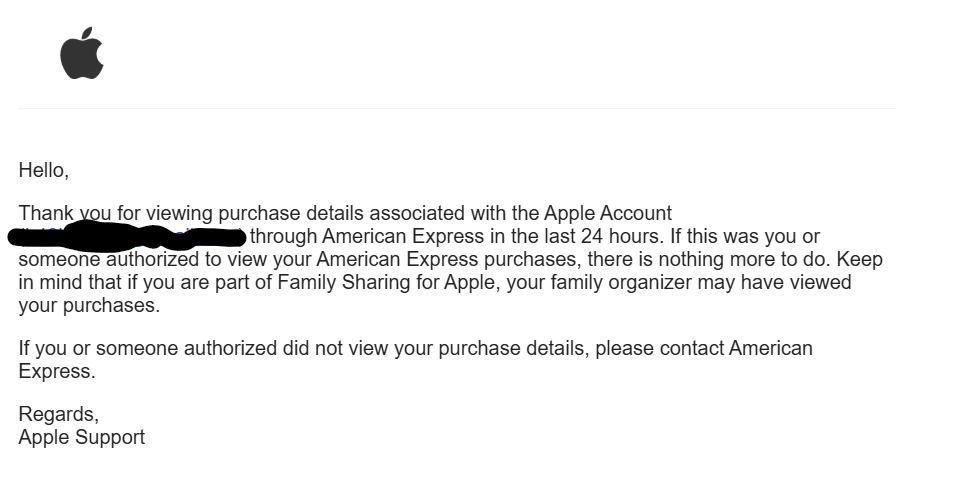 QWin Premier subscription1
 -
I am also having the same issue. I do one step update every few days and every time I get the same email from Apple since 2/20/2024
1 -
Hello @Mark Holly,
Thank you for letting us know you're also seeing this. I added you to the ticket.
Thank you for confirming and for the additional information!
Quicken Kristina
Make sure to sign up for the email digest to see a round up of your top posts.
0 -
Yes, me too!
0 -
Hello @Laotian,
Thank you for letting us know you're also impacted by this. I added you to the ticket.
Thank you!
Quicken Kristina
Make sure to sign up for the email digest to see a round up of your top posts.
0 -
I also continue to get these. Please add me to the ticket so I can get any updates that occur through it.
0 -
Hello @SilentSam,
Thank you for letting us know you're also impacted by this. I added you to the ticket.
Thank you!
Quicken Kristina
Make sure to sign up for the email digest to see a round up of your top posts.
0 -
Hello All,
We just received word from our teams that this issue should be resolved now. If anyone is still seeing these emails, please let us know!
Thank you!
Quicken Kristina
Make sure to sign up for the email digest to see a round up of your top posts.
0 -
Thanks for following up, and glad to hear this should be resolved. I haven't seen an email like this recently, so hopefully that's a good sign.
1 -
Thank you for confirming,
If the issue returns, please let us know!
Quicken Kristina
Make sure to sign up for the email digest to see a round up of your top posts.
0


