Managing the Payee list

My payee list is becoming unwieldy. Is there a way to delete or hide payees in the drop down payee list that is used when crating reports or editing transactions
Answers
-
Yes, you can delete, hide, or clean up payees so they no longer appear in dropdown lists or reports.
To delete payees
- Go to Tools - Memorized Payee List - (or Tools → Payee List, depending on your version).
- Select the payee or payees you want to remove.
- Click Edit - Delete Payee (or right-click → Delete).
If the payee is used in past transactions, Quicken will warn you that deleting it might affect reporting. In that case, you can instead hide it.
To hide payees
- Go to Tools - Payee List.
- Find the payee(s) you want to hide.
- Right-click and choose Hide Payee (or check the box if visible).
- Hidden payees won’t appear in dropdowns when entering new transactions or creating reports.
To clean up unused payees automatically
- Go to Tools - Payee List.
- Click the Gear icon - Manage Payee List.
- Choose Remove Unused Payees — Quicken will remove any payees not tied to transactions or memorized payees.
0 -
Thanks for your response. I already mange my memorized payees.
I have the most recent version of Quicken for Windows - Classic premier BUT I do not see Tools> Payee list. I'd like this feature to hide numerous payees that appear in Report customization. In report customization I believe the list should have the option to show hidden payees with the default being do not show them
0 -
I do not see Tools> Payee list
That should have been Tools> Memorized Payee List in your version of Quicken
If possible, give us an example or two of what makes your MPL "unwieldy". Screen image snapshots might be helpful so that we can give you specific suggestions.
How do I post a screenshot in the community from a mac
How do I post a screenshot in the community from windows
Please save images to files of file type PNG or JPG only. They're easier to work with than PDF files.0 -
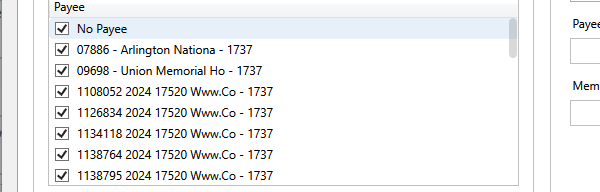
I have displayed an example. This view is from the drop down Payee list shown when creating reports. I would like to hide many of them. In the 'www.co' example, I'll usually rename the payee in the transaction or later via a report to allow them to be all together when I create a payee report. However, many of these I do not change since I do not need them to be together in any reports. As the result of this need I believe there are a variety of things Quicken could do unless others can suggest options.
- When we rename a payee via a report Quicken could automatically delete the original payee, if there are no other transactions with the original payee name. This would be the most helpful to users.
- Quicken could add a tool to hide items in the Payee list which appears in Report payee dropdowns (see below). The payee drop down list in a Report could then have an include or exclude hidden payees.
- If a user memorizes all payees then when a user merges memorized payees under single name the merge routine would delete all of the payee names being eliminated and they would not show in report drop downs
There are probably other options and nuances relative to my suggestions but I believe one of these would be of benefit. BTW these multiple names for the same vendor has existed for a awhile (I've used Quicken since the 90S) but became worse when the update transactions down load of CCs began to display vendor names differently.
 0
0 -
For new transactions of the "Www.Co" type, a Renaming Rule might help to name all new transactions just "Www.Co".
For existing register transactions you can try using Edit / Find/Replace to find all transactions where Payee contains www.co
Select and Replace all Payee with Www.CoOnce you have cleaned up your existing register transactions, the original (unwanted) payee names will disappear from the report selection lists.
0 -
The best way to deal with large numbers of variations on the same Payee going forward is to use Renaming Rules to standardize the names. For example a rule might be Change the name to www.co if the downloaded payee contains www.co.
To fix the Payee variations in existing transactions you can use Edit > Find/Replace. If you fix all the related transactions, the original variations should be purged from the list.
Warnings: The Find/Replace process defaults to all dates and there is no way to stop it. If the Find returns a lot of matches, it may take a very long time to complete.
There is no Undo. Always back up your data before making a bulk change.
See this discussion for more information
QWin Premier subscription0 -
Thanks everyone. I will give the above a try. I use renamimg rules extensively. I must have missed some but it'll prompt me to do a further clean up
0 -
Once a quarter I cleanup my payees by renaming them accordingly. I use the Reports > Spending > Itemized Payees report. That reports allows me to see similar payees next to each other and I can rename them right there as needed. It takes just a few minutes since I do it quarterly.
- Q Win Deluxe user since 2010, US Subscription
- I don't use Cloud Sync, Mobile & Web, Bill Pay2 -
Understood. I agree the workaround you mention is helpful . I use it when I need to clean up a report
thx
0




Categories
- All Categories
- 6 Product Ideas
- 34 Announcements
- 249 Alerts, Online Banking & Known Product Issues
- 19 Product Alerts
- 266 Welcome to the Community!
- 297 Before you Buy
- 1.5K Product Ideas
- 55.8K Quicken Classic for Windows
- 16.9K Quicken Classic for Mac
- 1K Quicken Mobile
- 834 Quicken on the Web
- 129 Quicken LifeHub