Bank of America Connection

This discussion was created from comments split from: Can't add Web connect express to a Bank of America account?.
Comments
-
Just so I understand…if I can't change my Bank of America account to Express Web Connect in Quicken…I have no other option than to manually enter the transactions to reconcile the account?
0 -
I don't see what you show when I open add account in Quicken. There is no edit ability for the Bank of America Account
0 -
Hello @jas63005,
Thanks for providing those screenshots!
I went ahead and moved your comments into a separate thread since you’re using Quicken Classic for Mac. The thread you commented on was for Quicken Classic for Windows, which is why the screenshots there don’t match what you’re seeing in your program.
Just to clarify — are you trying to add this account as a new account in Quicken, or do you already have it set up and are now trying to connect it online?
Check back and let us know! Thank you.
-Quicken Anja
Make sure to sign up for the email digest to see a round up of your top posts.0 -
I have it already set up in Quicken
0 -
Thanks for confirming!
In that case, please open the account register and click the Settings gear in the bottom-right corner, then select the Downloads tab. In that section, you should see a field labeled Connection Type.
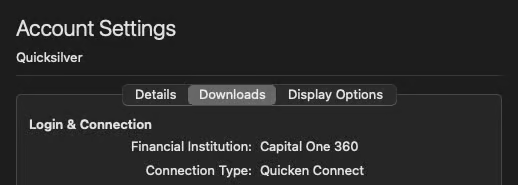
Which, if any, connection type is currently shown there?
Thank you!
-Quicken Anja
Make sure to sign up for the email digest to see a round up of your top posts.0 -
The Connection Type is Quicken Connect. Don't see where I can change that. Appreciate all of your help!
0 -
Thank you for your reply,
Quicken Connect is the Quicken for Mac equivalent of Express Web Connect/Express Web Connect+.
What is the exact issue you're encountering? For example, is the account claiming that it updated, but you're not receiving any new transactions?
I look forward to your response!
Quicken Kristina
Make sure to sign up for the email digest to see a round up of your top posts.
0 -
When I connect to B of A to download transactions from my checking account I have the above option. I select Web Connect for Quicken 2018.
After I download the transactions, I receive the above message. Nothing gets updated.
0 -
Any thoughts on my last message?
0 -
Thank you for your reply,
Bank of America no longer supports web connect/QFX. That is why you see the error when attempting to upload Web Connect/QFX files from Bank of America into Quicken. Please see this announcement for more details:
Thank you!
Quicken Kristina
Make sure to sign up for the email digest to see a round up of your top posts.
0 -
Note I don't see this mentioned. Once you setup the account for Quicken Connect, you can do the downloading of transactions from within Quicken, you don't go to the financial institution and download a Web Connect/QFX file.
0 -
Just so I understand what is being said…
- Bank of America uses Express Web Connect + to download transactions.
- Quicken Classic for Mac has no ability to use Express Web Connect +.
- The only way to download transaction is using a .CSV file
0 -
No. Express Web Connect + a the Windows term. Quicken Connect is the Quicken Mac term for the same thing. What Bank of America wants you to do is setup the account(s) using Quicken Connect.
The possible use of the CSV file import is for a person that refuses to setup Quicken Connect and only wants to import using a file.
0 -
Appreciate everyone's help.
0 -
Quicken Connect with Bank of America is still not working. See the screenshots of my attempt
0 -
Disregard my comment above. I have now successfully connected.
0 -
@dwr130 Thanks for updating! Glad to hear you've been able to connect successfully.
-Quicken Anja
Make sure to sign up for the email digest to see a round up of your top posts.0





