Fidelity Updates Still Broken after Update
Comments
-
Deluxe R64.30, Windows 11 Pro
0 -
@leishirsute The link also lists funds that can't be used for the core position ("Government and Core").
0 -
Wrong. I have FZDXX as a core position in my cash management account.
0 -
@Quicken Kristina I have FZDXX as a core position in my cash management account.
0 -
My Fidelity 401(k) account is also totally messed up, more ways than I care to report here. [Removed - Disruptive]
0 -
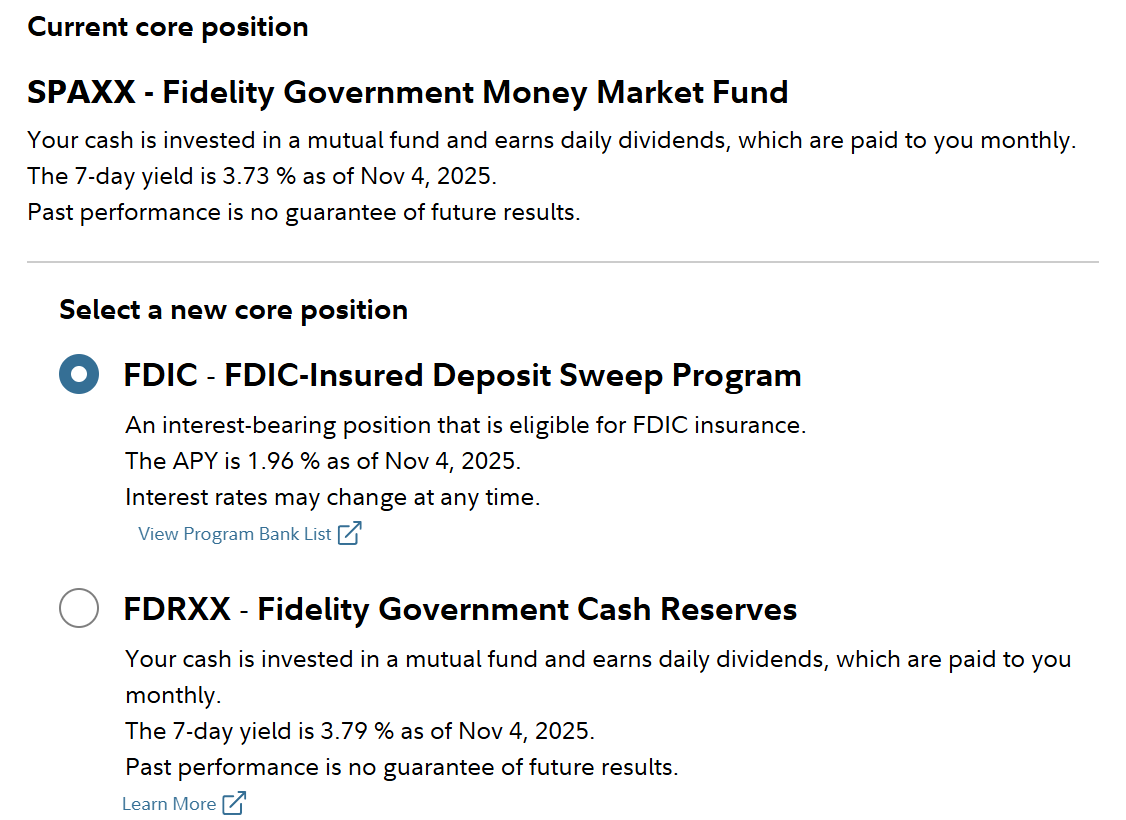
Per Fidelity support, FZDXX is a cash position but not really a core position, when money moves into or out of the account shares of the fund are automatically purchased or sold. With managed accounts, it is possible that FZDXX displays as the core position and treated as a core position even though it isn't technically a regularly selectable core position.
Deluxe R64.30, Windows 11 Pro
1 -
Fidelity refers to FZDXX as my core position and was advised to move my core over to this MMF for better return. However I see SPAXX as the core as the core in the cash management account in very small $ and don't know how it got there.
1 -
Has this frustrating issue been corrected by Quicken yet? Ever since this problem started I have reconfigured OSU so it does not try to download transactions , out of fear that things will go haywire as reported by others, and I skip the repeated prompt to re-authorize access. I have taken to manually entering transactions in the meantime. Quicken Premier fully patched running on W11.
0 -
I'm still struggling with this Fidelity issue. I can't imagine going through another month having to enter transactions for my 14 Fidelity accounts manually. Like many of you, some of my accounts have lots of transactions each month. Entering transactions manually takes a lot of time.
I've tried the various recommendations posted on the Community, but still, no go. One thing I've noticed, the IRA and Roth accounts for myself and for my wife connect with no problem (I've deactivated and reactivated multiple times). The accounts I'm having problems with are owned by a Trust. My wife and I are both trustees. I tried using my wife's Fidelity login when connecting the accounts from Quicken but still the same problem.
Could the issue be related to ownership of the Fidelity accounts? Has anyone else experienced this same issue?
Lastly, has anyone come up with an alternative to download transactions from Fidelity and upload to Quicken? Something similar to downloading transactions from credit card providers?
Thanks much!
0 -
Could the issue be related to ownership of the Fidelity accounts? Has anyone else experienced this same issue?
I've got one non-retirement brokerage account with Fidelity owned by our Trust. It's only got pennies in it now; there's been no actual activity since May. All I can report is that it connected fine when I did my reauth a week ago, and the register does claim "last download November 7 2025 8:39 am EWC+)".
My HSA account claims the same download, though we know HSA accounts are not downloading transactions (only 2 transactions for me so far).
0 -
@Bob@45 - Good info. Thanks for sharing.
I just ran One Step Update and the Summary report shows all 14 Fidelity accounts were sync'd. successfully (no errors) and the summary log showed all accounts had transactions downloaded. I see the new trans. in the Roth & IRA accounts but nothing in the Trust accounts. The Last Download stamp shown for all accounts shows the current date and time. Not sure where the trans. went 😣
I spent 2hrs. earlier today manually entering transactions and I still have a long way to go 😫
0 -
I was just going to ask this. I guess I lost track of posts I was following. I see issues with HSA's but was wondering about regular brokerage accounts or IRA accounts. Sounds like still issues?
I haven't downloaded since the forced conversion date. Was waiting for a fix as do not want to run multiple data sets etc. So have not converted yet but need to soon.
0 -
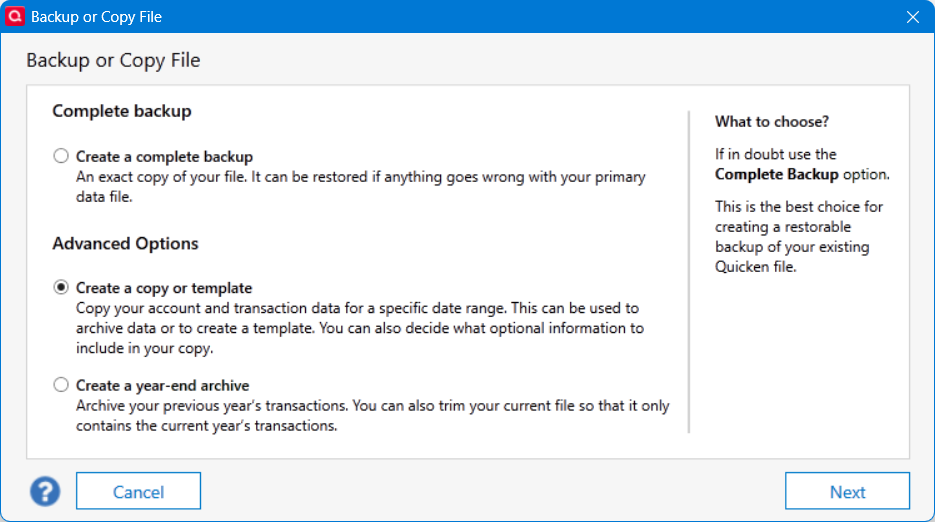
@BJB You can convert and keep the same prior datafile if you create a template backup and use the template file as your converted dataset (using a different name than your unconverted dataset), maybe something like dataset-EWC. The old datafile will remain with the existing connections and you can keep using it. The template datafile will require reconnecting all the accounts but it creates a different Quicken cloud connection. That's how I tested the Fidelity EWC connection while keeping my current datafile. It gave me time to learn what corrections and issues I would encounter by converting. Eventually, I switched my regular usage to the -EWC datafile. My former datafile with Fidelity Direct Connect is now behind in updates and no longer used. Do NOT use a regular backup datafile for the conversion file. That will not create a separate Quicken cloud connection.
A suggestion. It may be a better "ease in" approach than a "can't unconvert" onetime approach to switching Fidelity connection methods. Of course, backup your current datafile before trying any conversion.
Deluxe R64.30, Windows 11 Pro
2 -
Thanks. I was really hoping to just backup my file, and hopefully not need it…and convert with my live file. I guess I can do the template copy and a backup just in case. It is just that all my other connections work so don't want to break those.
0 -
With a template copy, you would have to reconnect all the other connections as well. For me, those connections were working so reconnection was not an issue.
Deluxe R64.30, Windows 11 Pro
1 -
What I have done with my HSA account (since it has stopped downloading for several weeks) is use the following:
- First, make a template backup so you can try out your changes and get everything "clean" before making updates to your live file (you don't have to actually connect this template to Fidelity, just use it to get your conversion process clean).
- Go to the Fidelity website and do a CSV download of your recent transactions (select account, go to Activity & Orders, Download CSV is on the upper right of the list of recent transactions)
- Edit this CSV to include just your missing transactions (I don't know how to select a date range, so I just edited the file to include the transactions I needed)
- Use this CSV along with ImportQIF (https://www.quicknperlwiz.com/) to convert your CSV into a QIF file.
- In Quicken, select FILE ⇒ File Import ⇒ Quicken Interchange Format (.QIF) File ⇒ enter the file name and select the account to import into ⇒ select Import and the transactions will be added to your Fidelity account.
- Take note of any errors or unknown securities for possible edit of the CSV file
ImportQIF has a LOT of documentation, so make sure you read and understand how this program works. I have used the ImportQIFSecuritiesMapping.csv input file to map the names from Fidelity to Quicken because they don't always match (seems the CSV download sometimes truncates long names). What I ended up doing was actually using the Fidelity Tickers instead of the full security name (telling ImportQIF that the Ticker was the actual Security) and then using the Security Mapping input to map the Ticker to the Security Name that is used in Quicken (the full / exact Security Name in Quicken). It took a few trials and edits, but I got things mapped correctly so that now I only have to download a new CSV, edit it and go. Once you have the conversion "clean" you can then use this same QIF file on your live version and add all the missing transactions. Also, next time, things should go much quicker since your mapping file should be ready and all you will need to do is get the correct transactions in the downloaded CSV file. I still try it first on the template, just to make sure everything is ready for the live file.
Good Luck!
2 -
@bmbass - Awesome! What you just shared is exactly what I was looking for. Thanks for taking the time to provide the details. I'll give it a try and post my outcome. I figured there had to be some type of Perl or Python script that someone on this Community has used. I just hope csv export has as much detail for each trans. as the connector provided by Quicken. I have some gnarly trans. such as options which are confusing and full of detail. I'll share my results once I'm done.
Also, fyi, in Fidelity there's a "Custom" tab when you select the amount of data you want to export. I believe the default is "60 days". Select the green "60 days" or whatever your default shows and you will see the custom tab where you can specify a date range.
Thanks again.
0 -
-
@Mark Torpey I also noticed the difference FZRXX/FZFXX vs. SPAXX for the core holding creating share mismatch issues. I am changing the core holding to SPAXX one account per 2 days so that I can fully monitor the resulting transactions. The yields for both are near equals. So far I am not getting share mismatches on any of the accounts with SPAXX as the Core holding. When I finish; I will report back if the mismatches also go away.
My primary Brokerage account is the one that breaks the link the most often. It is the only one which is configured in Quicken to show cash in a checking account. Are HSA accounts (which many people are having problems with) also set up this way?
I also get share mismatches for the "Collateral…" for the securities which are loaned out by Fidelity. Both Fidelity and Quicken show daily transactions for adjustments/buys/sales but they never show up under my Positions on the Fidelity web page. So I just delete them all. Keeps the ledger simpler.
1 -
My issue was resolved a couple of weeks ago, transactions are now downloading again without me doing anything. However there are still issues with core fund tracking.
1 -
My HSA doesn't have a cash account, and it's not downloading transactions.
I think you meant to say FDRXX instead of FZRXX.
0 -
I plan to wait to receive my monthly statements and compare them with the downloaded data. This way, I can sync the accounts until the next dividends/interest are posted.
0 -
I am sorry. I get the different MM fund tickers jumbled. The taxable fund choices are FZFXX or SPAXX. IRA's have FDRXX or SPAXX. FZDXX is the Premium MM and is available as a tradeable MM fund. I keep as much as possible in it because of the higher yield. Fidelity will even automatically sell it to cover a trade or withdrawl without getting mad at you.
2 -
Yes, @allen_car but then Quicken won't download the resulting FZDXX redemption transaction (just another Fidelity EWC+ issue).
0 -
Ok count me very confused.
I have 6 Fidelity accounts which have been having issues downloading transactions since August. I thought I finally got all of this sorted in early October and everything worked well through what I thought was October month end as I have transactions for 10/31/25.
I was away for a week on vacation and today just returned (11/9/25) and not one account is downloading. What is very odd is one of the IRA accounts which did stock purchases on on 11/3 and 11/4 for a new stock not in the Security List and the Fidelity IRA account prompted me to add which I did, but there is no correspnding purchase trasnaction in the download list.
I performed a "Reset Account" on three of the accounts this afternoon: 1 brokerage, 1 Fidelity GO and 1 IRA. All Resets appeared to go through fine. The first two accounts did not downloaded any transactions. The IRA account downloaded three dividends paid on 10/8 and 10/9 which is very odd since I have downloaded transactions probably 5-6 times over the month of October and these were never there in the previously downloaded transactions—why they suddenly showed up today is confusing. However none of the stock trades in November are still in the Downloaded section.
At this point I have no idea what to do to fix the issue. I have "Deactviated" and reactivated all 6 accounts numerous times to fix the issues from mid-Sept to mid-October to fix all issues and then seem to get 1-2 weeks of stability only to then have issues again.
Any additional suggestions?
0 -
I have FZDXX in both Taxable and Tax Deferred Accounts.
0 -
@EvDob FZDXX is NOT used for the Core Cash portion of my accounts. Every tranaction for FZDXX has been downloaded correctly; provided ANY Fidelity download functioned that day.
I am switching all accounts to SPAXX for the Core Cash; one account per every 2 days. Though I can have the Core Cash at zero and Fidelity will automatically Sell enough FZDXX (Premium MM) to cover the deficit from the trade or withdrawl. I confirmed this was OK to do with Fidelity by Secure Message (which I saved as a pdf in case Fidelity changed their mind).
Today I decided to Validate and Copy (BACKUP Must be done before Validate because it can make BIG changes to your file) my 4 separate Quicken files because I learned from Chris_QPW in a Post I Orginated; that the COPY resets ALL online connections. This sounded like a good plan since the first rule in troubleshooting is to simplify or control the situation. This would remove any hidden online connection information and start all online connections with a clean slate. I will report back if things improve or get worse.
This did not create much work for me since my Quicken files are functionally very simple; though one is 110 MB in size. Quicken ONLY downloads transactions (from 3 financial institutions) to be recorded in the accounts. Qucken does not initiate any tranasctions.
The Validate did find a bunch of Invalid transactions and removed them from an account (ACCT_10b38) that never existed and did not show up yesterday when I went through the Hidden accounts and CLOSED every old account that was no longer actually Open.
Here is myother post; but it probably does not apply to anyone else.
0 -
You should consider doing this the other way around, since Fidelity automatically defaults to FZDXX as a backup account when your Core account is depleted. This process allows you to gain a slightly higher interest rate. You can verify this directly with Fidelity.
0
Categories
- All Categories
- 56 Product Ideas
- 36 Announcements
- 223 Alerts, Online Banking & Known Product Issues
- 22 Product Alerts
- 701 Welcome to the Community!
- 671 Before you Buy
- 1.2K Product Ideas
- 53.7K Quicken Classic for Windows
- 16.3K Quicken Classic for Mac
- 1K Quicken Mobile
- 813 Quicken on the Web
- 111 Quicken LifeHub