Unrequested Change to Simple Investing with Vanguard Account

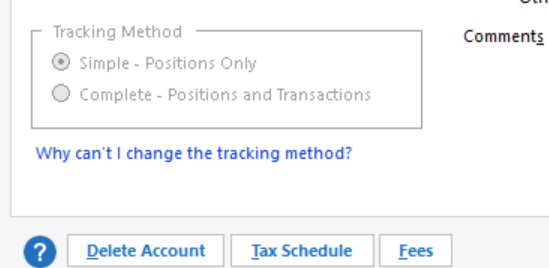
During this past week, somehow the download connection of my only active Vanguard account stopped working. I proceeded to Deactivate, and then Reconnect … I have largely moved out of Vanguard and only have one active account left, so I clicked Ignore all non-linked accounts which handily changed all of my dormant former accounts to Don't add to Quicken, and I then confirmed that linking of my sole remaining active account was set to the correct account in Quicken. At no point in the dialog did it ask me if I wanted Simple or Complete Investing, and at no point was there an opportunity to specify it, one way or the other. It completed the connection and I pressed Finish. To my surprise and displeasure, I found this account now showing Simple Investing as the Tracking Method (1st screenshot), with no apparent means of switching back to Complete (grayed out), nor any hope for the retrieval of 8 years of history on this particular account.
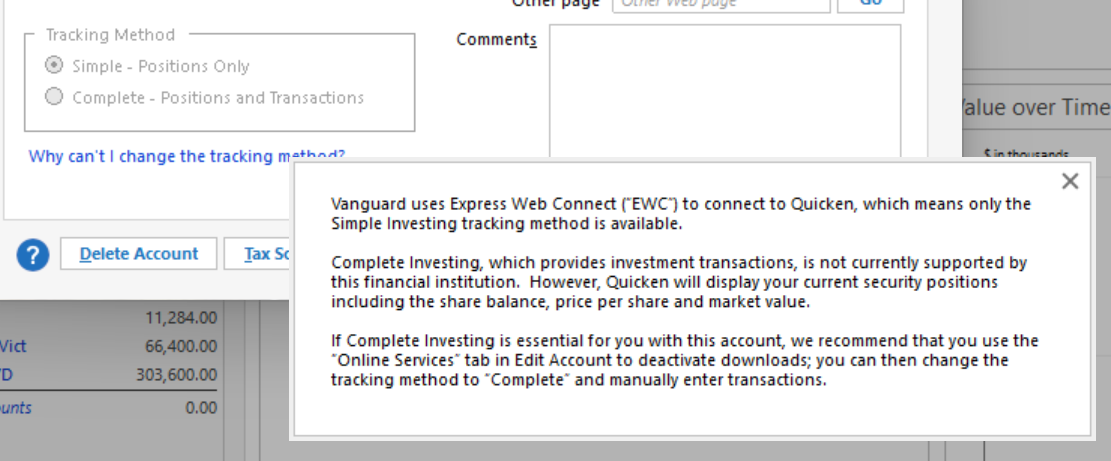
It's mind-bending to read this excerpt (2nd screenshot below) … Vanguard uses Express Web Connect ("EWC") to connect to Quicken, which means only the Simple Investing tracking method is available. Complete Investing, which provides investment transactions, is not currently supported by this financial institution. In the words of McEnroe, "you cannot be serious"
Is this an early sign that Vanguard is now transitioning toward EWC+ in a rather disruptive manner ? I have seen no communications concerning such a transition, but I assume it' inevitable. Transitions indeed can be rough in this environment, as evidenced by the months long Fidelity transition, now seemingly near complete.
It's also curious that this account, in Quicken, shows Direct Connect - Simple Investing (3rd screenshot), in contrast to the indication of EWC in the 2nd screenshot.
I plan to revert to a Backup from earlier in the week where I still have my transaction history, but am disconnected from further updates.
Awaiting comments, suggestions, or other indications that this has been FIXED, and just posting a few names asking for input and guidance …
@Quicken Kristina @Jim_Harman @Boatnmaniac @BarryGraham

[Edited - Removed partial account number]
Comments
-
Have you seen this thread? Does it sound like it might be applicable to your situation?
Quicken Classic Premier (US) Subscription: R66.23 on Windows 11 Home
0 -
Thank you @Boatnmaniac . At face value it looks totally applicable to my situation. I will report back with results and further comment, if needed.
0 -
OK, so following the @Jim_Harman 14 step plan, I was able to get this account back to normal. @Boatnmaniac, THANKS for the referral to his post from May 13, 2025. I see that others mentioned it worked for them, but for one person it did not. I am including that person here @DebMj1, in case they still need help. I expect the procedure should work as long as the follow every instruction to the letter. The most important steps in the procedure are 7-10.
Now my question for someone in Product Architecture, System Engineering, or Product Validation authority at Quicken, if only I was given the opportunity to DM them:
Why would Quicken provide multiple pathways to set up a required function as fundamental as Online Services, and yet deliver a product where at least one of those pathways fails in such inglorious fashion ? Further, the pathway that Jim presents, and apparently the only pathway that works for a Vanguard account (perhaps others, how would anyone know) is the least logical one when dealing with an existing account that has experienced a connection failure. Why would anyone imagine having to enter the process through the Add Account pathway for an existing account and then press an Advanced Options key along the way for a successful Connection and Tracking Method ? The more logical, straightforward yet failing pathway that I was attempting to use was: 1) right click on the Account and Edit Account, 2) Select the Online Services tab and execute a Deactivate, followed by a Set up now, which should have led to a successful connection and Tracking Method of the user's choice … In my view, at my Step 2, with properly behaving software, the user should be presented with a clear Tracking Method choice, and any other "Advanced Options", in the foreground, and not hidden behind a button that doesn't even appear in this pathway anyway.
Instead, we're totally dependent on folks like @Boatnmaniac to happen to see a problem report in a community forum, and then fortunate that he has a recollection of a post where a 14 step solution was laid out by @Jim_Harman that may outline a solution. For my subscription money, there are so many things I'd rather be doing than continuously fiddling with all of the loosely assembled parts here.
1 -
The issue is not unique to Vanguard … It also turns out that the "Add Account" pathway also helped me resolve a broken connection to an existing credit card account that had defied conventional resolution via the Edit Account pathway. This one happened to be a Discover Card account that I rarely use anymore, so it wasn't bothering me too much that it wasn't working the past 2+ months. In this case, Discover is using EWC.
0 -
Quicken Inc doesn’t post on the “whys of how the code works” so you are never going to get that kind of answer from them.
Given all the problems like this over the years it is something that should be addressed but I can give some insight into why these two different flows have different results.
When you have an existing account that is linked to an online account Quicken has information as seen in the Account Details that it uses for this connection.
When the “setup” or reset account it triggered from the account Quicken will keep using that information and if you need it changed it will fail. Add Account ignores any such information and prompts for it.
The same thing can be achieved by deactivating all the accounts and clear out this information from the Account Details, but Add Account is faster.
It seems to me that they have introduced code that tries to do this switch over more automatically but it gets tripped up by old code that tries to preserve this old information.
0 -
Thanks for the insight … in short Add Account provides a quick cleanup of whatever caused the failure in the first place (hopefully), and the opportunity for a fresher start. I'll save that tactic for likely future use. Thanks @Chris_QPW
0 -
Add Account is the default path for me in most cases because if it has the Advanced Options link it means that there are multiple connection methods available and it will then allow me to select which connection method I wish to use.
When an account is being set up for the first time or when the Financial Institution information has been removed from the General tab of Account Details (which makes Quicken think it is a first time set up), clicking on Set Up Now will open Add Account where the FI needs to be selected and Advanced Options, if present, can be selected..
Otherwise, if the account had been previously set up, Set Up Now will simply try to set up with the same FI that was previously used so it then bypasses Add Account.
I think much of the confusion exists surrounding this because of inconsistencies in the FIDIR listings. Instead of there always being a single FI listing for each connection method, there are some FI listings that have 2 or 3 connection methods included and the only way to select which connection method to use is via Add Account—>Advanced Options.
The FIDIR list is not something that Quicken controls. It is owned and maintained by the aggregator (Intuit) who sets it up based upon their contract with the FI. The Quicken software then needs to have some flexibility in dealing with the FIDIR list variable connection options. Add Account—>Advanced Options provides that flexibility.
My guess is that somewhere in Quicken's long past history someone requested or someone got it into their head that it sure would be nice to take the Add Account step out of the connection set up process for previously connected accounts so Set Up Now was implemented. It usually works well but not always.
Is it pretty? No. But there is a logic there that really is intended to help us manage some of our Online Services connections better and in the way we prefer.
Quicken Classic Premier (US) Subscription: R66.23 on Windows 11 Home
1 -
The new quirk to this is now when they have introduced the dialogs that tell you that you need to switch from Direct Connect to Express Web Connect.
1 -
@Boatnmaniac, and @Chris_QPW Thank you for the extended replies !
0 -
@pablomiller I'm glad that my instructions for reconnecting to Vanguard worked for you.
One complication with reconnecting Vanguard accounts is that brokerage accounts that were first connected before 2009 must use the old Pershing account numbers rather than the current 8 digit numbers in order to use DC.
I'm sorry I had to make the instructions so detailed. They went through several iterations of adding details and caveats because several people said they didn't work, which turned out to be because they had taken shortcuts.
QWin Premier subscription0 -
@Jim_Harman, I totally understand the need to cover all bases where users taking shortcuts was confounding the process. Now, as to the reasoning for the differences between Add Account and Set Up now, I wonder if the aggregate customer time "saved" by using the Set Up now button (instead of Add Account) compares to the aggregate customer time "wasted" by users failing to re-establish broken connections and searching for a solution, or searching for a previous backup where it was still working, and then re-doing all the subsequent transaction work, thinking that was their only path to restoration. If someone brought it up for a vote, I would vote for Set Up now to do what Add Account does, and just totally prevent the latter scenarios.
0 -
I certainly agree that having to go through the Add Account process to reconnect an account is counterintuitive. It is also error prone, because it defaults to adding a new account rather than linking to an existing one. Also you need to know the correct account numbers to link them correctly. If you get this wrong, you will end up with a new account or even worse, cross-linked accounts.
The Set Up now process uses the account information on the General tab, which might or might not be correct. Perhaps it could be improved by adding a confirmation screen that shows the existing account info and gives you an opportunity to correct it before trying to connect the account.
I think the Reset Account process has changed recently. When I had to reauthorize an American Express account a few days ago, it led me through what was basically the Add account path with Amex pre-selected.
QWin Premier subscription0 -
Hi guys.
I've been using Quicken since the mid-80s DOS versions. I guess that means 40 years? Holy cow. So I can't imagine life without it.
That said, I could never recommend it to the faint of heart or to anyone who isn't willing to suffer, precisely because of stuff like this and crashy updates and broken files. Quicken has sucked up many hours probably adding up to years of my life.But many thanks to people who have worked out so many of the issues and kept me up and running.
Despite the years of using it, I ain't no expert and I just ran into this Vanguard problem again. So back for a refresher.
mtbdog aka steve0 -
I hit this issue today and found the solution via this thread. Thank you to Jim Harman, Pablo Miller and the other folks who helped out here.
0 -
This happened to me over the past few days. I was on the phone with Vanguard today to try and solve this same issue before coming here. The advice to delete all the old accounts, reload them as fresh including the last 18 months of transactions and then call Quicken support to merge the old file was the recommendation. I believe that would work. Has anyone tried to do this where they had "transfer" transactions between Vanguard and other non-Vanguard accounts? What happens to those "transfer" transactions? I would expect them to break and cause a daisy chain of problems now with any account where I've transferred between them and my Vanguard accounts. Before I go down this rabbit hole, I was hoping there was a fellow Quicken user who might have already done this. Otherwise, I was able to disconnect entirely from the Direct Connect and will take the extra 30 seconds to log onto the Vanguard website and "download" a QFX file when I need to update transactions and call it a day. TYIA for anyone replying.
0 -
@kj1289 Have you tried the process described in my initial response to this discussion? That should resolve this problem
QWin Premier subscription0 -
@kj1289, from my experience, I would personally advise against going down the rabbit hole you mentioned, because all of your prior history, and potential transactions involving other accounts is still there in your Quicken data file. Blowing that all away seems like a recipe for corruption among those other accounts that may be impossible to recover from. I think your best way forward is to follow the @Jim_Harman procedure, in particular, Steps 7 - 10. It's actually pretty straightforward, and fixed my situation immediately and completely.
0 -
You received bad advice from Vanguard.
If your issue is only that the Vanguard account is showing as "Simple", then just go to account details of the problem account and change it to "Complete".
If you somehow were also switched to EWC from Direct Connect, follow the steps from @Jim_Harman in the following thread to switch it back.
0 -
@Quicken Kristina … I don't know who to address this to within Quicken, so I started with you. I think Quicken needs to own, find and fix the root cause(s) of this issue. For what it's worth, I have submitted a Help > Report a Problem. Here's the text of the Problem Report: Please see this Community link: https://community.quicken.com/discussion/comment/20527138#Comment_20527138 and a prior instance from earlier in the year which resulted in a Community generated "work-around": https://community.quicken.com/discussion/7962420/vanguard-register-change Quicken, please Investigate and Implement a proper fix to prevent this from happening. Customers are getting bad advice from Vanguard for addressing a Quicken-caused problem, at the risk of significant and potentially unrecoverable data damage.
0




