Costco Citi still unable to interface to Quicken Deluxe on PC

My downloads for my Costco Citi Card stopped working on April 16, 2025. In fact, disappeared from the update list entirely. Tried to do a "setup now" from the account edit screen (Online Services) and got through to "City Cards Need To Authorize Your Accounts". When I hit the "Sign In" button I get the following: "Sign in to Costco Anywhere Visa Card by Citi bank failed. Try again"
Comments
-
Hello @RickP58,
Thanks for checking in! That message typically indicates that something is interrupting the connection between the financial institution and Quicken during the authorization process. When you get a moment, please temporarily disable any browser add-ons (for example: ad blockers, script blockers, pop-up blockers), and try again. If you have another browser installed, try setting that as your default and running the authorization from there as well.
Also, if you’re using a VPN, be sure it’s turned off while connecting, as it can prevent Quicken from completing the connection with the bank.
Let us know what you find!
-Quicken Anja
Make sure to sign up for the email digest to see a round up of your top posts.0 -
Does your web browser come up? When you select Sign in what should happen is your web browser should open with a link to the Citi Card website where you login and authorize the connection.
If nothing comes up then something is blocking Quicken from asking Windows to open the link.
0 -
well I have been on the phone just now with quicken! It has gotten worse actually. It no longer opens a browser where it used to.
0 -
I believe that Quicken changed their handshake software where they validate citi. It has worked fine for many years.
0 -
Citi changed from Direct Connect to Express Web Connect + some time ago. (It is the financial institution that decides what connection methods they want to support).
0 -
I am having problems with my Costco and Capital One Accounts updating in Quicken. I have autopay set up with all these accounts and so did not want Quicken to pay, just to track and update the accounts. Now the accounts in Quicken seem to default to QUICK PAY, which I do not want to use. The accounts are also now updating correctly so everything in bills is now manual.
Anybody else having this issue?? I have talked to 3 different reps who have told me different things and have had me 'try' differnt things.
0 -
This sounds like a different problem than this thread is about. I suggest that you post your own question by selecting New Post in the upper right of this web page.
0 -
so after 2 hours on phone just now, quicken tier 2 specialist did a validation of my files and at least got me back to opening up a browser. But still no solution given. Other than to tell me it is a CITI problem. So I am stuck! They both say it’s not them but the other. Quicken vs Citi! 😡🤷♂️
0 -
If the problem is that you can’t finish the authorization I would guess that it neither a Citi or Quicken problem.
I would try setting a different web browser as your default and see if that helps and as @Quicken Anja said if using any kind of VPN turn that off.
0 -
we tried 3 browsers. Chrome, edge and Firefox. The problem is not a browser issue imho. Citi just needs to properly validate logins on that URL that quicken is using. A normal Citi login works fine. 🤷♂️
0 -
0
-
The biggest problem with trying to troubleshoot this is that we (as users) have no way to know what is communicate how it is done when you do the authorization at the financial institution.
But I know it does work for most people, including me.
0 -
One thing, when you are redirected to that URL do you actually get logged in?
0 -
wow! So after all this, a tech at Citi just deleted my online account with them and had me REGISTER all over again. Once I did that, then the login to Citi from quicken worked! And my account is now working! I sure hope quicken can now tell its customers this is the solution! 😎👍
2 -
That is great news, I’m glad you finally got it resolved!
0 -
I will be feeding this back to quicken so they can help others instead of being of no help!
1 -
Thanks for the update! Glad to hear you were able to get this resolved.
-Quicken Anja
Make sure to sign up for the email digest to see a round up of your top posts.0 -
This same issue is happening to me for my Citi Costco account and a TD Bank account. Does this mean I have to go to those institutions to delete my online accounts? That doesn't seem right - I have both set up with auto-pays that I really don't want to re-do
0 -
so I called Citi and they deleted my online account. And then had me re-register. I’m not sure, but you may be able to delete your own account yourself and then re-register it.
if you can do this you will save yourself many hours on hold imho. 😎👍0 -
I seriously doubt you can delete your online account. I certainly don't see any such option at Citi Cards.
When you said that you have to re-register, was that the main username and password, or just for Quicken access?
One thing I see at Citi Cards is that you can go to the following webpage and remove access by Quicken (I think though you have to go through Quicken to set it up in the first place).
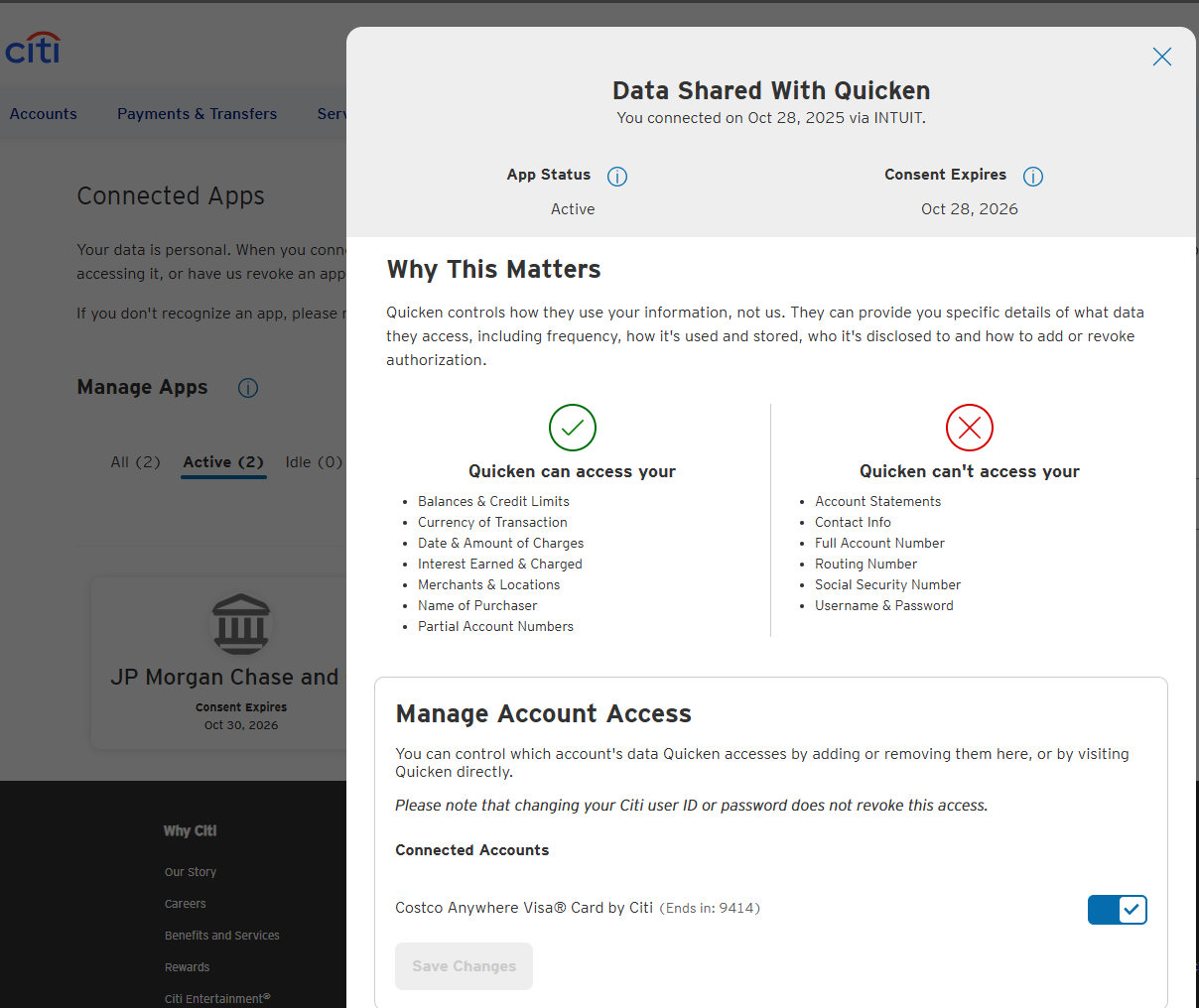
I'm just wondering how much the Citi support person really removed to get it to work.
1

