Fidelity not Downloading Investment Transactions (yet again!)

I am not sure what has happened but I was away for a week on vacation and just attempted today (Nov 9 2025) to download all my transactions across 6 Fidelity accounts. Not one account downloaded one single transaction while I was gone (all accounts paid at a minimum interest on Oct 31 2025 which even those did not download.)
What was odd is one account that I performed a purchase of a stock while I was away and which was new and not in my Security List and after the download, it actually asked me to set it up. So it must have recognized that there was a purchase yet no correspondending trade.
Any new issues with Fidelity yet again? At this point I am getting close to closing all 6 accounts and moving them to another brokerage firm. This is so frustrating after months of issues.
Comments
-
More info needed in order to help you.
Please do TOOLS, Account list. What shows in the following columns across from each of your Fidelity accts:
Transaction Download, Last Download, Financial Institution.BTW, I have 7 accounts at Fidelity (3 taxable, 3 IRA, 1 non-profit in a separate file) and have had no problems with downloads after the initial (a couple of weeks ago) conversion and clean-up.
Q user since February, 1990. DOS Version 4
Now running Quicken Windows Subscription, Business & Personal
Retired "Certified Information Systems Auditor" & Bank Audit VP0 -
TY for the help.
For all 6 Fidelity accounts it shows "Yes (Express Web Connect+)" and then "November 9 2025 - 2:14 pm".
On financial Institutions all are "Fidelity Investments" and Last Reconcile are all 9/7/25 except the brokerage account which is 11/9/25 (which I did this morning when I first noticed the issue).
0 -
I have the same issue across 7 different accounts. Last Download shows November 9 in the account list but none of the accounts show recorded transactions after October 30th. I know I received dividends in several of those accounts during that period.
0 -
Thank you for letting us know you're seeing an issue with your transactions not downloading. To start troubleshooting, please follow these steps from our article on missing transactions/transactions not downloading:
Be sure to follow these steps in order:
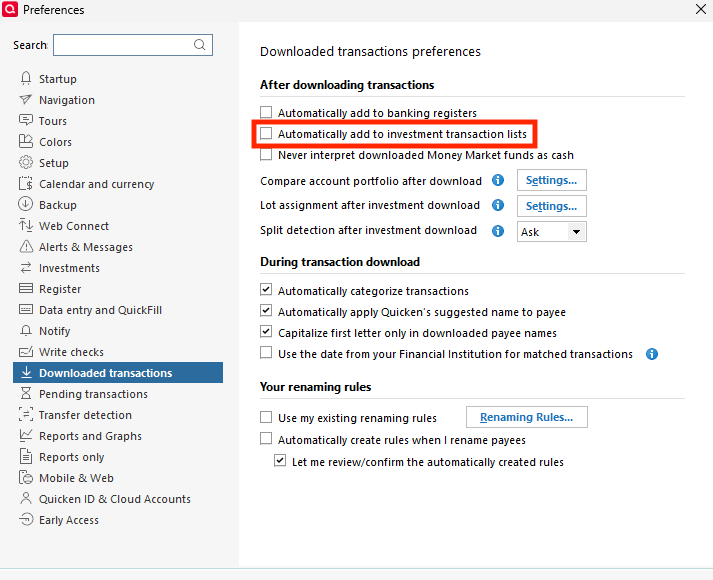
1. Go to Edit > Preferences > Downloaded Transactions. The option Automatically add to investment transaction lists needs to be unchecked.
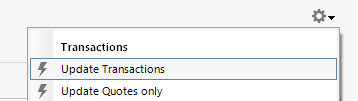
2. Refresh your online account information by clicking the Actions Gear Icon on the upper right of the register, and select Update Transactions. Follow the on-screen instructions to complete the update.
3. Confirm that the Sort Order in your account is by Date; just click the top of the Date column in your account register. It's possible the transactions are in your register, but not where you thought they'd be.

4. Try refreshing your login session: To do this, go to Help > Refresh Sign in. After completing the log-in process, trying running a One Step Update again.
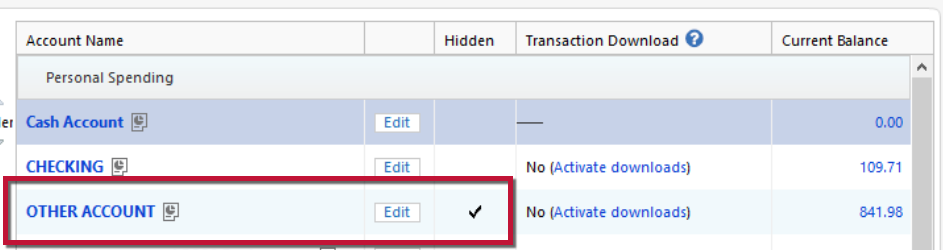
5. Go to Tools > Account List and check Show Hidden Accounts at the bottom left. Confirm the missing transactions haven't been added to a hidden account by clicking on the name of any account that appears with a check mark in the Hidden column.
Please let me know how it goes!
Quicken Kristina
Make sure to sign up for the email digest to see a round up of your top posts.
0 -
On #1 it was not checked.
#2 had no effect.
#3 was not the issue.
#4 had no effect.
#5 was not the issue.
Anything else short of deactivating and reactivating?
[Edited - Readability]
0 -
Further to trying your fixes, I did deactivate one of my IRA accounts where I knew I had stock trades last week. I then reactivated but those trades are still not in my Downloaded Transactions.
So I do not think that is the issue.
[Edited - Readability]
0 -
Thank you for your reply,
Since the troubleshooting steps did not resolve the issue, I recommend that you contact Quicken Support directly for further assistance, as they have access to tools we can't access on the Community and they're able to escalate the issue as needed. Quicken Support's contact information can be found through this link here. Phone support is available from 5:00 am PT to 5:00 pm PT, Monday through Friday. Chat support is available from 5:00 am PT to 5:00 pm PT, 7 days a week.
I apologize that I could not be of more assistance!
Quicken Kristina
Make sure to sign up for the email digest to see a round up of your top posts.
0 -
@Quicken Kristina SUUUUCCESSSSS!
It took about an hour but we finally got the 6 accounts to work. Let me post here what the ultimate fix was.
First Support tried a Super Validate (took 20+ minutes since I have accounts going back to my first year of Quicken which is 1992.) Then we did a Validate. Neither of these allowed for the download.
Next we signed out of Quicken and then back in. But before we did that, we deactivate all six Fidelity accounts. (As I have said, I have done this in the past to no avail.)
What was different this time is we did an Add Account from main top menu and activated all six Fidelity accounts at once. When this was completed, I got all transactions back to October 31st 2025 that were missing.
Support thinks the combo of signing out and back in plus activating at once did the trick. Hope others experience similar issues can use this to fix their problems.
0 -
Thank you for the follow-up,
I'm glad to hear you were finally able to get it to work. Thank you for sharing the steps that got it working again.
Hopefully, it will help others encountering the same issue!
Quicken Kristina
Make sure to sign up for the email digest to see a round up of your top posts.
0 -
This worked for me as well!!!!!
I had 7 Fidelity accounts with 2 different login names (wife and mine). I didn't have access to two of her accounts. Once she authorized access for me, I added all 7 accounts to Quicken at the same time with one Fidelity login and life is good again.
Thanks jcoley2 for posting this fix.
0 -
Glad it worked. Not sure why we have to do all accounts at the same time but oh well. At least it is working now.
0 -
Please post a step-by-step of what we need to do, and this is happening to me as well. Was working fine until the last week or so. When I connect, it says it is successful. I don't get any error, but it doesn't D/L the latest (Oct) transactions.
0 -
Simple: deactivate all accounts, log out of Quicken and back in. Add Accounts at top and select Fidelity. It should then prompt you to go to Fidelity website and authorize (at bottom of form), then it will come back with all accounts and you need to check them for "linking to existing accounts" (mine had 3 out of 6 trying to add, so I fixed that). Once done update and everything should populate properly.
Good luck.
Note the key is not to do them one by one but in bulk.
0 -
Deleting post as I need to seek help elsewhere.
0 -
I did this. It completed successfully, and the account was relinked. When I do a one-step update, it says it was successful and has all green. However, no new transactions are downloaded. It's a bummer that it just stopped working.
0 -
Hello @dccrens,
Thank you for reaching out! If you haven't already done so, please try the troubleshooting steps posted earlier in this discussion:
If that troubleshooting does not correct the issue, then I recommend that you contact Quicken Support directly for further assistance, as they have access to tools we can't access on the Community and they're able to escalate the issue as needed. The Quicken Support phone number can be found through this link here. Phone support is available from 5:00 am PT to 5:00 pm PT, Monday through Friday.
I apologize that I could not be of more assistance!
Quicken Kristina
Make sure to sign up for the email digest to see a round up of your top posts.
0


