CitiBank Costco card stopped downloading transactions

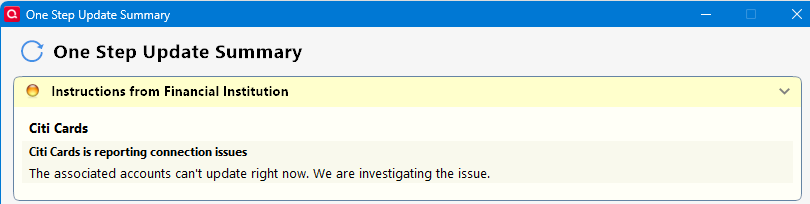
I have been getting the following error message for 4 days: "The associated accounts can't update right now. We are investigating the issue." I have tried resetting the account but the transactions are not downloading. I am using Quicken Classic For Windows 11.
Comments
-
Hello @Larry10,
Thank you for sharing your experience.
After reviewing your connections internally, I am not seeing any connection errors for Citi Cards. So that's good news.
Can you provide a screenshot of what you are seeing? If needed, please refer to this Community FAQ for instructions on how to attach a screenshot. Alternatively, you can also drag and drop screenshots to your response if you are not given the option to add attachments.
Thank you!
Quicken Alyssa
Make sure to sign up for the email digest to see a round up of your top posts.
0 -
I didn't want to show the entire screen, so this is a photo of the error I am receiving.
0 -
Thank you for following up with that additional information.
Is there an error code displayed on the right side of that window you took a picture of? It appears to be a message from the financial institution.
I see that it also shows a successful download, but transactions are not actually downloading, correct?
Can I have you log into the bank's website and see if you receive any prompt or notification in regard to this issue?
Let me know what you find.
Quicken Alyssa
Make sure to sign up for the email digest to see a round up of your top posts.
0 -
Since my last post, I have been made aware that this is a Known Issue and has been reported.
Some users have reported that the steps below have resolved this error for them:
- Run One Step Update (OSU) first to see if the issue resolves.
- If the issue persists, close Quicken
- Using Windows File Manager to rename the runtime.dat file located at:
C:\ProgramData\Quicken\Inet\FILENAME\ where FILENAME is the name of your current Quicken data file, e.g. My Quicken Data 2024 as seen in the image below. There usually is an \Inet\… subfolder for each Quicken data file in existence.- (For example, add a 1 at the beginning of the file name so it reads 1runtime.dat.)

- (For example, add a 1 at the beginning of the file name so it reads 1runtime.dat.)
- Start Quicken and run One Step Update again to check if the problem is resolved.
- Close and restart Quicken to ensure changes take effect.
📌 Note: The ProgramData folder is hidden by default. If you need help accessing it, Microsoft's support site has instructions on how to unhide folders.
Since this is considered a known issue, particularly with Citi, and has been escalated internally, you can assist in the investigation by providing the following info listed below.
- Logs (Help > Report a Problem)
- Screenshots (excluding personal data)
- A sanitized copy of your Quicken data file (with personal details removed)
If you do send logs, let me know so I can add you to the ticket.
Thank you!
(CTP-14158)Quicken Alyssa
Make sure to sign up for the email digest to see a round up of your top posts.
0 -
Note that the "known problem" is that people are getting that error message, but that they still get the transactions downloaded. Removing the runtime.dat file temporarily removes the message, but because the problem hasn't really been resolved it will just come back.
Since @Larry10 isn't getting transactions at all this is a different problem.
I think you need to contact Quicken support to see if they can figure out what the problem is.
Note that I have a Citibank Costco credit card and like others I get that error message, but my transactions are downloading just fine.
 0
0 -
Also, even though this problem seems different it might worth noting that a person that couldn't get the authorization to work at all ended up with a fix where Citi support deleted and recreated their online account:
0


