IRA RMD distributions

Has anyone found a way in Quicken to account for IRA RMD distributions as income?
Answers
-
TOOLS, Account List, click EDIT next to your IRA, click "Tax Schedule" at the bottom of the dialog, set "Transfers Out" to "1099-R Total IRA Gross Distribution".
You can't record taxable events in a Q non-taxable account so you'll need to transfer the total w/d to a taxable account and then split the transaction in the taxable account to record the total distribution as 1 line of the split and the taxes withheld (if any) on the next line as a negative number and then ADJUST the split to reflect the net deposit to the taxable account.
Q user since February, 1990. DOS Version 4
Now running Quicken Windows Subscription, Business & Personal
Retired "Certified Information Systems Auditor" & Bank Audit VP0 -
It can be tricky to record distributions such as RMDs from a tax deferred account to a taxable account in Quicken so that the tax implications are captured correctly.
There are no built-in Categories for IRA tax withholding; you must set them up yourself. I use these:
- Tax Fed:Fed IRA WH with a tax line item of 1099-R:IRA federal tax withheld
- Tax State:State IRA WH with a tax line item of 1099-R:IRA state tax withheld
In the IRA, click on the gear at the top right and select Edit account details. Click on Tax Schedule and set Transfers out to "1099-R:Total IRA taxable distrib." If you don’t see the Tax Schedule button at the bottom of the Account Details dialog, click on View in the top menu and select “Tabs to show”. In the list of tabs, select Planning.
Enter one or more Sold transactions for the securities that were sold. This will put a cash balance in the account equal to the total amount of the distribution, including any taxes that were withheld.
If no taxes are withheld from the distribution, you can simply enter the distribution in the IRA as a transfer to the receiving account.
If taxes are withheld from the distribution, the process is more complicated because you must record the gross distribution as well as the withholding(s) in the receiving account. To do this, go to the receiving account and:
1) Enter a Deposit transaction for the net amount of the RMD as a positive number.
2) Split the Category:
- Line 1 of the split: Category = the IRA account name in [square brackets] for the gross amount as a positive number. This will create a transfer from the IRA.
- Line 2 of the split: Category = the Fed tax withholding category that you use, as a negative number.
- Line 3 of the split: Category = the State tax withholding category that you use, as a negative number.
- Total of the split: Must equal the net amount of the deposit.
If the deposit is made to a banking account between Jan. 1 and April 15, you will see a dialog titled “Confirm Your Contribution Tax Year”, even though this is a distribution and not a contribution. Select the current year, not the default of the previous year, and click on OK. This seems to be a bug.
If you receive the distributions regularly, you can save repeated manual entry by setting up this transaction as an Income Reminder.
If taxes were withheld, you must delete or not accept any downloaded transactions in the IRA for the net distribution and the withholding.
With this setup, the taxable income will be shown in the Tax Planner and the “1099-R Total IRA Taxable distrib.” and any tax withholding in the withholding sections of the Tax Schedule report.
To see the IRA distribution as income in other reports, customize the report to include the taxable receiving account but not the IRA. On the Advanced customization tab, next to Transfers select Exclude internal. The distributions from the IRA should appear in the Income section of the report as FROM <the IRA account name>
QWin Premier subscription2 -
Jim,
It is correct if you are transferring dollars. However, I am transferring stock from a Traditional IRA brokerage account to a taxable brokerage account. I am using "Shares transferred between accounts". The dialog box does not contain a Category option for which I have set up an RMD category with a Tax Related "1099-R Total IRA Taxable distrib" designation to apppear in the Tax Planner.
I do not want to use the "Remove shares" or "Add shares" to complete this transaction.
Am I missing something???
0 -
I would think you need to enter it as a regular IRA distribution with a sell transaction because you will need to enter it in the taxable account as a buy with the new cost value you got for it. Especially since it is for the RMD. You can’t roll over a RMD, you get the money (or shares) and have to buy it separately in the regular account.
I'm staying on Quicken 2013 Premier for Windows.
3 -
@Glen Raggio You are missing something. The cost basis for the transferred stock will be set based on the transfer date. "Shares transferred" will not record this properly. You should follow @volvogirl advice and Sell in the IRA, transfer the cash (determined by your brokerage's valuation of the transfer) to the taxable account and then use a Buy to set the new cost basis for the shares.
1 -
I attempted to do as @volvogirl suggested and while the numbers will work the CATEGORY availibilty is not shown. None of the transaction options available to the Sell/Buy/Transfer get to the Category "RMD".
-1 -
How are the taxes handled?
That is the big sticking point with all of this. Tax transactions can't be recorded in a tax deferred account.
When deciding on how to pay taxes I haven't done RMDs yet, but I assume they are like doing a Roth Rollover which I have done. In that case I could choose not to pay them directly or through estimated taxes.
If paid through estimated taxes you limited the need to try to figure out how to record separate line items and then it would just be a transfer with the right tax line set on funds that are transferred out the account. This is of course not the way most people do it and there is the restriction that you can only set the one tax line for transfers out of the account which means you run into a problem with this if you change how, you do it in the future.
Once you decide that you need to split the transaction to have different tax lines you have to use more than one transaction. The typical way people do this is pay the RMD is cash and as such then as described at the top by @Jim_Harman you do the splitting out of the taxes and such in the taxable account. And for an IRA to another investment account, you would use a Deposit action in the taxable investment account to do the transfer and splitting out of the taxes.
Given a transfer of shares, like I started with you have to first know how you are going to pay those taxes. Given that you are using estimated taxes, and that most likely some amount of shares was taken out before the transfer out of the account for tax purposes, I would think you would do something like remove shares to get rid of the shares that were used for taxes, then a transfer for the shares that did move to the other account (BTW transfer shares between accounts uses remove shares and add share transactions with just adding in the cost basis). And then in the taxable account enter a transaction to enter the recording of paying the taxes using the RMD category you created with a Deposit transaction. The way to make the money magically appear to pay this is to have the first split line have the category of [Investment Account] where "Investment Account" is the account you are in, with the total amount and then a split line with your RMD transaction removing that amount and recording it as an expense and a given tax line.
0 -
For the "cash transfer", use a "Cash transferred out of account" transaction in the IRA and in the Transfer Account box, select the taxable account the shares are being transferred to. If you have the Tax Schedule assigned like @NotACPA has indicated above, the transaction will show up in Tax Planner. You add a Memo and Description entry of 2025 RMD or something to that effect to make it obvious in the register. Using a RMD category with the tax line is actually more cumbersome and less straightforward. For future RMDs, if you ever need to account for withholding, you will need to follow the instructions from @Jim_Harman
RMDs are
1 -
Bottom line on the issue Quicken should have a process that handles the RMD transaction as taxable event and show the monies as income. I'm sure there are a lot of Quicken users that are in retirement that have RMD distributions. Are you listening Quicken?
1 -
I doubt that will ever going to happen.
Just look at all the complications mentioned in this thread for how all of this can be handled. I don't think they could create a system even with a "wizard" that would handle all these use cases.
1 -
dnelson
I really was looking for the transactions to CATEGORIZE the RMD to reflect in the Tax Planner and in the correct places. I have Sell the stock and transferred the proceeds and then Bought the stock, but again nowhere in the transaction dialog box is the category available. I will just have to remember to insert the amount in the Tax Planner.
Thanks,
0 -
If you really did that as you said, look in Tax Planner and the transfer will show up in the Other Income, Taxable IRAs & Pensions Distributions section of the planner. If you don't see it, you haven't assigned the correct Tax Schedule to transfers Out in the IRA account.
1 -
I wouldn’t worry about it being a RMD. A RMD is just a regular distribution, nothing special except you can’t roll it over to another IRA account or ROTH. Enter it as a plain IRA distribution. See this
FAQ: Best way to handle distributions from IRA - also RMD — Quicken
I'm staying on Quicken 2013 Premier for Windows.
1 -
@Glen Raggio No, you do not have to remember. You need to edit ACCOUNT details for the IRA account, the Tax Schedule button.
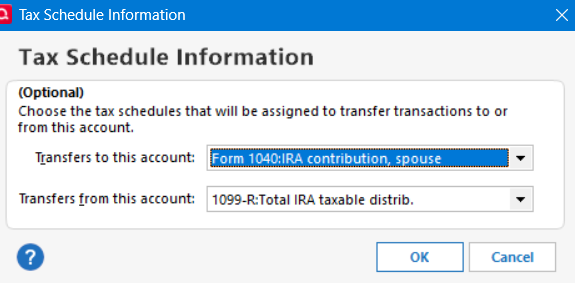
Make the Transfers From selection as shown. Withdrawals from the IRA account to a taxable account will show up as income in Tax planner and tax schedule reports. That is how the tax line assignment gets made. It is not through a transaction category. In an Income/Expense report, it will show up in the income section as a transfer from the IRA account.
It sounds to me as if you have created an RMD category and want to use that. Quicken isn't designed to do that.
1 -
Quicken user since Q1999. Currently using QW2017.
Questions? Check out the Quicken Windows FAQ list0 -
@q_lurker , does your recommendation also work for non-Cash transfers?
Deluxe R66.23, Windows 11 Pro
0 -
@leishirsute In my view, there are no non-cash transfers. If you are moving shares from an IRA to a taxable brokerage account, those shares in the taxable account take on a status of newly bought shares. There is no connection to the shares that came out of the IRA.
As such in Quicken, the IRA shares should be sold, cash transferred, and new shares bought in the taxable account.
3





