All Account Transactions Changed to MiscExp after Enter One New Transaction

A previously reported problem just happened. I input transaction directly into register and clicked “Enter” in a Fidelity Annuity account. EVERY transaction for past two yrs incorrectly changed Action columns to show “MiscExp.” They previous properly indicated Dep, ReinvDiv, etc. All shares showed when I click ‘Holdings’ button. It’s set up with Tracking Method: Complete - Positions and Transactions and Express Web Connect+. As recommended in previous discussions, I backed up file and then closed and restarted Q. The accounts’ original transactions and fields restored.
This or a similar error was previously reported by Q Community in Oct 2024 under Investment register display "zeroed" after last entry update and Nov 2025’s Investment register went BLANK; recovered by restarting Quicken. Comments indicate that same issue was also reported previous to these conversations. All are marked closed. Kudos to those who shared how they handled situation. That gave me confidence to try the same and, fortunately, the results look okay so far. Nonetheless, it’s a concerning, recurring issue.
Comments
-
Hello @SeaStar,
Thank you for letting us know you're encountering this issue. There was a ticket for this issue, but I can see it was marked fixed earlier this year. Since the issue is either not fixed or has returned, I forwarded it to the proper channels for further investigation and resolution. Thank you for already sending a problem report with log files attached!
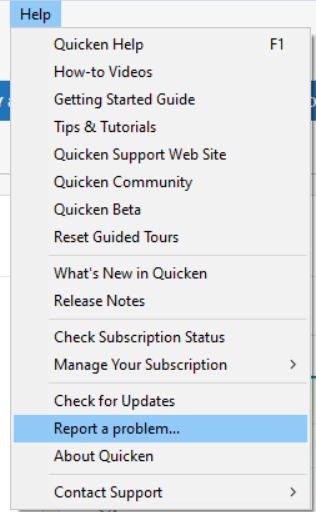
If anyone else is encountering this issue and would like to contribute to the investigation, please navigate to Help>Report a Problem and send a problem report with log files attached, and if you're willing, a sanitized file.
Thank you!
(CBT-935)
Quicken Kristina
Make sure to sign up for the email digest to see a round up of your top posts.
1 -
Thank you for your encouraging reply and for forwarding problem to support channels, Kristina.
0 -
A good first step in troubleshooting any issue here is to collect the similar issue posts:
Quicken user since Q1999. Currently using QW2017.
Questions? Check out the Quicken Windows FAQ list0 -
FWIW this just happened to me again. I submitted a problem report based on my Oct 9, 2025 posting, which is referenced above. At least I know what to do to "repair" things but I sure wish they would fix this!
0 -
Hello @Rx,
Thank you for letting us know this issue is still affecting you, and thank you for sending the problem report with log files attached. I updated the ticket with that information.
Thank you!
Quicken Kristina
Make sure to sign up for the email digest to see a round up of your top posts.
1

