clear cache in quicken

Answers
-
Hello @blippi,
Thanks for reaching out!
To clear Quicken cache, you will first need to close Quicken, then in your File Explorer, you will need to remove the “Cache” folder from “C:\programData\Quicken”, then reopen Quicken.

Hope this helps!
-Quicken Anja
Make sure to sign up for the email digest to see a round up of your top posts.0 -
Hi Anja, you sure make it look simple. when I follow your instructions it leads me to "registry" file. no cache to be found. And yes I did open view for 'hidden files'. sigh.
0 -
Cache may not matter. Basic challenge. I added several accounts to quicken which updated nicely. But in October one account failed. I deleted it and now I can not reauthorize. Yes it is the much discussed CITI.com. Quicken and Citi just don't get along anymore. Citi techs just want to clear chache, used different browsers, but to no avail. alas.
0 -
@blippi , What @Quicken Anja suggested is the proper approach to clear the cache; it is indeed that simple and it works. But you didn't explain why you needed to do that. And the subsequent comments about the registry etc. neither clarify it nor make any sense. Perhaps you are just venting and I can appreciate that. This community is about users helping each other. So maybe a better approach would be to explain in detail what issue you are exactly experiencing so that maybe someone can help troubleshoot and offer a solution.
- Q Win Deluxe user since 2010, US Subscription
- I don't use Cloud Sync, Mobile & Web, Bill Pay3 -
@blippi Thanks for following up! I checked your connection on our side for Citibank, and I’m not seeing any internal errors, so it appears as though it's connecting properly.
To help us understand what’s happening on your end, could you please elaborate a bit more on the specific issue you’re seeing? For example:
- Which account(s) are failing or not updating?
- Are you seeing any error messages or codes?
If possible, please include screenshots of what you’re seeing (with any personal/account info redacted). That will help us pinpoint the root cause and suggest the most effective next steps.
If needed, please refer to this Community FAQ for instructions on how to attach a screenshot. Alternatively, you can also drag and drop screenshots to your response if you are not given the option to add attachments.
Thank you!
-Quicken Anja
Make sure to sign up for the email digest to see a round up of your top posts.0 -
Hi,
My problem is with Citi credit cards only. All other accounts have been readily added to quicken.
I reside in California, but, since September, I have lived in Japan. My location was not a problem to connect to quicken in October from Japan. But in November, Citi cards failed to update. I deleted Citi from Quicken downloads and tried to re authorize. It has not worked. I downloaded a VPN in order to improve my chances, but I still can not authorize Citi to quicken.
When I follow the quicken instructions to add a new account, citi has a 2 step sign in (log in with ID and password followed by a 2nd request to sign in) your assistance is appreciated.
0 -
I don't have any specific suggestion but to pay for the best VPN that there is, set it to a US location and be consistent with it.
- Q Win Deluxe user since 2010, US Subscription
- I don't use Cloud Sync, Mobile & Web, Bill Pay0 -
I think @BK's suggestion is the right path.
There should be no second prompting. Even with multiple factor authentication it should prompt you to send the text. This sounds like something Citi is doing.
I notice that this is what my Citi Card URL looks like:
https://online.citi.com/US/login.do?JFP_TOKEN=RARL97QG
Notice the US in it. From what I can see Quicken opens this URL in Windows, which will open it in your default web browser (note don't try to use this one directly, it looks like Quicken has to get something setup, probably on the Intuit server beforehand):
https://auth.citi.com/ASag/oauth2/login
Once you login and authorize the connection, I believe Citi talks to the Intuit servers which in turn communicate back to the Quicken servers/Quicken (the program).
What happens when you try to log in with your web browser?
0 -
Hi Chris, I appreciate your attention. When I add account for Citi.com , I have used both the Citi logo to sign in and separately I have tried Citi.com with "advanced options". Each time quicken takes me to the sign in (Citi needs you to authorize your accounts). so I sign in and it takes me to "https://auth.citi.com/ASag/oauth2/login" and limits sign in time for 5 minutes. Once completed, it takes me to the 'normal' Citi website to again sign in. I fear this 2 step process (which I never created nor authorized) may be part of the problem). The first time I added Citi accounts 2 months ago, authorization went smoothly and I could link to citi. But a month ago it stopped working. So, I unlinked quicken and citi and cannot wed them again. That was why I first thought of clearing the cache. Any thoughts?
0 -
I have used the "Citi Cards" institution, not "Citi", to authorize for a credit card. If that is still in the list of institutions, you could try that. If it isn't immediately listed, do a search for the name.
0 -
I have never seen the double login that you have described. After you signed into the “oauth2/login” URL you should have been taken to a few steps that describes what you are authorizing and to select the account(s) and the OK it.
In the past I have typed in Citi Cards and Advanced, but that was to get Direct Connect. These days it has been switched to Express Web Connect + no matter which way you go in. My last test was just by clicking the Citi logo.
This really looks like something Citi is doing because you aren’t coming from a US IP address or such.
What happens if you just log into Citi with your web browser?
0 -
Hi Chris, if I go directly to Citi web site, I can log in easily, even from Japan. When I add Citi account to Quicken, it sends me to log in and when successful, quicken just continues to wait for authorization. There also is no opportunity to add ID & PW for citi.
I did contact Citi Tech a week ago. They just wanted me to try a different browser and clear cache. it didn't help. Maybe I'll go back and seek their assist again.
thank you all again for your advice.
0 -
The communications for this are "complicated" and "not disclosed" so it makes it really hard to judge what is going on.
There are four parties involved.
You have Quicken (the program), the Quicken servers, the Intuit servers and the financial institution.
Quicken (the program) clearly calls Windows to open the URL, but it has to also be communicating with either the Quicken servers (which then talk to the Intuit servers) or directly to the Intuit servers. It has to be this way because it is the Intuit servers that talk to the financial institution to setup the rotating security tokens. Note Quicken Inc pays Intuit for these connection services, they are the ones dealing directly with the financial institution.
When you authorized the accounts in at Citi it has to communicate with the Intuit servers to let it know and to get things setup. Somewhere after that one of these parties has to let Quicken (the program) know that the authorization passed or failed. And if it passes then go on to add the account to Quicken.
One thing I notice is if I login and then cancel the process, quicken "gets the message" just a few seconds later and posts the dialog that the Sign in to Citi Cards failed. It doesn't have to wait for a long timeout. That might be a way to see if Quicken is getting the message back or getting nothing and just waiting for a timeout.
0 -
Thank you Chris, I discovered the Citi website thinks I have Quicken authorized for downloads, but when I check Citi's specific link, it says "no apps' linked. So I believe it must be a Citi.com problem.
Quicken's ability to download bank and credit card accounts is real nifty. I used QuickBooks Pro for 20 years and never imagined the ease of seeing multiple accounts on one common platform.
0 -
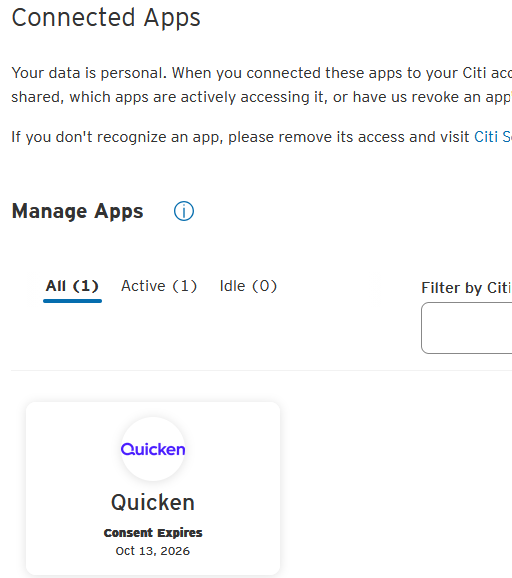
@blippi , I am not finding any section on my Citi that shows "authorized for downloads". However I do see the Connected Apps as seen in the image. My guess is that depending on which Citi product a customer is using or even the geographic location, we may be faced with a difference (and inconsistent) user experience unfortunately.
- Q Win Deluxe user since 2010, US Subscription
- I don't use Cloud Sync, Mobile & Web, Bill Pay0 -
If you select the menu → Profile → More Settings, you will see both “Connected Apps” and “Manage Desktop Apps”. “Manage Desktop Apps” was what was used to authorize Direct Connect” which is no longer available. “Connected Apps” is for Express Web Connect + (and other ones like linking to Chase or Fidelity).
If Express Web Connect + got full setup it should show up like showing in @BK ’s screenshot.
0 -
I'm still using Direct Connect with Citi Cards on both QMac and QWin. Are you saying only that one can no longer set that up? Because it continues to work, clearly. Citi is still running the server.
I have written several times in these forums that DC is working with Citi Cards.
i just checked Citi online - in Manage Desktop Apps, it shows both QWin and QMac with the time last accessed (on 12/2/25).
I have some sites/services listed in Connected Apps, sites that aggregate data, which I recognize having expressly established these connections (like eMoney, which is for Fidelity Full View), and Quicken isn't in this list, nor should it be at this time.1 -
Thanks @qudtp I thought Citi stopped supporting Direct Connect, I guess I was wrong.
But there is something to understand Citi only ever supported Direct Connect for the credit cards. And for that you need to first go to Manage Desktop Apps on the Citi Cards website and start the authorizing. Then in Quicken you do Ctrl+A start adding the account by typing in Citi Cards and then select the Advanced options and Next until it asks you the connection type. Select Direct Connect and continue. And it will ask to provide the username and password, and you should be able to finish up setting up the credit card(s).
But if @blippi needs any banking accounts on Citi then the connection type has to be Express Web Connect + which is the default connection type. And that is the procedure we have been talking about.
0 -
Thank you qudtp, Chris and BK. your combined advice helped me set up access to my credit cards. I very much appreciate your persistent help. Happy Holidaze.
2 -
Because Citi and Citi Cards are listed as 2 separate institutions, I think there is a good chance you can have one set up as Express Web Connect+ for other banking account types, and the other as Direct Connect for credit cards.
That wouldn't really slow down OSU by much. In my experience, OSU does the Direct Connects first, and transactions from Citi Cards download nearly instantaneously, while all the Express Web Connect+ downloads take considerable time to complete.
But what would be the advantage? It's a direct path, Desktop Quicken to Citi, not passing from Desktop Quicken to Quicken services to Intuit to Citi complete with all the timing of their updates and freshness of their data. I think data presented by Direct Connect is at least as up-to-date as data presented through EWC+, and plausibly more up-to-date with the most recent credit card transactions.
What's the disadvantage? Express Web Connect+ provides the latest in security, while Direct Connect is old tech no longer considered sufficiently secure.
0 -
So I don't know if this helps, as the previous messages were difficult for me to follow, but I did notice recently that on citi's website they actually have a place where you can click a button and it basically says "Try connecting your app in the next 5 minutes". I've never needed to use it, but it's a strange feature I've never seen before when connecting an external app like Quicken to a website.
0 -
That is the one used for authorizing Direct Connect.
I personally have my Costco Citi Credit card setup as Express Web Connect +. Until they added Express Web Connect + it was setup as Direct Connect. I have never had Citibank savings/checking accounts. Those were only available with Express Web Connect, which is the most unsecure and unreliable method possible. They changed that over to Express Web Connect + at the same time. One could have setup a credit card with Express Web Connect, but it didn't really make sense since Direct Connect was available, more secure and reliable.
As for "security" I can't really say whether Express Web Connect + or Direct Connect is more secure because they both have their pluses and minuses in this area.
Direct Connect is Quicken using the OFX protocol to talk directly to the financial institution's OFX server. Yes, your username and password are being used but that is over the same security protocol as you use on your web browser, and the information is only exchanged with the financial institution. The only weak point here is the Quicken user's machine somehow getting hacked. Note that in the latest version of the OFX protocol is possible to use the same OAuth2 rotation security tokens that Express Web Connect + is using, therefore having the "same level of security" since no username/password can be hacked. But none of the financial institutions support this.
Express Web Connect + does use the OAuth2 protocol for logging in, and therefore you are never sharing your username and password with a third party, but Express Web Connect + has this flow:
Quicken (the program) ←> Quicken Cloud dataset/server ←> Intuit server (Quicken Inc pays Intuit for connection services) ←> Financial institution's server.
The "more secure" is only between Intuit and the financial institution. We have never been told anything about the other protocols being used other than they are "bank grade". What's more we do know is that your transactions and summary information like the number of shares for investment accounts are stored both on the Intuit and the Quicken Inc servers for "some amount of time".
The least secure method is Express Web Connect. The whole idea here is that Intuit tries to log into the financial institution's website as you. The flow of data is the same as Express Web Connect +. This is why it is both the most unsecure (your username and password is stored on the Intuit server) and unreliable because you literally have a server that is trying to play as a human trying to defeat the very MFA kind of blocks the financial institutions put in place to try to prevent hacking your account(s).
0 -
I meant only that Express Web Connect + is more secure than Direct Connect in the way one's password is used. Or at least how infrequently it's supplied
But maybe that makes no difference. If we asume the protocol used when logging in via direct connect is an equally secure one, the frequency of use hardly matters. And you make a good point that with Express web connect + your data both passes through and is stored at Quicken and Intuit. That's more points of potential compromise. So I think you've convinced me that direct connect is probably the most secure of all the protocols! It's certainly the fastest by far.0 -
Well I congratulated ourselves too soon. After finally connecting to Citi Credit cards yesterday. Today Citi refused entry by Quicken. Citi giveths and Citi takeths away. So , I had to add account all over again which worked, but I hope I don't have to resign up each day. Citi seems to prefer Chrome to my Firefox browser. I will keep you posted on the exciting ups and downs of Citi Credit Cards.
0 -
I get connection errors to Citi Cards on both QWin and QMac. I just try again later and it's fine. Maybe that's all you need to do. I try to avoid reauth of Citi because it's error prone and takes a lot of patience, a lot of retries.
0 -
I sometimes get errors at night or weekends which I ignore for a day or so.
Also you need to be aware that Citi posts a message that say they couldn’t connect when in fact the transactions download just fine. Don’t take that as an error to do anything. Only if you know there are transactions that have not downloaded.
This has been going on for months.
I personally have the options on that say not to so the summary if there aren’t any errors and only show the last update. So, I don’t see this “warning”. I take it is just a warning because even Quicken isn’t treating it as an error and showing it to me.
0 -
In QMac it shows an orange (or is it red?) dot in the sidebar to the left of an account name when there's an update failure. Only happens with Citi.
It's not a big deal, I can see all my Citi transactions in my iPhone wallet, cause I only use that particular card for local shopping.
0 -
A lot of websites are like this, where they work in chrome-based browsers but not Firefox. It's not really a Citi website only problem. I recently switched to just using Google Chrome as my primary browser because I got sick of it.
0


