Bank of America - All Other States failing to download

For each of my accounts here:
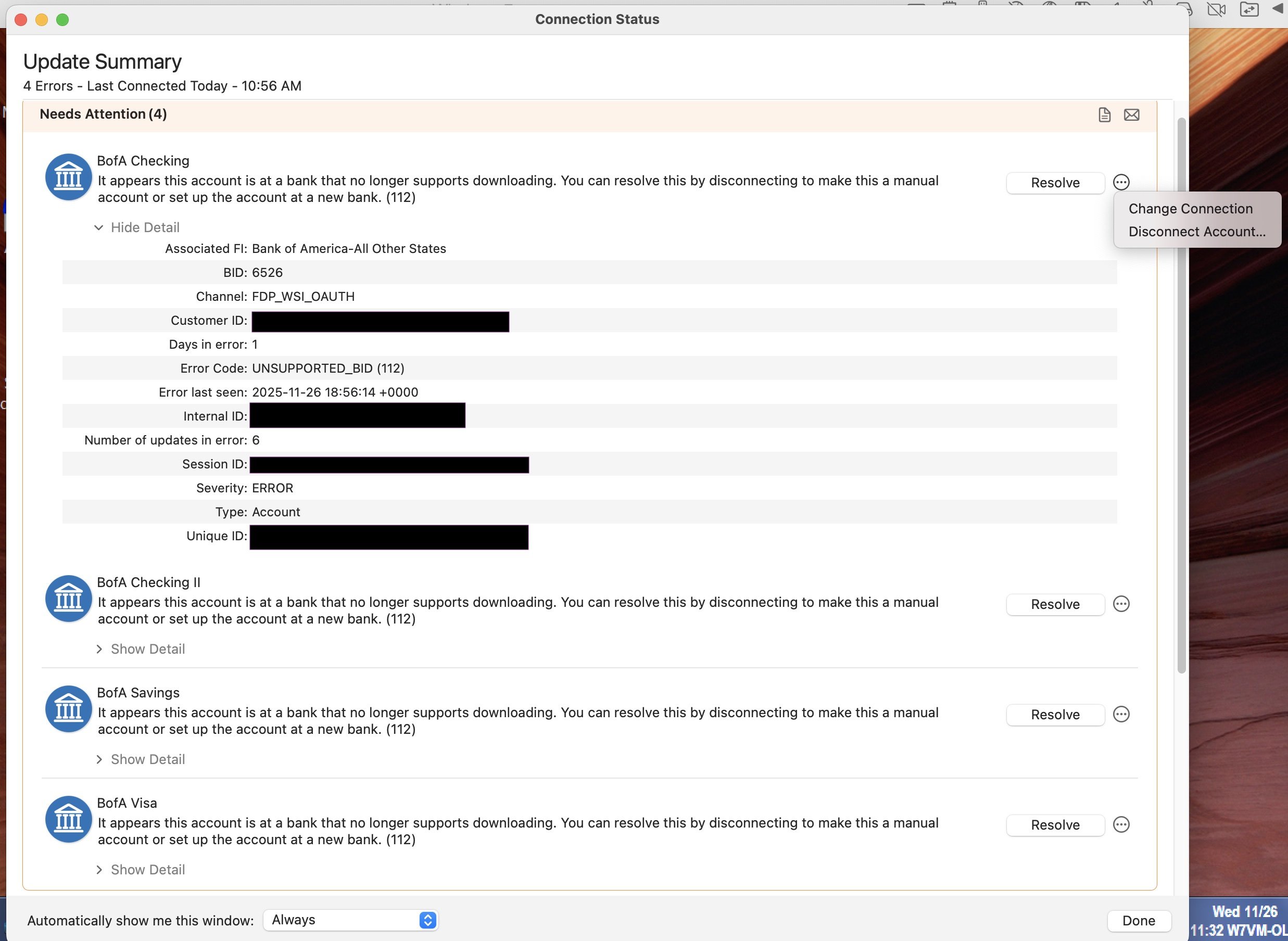
"It appears this account is at a bank that no longer supports downloading. You can resolve this by disconnecting to make this a manual account or set up the account at a new bank. (112)"
BID: 6526
Error Code: UNSUPPORTED_BID (112)
Next to each error, there is a Resolve button, and next to that a little menu (3 dots in a circle) that offers Change Connection and Disconnect Account as choices. There's no indication of what clicking the Resolve button would do vs. using the other options.
Meanwhile, downloading from BofA is working fine from Quicken for Windows.
Comments
-
Hello @qudtp,
Thanks for reaching out!
I took a look on our end, and I'm not seeing any internal errors associated with your Bank of America connection. Currently, it shows as connected successfully.
To get a better understanding of what you’re seeing, could you please provide a screenshot of the message and the options you’re presented with (including the Resolve button and the three-dot menu)? Please make sure to redact any personal or account information before posting.
If needed, please refer to this Community FAQ for instructions on how to attach a screenshot. Alternatively, you can also drag and drop screenshots to your response if you are not given the option to add attachments.
Once we can see exactly what’s appearing on your screen, we’ll be able to determine the next steps more accurately.
Thank you!
-Quicken Anja
Make sure to sign up for the email digest to see a round up of your top posts.1 -
If you are looking at my personal connection status - Bank of America is working normally for me in Quicken for Windows. The error is in Quicken for Mac. I'm still running both in parallel.
Here are 2 screenshots. First, the errors listed in the Connection Status window, with some redactions. There are identical error details for 4 accounts - I expanded the details of just one. This screenshot also captures the 3-dot menu choices presented.
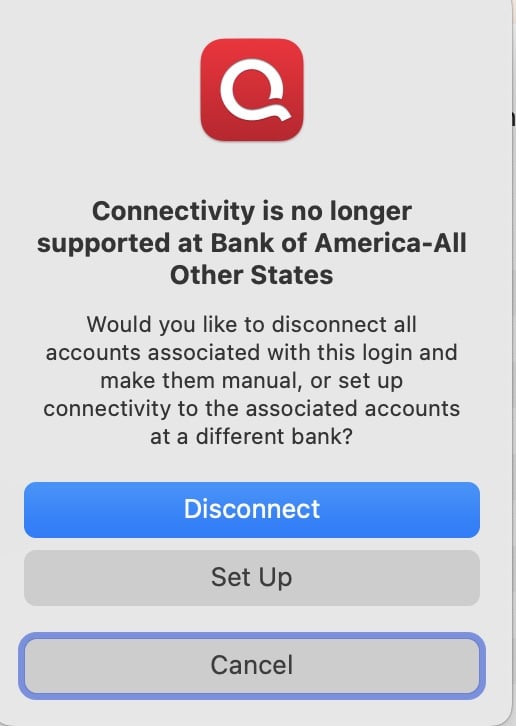
Second, for the Resolve button, pressing it leads to a pop-up window which I show in the second screenshot.
Thanks, let me know what you find.
Edit: I see those are not embedded images but just attachments. So I pasted the images into the next comment. The screenshot sizes are misleading - the Resolve pop-up window is actually fairly small. When you press that Resolve button, the window with the Quicken icon and "Connectivity is no longer supported…." with the Disconnect and Setup buttons, appears.
1 -
Typing something here because otherwise getting an error that the "body is 4 characters too short."
1 -
@qudtp Thanks for clarifying—and yes, I was referring to your Mac connection when I checked. Internally, your Bank of America connection is not showing any errors on our side—thanks for the screenshots of what you're seeing; they help a lot.
The UNSUPPORTED_BID (112) message means Quicken Mac is not currently authorized to connect using the Bank of America Bank ID you’re linked to. Since Windows is still working for you, your current Mac connection likely needs to be reauthorized.
Let’s go through a clean reset of the Mac connection to ensure Quicken is using the correct, supported Bank of America profile:
Step 1: Disconnect All Bank of America Accounts in Quicken for Mac
- Open each Bank of America account register.
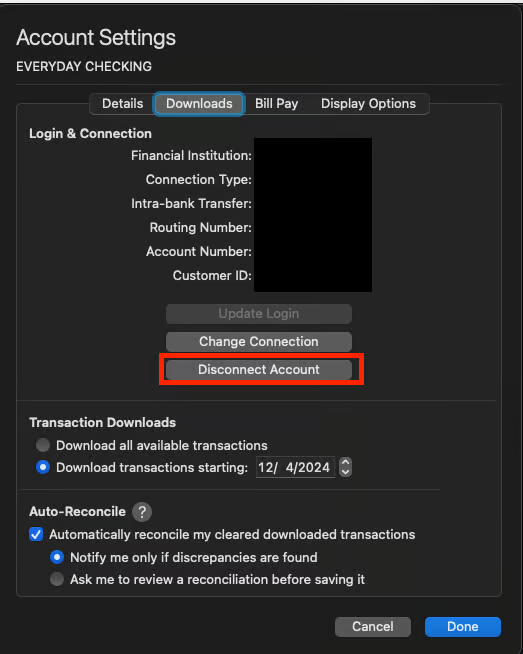
- Click the Settings (gear) icon at the bottom right.
- Go to Downloads.
- Click Disconnect Account for each Bank of America account.
Quit Quicken when you're done.
Step 2: Remove Old Bank of America Credentials from Keychain
- Click the Spotlight search icon (top-right corner of your screen).
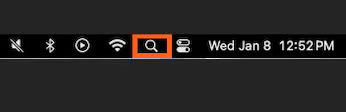
- Type Keychain Access and open it.
- On the left panel in the Keychain app, set the Keychains to Login and the Category to Passwords.
- Search for Bank of America.
- Delete any entries related to Quicken’s saved credentials for Bank of America.
Quit Keychain Access.
Step 3: Unlink Quicken From Bank of America Online
(This is important because Bank of America often maintains a token even after disconnecting locally.)
- Log into your Bank of America online banking website.
- Go to Security, Privacy, or Connected Apps/Accounts (naming varies).
- Look for Quicken, Third-party access, or Data sharing.
- Remove/disable Quicken access if listed.
Step 4: Re-add the Accounts in Quicken for Mac
- Reopen Quicken.
- Go to Accounts > Add Account.
- Search for Bank of America – All Other States.
- Sign in with your credentials and follow the prompts.
- When Quicken finds your accounts, use the drop-downs to Link them to your existing registers (do not add duplicates).
Please give these steps a try and let me know the results. If anything behaves differently, share a new screenshot and we'll take it from there.
Hope this helps!
-Quicken Anja
Make sure to sign up for the email digest to see a round up of your top posts.0 -
Yes, this did work.
I found that for Mac, the name to choose is "Bank of America - Quicken".
"Bank of America - All Other States" is no longer an option I could choose, so I chose the new name and it does work.
On Windows, my institution is currently still shown as "Bank of America - All Other States" as it has been for many years, but maybe that would change if I disconnected and reconnected it. That connection is still working for me on Windows, so I left it alone. Maybe it too will "break" at some point?
Since the error was essentially that there was no such place as "Bank of America - All Other States", maybe that old name has been phasing out and someone finally pulled the plug on it?
No BofA/Quicken credentials were in Keychain - just credentials for another institution that I still use with Direct Connect, and one that I used to. On Mac I've never used DC with BofA, so there was no old password left behind in the keychain.
Thank you, Anja!
3 -
I just read through all this — I have YEARS of Quicken records for my BofAmerica accounts. If I follow all the steps that @qudtp went through, will I 1) lose all that data? or 2) be able to connect the "new" added accounts to the data from the "old" accounts (which are the same accts at BofA)?
Thanks — please advise. This may be related to the new MacOS upgrade, Tahoe 26.1: it's terrifying.
1 -
Are you saying you are encountering the same error that I did?
In my case the answers were- No.
- Yes.
My error was not caused by Tahoe, which I don't have installed.1 -
I was just required to disconnect and reconnect all of my BofA accounts, and I can confirm that that the connection method for Bank of America accounts is now "Bank of America - Quicken," as the old "Bank of America - All Other States" option no longer exists as a connection point for Windows. In other words, you cannot add "Bank of America - All Other States" even if you have used it before, as I have done for years. "Bank of America - Quicken" seems to work fine, and there is no need for two connection points to the same bank, when one is working satisfactorily. If my opinion as to the satisfactory nature of the "Bank of America - Quicken" connection changes, I will post an update. Thank you, @qudtp
0 -
So it seems that the change caused immediate problems for me on QMac, but doesn't do that immediately on QWin, as my connection to the bank from Windows is still working. Rather it sounds like the problem on the Windows side only becomes manifest if you need for any reason to reset the connection. That suggests the interface from the Mac app is doing more checking and detecting the mismatch sooner. If that's true, this is going to be a slow rolling issue as existing BofA customers run into it.
The bank, Quicken or Intuit seems to have pushed out an overnight change without realizing how it might impact existing Quicken users.Fortunately the fix in Quicken is pretty straightforward if all steps are followed. The instructions from Anja are oriented towards Mac users, though, and the equivalent steps to fix QWin would be a little different.
0 -
I am having the exact same problem, same screen shots, etc. It definitely has nothing to do with Tahoe as I've been updated to that since it came out and only now (11/26/25) am I experiencing this problem.
I too have years of BoA account data and I'm concerned about losing it all if I go through the steps that Anja detailed for us. I didn't see an answer to the question about whether that data will be lost if I disconnect/connect each of my BoA accounts. Will the data be preserved?
1 -
No, you don’t lose data simply from disconnecting and reconnecting your accounts. Make sure when you reconnect your accounts that you do reconnect them to your existing accounts in Quicken rather than connecting them to new accounts. Also, if you have concerns about losing data then backup your file before making any changes; if something does go wrong you can restore from backup and try again.
0 -
Hello All,
Thanks all for the updates and questions! I’d like to address the main points that have come up regarding the Bank of America connection issue on Quicken for Mac.
- Connection Name Change:
- As @qudtp pointed out—The old “Bank of America – All Other States” connection is no longer available.
- The current supported connection is “Bank of America – Quicken”, which is the one you should use going forward.
- Disconnecting/Reconnecting Accounts:
- As @Jon stated—You will not lose your historical account data by disconnecting and reconnecting.
- The key is to reconnect to your existing accounts in Quicken rather than creating new accounts. If you have any doubts, back up your file first—it’s always a safe precaution.
I hope this clears things up! If anyone encounters anything unusual while reconnecting, please share a screenshot so we can take a closer look.
Thank you!
-Quicken Anja
Make sure to sign up for the email digest to see a round up of your top posts.1 - Connection Name Change:
-
This procedure worked for me. Thanks.
0 -
@n8mQOmom1& Thanks for chiming in and confirming! Glad to hear that worked for you.
-Quicken Anja
Make sure to sign up for the email digest to see a round up of your top posts.0


