Generating invoices, software is changing customer info to Billing info

Recently updated to R65.17. While creating invoices the system is changing all the Customer info to the billing info. I went back to earlier created invoices and it has done the same to previously submitted invoices. I consider the invoicing feature completely unusable at this point, until this issue is resolved, no issues until this latest update. need help ASAP. I cannot bill customers.
Using Classic business and personal
Comments
-
Hello @rwhitney,
Thank you for letting us know you're encountering this issue. To help troubleshoot, please provide more information. Where are you seeing the customer information replaced with the billing info? If possible, please include a screenshot (with any personal information redacted). If needed, please refer to this Community FAQ for instructions on how to attach a screenshot. Alternatively, you can also drag and drop screenshots to your response if you are not given the option to add attachments.
I look forward to your response!
Quicken Kristina
Make sure to sign up for the email digest to see a round up of your top posts.
1 -
I'm having the same problem. The "Ship to" info is forced to match "Bill to". This is a huge deal and needs to be fixed.
0 -
Hello @dseayme,
Thank you for letting me know you're having the same issue. To help troubleshoot, please provide the information I requested in my earlier post:
I look forward to your reply!
Quicken Kristina
Make sure to sign up for the email digest to see a round up of your top posts.
0 -
Well, I described exactly what's wrong. I can't attach screenshots because I renamed the fields. In the Invoices > Forms, there are 2 fields. Bill to and Ship to. We are supposed to be able to make them different. After the latest update, we can't make them different. Quicken is automatically filling in the "Bill to" information in both fields.
1 -
The latest release is described here, and the item causing the problem is this: "FIXED Customer addresses now fill in correctly when creating invoices from the register."
0 -
Thank you for your replies,
Thank you for providing that additional information. It looks like you may have been editing your original post while I was responding to it, which is why I didn't see it initially.
I was able to replicate the issue and forwarded it to the proper channels for further investigation and resolution. To contribute to the investigation, if you haven't already done so, please navigate to Help>Report a Problem and send a problem report with log files attached.
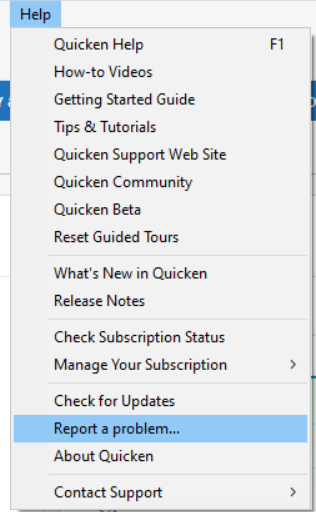
While you will not receive a response through this submission, these reports will help our teams in further investigating the issue. The more problem reports we receive, the better.
In the meantime, one possible work around is manually entering the information directly into the Ship To box.
We apologize for any inconvenience!
Thank you.
(CTP-15440)
Quicken Kristina
Make sure to sign up for the email digest to see a round up of your top posts.
-1 -
Thank you Kristina. I am not able to manually enter the information directly into the Ship To box. It immediately reverts to the quicken pre-populating data containing the Bill To information.
1 -
Thank you for the follow-up,
Thank you for letting me know that possible work around doesn't work and for sending those problem reports with log files attached. It will help our teams investigate the issue.
Thank you!
Quicken Kristina
Make sure to sign up for the email digest to see a round up of your top posts.
0 -
Hello All,
There is now a Community Alert for this issue. Though we do not currently have an ETA, you can bookmark the alert to get updates when available and to know when the issue is resolved. If you do not see the bookmark icon at the upper right, please make sure you are logged into the Community.
Thank you!
(Ticket#12081967/CTP-15437)
Quicken Kristina
Make sure to sign up for the email digest to see a round up of your top posts.
1 -
I will mark this to get alerts because THIS IS A HORRIBLE ISSUE YOU NEED TO FIX. I cannot believe you made this change and blew out 2 years worth of my data in my invoices. You cannot do this without warning customers. Did it not occur to the product team that some of us are using invoice forms for custom information? FACE PLANT PEOPLE.
2 -
Glad to see I'm not the only one facing this problem! I just spent half an hour trying to figure out what I did wrong before googling and finding this thread.
0 -
I am having the same issue. Luckily I had also saved invoices to a PDF, so I can search and find the correct invoice. Now, when I create a new invoice before I save it in Quicken I save it as a PDF with the correct Job Location then edit the incorrect Job Location and put in the correct one. Once I save in Quicken and go back in, it is back to the incorrect. This is frustrating because all of my previous invoices are now incorrect 10 years of data. It's a lot more work. This needs to be fixed. Any help is appreciated.
2 -
Hello @Les Gunn,
Thank you for sharing the work around you're using. Hopefully it helps others impacted by this issue. If you haven't already done so, please bookmark the Community Alert linked below to be notified of any updates, once available, and to know when the issue is resolved:
Thank you!
(Ticket#12081967/CTP-15437)
Quicken Kristina
Make sure to sign up for the email digest to see a round up of your top posts.
0 -
When will this be fixed???!!!
0 -
Any updates on a fix for this?
0 -
[Removed - Rant/Disruptive]
-1 -
Hello @SabrinaBask,
Thank you for reaching out! There are no new updates yet. If you haven't already done so, I recommend bookmarking the Community Alert linked in my earlier post in order to be notified of any updates, once available, and to know when the issue is resolved.
Thank you!
Quicken Kristina
Make sure to sign up for the email digest to see a round up of your top posts.
0 -
+1 same issue, please fix
1 -
Same issue, I reverted to R64.3 and my old data reappeared as before, and new invoices allowed my usual modifications. I replicated the problem/revert to 64.3 solution several times and it worked each time as long as I used the form template I always used. It appears the old data that we added to the customized Ship To field is still there in the database, something in the new Ship To form template is looking elsewhere and overriding it.
We really need a fix on this- our on-line financial history record details are wrong until we can move forward with a fix & get the newer releases!
1 -
We are all literally pleading with you for a fix.
I don't need AI analysis for my portfolio.
I need this invoicing function to work correctly. This program is supposed to AUTOMATE functions and save us time, not create a situation where we use cumbersome manual workarounds.
0 -
Thank you for your replies,
I'm not seeing any new updates yet. I've forwarded your feedback to our teams.
Thank you!
Quicken Kristina
Make sure to sign up for the email digest to see a round up of your top posts.
0 -
[Removed - Language/Rant]
0 -
Does the March release, Ver R66.26 fix this problem? I'm not touching another update until it is corrected. [Removed - Disruptive]
0 -
I'd like to know this too. We've been waiting months for a fix.
0 -
Thank you for your reply,
To answer your question, I do not see anything in the release notes for R66.26 that says the issue is fixed in that version.
Thank you!
Quicken Kristina
Make sure to sign up for the email digest to see a round up of your top posts.
-1 -
I am paying for a subscription to Quicken Home & Business. As such, I think it is reasonable to request from Quicken an update on this issue to include an estimated date for a fix, and what Quicken anticipates refunding to customers for the months this issue has caused significant increases in my administrative time to handle customer invoicing. Thank you for your attention to this matter!
0 -
Hello @mdillon,
Unfortunately, our teams do not give ETAs. I recommend bookmarking the Community Alert to be notified of any updates and to know when the issue is resolved.
Thank you!
Quicken Kristina
Make sure to sign up for the email digest to see a round up of your top posts.
0
