Reconcile issue
Answers
-
You might look through the logs and see what they have in them. I have seen things like this which make me question whether it is Quicken messing up or not.
0 -
Good point. I'll need to do that when I get a chance.
Quicken Classic Premier (US) Subscription: R66.23 on Windows 11 Home
0 -
Hello,
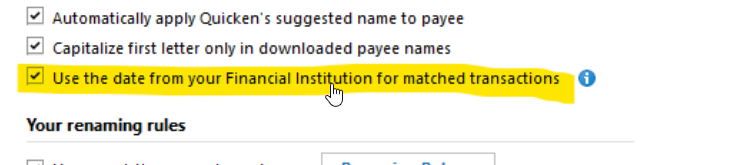
I have had the below checked off in my downloaded preferences for years. Don't really understand how this ccan effect my reconciled items. To date I have over 40 CLEARED transactions, which I cannot reconcile as my balace is not matching up.
Might be time to look for a new Check register????
 0
0 -
@Boatnmaniac are you saying to have it checked or unchecked?
0 -
Me either
0 -
If you have that box checked, the downloaded post date will change the manually entered transaction date.
I enter a lot of my transactions manually so I want to see the transaction date in the DATE column. The main reason for this is when it comes to things that I want to be able to historically track by transaction date. Examples of this include purchases of things where the date is needed for product warranty purposes, HVAC system servicing when I want to know how long ago it was last done and tax related income, distributions and expenses where having the date in the DATE column determines which tax year the transaction occurred in. So, for me, I definitely do not want the posting date to overwrite the actual transaction date.
Seeing the posting date separately can also be of value. For instance, if I make a distribution transfer from my Fidelity IRA account to my PNC checking account I want to know the transfer date for tax planning and reporting but I also want to know when that money is fully available at PNC for whatever use I choose.
It's a personal choice matter as to whether you want to check the box or not. Do what you find to best meet your wants and needs.
As for me, I do not want the posting date to change the transaction date…ever…so I will not check that Preference box.
Quicken Classic Premier (US) Subscription: R66.23 on Windows 11 Home
0 -
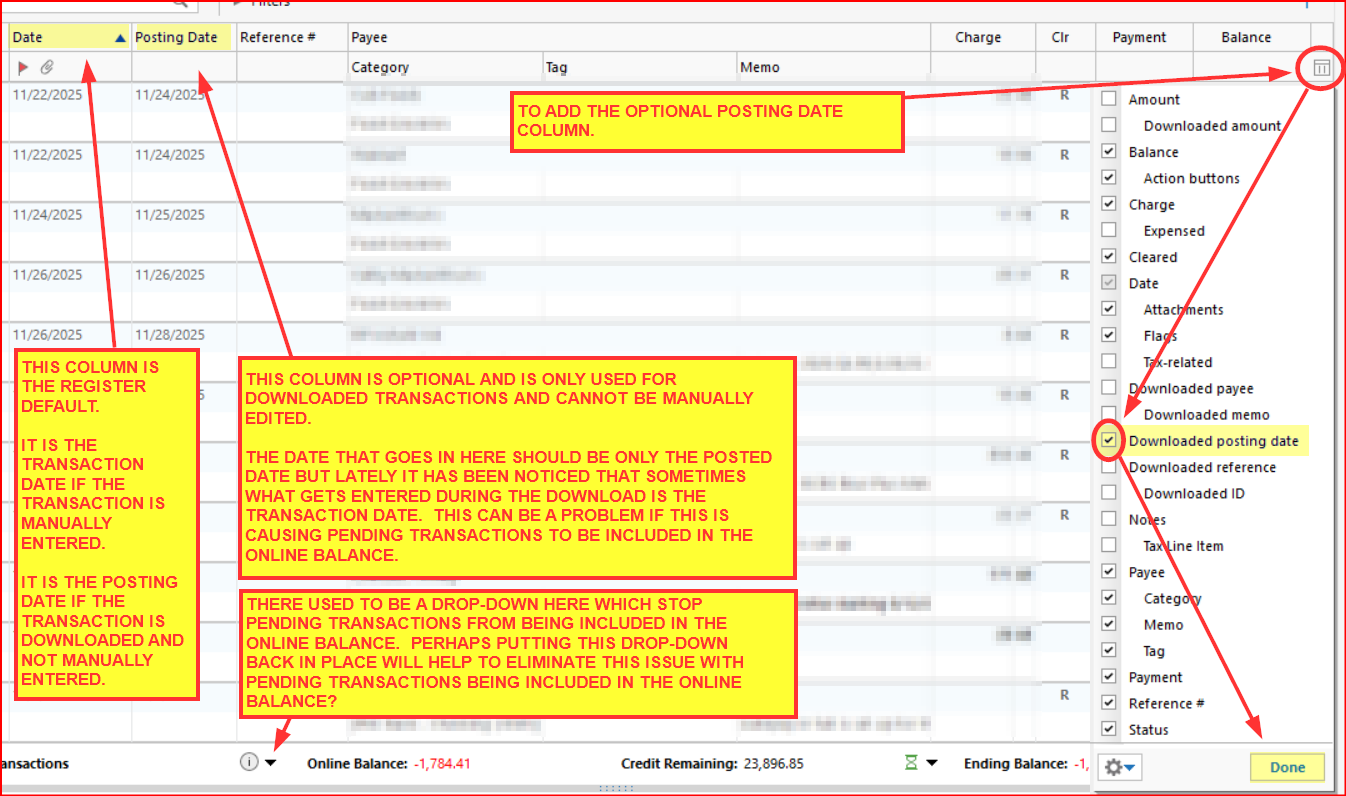
If anyone wants to add the optional Posting Date column to their Spending Accounts registers see the following picture.
Quicken Classic Premier (US) Subscription: R66.23 on Windows 11 Home
0 -
have the same issue. have made sure my file has no dups, etc. when using web express connect to download files from my bank, the online balance is used in reconciliation, but no pending transactions are downloaded. After I enter the pending transactions, I still get random amounts that cause my balances to not be reconciled. whats the latest on this bug?
0 -
For those who are still experiencing this issue where pending transactions are being included in the Reconcile to the Online Balance process:
Previously in this thread I'd posted that there was a function that can correct this issue but that the function seemed to have been disabled or even removed.
After I updated from R65.15 to R65.17 a couple of days ago I just now checked and for me that function has been restored.
When Pending transactions have been enabled and downloaded below the Account Register and if those Pending transactions are being included in the Online Balance:
- Backup the data file.
- Click on the button directly to the left of the Online Balance.
- Click on Online Balance not right?
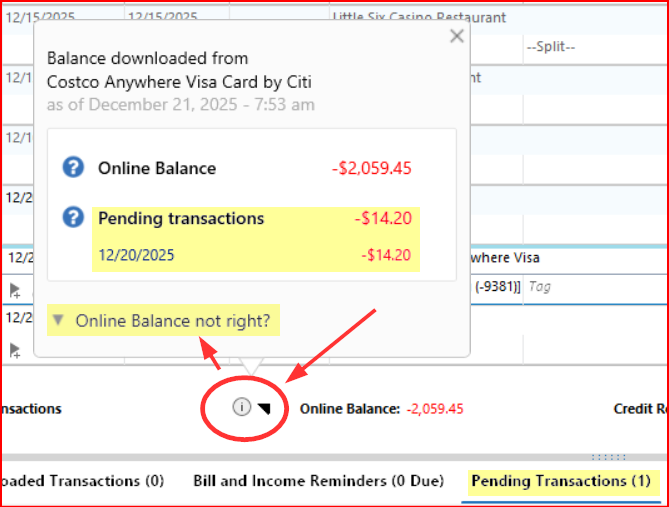
- Select Exclude pending: and then click on Save.
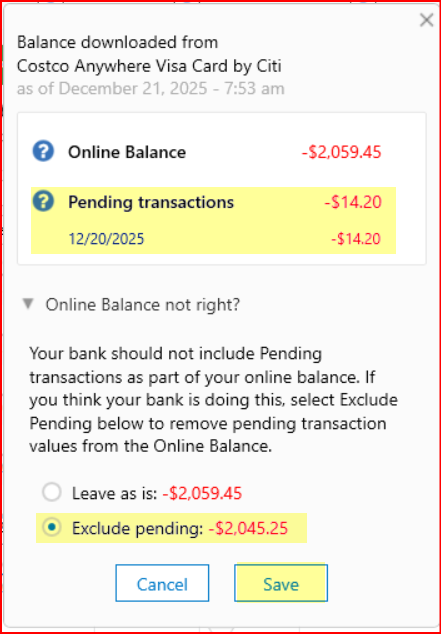
The Pending Transactions should then be removed from the Online Balance. Note:
- In order for this to work, Pending Transactions must be enabled.
- In order for this to work, there must be Pending Transactions showing on the tab below the account register.
- If there are no Pending Transactions present below the account register, then this will not fix the issue because the issue is caused by something else….perhaps the server updating time/download time issue mentioned on the 1st page of this thread.
Quicken Classic Premier (US) Subscription: R66.23 on Windows 11 Home
1 -
In the recent past, I have had a problem with credit card transactions being download to Q correctly, but then some of them mysteriously disappear from Q a few days later. This manifests as a balance that cannot be reconciled. I know these were initially downloaded correctly, because as I re-enter a missing transaction, the transaction is auto-completed by Q with the correct date, payee, and amount. This happens in streaks - a lot of errors in a small window of time (< a week), and then everything is fine for months.
To establish whether this is happening to you, pick a billing month where you cannot reconcile. Then compare the transactions in Q vs your bank records as you display them in your browser. They should match exactly for your cleared un-reconciled transactions. If any are missing, it's time for a phone conversation with Quicken support. At first they will suspect you screwed up. Show them the evidence. The technician then told me they've had a number of similar user complaints involving my bank.
0



