"Done" button missing after accepting downloaded transactions

I have a problem that has been occurring for a long time through multiple Quicken updates, but I'm just getting around to asking about it now. I have two credit card accounts with Chase bank. On the older of the two, but not the newer one, whenever I'm done accepting downloaded transactions I want to press the "Done" button but it is not there. If I minimize the downloaded transactions pane and then open it again the button reappears, although I have to scroll down to find it. Is there a fix? I'm on Quicken Classic Premiere for Windows R65.17. The issue is not intermittent. It happens every time I have downloaded transactions for this account.
Comments
-
Hello @thompson87,
Thank you for letting us know you're seeing this issue. To help troubleshoot, please provide more information. Do you recall roughly when you first noticed this issue? Are you accepting transactions one at a time, or are you clicking Accept All? If possible, please provide a screenshot of what you are seeing (make sure to redact any personal information). If needed, please refer to this Community FAQ for instructions on how to attach a screenshot. Alternatively, you can also drag and drop screenshots to your response if you are not given the option to add attachments.
I look forward to your response!
Quicken Kristina
Make sure to sign up for the email digest to see a round up of your top posts.
0 -
I am also having the same problem. Quicken for Windows 11 ver,R65.17 Build 27,1,65,17.
I have been having this problem for quite som time. It happens only on my first bank account listed. I accept downloaded transactions one at a time and when all have been accepted, I click on the "Downloaded Transactions" button next to the "Bill and income reminders" button and voila, there appears now the "Done" button. This occurs only on my first bank account listed on the left side of the screen, under Banking.
Lou A
0 -
I've seen this for a long time. I find re-sizing the main window makes the button re-appear.
0 -
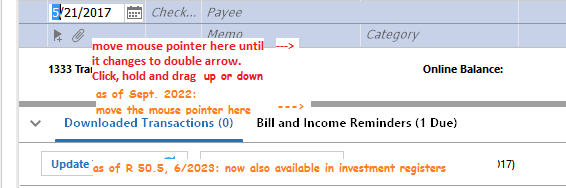
After making sure that your Quicken window is as tall as your screen allows, try resizing the Bills and Income Reminders tab area, making it taller or smaller by a fraction of an inch.
 0
0 -
I believe I've had this problem for a very long time (more than a year perhaps), but only on the one Chase credit card account. I accept the transactions one at a time. I may be able to provide a screenshot next time I have the issue, but I only have it when I accept transactions so I will need to wait until I have a transaction in the account, and that might take a while because the account isn't very active.
Others in this thread have mentioned resizing the window. I have tried that but it doesn't make a difference. Nor does resizing the Downloaded Transactions pane within the register window. And even if that were the problem it wouldn't explain why I only have the problem on this one account and not on others. (On other accounts I sometimes have to use the scroll bars to see the bottom of the pane where the button appears but that does not work for this one account.) Nor would it explain why hiding and then restoring the pane makes the button reappear.
Someone mentioned that it only happens on the first bank account listed. That is not the case for me. For me the account in question is well down the list of bank accounts and isn't even the first Chase or first credit card account listed.
0


