Bank of America Checking account numbers are off

This discussion was created from comments split from:
Bank of America Checking no longer updating in Quicken without resetting the account [Edited]
.
Comments
-
I'm experiencing the same issue with my Bank of America Checking Account. For 4 days now, each time I finish reconciling, my numbers are off and I need to adjust my balance to match the bank. Each day it's been different. I've submitted a problem report and hope that can yield some answers.
0 -
Hello @sandy.wood,
Thank you for letting us know you're seeing an issue. Currently, there is a known issue with Bank of America where the online balance in Quicken is reflecting pending transactions. For more information, please view this Community Alert:
Do the balance discrepancies you're encountering match up with the sum of the pending transactions with Bank of America? If not, then please provide more detail exactly what is happening. Are you able to identify any pattern to the discrepancies?
I look forward to your response!
Quicken Kristina
Make sure to sign up for the email digest to see a round up of your top posts.
0 -
Hello, Quicken Kristina. I downloaded my transactions today and after categorizing them, it showed a difference in the bank balance and I had to adjust. It is reconciling against the online balance which if I'm not mistaken is the current amount including pending transactions.
I looked at my BofA Account in Quicken and, under Account Details > Online Services, I noticed that the "Reconcile using online balance" checkbox was checked. This must be what's making Quicken make adjustments. Should I try unchecking that box and try again tomorrow?
0 -
Thank you for your reply,
If you uncheck that box, then when you reconcile, you should have the option to reconcile using the statement balance instead of the online balance. If the problem is being caused by the online balance incorrectly including pending transactions, then reconciling using the statement balance should be a viable work around.
Thank you!
Quicken Kristina
Make sure to sign up for the email digest to see a round up of your top posts.
0 -
Hello. I unchecked that box and ran Reconcile again but it was still off by over $400. If I check the box, it's off by quite a bit more but it will adjust to the correct current online balance. I've had to do this every day for 2-3 weeks now. I have a BofA Visa account that has no problems when I Reconcile. I did to a Reactivate accound but it didn't change anything.
Can you tell me if there are still known issues with BofA and Quicken that are being worked on? Should I open a support case to get some specialized support?
Thanks for the help.
0 -
Thank you for your reply,
The issue with pending transactions reflecting in the online balance is still ongoing. It sounds like you still have a discrepancy, even when comparing to the statement balance though. I recommend that you contact Quicken Support directly for further assistance, since they have access to tools we can't access on the Community and they're able to escalate the issue as needed. The Quicken Support phone number can be found through this link here. Phone support is available from 5:00 am PT to 5:00 pm PT, Monday through Friday.
I apologize that I could not be of more assistance!
Quicken Kristina
Make sure to sign up for the email digest to see a round up of your top posts.
0 -
I did reach out to support but they were not able to help with my issue. They weren't aware of any BofA checking discrepancies that they were currently working on. They suggested I might want to consider not reconciling each time. That was one way around the problem. I mentioned I hadn't had this issue for years until seeing it in December. At this point I'll hope that like in 2023 when I saw it before, a fix came along with the next update and life was good again.
0 -
It's working for me now!
I downloaded my BofA transactions this afternoon and everything balanced. No adjustments needed.
Yay!
0 -
Thank you for the follow-up,
I'm glad to hear everything balanced!
If you need further assistance, please feel free to reach out!
Quicken Kristina
Make sure to sign up for the email digest to see a round up of your top posts.
0 -
I am having this same issue. Pending transactions are included in the online BOA balance. I noticed that the issue resolved itself for sandy.wood but as of this morning, it is still happening to me. I have the latest update. Is there a known issue with BOA?
Thanks!
0 -
Hello @lynn.welborn,
Thank you for letting us know you're seeing this issue. Yes, it is a known issue. If you haven't already done so, I recommend that you bookmark the Community Alert linked below to be notified of any updates, once available, and to know when the issue is resolved.
In the meantime, there are a couple work arounds:
- Wait until all pending transactions have cleared the financial institution and are downloaded into Quicken prior to reconciling.
- Reconcile using the statement balance instead of using the Online Balance.
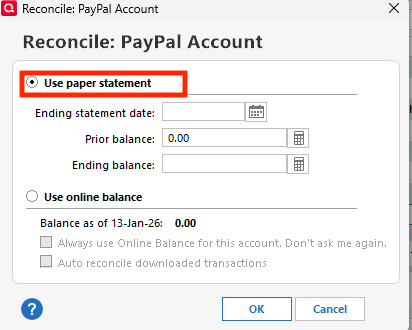
I hope this helps!
Quicken Kristina
Make sure to sign up for the email digest to see a round up of your top posts.
0 -
Thanks for the quick response. I really hope they get this resolved soon. I read somewhere that BOA is no longer supporting Quicken? I've been manually correcting the issue of the pending transactions just to keep things going but at some point, if not corrected, I'll probably have to look for alternative products. Thanks!
0 -
Thank you for your reply,
To clarify, Bank of America stopped supporting OFX/QFX services. That means you're not able to download a QFX file from Bank of America's website and import it into Quicken anymore. For more information, please see this announcement:
Thank you!
Quicken Kristina
Make sure to sign up for the email digest to see a round up of your top posts.
0

