Synchrony Savings Adding to Quicken

The Express Web Connect option is missing when adding this account type. Has there been any changes?
Answers
-
Hello @nchop,
Thank you for sharing your experience.
There have not been any changes that I know of. If you are using the Synchrony Savings instance in Quicken, Ezpress Web Connect should be the only option.
I have some follow-up questions for you.
- When did this issue start for you?
- What exactly are you seeing from your end?
- Did you previously have these accounts connected in Quicken?
Additionally, screenshots of what you are seeing might be helpful. If needed, please refer to this Community FAQ for instructions on how to attach a screenshot. Alternatively, you can also drag and drop screenshots to your response if you are not given the option to add attachments.
Looking forward to your response.
Quicken Alyssa
Make sure to sign up for the email digest to see a round up of your top posts.
0 -
Only asks for username and pwd in the Quicken screen and gives a CC-503 error. No "Advanced Options" like other banks. I have other Synchrony Savings accounts that were set up and working fine - just this new one and no longer gives the option for EWC.
0 -
Do you know when you are bringing back EWC or EWC+ for Synchrony Savings? The logo for Synchrony Savings is also incorrect so not sure what is going on. But you can no longer add new accounts. No idea how long it has been going on.
0 -
Please let me know if you can resolve this. I have two other Synchrony Savings accounts set up with EWC (working fine) but not sure how to connect a new (third) account. There is no option for EWC. It only gives the legacy DC way and always returns the dreaded CC-503 error (like CIT Bank right now).
0 -
I opened Ticket # 12102568. When can get this resolved? The Synchrony Savings EWC is missing under Advanced Options (in fact, there are no Advanced Options anymore), but I have it set up for other SS accounts (if I disconnect those accounts, I probably won't be able to set it up again). To be clear, EWC is a supported option for Synchrony Savings. Thanks for your help.
0 -
Anyone else seeing this when trying to set up a new account. EWC is supported as I have other Synchrony Savings accounts set up with this download method. DC does not work anymore as SS migrated to the new method a year ago. Now it stopped working I guess? Let me know. Quicken Support wasn't much help at all. Told me to call the FI and I opened a ticket.
[Merged Post]
0 -
Hello @nchop,
Thank you for letting us know you're encountering an issue. To help troubleshoot, please provide more information. Do you have the ticket number handy from your conversation with Support? Are you seeing any error messages/codes when you try to add/update your account? If not, what exactly is happening?
I look forward to your response!
[Merged Post]
Quicken Kristina
Make sure to sign up for the email digest to see a round up of your top posts.
0 -
Ticket 12102568.
I tried multiple times thinking it would take me to the standard EWC screen where I login to the bank from a browser and authorize the accounts, but that resulted in multiple CC-503 errors now followed by CC-929. In fact, I only get CC-929 when I try to add any account in Quicken.
So now I have two issues:
1) I can't add any accounts because I am stuck with CC-929 errors that can't be cleared (tried signing out and signing back in after 1 hour, etc, tried a different ID, etc) - did not work. How do I resolve this? I do not want to revert to a new Quicken ID, (As an aside, I can't add other non-EWC accounts like CIT Bank (also get 929). Used to get just 503 and I guess I am locked out now?)
2) Synchrony Bank still missing the Advanced Options (as you can see by the screenshot) to allow EWC. The bank supports it as have another Synchrony Savings account set up for that type of download, which works every time. Quicken removed it as some point in the last few months and it should be added back. Again, see attachment. This would make life easier.
[Merged Post]
0 -
Thank you for following up with additional details.
The Synchrony Savings instance that you are connecting to only offers Express Web Connect (EWC). Definitely strange that you would be seeing Direct Connect as the only option.
Is your Quicken up-to-date? You can check this by going to Help>Check for Updates.
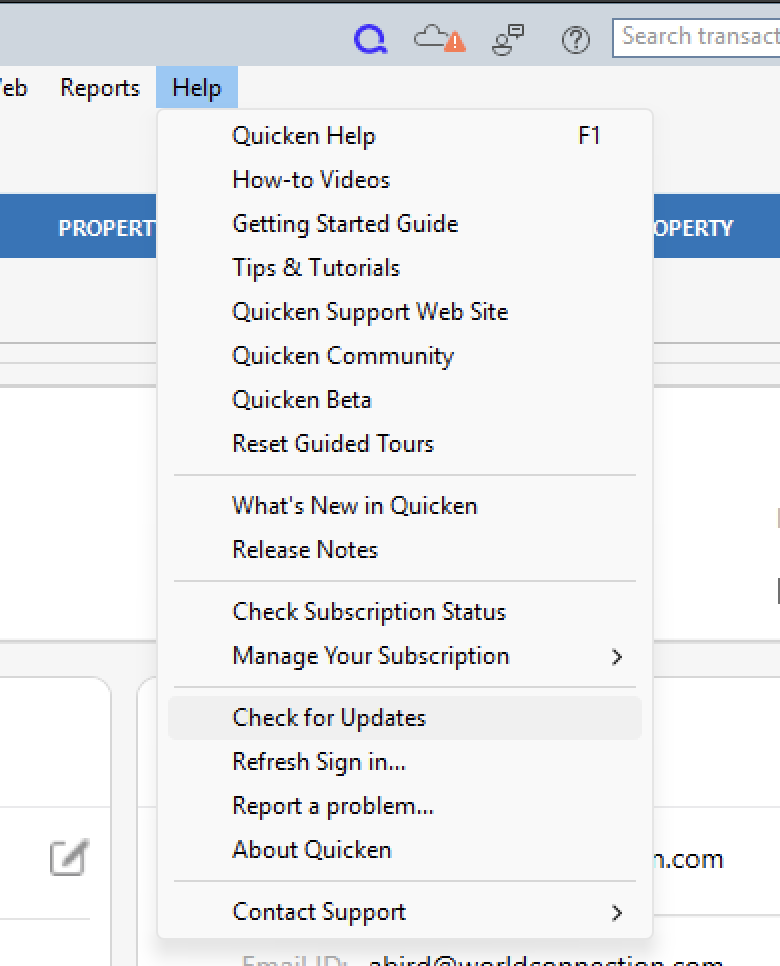
From my end, it looks like you are on the latest release and connecting to Synchrony Savings via EWC. In case you are using multiple computers or something, it can't hurt to check.
What exactly are you seeing from your end that is indicating a Direct Connect connection method being used? Screenshots may be helpful as well. If needed, please refer to this Community FAQ for instructions on how to attach a screenshot. Alternatively, you can also drag and drop screenshots to your response if you are not given the option to add attachments.
** On a separate note, there is a login-related issue I can see on your account. You need to get back in touch with Quicken Support so they can get that resolved for you.
Thank you!
Quicken Alyssa
Make sure to sign up for the email digest to see a round up of your top posts.
0 -
I have two other Synchrony Savings Accounts that aren't allowing the EWC connection. You can try to set up a new Synchrony Savings account from scratch and you will see what I mean. Look at the screenshot..no advanced connection options like EWC are available. I'll call support about my login issues. How do I get rid of the 929 errors.
[Merged Post]
0 -
Thank you for your reply,
The CC-929 error can block other connection attempts. To troubleshoot, per our article on CC-929 errors, please wait one full hour, without making any attempts to connect or update any accounts.
If the issue persists after that hour, then please contact Quicken Support directly for assistance. The Quicken Support phone number can be found through this link here. Phone support is available from 5:00 am PT to 5:00 pm PT, Monday through Friday.
Thank you!
Quicken Kristina
Make sure to sign up for the email digest to see a round up of your top posts.
0 -
I just tried to call Quicken support and they weren't helpful at all. Very disappointed. Ticket 12110330. Please have them remove the 929 block on my Quicken ID. I've shared multiple screenshots. As far as the CIT bank error, I am happy to wait it out.
0 -
Thank you for the follow-up,
I can see that you contacted Support about an hour ago. I'm not yet able to see the notes for that ticket. Would you please let me know what troubleshooting they did with you during the call? Did they tell you to wait an hour and call back if the issue isn't resolved?
Thank you!
Quicken Kristina
Make sure to sign up for the email digest to see a round up of your top posts.
0 -
I am not sure what they did. The log out , wait one hour, and log back in, does not solve it. This has been going on two weeks so I've tried everything, I showed them that it occurs on multiple accounts (pick any FI and it will give you CC-929). The escalations team said they would call tomorrow at a scheduled time. You are right though, there is an overall block of adding new accounts because I tried CIT and Synchrony too many times (went from 503 to 929).
I hope they can also get EWC working on new Synchrony Savings Accounts again. CIT bank still seems to be broken per the current alert that is out there, although some users have reported recent success.
Will let you know how it goes. Thanks for checking in.
0 -
They called me and don't have a resolution. Not sure why they even called me. They just opened a ticket 15 minutes ago, so not sure why I was on hold on for 45 minutes last night with a supervisor who lied to me and told me this was a "quick fix" and I would be getting a call today at 6:30 pm to let me know that.. Ughhhh. All they could offer was 3 months credit and apology, and no timeline. Not what I expected.
0 -
I just used a different Quicken ID, and it all works. Also CIT and Synchrony work now (no more 503 errors). I am just re-adding all of my downloads, one by one. Tedious. I really wish Quicken would look at the CC-929 problem. It is pretty widespread amongst the community and the systemwide "lock" should be released after a few hours. Also, if there are 503 errors after attempting a download, a warning should be given to the end user not to keep trying else they should know that it will corrupt their Quicken ID with perpetual 929s. I've spent so much time on the phone and I really feel that they did not help me at all, or understand my concerns. Even a supervisor seemed irritated yesterday and promised me a call back from escalations, and this would be a quick fix. Really can't say good things about my customer support interaction. First time that I have called since 2007, and it didn't go well at all. I found my own fix based on reddit and quicken community forums. Thanks for trying and checking in. All the best.
0 -
Thank you for the follow-up,
I'm glad to hear that using a different Quicken ID seems to have corrected the issue. I have seen other mentions of the issue on the Community; it seems to be a rare, but extremely frustrating issue.
Thank you!
Quicken Kristina
Make sure to sign up for the email digest to see a round up of your top posts.
0



