How do I fix the following:

Each month I use Edit/Find/Replace to list each category of my spends for the last month. I normally see a fixed list of items, starting with the latest, on which I can see the items for that period. In the last few days, something has changed (although Tech Support deny it) in that when I now try to list the items, I get a continually scrolling list which, for several minutes, lists the thousands of items in that category going back to 2009 when I started using Quicken.
How do I get it to revert to giving me a stationary list of items, starting with the latest?
Best Answers
-
Why would you be using Edit/Find/Replace for this purpose instead of a report like:
Reports → Spending → Spending by Category?
0 -
I agree that Find/replace is not the best way to get a list of recent spending for a Category. But If you really want to use that:
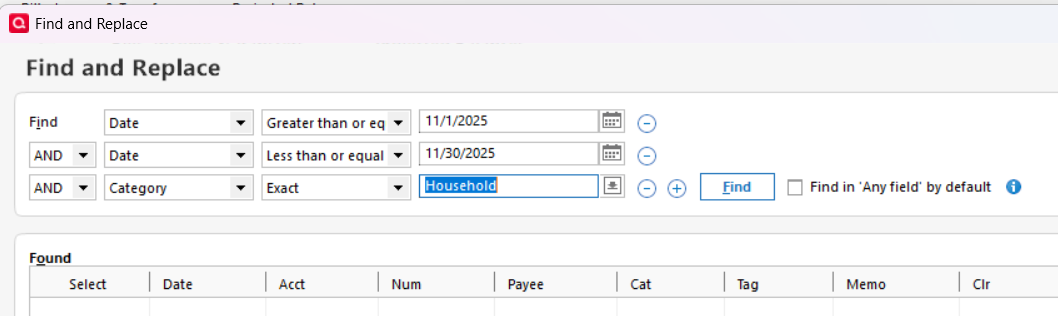
For me, the Find/Replace annoyingly defaults to Earliest to date, which as you are seeing will often list way more items than you want. I don't know why it was defaulting to Last month for you earlier, unless you had set a date filter like this
 QWin Premier subscription1


Answers
-
Why would you be using Edit/Find/Replace for this purpose instead of a report like:
Reports → Spending → Spending by Category?
0 -
And what, exactly, are your Edit / Find criteria that now no longer function?
Can you please capture one or more images of the parts of your Quicken window showing the issue, sensitive information blacked out as necessary to protect your privacy and attach the image(s) here?
How do I post a screenshot in the community from a macHow do I post a screenshot in the community from windows
Please save images to files of file type PNG or JPG only. They're easier to work with than PDF files.
0 -
I agree that Find/replace is not the best way to get a list of recent spending for a Category. But If you really want to use that:
For me, the Find/Replace annoyingly defaults to Earliest to date, which as you are seeing will often list way more items than you want. I don't know why it was defaulting to Last month for you earlier, unless you had set a date filter like this
QWin Premier subscription1 -
Both Jim_Harman and Chris_QPW have given me solutions to my problem for which many thanks.
I was not aware of the ability to limit the search by dates and did not have the date filter in use, so I got scrolling of thousands of items. Now I can limit the search to the month in question. And I had also not tried the Reports function, which is even better since it adds up the spends by category for me.
It makes me wonder why Tech Support did not suggest these alternatives.
What is still a mystery is why I did not get the scrolling until recent days, but since I now have these other alternatives to log my spends by category each month, I will leave it as one of life's unsolved mysteries.
0

Categories
- All Categories
- 6 Product Ideas
- 34 Announcements
- 249 Alerts, Online Banking & Known Product Issues
- 19 Product Alerts
- 266 Welcome to the Community!
- 301 Before you Buy
- 1.5K Product Ideas
- 55.8K Quicken Classic for Windows
- 16.9K Quicken Classic for Mac
- 1K Quicken Mobile
- 834 Quicken on the Web
- 129 Quicken LifeHub