Download Banking Missing Payee (Dearborn Federal Credit Union, DFCU)

Within the past week or two (December 2025), downloaded transactions for a checking account (Dearborn Federal Credit Union) using Direct Connect has no downloaded payee for me. I've tried refreshing sign-in, resetting the account in online services. I noticed this with One Step Update, and it continues to be a problem with the Update Now for the individual account register. My online bank access shows the same statement names as always, but the Quicken downloaded transaction is empty (verified when adding the downloaded payee to the register columns).
What's strange is that the Bills calendar is getting updated to mark scheduled bills as paid. Example, a transaction for Consumer's Energy is missing the payee, but it marks as paid a monthly bill for Consumer's Energy, and it properly categorizes as Utilities:Natural Gas. If the payee data was missing from the bank data feed, then I wouldn't expect Quicken to figure out the match to the scheduled bills calendar.
I've not changed any online services or download settings, at least not intentionally. I've been running validate/fix file rather frequently because of some memorized payee handling that's not doing what I'm expecting, and this validate file step reports no errors, all internal checks passed.
Not sure what else to review at this point.
Comments
-
Hello @kenman38,
Thank you for sharing your experience and reporting the issues you are seeing from your end.
Definitely a strange issue, considering Quicken still recognizes these and matches them with your upcoming bills. Unfortunately, we will be unable to see what exactly is occurring from the backend because the Direct Connect connection method that you are on uses the bank's servers, which we do not have access to.
Given that you have already checked the Downloaded Payee, confirmed it was empty, and that you are on Direct Connect, it would be best for you to reach out to the bank for assistance with this.
Let us know how it goes.
Quicken Alyssa
Make sure to sign up for the email digest to see a round up of your top posts.
0 -
Where exactly do you first see these problems with the missing payee name?
In the Downloaded Transactions tab at the bottom of the account register before you match / accept the just downloaded transaction?
Or in the register where a just downloaded transaction was automatically accepted to, but not matched to a register transaction?Sometimes a picture is worth a thousand words …
Can you please capture one or more images of the parts of your Quicken window showing the issue, sensitive information blacked out as necessary to protect your privacy and attach the image(s) here?
How do I post a screenshot in the community from a macHow do I post a screenshot in the community from windows
Please save images to files of file type PNG or JPG only. They're easier to work with than PDF files.
0 -
It's in the download transaction pane that I already don't see the payee, and it doesn't arrive on Accept. It may take a few days to get a good example, as my most recent download was two transactions of which one had a payee. The one missing the payee is a transfer from an IRA, so any downloaded payee isn't all that relevant anyway (I can see prior transactions of IRA distribution had a downloaded payee that was non-empty).
What I really want to capture is one that has no payee in the download pane, doesn't have one when accepted, but still finds a way to mark the bill calendar as paid.
I had just tried a copy/template that I was going to reconnect online services. This helped correct some odd problems in the past when validate and fix was clean. However, that had no impact on today's download for me. This IRA distribution may be some special case because what I see on my online bank transaction and what I see on the monthly statement hasn't been exactly matching in past records for Quicken's downloaded payee.
0 -
Thank you for your reply,
If you haven't already done so, after accepting a transaction with a blank payee, try right clicking on it and check to see if there is a Revert to option. If there is, does it show the correct payee name?
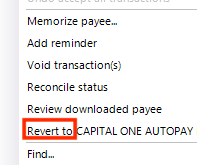
I look forward to your reply!
Quicken Kristina
Make sure to sign up for the email digest to see a round up of your top posts.
0 -
I had tried both the revert, as well as adding the downloaded payee to the register columns when I noticed no payees. There's nothing to revert, and the downloaded payee is empty.
Attached is a view of the register with downloaded payee, and one can see about a week span of missing downloaded payees. I've obfuscated the content, but one can see where there was downloaded payee, and a block of missing payees. I've verified that some of these same payees downloaded something within the last couple months.
I noticed this morning that my settings for download had the 'apply Quicken suggested name to the payee' was unchecked, as I've also recently noticed needing more renaming rules. I don't remember unchecking that. Even so, I would have expected the downloaded payee to at least be some non-empty field.
0 -
I've submitted the following to Quicken using the Help, Report a problem. I found a couple of my Download transactions settings to be unchecked (not sure how or when that happened). I got them back the way I thought they should be, saw payees in the download pane, but they disappeared on acceptance into the register. Despite the payee names dropping, the Quicken Classic desktop app is still matching and marking bills as paid even though in one case it's an estimated (non-exact) amount.
Quicken version 65.17 looks to be the latest, and from what I can tell that was updated to my system on 11/28. Next will follow the text and images that I submitted.
DFCU transactions missing payee when accepted into Banking register. Date of download is 12/21/2025 using a backup file from 12/9/2025. Tracing two transactions that have overdue bills to be paid. R-64.35-2025-11-28.QDF-backup suggests that the latest version was installed at the end of November.
Files 00_QuickenVersion and 01_QuickenDownloadSettings for reference.
02_BillsCalendarOverdue show two pending payments for the account.
03_DFCUOnlineTransactions show these transactions with nonblank payees, and 04_DFCUOnlineStatement shows the nonblank payees on a monthly statement.
05_QuickenAsDownloaded looks to be as expected, payees populated.
06_QuickenRegisterAsAccepted has no payees, and downloaded payee is missing.
07_BillsCalendarAdvancedMonthly shows that the 35.00 transaction matched to the bill to be paid, due date advanced one month as expected.
08_BillsCalendarAdvancedBiMonthly shows that the 178.52 transaction matched to the bill to be paid, due date advanced two months as expected.
Validate/Fix function finds no problems.
0 -
Hello @kenman38,
Thank you for your replies. I recommend that you contact Quicken Support directly for further assistance, since they will likely need to review the log files to determine if this is an issue with the data being sent to Quicken, or something happening in your file after download. The Quicken Support phone number can be found through this link here. Phone support is available from 5:00 am PT to 5:00 pm PT, Monday through Friday.
I apologize that I could not be of more assistance!
Quicken Kristina
Make sure to sign up for the email digest to see a round up of your top posts.
0 -
This may have been a temporary (one week) problem. I've had a few weeks of downloads without this recurring.
0 -
Thank you for the follow-up,
I'm glad to hear it's working now!
If you need further assistance, please feel free to reach out!
Quicken Kristina
Make sure to sign up for the email digest to see a round up of your top posts.
0





