The infamous non-totaling Budget Report by Category Group

For many years now my budget report has not totaled when showing by Category Group. For a long time, I thought it was due to a mixture of Income and Expense categories in a couple groups even though I specified the Mixed / Default Group Type in the Budget.
However! I have discovered the problem may actually be one of totaling Category Groups when there are categories with amounts that were not budgeted.
I say this because:
- When the budget report is set to show Non-Zero Actual/Budgeted categories, the totals do not show in a category group that is not a mix of income and expense categories but has some unbudgeted categories.
- When the budget report is set to show only Budgeted Categories, the totals show in all category groups - both those with mixed income and expenses categories and unmixed.
Help Quicken Corporate, you are our only hope!
Comments
-
Hello @sNashville,
Thank you for reaching out. To clarify, the Community is mainly a user-to-user forum with some moderators, like myself, who can help troubleshoot with you.
I tried to replicate the issue you describe, but wasn't able to get a budget report that is missing the totals. If you're willing, please post screenshots of what you are seeing (make sure to redact any personal information). If needed, please refer to this Community FAQ for instructions on how to attach a screenshot. Alternatively, you can also drag and drop screenshots to your response if you are not given the option to add attachments.
I look forward to your response!
Quicken Kristina
Make sure to sign up for the email digest to see a round up of your top posts.
0 -
@Quicken Kristina: Thanks for the reply.
Here is an example from a section of my budget report with some updates to observed behavior.
In all cases, the Mixed Categories setting in the budget is set to Expense.
I submitted this to support several times with limited response, and no resolution.
Thanks for helping.
Situation 1a
When the budget looks like this,
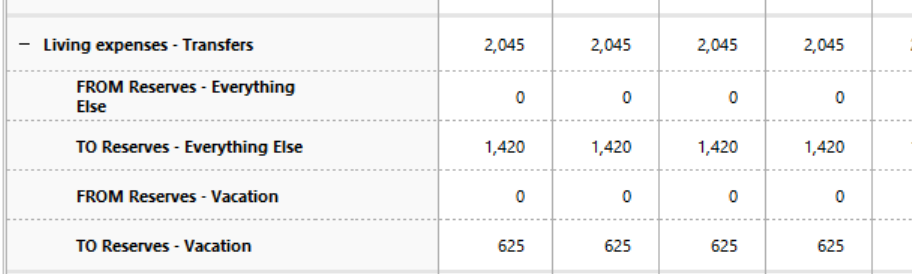
And the Advanced Report Settings are set to - Categories: Non-zero Actual/Budgeted
The report looks like this:
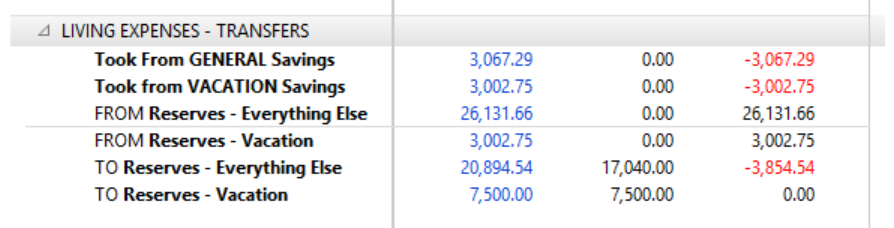
Situation 1b
Same budget as above (1a)
And the Advanced Report Settings are set to - Categories: Budgeted only
The report looks like this:

Situation 2
When the budget looks like this:
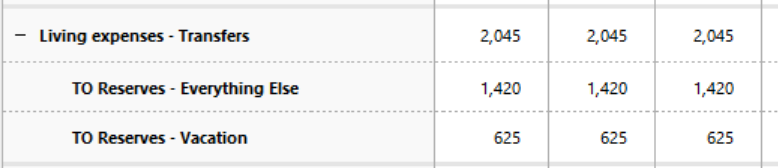
And the Advanced Report Settings are set to - Categories: Budgeted only
The report looks like this:
 1
1 -
Thank you for your reply,
I'm not able to replicate the issue you're reporting. Because of that, I suspect this issue may be file specific. To start troubleshooting for file issues, I suggest that you try validating your data file. Please save a backup file prior to performing these steps.
Validate:
- File
- Validate and Repair File...
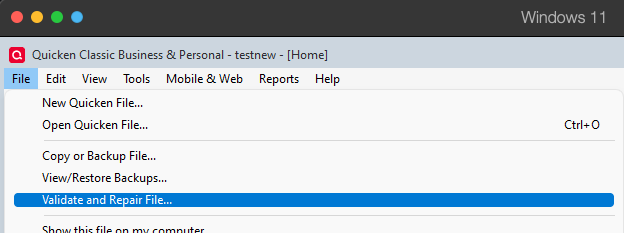
- Validate File
- Click OK
- Close the Data Log
- Close Quicken (leave it closed for at least 5 secs)
- Reopen Quicken and see if the issue persists.
Please let me know how it goes!
Quicken Kristina
Make sure to sign up for the email digest to see a round up of your top posts.
0 -
@Quicken Kristina - I did this and it did not resolve the problem. I have created a new QDF file with a few manual accounts and transactions in a manner that replicates the problem. Is there somewhere I can send it for review? I didn't want to post here in case it's got my Quicken ID attached.
0 -
And It's important to note these transfers are to/from Savings Goals. Not Accounts.
1 -
Thank you for your replies,
I recommend that you contact Quicken Support directly for further assistance, as they have access to tools that we can't access on the Community and they're able to escalate the issue as needed. The Quicken Support phone number can be found through this link here. Phone support is available from 5:00 am PT to 5:00 pm PT, Monday through Friday.
I apologize that I could not be of more assistance!
Quicken Kristina
Make sure to sign up for the email digest to see a round up of your top posts.
0 -
For the record, I reported this to the Phone Support line today (650-250-1900). They said the problem has been previously logged and they expect a fix to be included in the next Quicken release. They provided no information (bug report, etc.) to track the matter.
0 -
- And there was more specific information on the kind of transfers used. The full description of the problem I provided was:
- I have Budget Reports with transfers to a Savings Goals assigned to Custom Category Groups.
- The Custom Category Groups have the Mixed Income/Expense setting is Expenses in the Budget.
- In Budget Reports, those Category Groups will not show totals.
0 -
Thank you for the follow-up,
I sent you a DM. To view it, please navigate to the envelope icon near the upper right.

Thank you!
Quicken Kristina
Make sure to sign up for the email digest to see a round up of your top posts.
0
